

Introduction
Prerequisites
- HTML, CSS, and JS
- Basics of angular
- Reactive Forms
Implementation
Open test.component.ts and add the below contents:
- import { Component, OnInit } from '@angular/core';
- import { FormGroup, FormControl, FormControlName } from '@angular/forms';
- @Component({
- selector: 'app-test',
- templateUrl: './test.component.html',
- styleUrls: ['./test.component.css']
- })
- export class TestComponent implements OnInit {
- registrationForm: any;
- graduationData: any;
- pgData: any;
- constructor() { }
- ngOnInit() {
- this.graduationData = ['Select','BCA', 'BBA', 'BE', 'B.Tech', 'B.Sc'];
- this.pgData = ['Select','MCA', 'MBA', 'M.Tech', 'M.Sc'];
- this.registrationForm= new FormGroup({
- userName : new FormControl('Irshad'),
- password : new FormControl('password'),
- email : new FormControl('[email protected]'),
- phone : new FormControl('9999999999'),
- address : new FormGroup({
- country : new FormControl('India'),
- state : new FormControl('UP'),
- city : new FormControl('Allahabad'),
- pin : new FormControl('211001')
- }),
- qualification : new FormGroup({
- graduation : new FormControl('BCA'),
- pg : new FormControl('MCA')
- })
- });
- }
- }
- <div class="container-fluid">
- <h3>Registration Form</h3>
- <form [formGroup]="registrationForm">
- <div class="row">
- <div class="col-sm-6">
- <div class="form-group">
- <label>UserName</label>
- <input formControlName="userName" type="text" class="form-control">
- </div>
- </div>
- <div class="col-sm-6">
- <div class="form-group">
- <label>Password</label>
- <input formControlName="password" type="Password" class="form-control">
- </div>
- </div>
- </div>
- <div class="row">
- <div class="col-sm-6">
- <div class="form-group">
- <label>Email Address</label>
- <input formControlName="email" type="email" class="form-control">
- </div>
- </div>
- <div class="col-sm-6">
- <div class="form-group">
- <label>Phone</label>
- <input formControlName="phone" type="Phone" class="form-control">
- </div>
- </div>
- </div>
- <div formGroupName="address">
- <div class="row">
- <div class="col-sm-6">
- <div class="form-group">
- <label>Country</label>
- <input formControlName="country" type="text" class="form-control">
- </div>
- </div>
- <div class="col-sm-6">
- <div class="form-group">
- <label>State</label>
- <input formControlName="state" type="text" class="form-control">
- </div>
- </div>
- </div>
- <div class="row">
- <div class="col-sm-6">
- <div class="form-group">
- <label>City</label>
- <input formControlName="city" type="text" class="form-control">
- </div>
- </div>
- <div class="col-sm-6">
- <div class="form-group">
- <label>Pin</label>
- <input formControlName="pin" type="text" class="form-control">
- </div>
- </div>
- </div>
- </div>
- <div formGroupName="qualification">
- <div class="row">
- <div class="col-sm-6">
- <div class="form-group">
- <label>Graduation</label>
- <select formControlName="graduation" class="form-control">
- <option *ngFor="let value of graduationData" [ngValue]="value">{{value}}</option>
- </select>
- </div>
- </div>
- <div class="col-sm-6">
- <div class="form-group">
- <label>PG</label>
- <select formControlName="pg" class="form-control">
- <option *ngFor="let value of pgData" [ngValue]="value">{{value}}</option>
- </select>
- </div>
- </div>
- </div>
- </div>
- <div class="row">
- <div class="col-sm-6">
- <button class="btn btn-primary" type="submit">Register</button>
- </div>
- </div>
- </form>
- {{registrationForm.value | json}}
- </div>
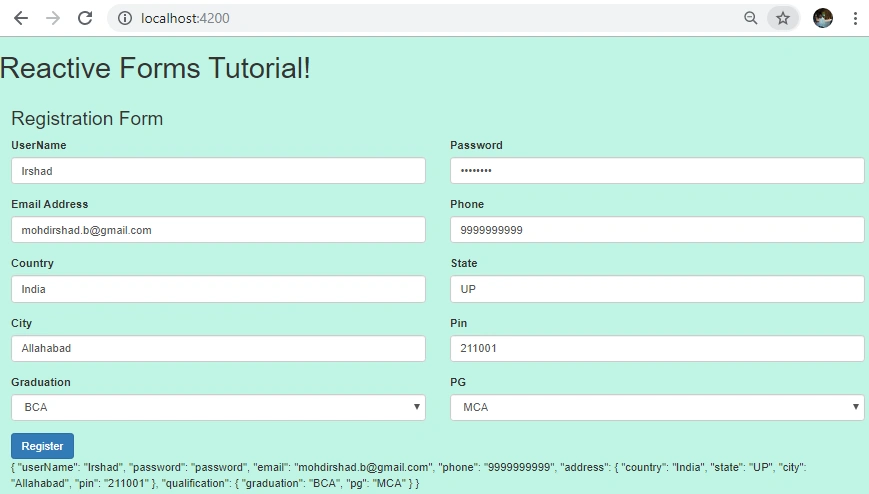
- import { Component, OnInit } from '@angular/core';
- import { FormGroup, FormControl, FormControlName } from '@angular/forms';
- @Component({
- selector: 'app-test',
- templateUrl: './test.component.html',
- styleUrls: ['./test.component.css']
- })
- export class TestComponent implements OnInit {
- registrationForm: any;
- graduationData: any;
- pgData: any;
- sampleData: any;
- constructor() { }
- ngOnInit() {
- this.graduationData = ['Select', 'BCA', 'BBA', 'BE', 'B.Tech', 'B.Sc'];
- this.pgData = ['Select', 'MCA', 'MBA', 'M.Tech', 'M.Sc'];
- this.sampleData = {
- userName: 'Irshad',
- password: 'password',
- email: '[email protected]',
- phone: '9999999999',
- address: {
- country: 'India',
- state: 'UP',
- city: 'Allahabad',
- pin: '211001'
- },
- qualification: {
- graduation: 'B.Sc',
- pg: 'MCA'
- }
- };
- this.registrationForm = new FormGroup({
- userName: new FormControl(''),
- password: new FormControl(''),
- email: new FormControl(''),
- phone: new FormControl(''),
- address: new FormGroup({
- country: new FormControl(''),
- state: new FormControl(''),
- city: new FormControl(''),
- pin: new FormControl('')
- }),
- qualification: new FormGroup({
- graduation: new FormControl(''),
- pg: new FormControl('')
- })
- });
- setTimeout(() => this.registrationForm.setValue(this.sampleData), 5000);
- }
- }
- this.sampleData = {
- userName: 'Irshad',
- password: 'password',
- email: '[email protected]',
- phone: '9999999999',
- qualification: {
- graduation: 'B.Sc',
- pg: 'MCA'
- }
- };
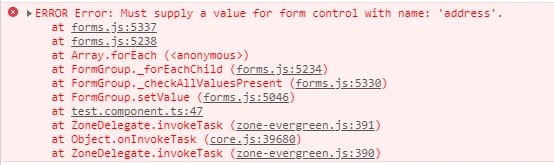
You can see the value will not be set to the formControls and if you open the console you can see the above error.
So, setValue is very strict for maintaining the structure of the formGroup, you have to pass all the formControl values.
Still if you want to set the partial values to the formGroup then you can use patchValue method.
Now change the statement setValue to patchValue. Remaining all will be same.
- setTimeout(() => this.registrationForm.patchValue(this.sampleData), 5000);
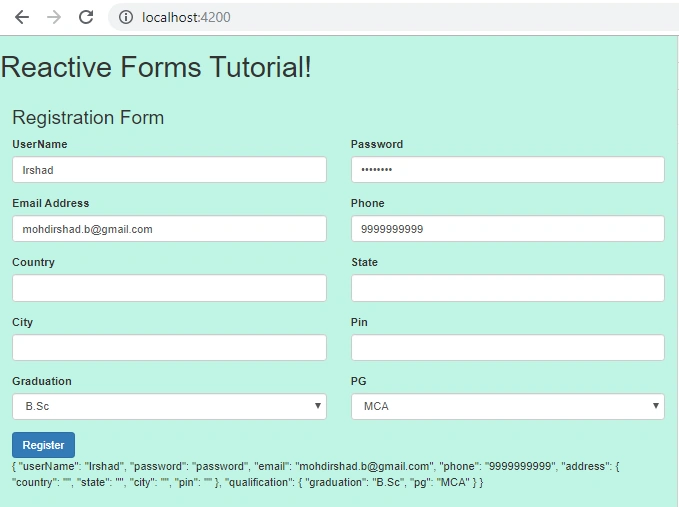
You can see the values for address fields are not set and only the partial form is being filled whose values are supplied.
Thank you.
Sani YadavPosted Apr 17, 2020, 8:10 AM
Nice article explained in easy way
Mageshwaran RPosted Nov 15, 2019, 12:18 AM
Super Article...
Sourav Kumar DasPosted Nov 6, 2019, 10:36 PM
Nice Article.