

Make your own Music Player in Android
Procedure
- Start Eclipse IDE.
- Create a new project.
- Create a MainActivity.java file.
- Create an activity_main.xml file for layout design.
- Add an XML file, a Button and a SeekBar.
- Create a new folder in "res", named "raw".
- Put the song in the "raw" folder with .mp3 extension.
- The code is given below.
MainActivity.java
- package com.example.musicplayer;
- import android.media.MediaPlayer;
- import android.os.Bundle;
- import android.os.Handler;
- import android.app.Activity;
- import android.view.Menu;
- import android.view.MotionEvent;
- import android.view.View;
- import android.view.View.OnClickListener;
- import android.view.View.OnTouchListener;
- import android.widget.Button;
- import android.widget.SeekBar;
- public class MainActivity extends Activity implements OnClickListener {
- SeekBar ss;
- Button b;
- MediaPlayer mp;
- Handler h1=new Handler();
- int i=0;
- @Override
- protected void onCreate(Bundle savedInstanceState) {
- super.onCreate(savedInstanceState);
- setContentView(R.layout.activity_main);
- ss=(SeekBar)findViewById(R.id.ss);
- b=(Button)findViewById(R.id.bb);
- mp=MediaPlayer.create(getApplicationContext(), R.raw.aashiqui);
- ss.setMax(mp.getDuration());
- b.setOnClickListener(this);
- ss.setOnTouchListener(new OnTouchListener() {
- @Override
- public boolean onTouch(View v, MotionEvent event) {
- // TODO Auto-generated method stub
- SeekBar s=(SeekBar) v;
- mp.seekTo(s.getProgress());
- return false;
- }
- });
- }
- @Override
- public boolean onCreateOptionsMenu(Menu menu) {
- // Inflate the menu; this adds items to the action bar if it is present.
- getMenuInflater().inflate(R.menu.main, menu);
- return true;
- }
- @Override
- public void onClick(View v) {
- // TODO Auto-generated method stub
- if (i==0)
- {
- mp.start();
- add();
- b.setText("pause");
- i++;
- }
- else if(i==1)
- {
- mp.pause();
- b.setText("Resume");
- i++;
- }
- else if(i==2)
- {
- mp.start();
- add();
- b.setText("Pause");
- i=1;
- }
- }
- public void add()
- {
- ss.setProgress(mp.getCurrentPosition());
- Runnable r1=new Runnable() {
- @Override
- public void run() {
- // TODO Auto-generated method stub
- add();
- }
- };
- h1.postDelayed(r1, 4000);
- }
- }
activity_main.xml
- <RelativeLayout xmlns:android="http://schemas.android.com/apk/res/android"
- xmlns:tools="http://schemas.android.com/tools"
- android:layout_width="match_parent"
- android:layout_height="match_parent"
- android:paddingBottom="@dimen/activity_vertical_margin"
- android:paddingLeft="@dimen/activity_horizontal_margin"
- android:paddingRight="@dimen/activity_horizontal_margin"
- android:paddingTop="@dimen/activity_vertical_margin"
- tools:context=".MainActivity" >
- <SeekBar
- android:id="@+id/ss"
- android:layout_width="fill_parent"
- android:layout_height="wrap_content"
- />
- <Button android:layout_height="wrap_content"
- android:layout_width="fill_parent"
- android:id="@+id/bb"
- android:layout_below="@+id/ss"
- android:layout_alignRight="@+id/ss"
- android:text="Play"
- /> </RelativeLayout>
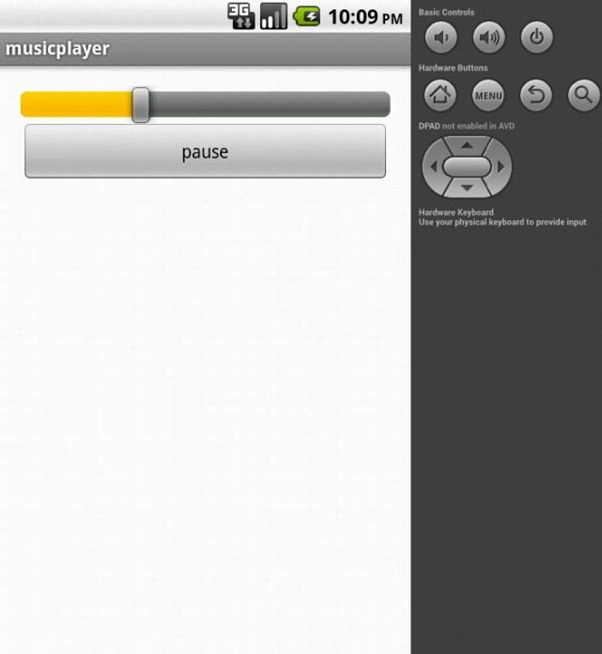
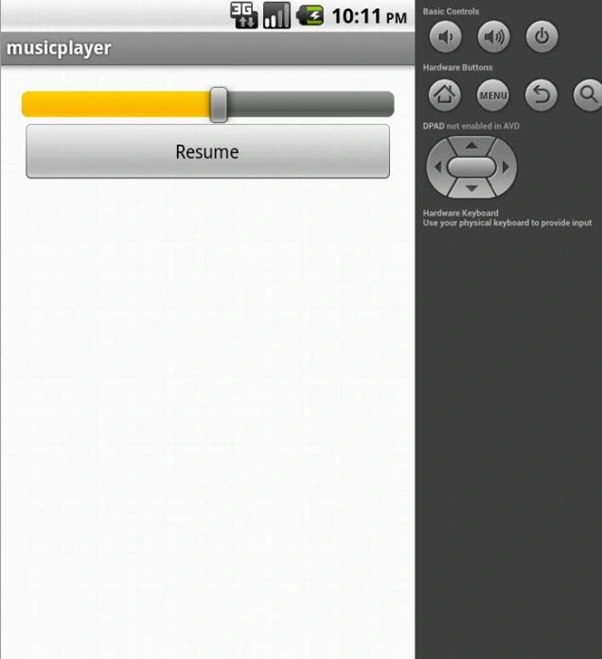
Output
Happy TimePosted Sep 22, 2014, 4:46 AM
Good to know. Thank you.
Abhijeet SinghPosted Aug 8, 2013, 11:39 AM
Thank you sir... :)
Raj KumarPosted Aug 8, 2013, 8:13 AM
Nice