

In this article, we discuss the basics of logging and step-by-step implementation with Serilog in .NET Core 6 Web API.
Agenda
- Basics of Logging
- Benefits of Logging
- Serilog in .NET Core
Prerequisites
- Visual Studio 2022
- Basics of C# and .NET Core
- .NET Core 6 SDK
Basics of Logging
- In technical terms, logging is the process of recording events and capturing other information that is generated by the application during its operations.
- Logging helps developers and administrators of the system understand and diagnose different issues and monitor the behavior of the application. These records mean log entries that are typically stored in a file or database and that help us to troubleshoot, analyze, and monitor the behavior of the system.
Benefits of Logging
Logging is an important thing in the software development life cycle, and there are several benefits to logging.
- User Activity Tracking: Logs can capture different actions of users within the application, and that helps us understand the behavior of users. It also helps us in many ways to improve the system and for other analytical purposes.
- Historical Data: Log data provides historical data and transactions of events, which helps us track changes over time and maintain important records of different events.
- Monitoring and Performance Analysis: Logs help to monitor application performance, and developers or administrators can analyze data and user patterns that help us optimize performance and improve system efficiency.
- Debugging and Troubleshooting: In the software development cycle, sometimes applications do not behave as expected. In that case, logging plays an important role in identifying what happened with the system by providing valuable information for developers or administrators.
- Security: Logging also helps while investigating security incidents and events related to them, like when someone is doing suspicious activity and attempts with an application. With the help of a log, the security team analyzes records and responds to them properly based on events.
Serilog in .NET Core
Serilog is a logging library in .NET Core applications, and it provides a flexible and extensible logging framework with structured logging.
Step 1. Install the following NuGet package from the manager.
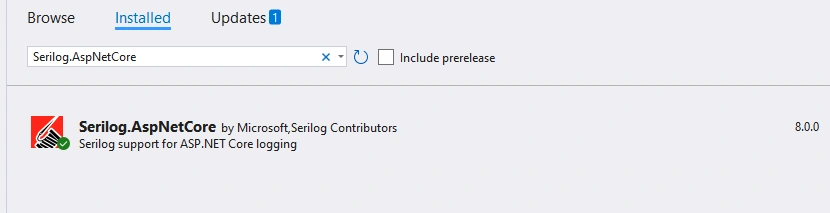
Step 2. Serilog configuration in the app settings file.
{
  "Serilog": {
    "Using": [ "Serilog.Sinks.Console", "Serilog.Sinks.File" ],
    "MinimumLevel": {
      "Default": "Information",
      "Override": {
        "Microsoft": "Warning",
        "System": "Warning"
      }
    },
    "WriteTo": [
      {
        "Name": "Console"
      },
      {
        "Name": "File",
        "Args": {
          "path": "logs/log.txt",
          "rollingInterval": "Day"
        }
      }
    ],
    "Enrich": [ "FromLogContext" ],
    "Properties": {
      "Application": "WeatherForecast"
    }
  }
}
Explanation
- Using: In this section, we need to specify the type of sinks that we want to use. (example: Console and File)
- Minimum Level: With this section, we can set the minimum log level and level of information.
- WriteTo: In this section, we can configure sinks. In this example, we use both console and file to write the logs with some additional configuration.
- Enrich: using this section, we can add additional context to the log events.
- Properties: allows us to add custom properties to the log events.
Step 3. Register required Serilog services with app settings configuration and add middleware in the pipeline.
using Serilog;

var builder = WebApplication.CreateBuilder(args);

// Add serilog services to the container and read config from appsettings
builder.Host.UseSerilog((context, configuration) =>
    configuration.ReadFrom.Configuration(context.Configuration));

builder.Services.AddControllers();
// Learn more about configuring Swagger/OpenAPI at https://aka.ms/aspnetcore/swashbuckle
builder.Services.AddEndpointsApiExplorer();
builder.Services.AddSwaggerGen();

var app = builder.Build();

// Configure the HTTP request pipeline.
if (app.Environment.IsDevelopment())
{
    app.UseSwagger();
    app.UseSwaggerUI();
}

// Configure Serilog for logging
app.UseSerilogRequestLogging();

app.UseHttpsRedirection();

app.UseAuthorization();

app.MapControllers();

app.Run();
Step 4. Weather Forecast class with required properties.
namespace SerilogDemo
{
    public class WeatherForecast
    {
        public DateTime Date { get; set; }

        public int TemperatureC { get; set; }

        public int TemperatureF => 32 + (int)(TemperatureC / 0.5556);

        public string? Summary { get; set; }
    }
}
Step 5. Weather Forecast controller with action method and logger injection in the constructor for logging purposes.
using Microsoft.AspNetCore.Mvc;

namespace SerilogDemo.Controllers
{
    [ApiController]
    [Route("[controller]")]
    public class WeatherForecastController : ControllerBase
    {
        private static readonly string[] Summaries = new[]
        {
        "Freezing", "Bracing", "Chilly", "Cool", "Mild", "Warm", "Balmy", "Hot", "Sweltering", "Scorching"
    };

        private readonly ILogger<WeatherForecastController> _logger;

        public WeatherForecastController(ILogger<WeatherForecastController> logger)
        {
            _logger = logger;
        }

        [HttpGet(Name = "GetWeatherForecast")]
        public IEnumerable<WeatherForecast> Get()
        {
            _logger.LogInformation("Requesting Weather Forecast Details...");

            return Enumerable.Range(1, 5).Select(index => new WeatherForecast
            {
                Date = DateTime.Now.AddDays(index),
                TemperatureC = Random.Shared.Next(-20, 55),
                Summary = Summaries[Random.Shared.Next(Summaries.Length)]
            })
            .ToArray();
        }
    }
}
Step 6. Run the application and execute the application endpoint with the help of Swagger, and in the log file, we can see our log entries with details. If any error occurs while registering the services in the program class or other events, the logger is also capturing the same as shown below.
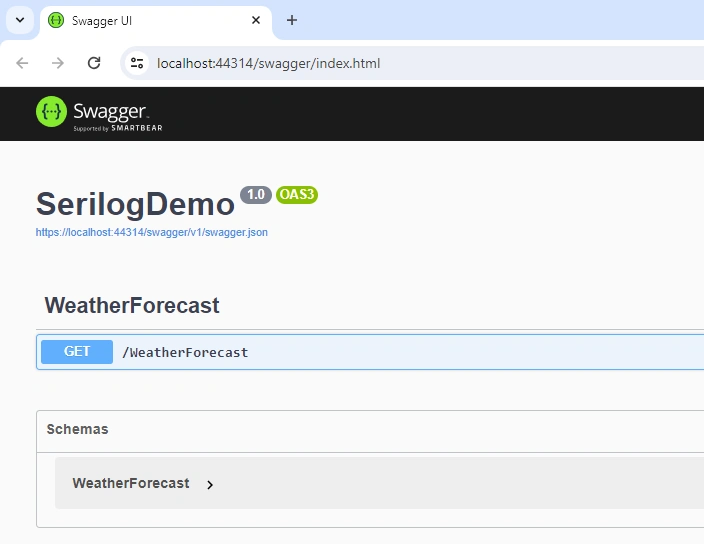
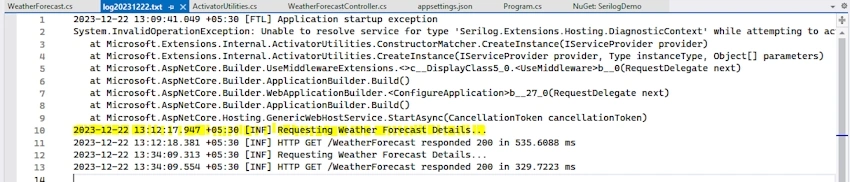
If we want to customize and structure the log detail or upload it to cloud blob storage as per requirement, then that customization is also possible with Serilog.
GitHub: https://github.com/Jaydeep-007/SeriloggerDemo
Conclusion
In this article, we looked into the basics of logging and its benefits in real-time with step-by-step implementation with the help of .NET Core 6 Weather Forecast API.
Join the conversation! Your thoughts help the community grow.