

Introduction
Sometimes we get a requirement to implement localization in our website. Localization means browser display data in different language as per browser setting or manual setting inside application. So this article helps to implement jQuery Datepicker to display in different languages as per browser settings. Before going through this article I would suggest you to visit here, that might help you more.
Let’s discuss how it can be implemented:
Step 1: Add the following JavaScript references.
Sometimes we get a requirement to implement localization in our website. Localization means browser display data in different language as per browser setting or manual setting inside application. So this article helps to implement jQuery Datepicker to display in different languages as per browser settings. Before going through this article I would suggest you to visit here, that might help you more.
Let’s discuss how it can be implemented:
Step 1: Add the following JavaScript references.
- <script src="https://ajax.googleapis.com/ajax/libs/jquery/1.11.3/jquery.min.js"></script>
- <script src="http://code.jquery.com/ui/1.11.4/jquery-ui.js"></script>
- <link href="http://code.jquery.com/ui/1.11.4/themes/smoothness/jquery-ui.css" rel="stylesheet" type="text/css" />
- <script src="https://ajax.googleapis.com/ajax/libs/jqueryui/1.11.1/i18n/jquery-ui-i18n.min.js"></script>
Step 2: Fetch browser language version using JavaScript. Here is the code:
- var userLang = navigator.language || navigator.userLanguage;
Step 3: Add the following JavaScript code to implement localization in jQuery Datepicker. Here we are using extend property to set regional language as per the browser setting (Step 2).
- var options = $.extend(
- {}, // empty object
- $.datepicker.regional[userLang], // Dynamically
- { dateFormat: "mm/dd/yy"} // your custom options
- );
- $("#calendar").datepicker(options);
Putting all together, here is the complete code:
- <!doctype html>
- <html lang="en">
- <head>
- <title>Localization JQuery UI Datepicker </title>
- <meta charset="utf-8">
- <script src="https://ajax.googleapis.com/ajax/libs/jquery/1.11.3/jquery.min.js"></script>
- <script src="http://code.jquery.com/ui/1.11.4/jquery-ui.js"></script>
- <link href="http://code.jquery.com/ui/1.11.4/themes/smoothness/jquery-ui.css" rel="stylesheet" type="text/css" />
- <script src="https://ajax.googleapis.com/ajax/libs/jqueryui/1.11.1/i18n/jquery-ui-i18n.min.js"></script>
- <script type="text/javascript">
- $(document).ready(function() {
- var userLang = navigator.language || navigator.userLanguage;
- var options = $.extend({}, // empty object
- $.datepicker.regional[userLang], {
- dateFormat: "mm/dd/yy"
- } // your custom options
- );
- $("#calendar").datepicker(options);
- });
- </script>
- </head>
- <body>
- <div class="container">
- <h3>JQuery UI Datepicker Localization</h3>
- <div id="calendar"> </div>
- </div>
- </body>
- </html>
Let's see the following figures how it is showing when the language change:
Output 1: Here I changed regional language as Hindi using "hi" in the following code:
Output 1: Here I changed regional language as Hindi using "hi" in the following code:
- var options = $.extend(
- {}, // empty object
- $.datepicker.regional["hi"], // Dynamically
- { dateFormat: "mm/dd/yy"} // your custom options
- );
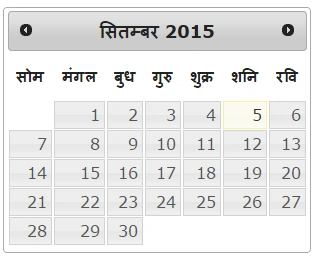
Figure 1: Calendar in Hindi
Output 2: Here I changed regional language as English using "en-US" in the following code:
Output 2: Here I changed regional language as English using "en-US" in the following code:
- var options = $.extend(
- {}, // empty object
- $.datepicker.regional["en-US"], // Dynamically
- { dateFormat: "mm/dd/yy"} // your custom options
- );
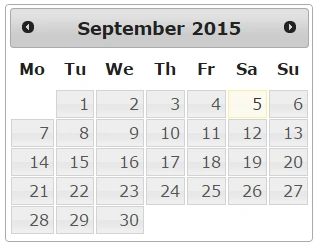
Figure 2: Calendar in English
Output 3: Here I changed regional language as French using "fr" in the following code:
Output 3: Here I changed regional language as French using "fr" in the following code:
- var options = $.extend(
- {}, // empty object
- $.datepicker.regional["fr"], // Dynamically
- { dateFormat: "mm/dd/yy"} // your custom options
- );
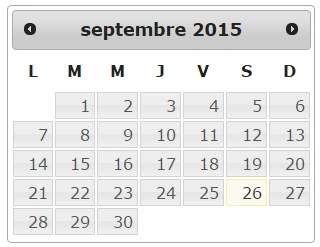
Figure 3: Calendar in French
In above example, I added regional as hard coded. You can use regional language as per your need from the following table:
| Language | Code |
| Arabic | ar |
| Bulgarian | bg |
| Chinese Simplified | zh-CN |
| Czech (čeština) | cs |
| Dutch (Belgium) | nl-BE |
| Dutch (Nederlands) | nl |
| English(Australia) | en-AU |
| English(New Zealand) | en-NZ |
| English(UK) | en-GB |
| French(Français) | fr |
| Georgian | ge |
| German | de |
| Greek (Ελληνικά) | el |
| Hindi (हिंदी) | hi |
| Hungarian | hu |
| Indonesian | id |
| Italian | it |
| Japanese (日本語) | ja |
| Korean | ko |
| Malaysian | ms |
| Norwegian | no |
| Portuguese/Brazilian | pt-BR |
| Portuguese | pt |
| Romanian | ro |
| Russian (Русский) | ru |
| Spanish (Español) | es |
| Tamil (தமிழ்) | ta |
| Thai | th |
| Turkish | tr |
Table 1: Languages with their code
Conclusion
In this article we discussed how to implement jQuery Datepicker with localization. Hope it will be helpful for you.
Priya LallPosted Jun 26, 2019, 1:47 AM
I am not able to get it
Sibeesh VenuPosted Sep 28, 2015, 3:16 AM
Thanks for the share
Humayun Kabir MamunPosted Sep 28, 2015, 2:21 AM
Nice...
Ankit BansalPosted Sep 28, 2015, 12:52 AM
nice one..thanks ..
Harshad PansuriyaPosted Sep 28, 2015, 12:36 AM
Nice One
Vinodh NarayananPosted Sep 27, 2015, 8:59 AM
nice share[
Pankaj Kumar ChoudharyPosted Sep 27, 2015, 6:01 AM
Nice Article.........
Raja TPosted Sep 27, 2015, 4:00 AM
Nice, Good one....
Raja TPosted Sep 27, 2015, 3:40 AM
Thanks for sharing
Santhakumar MunuswamyPosted Sep 27, 2015, 3:01 AM
Good Article
RakeshPosted Sep 27, 2015, 1:39 AM
Good Article Share