

Introduction
We will create an Employee application using Angular CLI commands and will add i18n attributes for major labels in HTML files for localization. Later, we will create a translation source file and translation content files for Hindi and Malayalam languages. We are using i18n internationalization and localization for displaying application in different languages. You can get more details on i18n internationalization from this official angular document.
Create Employee application with Angular CLI
We can use the below command to create a new employee application in angular CLI
ng new employeelocalization
It will take some moments to install all node dependencies to our project. After some time, our new project will be ready.
We need bootstrap, font-awesome and angular-in-memory-web-api libraries in our project. We can add all these libraries one by one.
- npm i bootstrap
- npm i font-awesome
- npm i angular-in-memory-web-api
We have successfully added required three libraries to our project. You can see the new entries in the package.json file as well.
We can create Home component now. You can use below CLI command to create a new component.
ng g c home
Above command is the shortcut for ng generate component home
Copy the below code and paste to home.component.html file.
home.component.html
- <div style="text-align:center">
- <h1 i18n="@@welcome">
- Welcome to Employee Application!
- </h1>
- <img width="200" alt="Angular Logo"
- src="data:image/svg+xml;base64,PHN2ZyB4bWxucz0iaHR0cDovL3d3dy53My5vcmcvMjAwMC9zdmciIHZpZXdCb3g9IjAgMCAyNTAgMjUwIj4KICAgIDxwYXRoIGZpbGw9IiNERDAwMzEiIGQ9Ik0xMjUgMzBMMzEuOSA2My4ybDE0LjIgMTIzLjFMMTI1IDIzMGw3OC45LTQzLjcgMTQuMi0xMjMuMXoiIC8+CiAgICA8cGF0aCBmaWxsPSIjQzMwMDJGIiBkPSJNMTI1IDMwdjIyLjItLjFWMjMwbDc4LjktNDMuNyAxNC4yLTEyMy4xTDEyNSAzMHoiIC8+CiAgICA8cGF0aCAgZmlsbD0iI0ZGRkZGRiIgZD0iTTEyNSA1Mi4xTDY2LjggMTgyLjZoMjEuN2wxMS43LTI5LjJoNDkuNGwxMS43IDI5LjJIMTgzTDEyNSA1Mi4xem0xNyA4My4zaC0zNGwxNy00MC45IDE3IDQwLjl6IiAvPgogIDwvc3ZnPg==">
- <div class="jumbotron">
- <h5 i18n="@@homemessage">
- Localization in Angular 8 using i18n
- </h5>
- </div>
- </div>
You can notice that I have added two i18n attributes inside <h1> and <h5> tags. These attributes are accompanied by @@welcome and @@homemessage values. We will add these kinds of attributes and values in many html files and later we will create a translation source file for allthese i18n attributes.
We can create a common header component for our application.
ng g c ui\header
The above command will create a new header component inside the new “ui” folder.
Copy the below code and paste it inside the header.component.html file.
header.component.html
- <nav class="navbar navbar-dark bg-dark mb-5">
- <a class="navbar-brand" href="/">Employee App</a>
- <div class="navbar-expand mr-auto">
- <div class="navbar-nav">
- <a class="nav-item nav-link active" routerLink="home" routerLinkActive="active" i18n="@@home">Home</a>
- <a class="nav-item nav-link" routerLink="employees" i18n="@@app">Employee</a>
- </div>
- </div>
- <div class="navbar-expand ml-auto navbar-nav">
- <div class="navbar-nav">
- <a class="nav-item nav-link" href="https://github.com/sarathlalsaseendran" target="_blank">
- <i class="fa fa-github"></i>
- </a>
- <a class="nav-item nav-link" href="https://twitter.com/sarathlalsasee1" target="_blank">
- <i class="fa fa-twitter"></i>
- </a>
- <a class="nav-item nav-link" href="https://codewithsarath.com" target="_blank">
- <i class="fa fa-wordpress"></i>
- </a>
- </div>
- </div>
- </nav>
You can see that a couple of i18n attributes are added in the above file also.
We can create a common footer component in the same way.
ng g c ui\footer
Copy the below code and paste inside the footer.component.html file.
footer.component.html
- <nav class="navbar navbar-dark bg-dark mt-5 fixed-bottom">
- <div class="navbar-expand m-auto navbar-text" i18n="@@developer">
- Developed with <i class="fa fa-heart"></i> by <a href="https://codewithsarath.com" target="_blank">Sarathlal</a>
- </div>
- </nav>
We can create Layout component now.
ng g c ui\layout
Copy below code and paste inside the layout.component.html file.
layout.component.html
- <app-header></app-header>
- <div class="container">
- <ng-content></ng-content>
- </div>
- <app-footer></app-footer>
We have added header and footer components tags inside this file along with a container to display remaining application parts.
We will use a generic validation class to validate the employee name. We can create this class now.
ng g class shared\GenericValidator
The above command will create an empty class inside the shared folder. Copy the below code and paste it inside this class file.
generic-validator.ts
- import { FormGroup } from '@angular/forms';
- export class GenericValidator {
- constructor(private validationMessages: { [key: string]: { [key: string]: string } }) {
- }
- processMessages(container: FormGroup): { [key: string]: string } {
- const messages = {};
- for (const controlKey in container.controls) {
- if (container.controls.hasOwnProperty(controlKey)) {
- const c = container.controls[controlKey];
- // If it is a FormGroup, process its child controls.
- if (c instanceof FormGroup) {
- const childMessages = this.processMessages(c);
- Object.assign(messages, childMessages);
- } else {
- // Only validate if there are validation messages for the control
- if (this.validationMessages[controlKey]) {
- messages[controlKey] = '';
- if ((c.dirty || c.touched) && c.errors) {
- Object.keys(c.errors).map(messageKey => {
- if (this.validationMessages[controlKey][messageKey]) {
- messages[controlKey] += this.validationMessages[controlKey][messageKey] + ' ';
- }
- });
- }
- }
- }
- }
- }
- return messages;
- }
- getErrorCount(container: FormGroup): number {
- let errorCount = 0;
- for (const controlKey in container.controls) {
- if (container.controls.hasOwnProperty(controlKey)) {
- if (container.controls[controlKey].errors) {
- errorCount += Object.keys(container.controls[controlKey].errors).length;
- console.log(errorCount);
- }
- }
- }
- return errorCount;
- }
- }
We will create each employee with a unique Guid. Hence, we can create a Guid class.
ng g class shared\Guid
The above command will create an empty class. Copy the below code and paste to this class file.
guid.ts
- export class Guid {
- static newGuid() {
- return 'xxxxxxxx-xxxx-4xxx-yxxx-xxxxxxxxxxxx'.replace(/[xy]/g, function(c) {
- var r = Math.random()*16|0, v = c == 'x' ? r : (r&0x3|0x8);
- return v.toString(16);
- });
- }
- }
We have added the logic for creating an automatic Guid.
We can create an employee interface using below command.
ng g interface employee\Employee
The above command will create an empty interface inside the employee folder. Copy the below code and paste to this file.
employee.ts
- export interface Employee {
- id: string,
- name: string,
- address: string,
- gender: string,
- company: string,
- designation: string
- }
In this application, we are using in-memory data to save and retrieve employee information. Hence, we can add below employee data class.
ng g class employee\EmployeeData
Copy below code and paste to this class file.
employee-data.ts
- import { InMemoryDbService } from 'angular-in-memory-web-api';
- import { Employee } from './employee';
- export class EmployeeData implements InMemoryDbService {
- createDb() {
- const employees: Employee[] = [
- {
- 'id': '496f04a0-5c6d-400f-a0a8-0929088dc41e',
- 'name': 'Sarath Lal',
- 'address': 'Kakkanad',
- 'gender': 'Male',
- 'company': 'Orion Business Innovation',
- 'designation': 'Technical Lead'
- },
- {
- 'id': '03810397-381c-4b9d-85f6-d7c87622e518',
- 'name': 'Baiju Mathew',
- 'address': 'Kakkanad',
- 'gender': 'Male',
- 'company': 'Orion Business Innovation',
- 'designation': 'Project Manager'
- }
- ];
- return { employees };
- }
- }
We can create employee service now.
ng g service employee\Employee
Copy the below code to this service class.
employee.service.ts
- import { Injectable } from '@angular/core';
- import { HttpClient, HttpHeaders } from '@angular/common/http';
- import { Employee } from './employee';
- import { Observable, throwError, of } from 'rxjs';
- import { catchError, map } from 'rxjs/operators';
- import { Guid } from '../shared/guid';
- @Injectable({
- providedIn: 'root'
- })
- export class EmployeeService {
- private employeesUrl = 'api/employees';
- constructor(private http: HttpClient) { }
- getEmployees(): Observable<Employee[]> {
- return this.http.get<Employee[]>(this.employeesUrl)
- .pipe(
- catchError(this.handleError)
- );
- }
- getEmployee(id: string): Observable<Employee> {
- if (id === '') {
- return of(this.initializeEmployee());
- }
- const url = `${this.employeesUrl}/${id}`;
- return this.http.get<Employee>(url)
- .pipe(
- catchError(this.handleError)
- );
- }
- createEmployee(employee: Employee): Observable<Employee> {
- const headers = new HttpHeaders({ 'Content-Type': 'application/json' });
- employee.id = Guid.newGuid();
- debugger;
- return this.http.post<Employee>(this.employeesUrl, employee, { headers: headers })
- .pipe(
- catchError(this.handleError)
- );
- }
- deleteEmployee(id: string): Observable<{}> {
- const headers = new HttpHeaders({ 'Content-Type': 'application/json' });
- const url = `${this.employeesUrl}/${id}`;
- return this.http.delete<Employee>(url, { headers: headers })
- .pipe(
- catchError(this.handleError)
- );
- }
- updateEmployee(employee: Employee): Observable<Employee> {
- const headers = new HttpHeaders({ 'Content-Type': 'application/json' });
- const url = `${this.employeesUrl}/${employee.id}`;
- return this.http.put<Employee>(url, employee, { headers: headers })
- .pipe(
- map(() => employee),
- catchError(this.handleError)
- );
- }
- private handleError(err) {
- let errorMessage: string;
- if (err.error instanceof ErrorEvent) {
- errorMessage = `An error occurred: ${err.error.message}`;
- } else {
- errorMessage = `Backend returned code ${err.status}: ${err.body.error}`;
- }
- console.error(err);
- return throwError(errorMessage);
- }
- private initializeEmployee(): Employee {
- return {
- id: null,
- name: null,
- address: null,
- gender: null,
- company: null,
- designation: null
- };
- }
- }
We have added all CRUD actions logic inside above service class.
We can add employee list component to list all employee information.
ng g c employee\EmployeeList
Copy the below code and paste inside the component class file.
employee-list.component.ts
- import { Component, OnInit } from '@angular/core';
- import { Employee } from '../employee';
- import { EmployeeService } from '../employee.service';
- @Component({
- selector: 'app-employee-list',
- templateUrl: './employee-list.component.html',
- styleUrls: ['./employee-list.component.css']
- })
- export class EmployeeListComponent implements OnInit {
- pageTitle = 'Employee List';
- filteredEmployees: Employee[] = [];
- employees: Employee[] = [];
- errorMessage = '';
- _listFilter = '';
- get listFilter(): string {
- return this._listFilter;
- }
- set listFilter(value: string) {
- this._listFilter = value;
- this.filteredEmployees = this.listFilter ? this.performFilter(this.listFilter) : this.employees;
- }
- constructor(private employeeService: EmployeeService) { }
- performFilter(filterBy: string): Employee[] {
- filterBy = filterBy.toLocaleLowerCase();
- return this.employees.filter((employee: Employee) =>
- employee.name.toLocaleLowerCase().indexOf(filterBy) !== -1);
- }
- ngOnInit(): void {
- this.employeeService.getEmployees().subscribe(
- employees => {
- this.employees = employees;
- this.filteredEmployees = this.employees;
- },
- error => this.errorMessage = <any>error
- );
- }
- deleteEmployee(id: string, name: string): void {
- if (id === '') {
- // Don't delete, it was never saved.
- this.onSaveComplete();
- } else {
- if (confirm(`Are you sure want to delete this Employee: ${name}?`)) {
- this.employeeService.deleteEmployee(id)
- .subscribe(
- () => this.onSaveComplete(),
- (error: any) => this.errorMessage = <any>error
- );
- }
- }
- }
- onSaveComplete(): void {
- this.employeeService.getEmployees().subscribe(
- employees => {
- this.employees = employees;
- this.filteredEmployees = this.employees;
- },
- error => this.errorMessage = <any>error
- );
- }
- }
Also, copy the corresponding HTML and CSS files.
employee-list.component.html
- <div class="card">
- <div class="card-header">
- {{pageTitle}}
- </div>
- <div class="card-body">
- <div class="row">
- <div class="col-md-2" i18n="@@filter">Filter by:</div>
- <div class="col-md-4">
- <input type="text" [(ngModel)]="listFilter" />
- </div>
- <div class="col-md-3"></div>
- <div class="col-md-3">
- <button class="btn btn-primary mr-3" [routerLink]="['/employees/0/edit']" i18n="@@newemployee">
- New Employee
- </button>
- </div>
- </div>
- <div class="row" *ngIf="listFilter">
- <div class="col-md-6">
- <h4 i18n="@@filteredBy">Filtered by: {{listFilter}}</h4>
- </div>
- </div>
- <div class="table-responsive">
- <table class="table mb-0" *ngIf="employees && employees.length">
- <thead>
- <tr>
- <th i18n="@@empName">Name</th>
- <th i18n="@@empAddress">Address</th>
- <th i18n="@@empGender">Gender</th>
- <th i18n="@@empCompany">Company</th>
- <th i18n="@@empDesignation">Designation</th>
- <th></th>
- <th></th>
- </tr>
- </thead>
- <tbody>
- <tr *ngFor="let employee of filteredEmployees">
- <td>
- <a [routerLink]="['/employees', employee.id]">
- {{ employee.name }}
- </a>
- </td>
- <td>{{ employee.address }}</td>
- <td>{{ employee.gender }}</td>
- <td>{{ employee.company }}</td>
- <td>{{ employee.designation}} </td>
- <td>
- <button class="btn btn-outline-primary btn-sm" [routerLink]="['/employees', employee.id, 'edit']" i18n="@@edit">
- Edit
- </button>
- </td>
- <td>
- <button class="btn btn-outline-warning btn-sm" (click)="deleteEmployee(employee.id,employee.name);" i18n="@@delete">
- Delete
- </button>
- </td>
- </tr>
- </tbody>
- </table>
- </div>
- </div>
- </div>
- <div *ngIf="errorMessage" class="alert alert-danger">
- Error: {{ errorMessage }}
- </div>
employee-list.component.css
- thead {
- color: #337AB7;
- }
We can create employee edit component in the same way.
ng g c employee\EmployeeEdit
Copy the below code and paste to component class and HTML files.
employee-edit.component.ts
- import { Component, OnInit, AfterViewInit, OnDestroy, ElementRef, ViewChildren } from '@angular/core';
- import { FormControlName, FormGroup, FormBuilder, Validators } from '@angular/forms';
- import { Subscription, Observable, fromEvent, merge } from 'rxjs';
- import { Employee } from '../employee';
- import { EmployeeService } from '../employee.service';
- import { ActivatedRoute, Router } from '@angular/router';
- import { debounceTime } from 'rxjs/operators';
- import { GenericValidator } from 'src/app/shared/generic-validator';
- @Component({
- selector: 'app-employee-edit',
- templateUrl: './employee-edit.component.html',
- styleUrls: ['./employee-edit.component.css']
- })
- export class EmployeeEditComponent implements OnInit, AfterViewInit, OnDestroy {
- @ViewChildren(FormControlName, { read: ElementRef }) formInputElements: ElementRef[];
- pageTitle = 'Employee Edit';
- errorMessage: string;
- employeeForm: FormGroup;
- employee: Employee;
- private sub: Subscription;
- displayMessage: { [key: string]: string } = {};
- private validationMessages: { [key: string]: { [key: string]: string } };
- private genericValidator: GenericValidator;
- constructor(private fb: FormBuilder,
- private route: ActivatedRoute,
- private router: Router,
- private employeeService: EmployeeService) {
- this.validationMessages = {
- name: {
- required: 'Employee name is required.',
- minlength: 'Employee name must be at least three characters.',
- maxlength: 'Employee name cannot exceed 50 characters.'
- },
- address: {
- required: 'Employee address is required.',
- }
- };
- this.genericValidator = new GenericValidator(this.validationMessages);
- }
- ngOnInit() {
- this.employeeForm = this.fb.group({
- name: ['', [Validators.required
- ]],
- address: ['', [Validators.required]],
- gender: '',
- company: '',
- designation: ''
- });
- this.sub = this.route.paramMap.subscribe(
- params => {
- const id = params.get('id');
- if (id == '0') {
- const employee: Employee = { id: "0", name: "", address: "", gender: "", company: "", designation: "" };
- this.displayEmployee(employee);
- }
- else {
- this.getEmployee(id);
- }
- }
- );
- }
- ngOnDestroy(): void {
- this.sub.unsubscribe();
- }
- ngAfterViewInit(): void {
- // Watch for the blur event from any input element on the form.
- const controlBlurs: Observable<any>[] = this.formInputElements
- .map((formControl: ElementRef) => fromEvent(formControl.nativeElement, 'blur'));
- // Merge the blur event observable with the valueChanges observable
- merge(this.employeeForm.valueChanges, ...controlBlurs).pipe(
- debounceTime(800)
- ).subscribe(value => {
- this.displayMessage = this.genericValidator.processMessages(this.employeeForm);
- });
- }
- getEmployee(id: string): void {
- this.employeeService.getEmployee(id)
- .subscribe(
- (employee: Employee) => this.displayEmployee(employee),
- (error: any) => this.errorMessage = <any>error
- );
- }
- displayEmployee(employee: Employee): void {
- if (this.employeeForm) {
- this.employeeForm.reset();
- }
- this.employee = employee;
- if (this.employee.id == '0') {
- this.pageTitle = 'Add Employee';
- } else {
- this.pageTitle = `Edit Employee: ${this.employee.name}`;
- }
- // Update the data on the form
- this.employeeForm.patchValue({
- name: this.employee.name,
- address: this.employee.address,
- gender: this.employee.gender,
- company: this.employee.company,
- designation: this.employee.designation
- });
- }
- deleteEmployee(): void {
- if (this.employee.id == '0') {
- // Don't delete, it was never saved.
- this.onSaveComplete();
- } else {
- if (confirm(`Are you sure want to delete this Employee: ${this.employee.name}?`)) {
- this.employeeService.deleteEmployee(this.employee.id)
- .subscribe(
- () => this.onSaveComplete(),
- (error: any) => this.errorMessage = <any>error
- );
- }
- }
- }
- saveEmployee(): void {
- if (this.employeeForm.valid) {
- if (this.employeeForm.dirty) {
- const p = { ...this.employee, ...this.employeeForm.value };
- if (p.id === '0') {
- this.employeeService.createEmployee(p)
- .subscribe(
- () => this.onSaveComplete(),
- (error: any) => this.errorMessage = <any>error
- );
- } else {
- this.employeeService.updateEmployee(p)
- .subscribe(
- () => this.onSaveComplete(),
- (error: any) => this.errorMessage = <any>error
- );
- }
- } else {
- this.onSaveComplete();
- }
- } else {
- this.errorMessage = 'Please correct the validation errors.';
- }
- }
- onSaveComplete(): void {
- // Reset the form to clear the flags
- this.employeeForm.reset();
- this.router.navigate(['/employees']);
- }
- }
employee-edit.component.html
- <div class="card">
- <div class="card-header">
- {{pageTitle}}
- </div>
- <div class="card-body">
- <form novalidate
- (ngSubmit)="saveEmployee()"
- [formGroup]="employeeForm">
- <div class="form-group row mb-2">
- <label class="col-md-2 col-form-label"
- for="employeeNameId" i18n="@@empName">Name</label>
- <div class="col-md-8">
- <input class="form-control"
- id="employeeNameId"
- type="text"
- placeholder="Name (required)"
- formControlName="name"
- [ngClass]="{'is-invalid': displayMessage.name }" />
- <span class="invalid-feedback">
- {{displayMessage.name}}
- </span>
- </div>
- </div>
- <div class="form-group row mb-2">
- <label class="col-md-2 col-form-label"
- for="addressId" i18n="@@empAddress">Address</label>
- <div class="col-md-8">
- <input class="form-control"
- id="addressId"
- type="text"
- placeholder="Address"
- formControlName="address"
- [ngClass]="{'is-invalid': displayMessage.address}" />
- <span class="invalid-feedback">
- {{displayMessage.address}}
- </span>
- </div>
- </div>
- <div class="form-group row mb-2">
- <label class="col-md-2 col-form-label"
- for="genderId" i18n="@@empGender">Gender</label>
- <div class="col-md-8">
- <input class="form-control"
- id="genderId"
- type="text"
- placeholder="Gender"
- formControlName="gender"
- [ngClass]="{'is-invalid': displayMessage.gender}" />
- <span class="invalid-feedback">
- {{displayMessage.gender}}
- </span>
- </div>
- </div>
- <div class="form-group row mb-2">
- <label class="col-md-2 col-form-label"
- for="companyId" i18n="@@empCompany">Company</label>
- <div class="col-md-8">
- <input class="form-control"
- id="companyId"
- type="text"
- placeholder="Company"
- formControlName="company"
- [ngClass]="{'is-invalid': displayMessage.gender}" />
- <span class="invalid-feedback">
- {{displayMessage.company}}
- </span>
- </div>
- </div>
- <div class="form-group row mb-2">
- <label class="col-md-2 col-form-label"
- for="designationId" i18n="@@empDesignation">Designation</label>
- <div class="col-md-8">
- <input class="form-control"
- id="designationId"
- type="text"
- placeholder="Designation"
- formControlName="designation"
- [ngClass]="{'is-invalid': displayMessage.designation}" />
- <span class="invalid-feedback">
- {{displayMessage.designation}}
- </span>
- </div>
- </div>
- <div class="form-group row mb-2">
- <div class="offset-md-2 col-md-6">
- <button class="btn btn-primary mr-3"
- style="width:100px;"
- type="submit"
- [title]="employeeForm.valid ? 'Save your entered data' : 'Disabled until the form data is valid'"
- [disabled]="!employeeForm.valid" i18n="@@save">
- Save
- </button>
- <button class="btn btn-outline-secondary mr-3"
- style="width:140px;"
- type="button"
- title="Cancel your edits"
- [routerLink]="['/employees']" i18n="@@cancel">
- Cancel
- </button>
- <button class="btn btn-outline-warning" *ngIf="employee.id != '0'"
- style="width:100px"
- type="button"
- title="Delete this product"
- (click)="deleteEmployee()" i18n="@@delete">
- Delete
- </button>
- </div>
- </div>
- </form>
- </div>
- <div class="alert alert-danger"
- *ngIf="errorMessage">{{errorMessage}}
- </div>
- </div>
We can create a guard to prevent data loss before saving the data.
ng g guard employee\EmployeeEdit
Copy the below code and paste to guard class file.
employee-edit.guard.ts
- import { Injectable } from '@angular/core';
- import { CanDeactivate } from '@angular/router';
- import { Observable } from 'rxjs';
- import { EmployeeEditComponent } from './employee-edit/employee-edit.component';
- @Injectable({
- providedIn: 'root'
- })
- export class EmployeeEditGuard implements CanDeactivate<EmployeeEditComponent> {
- canDeactivate(component: EmployeeEditComponent): Observable<boolean> | Promise<boolean> | boolean {
- if (component.employeeForm.dirty) {
- const name = component.employeeForm.get('name').value || 'New Employee';
- return confirm(`Navigate away and lose all changes to ${name}?`);
- }
- return true;
- }
- }
We can create employee detail component.
ng g c employee\EmployeeDetail
Copy the below code and paste to component class and HTML files.
employee-detail.component.ts
- import { Component, OnInit } from '@angular/core';
- import { Employee } from '../employee';
- import { ActivatedRoute, Router } from '@angular/router';
- import { EmployeeService } from '../employee.service';
- @Component({
- selector: 'app-employee-detail',
- templateUrl: './employee-detail.component.html',
- styleUrls: ['./employee-detail.component.css']
- })
- export class EmployeeDetailComponent implements OnInit {
- pageTitle = 'Employee Detail';
- errorMessage = '';
- employee: Employee | undefined;
- constructor(private route: ActivatedRoute,
- private router: Router,
- private employeeService: EmployeeService) { }
- ngOnInit() {
- const param = this.route.snapshot.paramMap.get('id');
- if (param) {
- const id = param;
- this.getEmployee(id);
- }
- }
- getEmployee(id: string) {
- this.employeeService.getEmployee(id).subscribe(
- employee => this.employee = employee,
- error => this.errorMessage = <any>error);
- }
- onBack(): void {
- this.router.navigate(['/employees']);
- }
- }
employee-detail.component.html
- <div class="card">
- <div class="card-header"
- *ngIf="employee">
- {{pageTitle + ": " + employee.name}}
- </div>
- <div class="card-body"
- *ngIf="employee">
- <div class="row">
- <div class="col-md-8">
- <div class="row">
- <div class="col-md-3" i18n="@@empName">Name:</div>
- <div class="col-md-6">{{employee.name}}</div>
- </div>
- <div class="row">
- <div class="col-md-3" i18n="@@empAddress">Address:</div>
- <div class="col-md-6">{{employee.address}}</div>
- </div>
- <div class="row">
- <div class="col-md-3" i18n="@@empGender">Gender:</div>
- <div class="col-md-6">{{employee.gender}}</div>
- </div>
- <div class="row">
- <div class="col-md-3" i18n="@@empCompany">Company:</div>
- <div class="col-md-6">{{employee.company}}</div>
- </div>
- <div class="row">
- <div class="col-md-3" i18n="@@empDesignation">Designation:</div>
- <div class="col-md-6">{{employee.designation}}</div>
- </div>
- </div>
- </div>
- <div class="row mt-4">
- <div class="col-md-6">
- <button class="btn btn-outline-secondary mr-3"
- style="width:100px"
- (click)="onBack()" i18n="@@back">
- <i class="fa fa-chevron-left"></i> Back
- </button>
- <button class="btn btn-outline-primary"
- style="width:100px"
- [routerLink]="['/employees', employee.id, 'edit']" i18n="@@edit">
- Edit
- </button>
- </div>
- </div>
- </div>
- <div class="alert alert-danger"
- *ngIf="errorMessage">{{errorMessage}}
- </div>
- </div>
We have created all components. We can create a route config file now.
ng g class RouterConfig
Copy the below code and paste inside the router constant file.
router-config.ts
- import { Routes } from '@angular/router';
- import { HomeComponent } from './home/home.component';
- import { EmployeeListComponent } from './employee/employee-list/employee-list.component';
- import { EmployeeEditComponent } from './employee/employee-edit/employee-edit.component';
- import { EmployeeEditGuard } from './employee/employee-edit.guard';
- import { EmployeeDetailComponent } from './employee/employee-detail/employee-detail.component';
- export const routes: Routes = [
- {
- path: 'home',
- component: HomeComponent
- },
- {
- path: 'employees',
- component: EmployeeListComponent
- },
- {
- path: 'employees/:id',
- component: EmployeeDetailComponent
- },
- {
- path: 'employees/:id/edit',
- canDeactivate: [EmployeeEditGuard],
- component: EmployeeEditComponent
- },
- {
- path: '',
- redirectTo: 'home',
- pathMatch: 'full'
- },
- {
- path: '**',
- redirectTo: 'home',
- pathMatch: 'full'
- }
- ];
We can modify the app.module.ts file.
app.module.ts
- import { BrowserModule } from '@angular/platform-browser';
- import { NgModule } from '@angular/core';
- import { AppComponent } from './app.component';
- import { HomeComponent } from './home/home.component';
- import { HeaderComponent } from './ui/header/header.component';
- import { FooterComponent } from './ui/footer/footer.component';
- import { LayoutComponent } from './ui/layout/layout.component';
- import { EmployeeListComponent } from './employee/employee-list/employee-list.component';
- import { EmployeeEditComponent } from './employee/employee-edit/employee-edit.component';
- import { EmployeeDetailComponent } from './employee/employee-detail/employee-detail.component';
- import { ReactiveFormsModule, FormsModule } from '@angular/forms';
- import { RouterModule } from '@angular/router';
- import { HttpClientModule } from '@angular/common/http';
- import { routes } from './router-config';
- import { InMemoryWebApiModule } from 'angular-in-memory-web-api';
- import { EmployeeData } from './employee/employee-data';
- @NgModule({
- declarations: [
- AppComponent,
- HomeComponent,
- HeaderComponent,
- FooterComponent,
- LayoutComponent,
- EmployeeListComponent,
- EmployeeEditComponent,
- EmployeeDetailComponent
- ],
- imports: [
- BrowserModule,
- ReactiveFormsModule,
- FormsModule,
- RouterModule,
- HttpClientModule,
- RouterModule.forRoot(routes),
- InMemoryWebApiModule.forRoot(EmployeeData),
- ],
- providers: [],
- bootstrap: [AppComponent]
- })
- export class AppModule { }
We can import bootstrap and font-awesome classes inside the style.css file to use these libraries globally without further references.
style.css
- /* You can add global styles to this file, and also import other style files */
- @import "~bootstrap/dist/css/bootstrap.css";
- @import "~font-awesome/css/font-awesome.css";
- div.card-header {
- font-size: large;
- }
- div.card {
- margin-top: 10px
- }
- .table {
- margin-top: 10px
- }
We can modify app.component.html file
app.component.html
- <app-layout>
- <router-outlet></router-outlet>
- </app-layout>
We have added app layout component inside this file.
We have completed the entire coding part except for the translation content creation.
We can create a translation source file using the below command.
ng xi18n --output-path src\app\translate
It will create a folder “translate” and create a messages.xlf file inside it. Open the file and you can observe the following XML code inside it.
messages.xlf
- <?xml version="1.0" encoding="UTF-8" ?>
- <xliff version="1.2" xmlns="urn:oasis:names:tc:xliff:document:1.2">
- <file source-language="en" datatype="plaintext" original="ng2.template">
- <body>
- <trans-unit id="welcome" datatype="html">
- <source>
- Welcome to Employee Application!
- </source>
- <context-group purpose="location">
- <context context-type="sourcefile">src/app/home/home.component.html</context>
- <context context-type="linenumber">2</context>
- </context-group>
- </trans-unit>
- <trans-unit id="homemessage" datatype="html">
- <source>
- Localization in Angular 8 using i18n
- </source>
- <context-group purpose="location">
- <context context-type="sourcefile">src/app/home/home.component.html</context>
- <context context-type="linenumber">9</context>
- </context-group>
- </trans-unit>
- <trans-unit id="home" datatype="html">
- <source>Home</source>
- <context-group purpose="location">
- <context context-type="sourcefile">src/app/ui/header/header.component.html</context>
- <context context-type="linenumber">5</context>
- </context-group>
- </trans-unit>
- <trans-unit id="app" datatype="html">
- <source>Employee</source>
- <context-group purpose="location">
- <context context-type="sourcefile">src/app/ui/header/header.component.html</context>
- <context context-type="linenumber">6</context>
- </context-group>
- </trans-unit>
- <trans-unit id="developer" datatype="html">
- <source>
- Developed with <x id="START_ITALIC_TEXT" ctype="x-i" equiv-text="<i>"/><x id="CLOSE_ITALIC_TEXT" ctype="x-i" equiv-text="</i>"/> by <x id="START_LINK" ctype="x-a" equiv-text="<a>"/>Sarathlal<x id="CLOSE_LINK" ctype="x-a" equiv-text="</a>"/>
- </source>
- <context-group purpose="location">
- <context context-type="sourcefile">src/app/ui/footer/footer.component.html</context>
- <context context-type="linenumber">2</context>
- </context-group>
- </trans-unit>
- <trans-unit id="filter" datatype="html">
- <source>Filter by:</source>
- <context-group purpose="location">
- <context context-type="sourcefile">src/app/employee/employee-list/employee-list.component.html</context>
- <context context-type="linenumber">8</context>
- </context-group>
- </trans-unit>
- <trans-unit id="newemployee" datatype="html">
- <source>
- New Employee
- </source>
- <context-group purpose="location">
- <context context-type="sourcefile">src/app/employee/employee-list/employee-list.component.html</context>
- <context context-type="linenumber">14</context>
- </context-group>
- </trans-unit>
- <trans-unit id="filteredBy" datatype="html">
- <source>Filtered by: <x id="INTERPOLATION" equiv-text="{{listFilter}}"/></source>
- <context-group purpose="location">
- <context context-type="sourcefile">src/app/employee/employee-list/employee-list.component.html</context>
- <context context-type="linenumber">21</context>
- </context-group>
- </trans-unit>
- <trans-unit id="empName" datatype="html">
- <source>Name</source>
- <context-group purpose="location">
- <context context-type="sourcefile">src/app/employee/employee-list/employee-list.component.html</context>
- <context context-type="linenumber">29</context>
- </context-group>
- <context-group purpose="location">
- <context context-type="sourcefile">src/app/employee/employee-edit/employee-edit.component.html</context>
- <context context-type="linenumber">13</context>
- </context-group>
- <context-group purpose="location">
- <context context-type="sourcefile">src/app/employee/employee-detail/employee-detail.component.html</context>
- <context context-type="linenumber">14</context>
- </context-group>
- </trans-unit>
- <trans-unit id="empAddress" datatype="html">
- <source>Address</source>
- <context-group purpose="location">
- <context context-type="sourcefile">src/app/employee/employee-list/employee-list.component.html</context>
- <context context-type="linenumber">30</context>
- </context-group>
- <context-group purpose="location">
- <context context-type="sourcefile">src/app/employee/employee-edit/employee-edit.component.html</context>
- <context context-type="linenumber">29</context>
- </context-group>
- <context-group purpose="location">
- <context context-type="sourcefile">src/app/employee/employee-detail/employee-detail.component.html</context>
- <context context-type="linenumber">18</context>
- </context-group>
- </trans-unit>
- <trans-unit id="empGender" datatype="html">
- <source>Gender</source>
- <context-group purpose="location">
- <context context-type="sourcefile">src/app/employee/employee-list/employee-list.component.html</context>
- <context context-type="linenumber">31</context>
- </context-group>
- <context-group purpose="location">
- <context context-type="sourcefile">src/app/employee/employee-edit/employee-edit.component.html</context>
- <context context-type="linenumber">45</context>
- </context-group>
- <context-group purpose="location">
- <context context-type="sourcefile">src/app/employee/employee-detail/employee-detail.component.html</context>
- <context context-type="linenumber">22</context>
- </context-group>
- </trans-unit>
- <trans-unit id="empCompany" datatype="html">
- <source>Company</source>
- <context-group purpose="location">
- <context context-type="sourcefile">src/app/employee/employee-list/employee-list.component.html</context>
- <context context-type="linenumber">32</context>
- </context-group>
- <context-group purpose="location">
- <context context-type="sourcefile">src/app/employee/employee-edit/employee-edit.component.html</context>
- <context context-type="linenumber">61</context>
- </context-group>
- <context-group purpose="location">
- <context context-type="sourcefile">src/app/employee/employee-detail/employee-detail.component.html</context>
- <context context-type="linenumber">26</context>
- </context-group>
- </trans-unit>
- <trans-unit id="empDesignation" datatype="html">
- <source>Designation</source>
- <context-group purpose="location">
- <context context-type="sourcefile">src/app/employee/employee-list/employee-list.component.html</context>
- <context context-type="linenumber">33</context>
- </context-group>
- <context-group purpose="location">
- <context context-type="sourcefile">src/app/employee/employee-edit/employee-edit.component.html</context>
- <context context-type="linenumber">77</context>
- </context-group>
- <context-group purpose="location">
- <context context-type="sourcefile">src/app/employee/employee-detail/employee-detail.component.html</context>
- <context context-type="linenumber">30</context>
- </context-group>
- </trans-unit>
- <trans-unit id="edit" datatype="html">
- <source>
- Edit
- </source>
- <context-group purpose="location">
- <context context-type="sourcefile">src/app/employee/employee-list/employee-list.component.html</context>
- <context context-type="linenumber">50</context>
- </context-group>
- <context-group purpose="location">
- <context context-type="sourcefile">src/app/employee/employee-detail/employee-detail.component.html</context>
- <context context-type="linenumber">46</context>
- </context-group>
- </trans-unit>
- <trans-unit id="delete" datatype="html">
- <source>
- Delete
- </source>
- <context-group purpose="location">
- <context context-type="sourcefile">src/app/employee/employee-list/employee-list.component.html</context>
- <context context-type="linenumber">55</context>
- </context-group>
- <context-group purpose="location">
- <context context-type="sourcefile">src/app/employee/employee-edit/employee-edit.component.html</context>
- <context context-type="linenumber">111</context>
- </context-group>
- </trans-unit>
- <trans-unit id="save" datatype="html">
- <source>
- Save
- </source>
- <context-group purpose="location">
- <context context-type="sourcefile">src/app/employee/employee-edit/employee-edit.component.html</context>
- <context context-type="linenumber">97</context>
- </context-group>
- </trans-unit>
- <trans-unit id="cancel" datatype="html">
- <source>
- Cancel
- </source>
- <context-group purpose="location">
- <context context-type="sourcefile">src/app/employee/employee-edit/employee-edit.component.html</context>
- <context context-type="linenumber">104</context>
- </context-group>
- </trans-unit>
- <trans-unit id="back" datatype="html">
- <source>
- <x id="START_ITALIC_TEXT" ctype="x-i" equiv-text="<i>"/><x id="CLOSE_ITALIC_TEXT" ctype="x-i" equiv-text="</i>"/> Back
- </source>
- <context-group purpose="location">
- <context context-type="sourcefile">src/app/employee/employee-detail/employee-detail.component.html</context>
- <context context-type="linenumber">41</context>
- </context-group>
- </trans-unit>
- </body>
- </file>
- </xliff>
This file contains a list of <trans-unit> tags. These tags have all the content that was marked for translation using i18n attribute. You can also observe that each <trans-unit> tag has an “id” property associated with it.
Also, observe that each tag has “source” property associated. We can translate our application content to two new languages, Hindi and Malayalam.
Copy the content of messages.xlf to messages.hi.xlf and messages.ml.xlf. We can add a “target” property to each “source” property and add corresponding translation contents for each language.
messages.hi.xlf
- <?xml version="1.0" encoding="UTF-8" ?>
- <xliff version="1.2" xmlns="urn:oasis:names:tc:xliff:document:1.2">
- <file source-language="en" datatype="plaintext" original="ng2.template">
- <body>
- <trans-unit id="welcome" datatype="html">
- <source>Welcome to Employee App!</source>
- <target>एम्प्लोयी आप्प्लिकशन में आपका स्वागत है</target>
- <context-group purpose="location">
- <context context-type="sourcefile">src/app/home/home.component.html</context>
- <context context-type="linenumber">2</context>
- </context-group>
- </trans-unit>
- <trans-unit id="homemessage" datatype="html">
- <source>Localization in Angular using i18n</source>
- <target>i18n का उपयोग कर अंगुलार में स्थानीयकरण</target>
- <context-group purpose="location">
- <context context-type="sourcefile">src/app/home/home.component.html</context>
- <context context-type="linenumber">9</context>
- </context-group>
- </trans-unit>
- <trans-unit id="app" datatype="html">
- <source>Employee</source>
- <target>एम्प्लोयी</target>
- <context-group purpose="location">
- <context context-type="sourcefile">src/app/ui/header/header.component.html</context>
- <context context-type="linenumber">6</context>
- </context-group>
- </trans-unit>
- <trans-unit id="developer" datatype="html">
- <source>Developed with <x id="START_ITALIC_TEXT" ctype="x-i" equiv-text="<i>"/><x id="CLOSE_ITALIC_TEXT" ctype="x-i" equiv-text="</i>"/> by <x id="START_LINK" ctype="x-a" equiv-text="<a>"/>Sarathlal<x id="CLOSE_LINK" ctype="x-a" equiv-text="</a>"/></source>
- <target>के साथ विकसित <x id="START_ITALIC_TEXT" ctype="x-i" equiv-text="<i>"/><x id="CLOSE_ITALIC_TEXT" ctype="x-i" equiv-text="</i>"/> द्वारा <x id="START_LINK" ctype="x-a" equiv-text="<a>"/>सरथलाल<x id="CLOSE_LINK" ctype="x-a" equiv-text="</a>"/></target>
- <context-group purpose="location">
- <context context-type="sourcefile">src/app/ui/footer/footer.component.html</context>
- <context context-type="linenumber">2</context>
- </context-group>
- </trans-unit>
- <trans-unit id="home" datatype="html">
- <source>Home</source>
- <target>होम</target>
- <context-group purpose="location">
- <context context-type="sourcefile">src/app/ui/header/header.component.html</context>
- <context context-type="linenumber">5</context>
- </context-group>
- </trans-unit>
- <trans-unit id="filter" datatype="html">
- <source>Filter by:</source>
- <target>के द्वारा छनित:</target>
- <context-group purpose="location">
- <context context-type="sourcefile">src/app/employee/employee-list/employee-list.component.html</context>
- <context context-type="linenumber">8</context>
- </context-group>
- </trans-unit>
- <trans-unit id="newemployee" datatype="html">
- <source>
- New Employee
- </source>
- <target>
- नए एम्प्लोयी
- </target>
- <context-group purpose="location">
- <context context-type="sourcefile">src/app/employee/employee-list/employee-list.component.html</context>
- <context context-type="linenumber">14</context>
- </context-group>
- </trans-unit>
- <trans-unit id="filteredBy" datatype="html">
- <source>Filtered by: <x id="INTERPOLATION" equiv-text="{{listFilter}}"/></source>
- <target>द्वारा फ़िल्टर किया गया : <x id="INTERPOLATION" equiv-text="{{listFilter}}"/></target>
- <context-group purpose="location">
- <context context-type="sourcefile">src/app/employee/employee-list/employee-list.component.html</context>
- <context context-type="linenumber">21</context>
- </context-group>
- </trans-unit>
- <trans-unit id="empName" datatype="html">
- <source>Name</source>
- <target>नाम</target>
- <context-group purpose="location">
- <context context-type="sourcefile">src/app/employee/employee-list/employee-list.component.html</context>
- <context context-type="linenumber">29</context>
- </context-group>
- <context-group purpose="location">
- <context context-type="sourcefile">src/app/employee/employee-edit/employee-edit.component.html</context>
- <context context-type="linenumber">13</context>
- </context-group>
- </trans-unit>
- <trans-unit id="empAddress" datatype="html">
- <source>Address</source>
- <target>पता</target>
- <context-group purpose="location">
- <context context-type="sourcefile">src/app/employee/employee-list/employee-list.component.html</context>
- <context context-type="linenumber">30</context>
- </context-group>
- </trans-unit>
- <trans-unit id="empGender" datatype="html">
- <source>Gender</source>
- <target>लिंग</target>
- <context-group purpose="location">
- <context context-type="sourcefile">src/app/employee/employee-list/employee-list.component.html</context>
- <context context-type="linenumber">31</context>
- </context-group>
- </trans-unit>
- <trans-unit id="empCompany" datatype="html">
- <source>Company</source>
- <target>कंपनी</target>
- <context-group purpose="location">
- <context context-type="sourcefile">src/app/employee/employee-list/employee-list.component.html</context>
- <context context-type="linenumber">32</context>
- </context-group>
- </trans-unit>
- <trans-unit id="empDesignation" datatype="html">
- <source>Designation</source>
- <target>पद</target>
- <context-group purpose="location">
- <context context-type="sourcefile">src/app/employee/employee-list/employee-list.component.html</context>
- <context context-type="linenumber">33</context>
- </context-group>
- </trans-unit>
- <trans-unit id="edit" datatype="html">
- <source>Edit</source>
- <target>एडिट</target>
- <context-group purpose="location">
- <context context-type="sourcefile">src/app/employee/employee-list/employee-list.component.html</context>
- <context context-type="linenumber">50</context>
- </context-group>
- </trans-unit>
- <trans-unit id="delete" datatype="html">
- <source>Delete</source>
- <target>डिलीट</target>
- <context-group purpose="location">
- <context context-type="sourcefile">src/app/employee/employee-list/employee-list.component.html</context>
- <context context-type="linenumber">55</context>
- </context-group>
- </trans-unit>
- <trans-unit id="save" datatype="html">
- <source>Save</source>
- <target>सेव</target>
- <context-group purpose="location">
- <context context-type="sourcefile">src/app/employee/employee-edit/employee-edit.component.html</context>
- <context context-type="linenumber">97</context>
- </context-group>
- </trans-unit>
- <trans-unit id="cancel" datatype="html">
- <source>Cancel</source>
- <target>कैंसल</target>
- <context-group purpose="location">
- <context context-type="sourcefile">src/app/employee/employee-edit/employee-edit.component.html</context>
- <context context-type="linenumber">104</context>
- </context-group>
- </trans-unit>
- <trans-unit id="back" datatype="html">
- <source>
- <x id="START_ITALIC_TEXT" ctype="x-i" equiv-text="<i>"/><x id="CLOSE_ITALIC_TEXT" ctype="x-i" equiv-text="</i>"/> Back
- </source>
- <target>
- <x id="START_ITALIC_TEXT" ctype="x-i" equiv-text="<i>"/><x id="CLOSE_ITALIC_TEXT" ctype="x-i" equiv-text="</i>"/> बैक
- </target>
- <context-group purpose="location">
- <context context-type="sourcefile">src/app/employee/employee-detail/employee-detail.component.html</context>
- <context context-type="linenumber">41</context>
- </context-group>
- </trans-unit>
- </body>
- </file>
- </xliff>
messages.ml.xlf
- <?xml version="1.0" encoding="UTF-8" ?>
- <xliff version="1.2" xmlns="urn:oasis:names:tc:xliff:document:1.2">
- <file source-language="en" datatype="plaintext" original="ng2.template">
- <body>
- <trans-unit id="welcome" datatype="html">
- <source>Welcome to Employee App!</source>
- <target>എംപ്ലോയീ അപ്പ്ലിക്കേഷനില്ലെക്ക് സ്വഗതം</target>
- <context-group purpose="location">
- <context context-type="sourcefile">src/app/home/home.component.html</context>
- <context context-type="linenumber">2</context>
- </context-group>
- </trans-unit>
- <trans-unit id="homemessage" datatype="html">
- <source>Localization in Angular using i18n</source>
- <target>ആംഗുലരിൽ i18n ഉപയോഗിച്ച് ലോക്കലൈസഷൻ</target>
- <context-group purpose="location">
- <context context-type="sourcefile">src/app/home/home.component.html</context>
- <context context-type="linenumber">9</context>
- </context-group>
- </trans-unit>
- <trans-unit id="app" datatype="html">
- <source>Employee</source>
- <target>എംപ്ലോയീ</target>
- <context-group purpose="location">
- <context context-type="sourcefile">src/app/ui/header/header.component.html</context>
- <context context-type="linenumber">6</context>
- </context-group>
- </trans-unit>
- <trans-unit id="developer" datatype="html">
- <source>Developed with <x id="START_ITALIC_TEXT" ctype="x-i" equiv-text="<i>"/><x id="CLOSE_ITALIC_TEXT" ctype="x-i" equiv-text="</i>"/> by <x id="START_LINK" ctype="x-a" equiv-text="<a>"/>Sarathlal<x id="CLOSE_LINK" ctype="x-a" equiv-text="</a>"/></source>
- <target>ഡെവലപ്പേഡ് വിത്ത് <x id="START_ITALIC_TEXT" ctype="x-i" equiv-text="<i>"/><x id="CLOSE_ITALIC_TEXT" ctype="x-i" equiv-text="</i>"/> ബൈ <x id="START_LINK" ctype="x-a" equiv-text="<a>"/>ശരത്ലാൽ<x id="CLOSE_LINK" ctype="x-a" equiv-text="</a>"/></target>
- <context-group purpose="location">
- <context context-type="sourcefile">src/app/ui/footer/footer.component.html</context>
- <context context-type="linenumber">2</context>
- </context-group>
- </trans-unit>
- <trans-unit id="home" datatype="html">
- <source>Home</source>
- <target>ഹോം</target>
- <context-group purpose="location">
- <context context-type="sourcefile">src/app/ui/header/header.component.html</context>
- <context context-type="linenumber">5</context>
- </context-group>
- </trans-unit>
- <trans-unit id="filter" datatype="html">
- <source>Filter by:</source>
- <target>ഫിൽട്ടർ ബൈ:</target>
- <context-group purpose="location">
- <context context-type="sourcefile">src/app/employee/employee-list/employee-list.component.html</context>
- <context context-type="linenumber">8</context>
- </context-group>
- </trans-unit>
- <trans-unit id="newemployee" datatype="html">
- <source>
- New Employee
- </source>
- <target>
- പുതിയ എംപ്ലോയീ
- </target>
- <context-group purpose="location">
- <context context-type="sourcefile">src/app/employee/employee-list/employee-list.component.html</context>
- <context context-type="linenumber">14</context>
- </context-group>
- </trans-unit>
- <trans-unit id="filteredBy" datatype="html">
- <source>Filtered by: <x id="INTERPOLATION" equiv-text="{{listFilter}}"/></source>
- <target>ഫിൽട്ടർ ചെയ്തു : <x id="INTERPOLATION" equiv-text="{{listFilter}}"/></target>
- <context-group purpose="location">
- <context context-type="sourcefile">src/app/employee/employee-list/employee-list.component.html</context>
- <context context-type="linenumber">21</context>
- </context-group>
- </trans-unit>
- <trans-unit id="empName" datatype="html">
- <source>Name</source>
- <target>പേര്</target>
- <context-group purpose="location">
- <context context-type="sourcefile">src/app/employee/employee-list/employee-list.component.html</context>
- <context context-type="linenumber">29</context>
- </context-group>
- <context-group purpose="location">
- <context context-type="sourcefile">src/app/employee/employee-edit/employee-edit.component.html</context>
- <context context-type="linenumber">13</context>
- </context-group>
- </trans-unit>
- <trans-unit id="empAddress" datatype="html">
- <source>Address</source>
- <target>വിലാസം</target>
- <context-group purpose="location">
- <context context-type="sourcefile">src/app/employee/employee-list/employee-list.component.html</context>
- <context context-type="linenumber">30</context>
- </context-group>
- </trans-unit>
- <trans-unit id="empGender" datatype="html">
- <source>Gender</source>
- <target>ജൻഡർ</target>
- <context-group purpose="location">
- <context context-type="sourcefile">src/app/employee/employee-list/employee-list.component.html</context>
- <context context-type="linenumber">31</context>
- </context-group>
- </trans-unit>
- <trans-unit id="empCompany" datatype="html">
- <source>Company</source>
- <target>കമ്പനി</target>
- <context-group purpose="location">
- <context context-type="sourcefile">src/app/employee/employee-list/employee-list.component.html</context>
- <context context-type="linenumber">32</context>
- </context-group>
- </trans-unit>
- <trans-unit id="empDesignation" datatype="html">
- <source>Designation</source>
- <target>പദവി</target>
- <context-group purpose="location">
- <context context-type="sourcefile">src/app/employee/employee-list/employee-list.component.html</context>
- <context context-type="linenumber">33</context>
- </context-group>
- </trans-unit>
- <trans-unit id="edit" datatype="html">
- <source>Edit</source>
- <target>എഡിറ്റ്</target>
- <context-group purpose="location">
- <context context-type="sourcefile">src/app/employee/employee-list/employee-list.component.html</context>
- <context context-type="linenumber">50</context>
- </context-group>
- </trans-unit>
- <trans-unit id="delete" datatype="html">
- <source>Delete</source>
- <target>ഡിലീറ്റ്</target>
- <context-group purpose="location">
- <context context-type="sourcefile">src/app/employee/employee-list/employee-list.component.html</context>
- <context context-type="linenumber">55</context>
- </context-group>
- </trans-unit>
- <trans-unit id="save" datatype="html">
- <source>Save</source>
- <target>സേവ്</target>
- <context-group purpose="location">
- <context context-type="sourcefile">src/app/employee/employee-edit/employee-edit.component.html</context>
- <context context-type="linenumber">97</context>
- </context-group>
- </trans-unit>
- <trans-unit id="cancel" datatype="html">
- <source>Cancel</source>
- <target>ക്യാൻസൽ</target>
- <context-group purpose="location">
- <context context-type="sourcefile">src/app/employee/employee-edit/employee-edit.component.html</context>
- <context context-type="linenumber">104</context>
- </context-group>
- </trans-unit>
- <trans-unit id="back" datatype="html">
- <source>
- <x id="START_ITALIC_TEXT" ctype="x-i" equiv-text="<i>"/><x id="CLOSE_ITALIC_TEXT" ctype="x-i" equiv-text="</i>"/> Back
- </source>
- <target>
- <x id="START_ITALIC_TEXT" ctype="x-i" equiv-text="<i>"/><x id="CLOSE_ITALIC_TEXT" ctype="x-i" equiv-text="</i>"/> ബാക്ക്
- </target>
- <context-group purpose="location">
- <context context-type="sourcefile">src/app/employee/employee-detail/employee-detail.component.html</context>
- <context context-type="linenumber">41</context>
- </context-group>
- </trans-unit>
- </body>
- </file>
- </xliff>
We can modify the angular.json file to serve in multiple languages.
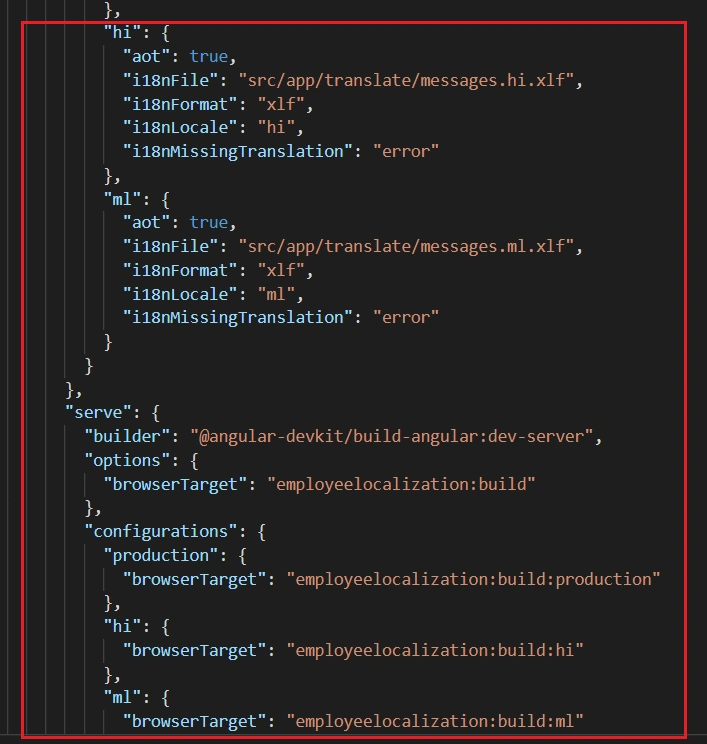
angular.json
- {
- "$schema": "./node_modules/@angular/cli/lib/config/schema.json",
- "version": 1,
- "newProjectRoot": "projects",
- "projects": {
- "employeelocalization": {
- "projectType": "application",
- "schematics": {},
- "root": "",
- "sourceRoot": "src",
- "prefix": "app",
- "architect": {
- "build": {
- "builder": "@angular-devkit/build-angular:browser",
- "options": {
- "outputPath": "dist/employeelocalization",
- "index": "src/index.html",
- "main": "src/main.ts",
- "polyfills": "src/polyfills.ts",
- "tsConfig": "tsconfig.app.json",
- "aot": false,
- "assets": [
- "src/favicon.ico",
- "src/assets"
- ],
- "styles": [
- "src/styles.css"
- ],
- "scripts": []
- },
- "configurations": {
- "production": {
- "fileReplacements": [
- {
- "replace": "src/environments/environment.ts",
- "with": "src/environments/environment.prod.ts"
- }
- ],
- "optimization": true,
- "outputHashing": "all",
- "sourceMap": false,
- "extractCss": true,
- "namedChunks": false,
- "aot": true,
- "extractLicenses": true,
- "vendorChunk": false,
- "buildOptimizer": true,
- "budgets": [
- {
- "type": "initial",
- "maximumWarning": "2mb",
- "maximumError": "5mb"
- }
- ]
- },
- "hi": {
- "aot": true,
- "i18nFile": "src/app/translate/messages.hi.xlf",
- "i18nFormat": "xlf",
- "i18nLocale": "hi",
- "i18nMissingTranslation": "error"
- },
- "ml": {
- "aot": true,
- "i18nFile": "src/app/translate/messages.ml.xlf",
- "i18nFormat": "xlf",
- "i18nLocale": "ml",
- "i18nMissingTranslation": "error"
- }
- }
- },
- "serve": {
- "builder": "@angular-devkit/build-angular:dev-server",
- "options": {
- "browserTarget": "employeelocalization:build"
- },
- "configurations": {
- "production": {
- "browserTarget": "employeelocalization:build:production"
- },
- "hi": {
- "browserTarget": "employeelocalization:build:hi"
- },
- "ml": {
- "browserTarget": "employeelocalization:build:ml"
- }
- }
- },
- "extract-i18n": {
- "builder": "@angular-devkit/build-angular:extract-i18n",
- "options": {
- "browserTarget": "employeelocalization:build"
- }
- },
- "test": {
- "builder": "@angular-devkit/build-angular:karma",
- "options": {
- "main": "src/test.ts",
- "polyfills": "src/polyfills.ts",
- "tsConfig": "tsconfig.spec.json",
- "karmaConfig": "karma.conf.js",
- "assets": [
- "src/favicon.ico",
- "src/assets"
- ],
- "styles": [
- "src/styles.css"
- ],
- "scripts": []
- }
- },
- "lint": {
- "builder": "@angular-devkit/build-angular:tslint",
- "options": {
- "tsConfig": [
- "tsconfig.app.json",
- "tsconfig.spec.json",
- "e2e/tsconfig.json"
- ],
- "exclude": [
- "**/node_modules/**"
- ]
- }
- },
- "e2e": {
- "builder": "@angular-devkit/build-angular:protractor",
- "options": {
- "protractorConfig": "e2e/protractor.conf.js",
- "devServerTarget": "employeelocalization:serve"
- },
- "configurations": {
- "production": {
- "devServerTarget": "employeelocalization:serve:production"
- }
- }
- }
- }
- }},
- "defaultProject": "employeelocalization"
- }
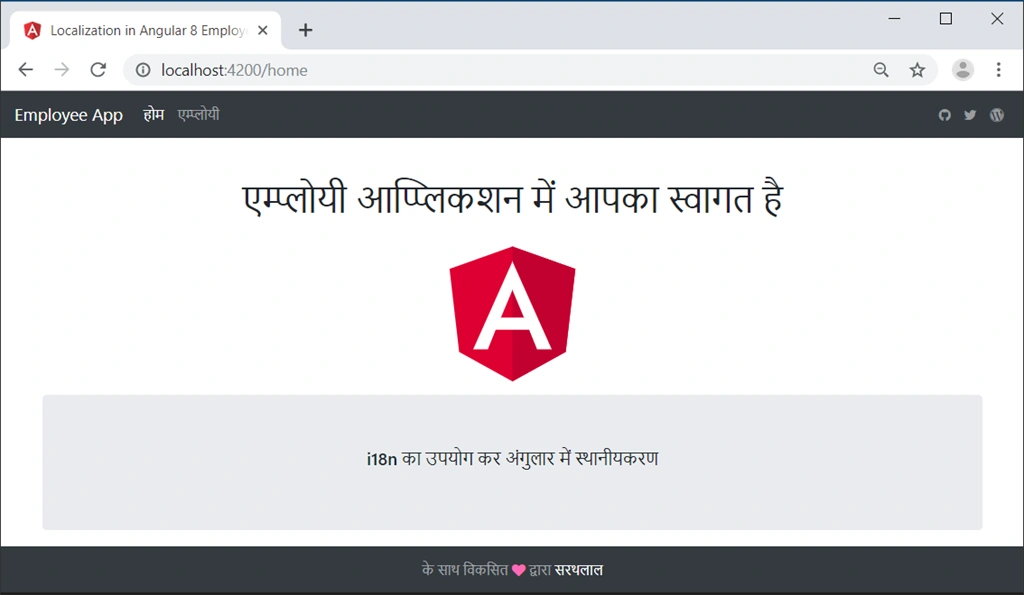
Use the below command to run the application in Hindi.
ng serve --configuration=hi
By default, application will run on 4200 port.
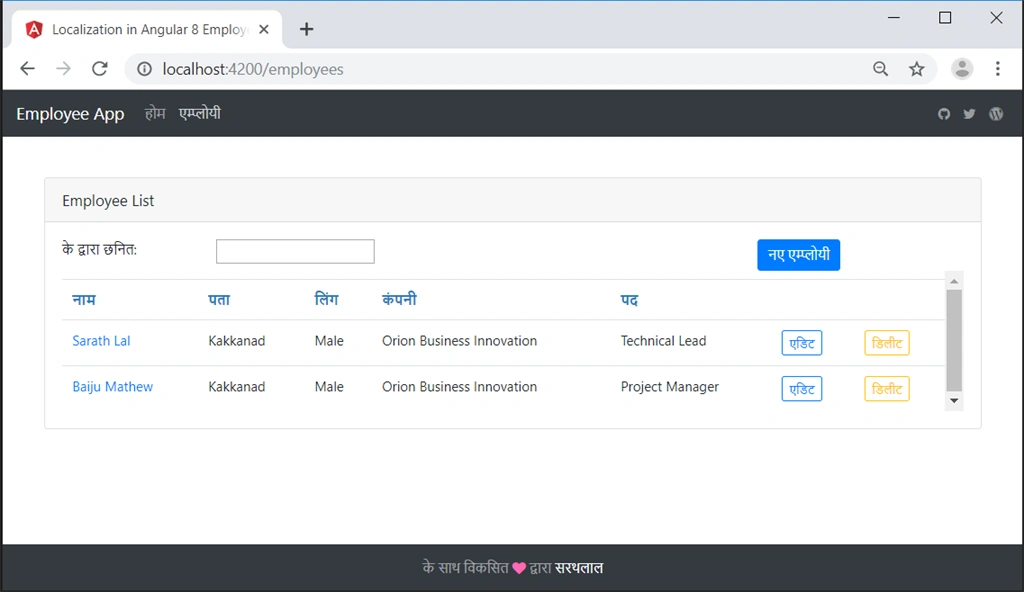
If you click the employee menu, you will get the below screen.
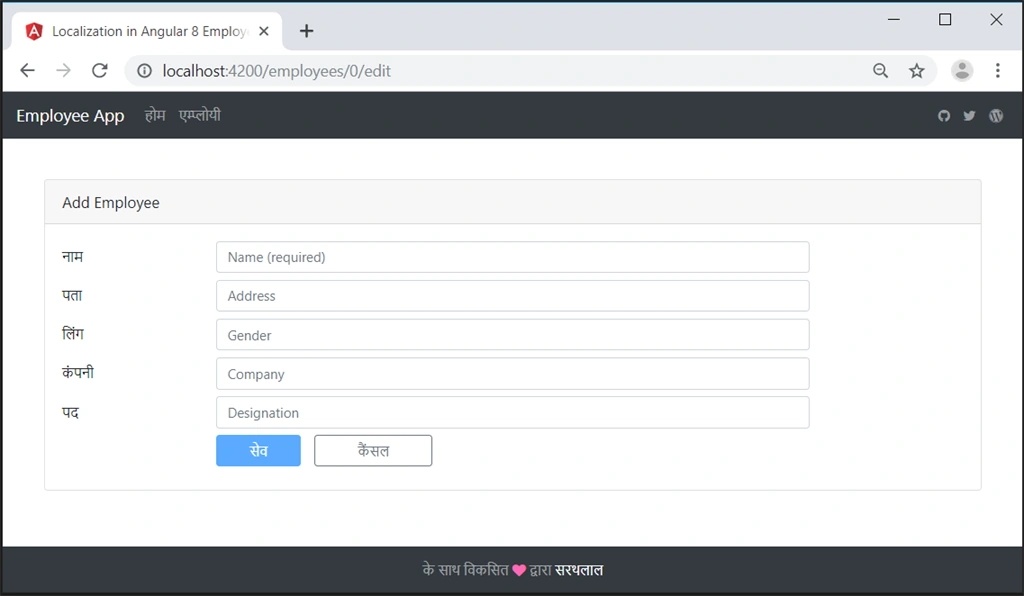
You can add a new employee by clicking the corresponding button.
You can also click any employee name and display employee information as read-only.
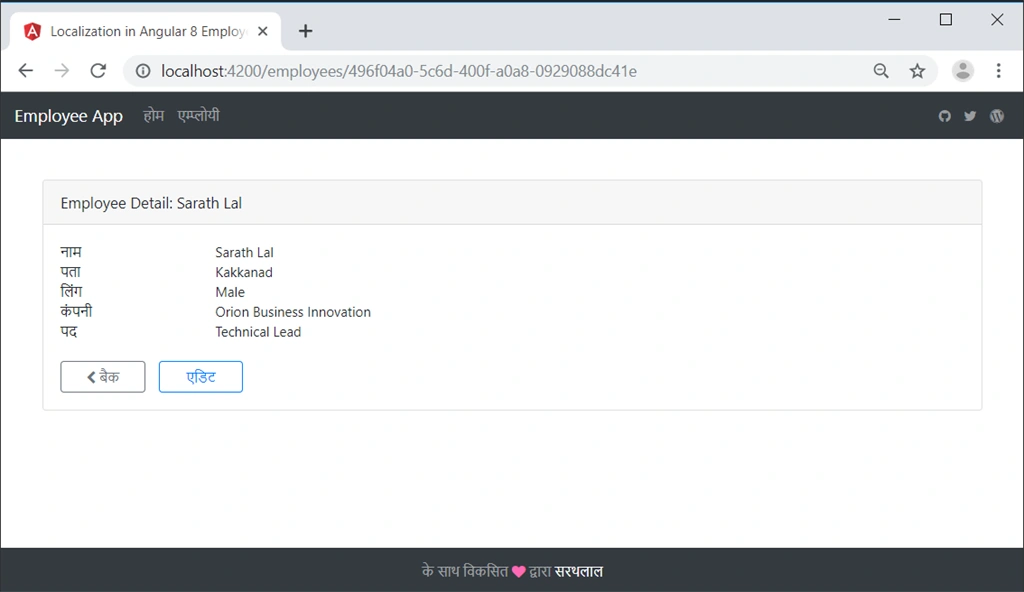
You can click the Edit button to edit the employee data.
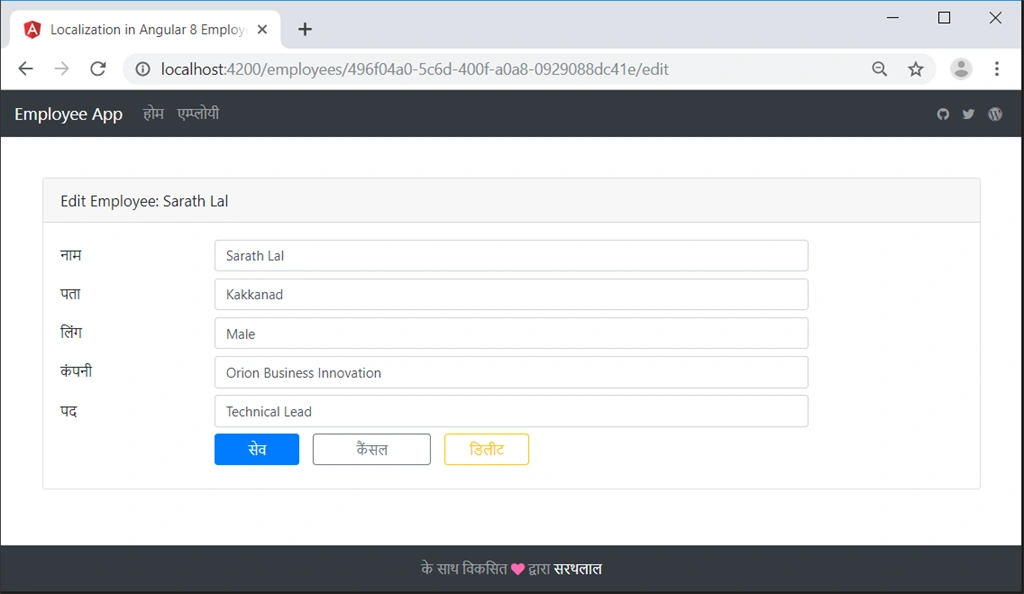
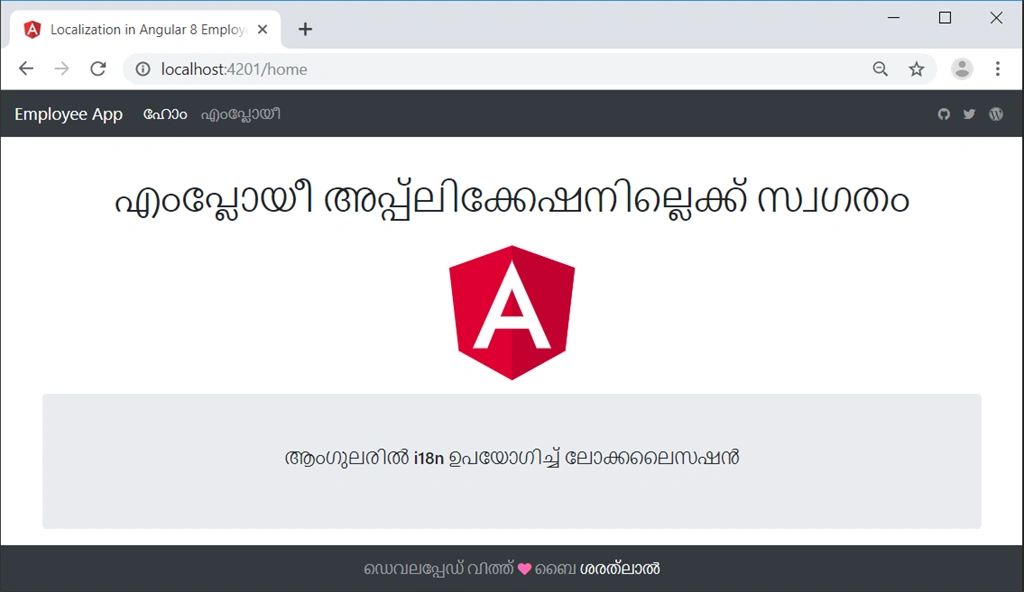
We can open one more command prompt and run the application in a different port with the Malayalam language also.
ng serve --configuration=ml --port 4201
Conclusion
In this post, we have seen how to create an Employee application using Angular CLI commands and we have created translation source files and content files for different languages using i18n and localization. We have run the application in two different ports with two languages, Hindi and Malayalam.
GMF HoogenraadPosted Feb 22, 2020, 10:52 AM
Using Visual Code: command [$ ng xi18n --output-path src\app\translate] is wrong, it creates a 'scrapptranslate' folder in the root! The correct path is: src/app/translate! You should correct your source => [$ ng xi18n --output-path src/app/translate] (and other ommissions).
GMF HoogenraadPosted Feb 22, 2020, 6:40 AM
Hi Sarathlal, Thanks for your contribution. Two questions: 1) why is there the 'debugger' statement in the employee.service.ts class dialog? What are the thoughts behind it to have there a 'pauze' while creating a new Employee? 2) Possibly I missed it during reading, but what should be the best way to dynamically switch (toggle) between languages? Thanks for your concern, Sarathlal
saji georgePosted Oct 25, 2019, 12:40 AM
Very Nice Article, we have one requirement like if Arabic version then need to display page right to left directions, how can we achieve this in Angular? if you give sample that would be great.
Sundaram SubramanianPosted Aug 14, 2019, 4:47 AM
Really Great article. Thanks for Sharing
Mahesh VermaPosted Jul 16, 2019, 5:00 AM
Awesome article...thanks for sharing....
Arvind SinghPosted Jul 16, 2019, 2:37 AM
Very nice article....and usefull info...
Rajanikant HawaldarPosted Jul 16, 2019, 1:58 AM
nice article thanks for sharing
Amit MohantyPosted Jul 16, 2019, 1:11 AM
Useful article