

Introduction
In this article, we will learn how to load datagridview from a database in C#. C# datagridview loads data from a MySQL database. This tutorial takes a specific table from a database and displays it on a DataGridView. This is done with a DataReader and data logic. A visual representation of data is the end result.
Let’s follow the steps to learn how to load data in Datagridview/
- Create a database in MySQL with name “test” and create a table with the name “user”, like shown below.

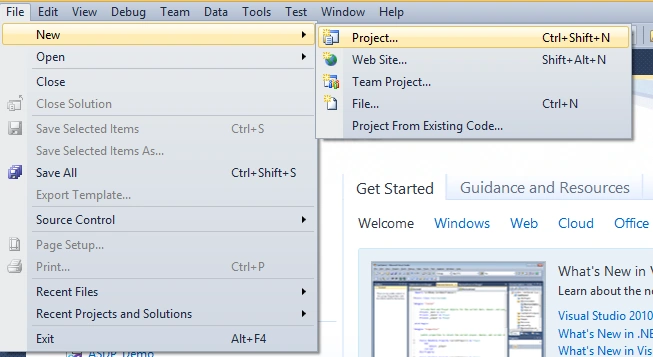
- Create a new application project. In Visual Studio, on the menu click File> New > Project. For more details, see the following menu on the display.
- Then a window will open called New Project that should look like below:
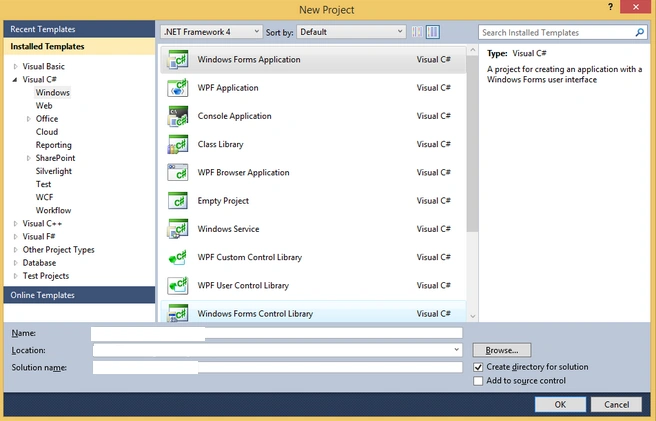
- Write down the name of the project that will be created on a field Name. Specify the directory storage project by accessing the field Location. Next, give the name of the solution in the Solution Name. Then click OK.
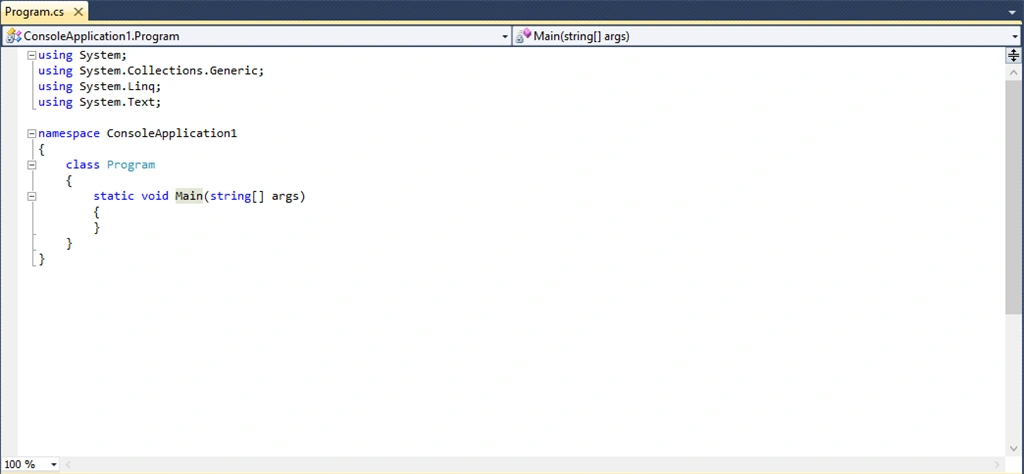
- Create a new windows form like the one shown below.
Create a new class for the connection database and write the following program listing:
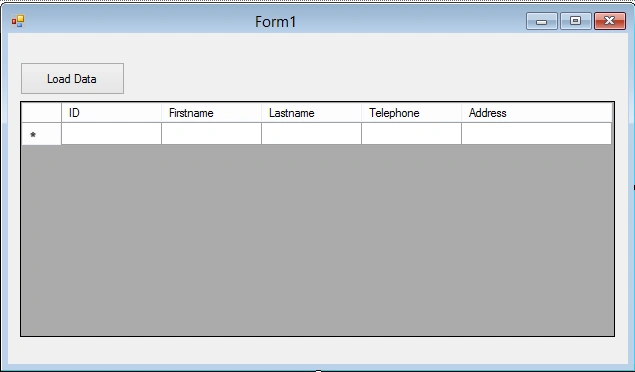
- using System;
- using System.Collections.Generic;
- using System.Linq;
- using System.Text;
- using MySql.Data.MySqlClient;
- using System.Windows.Forms;
- using System.Data;
- namespace DataGridview_Connect_DB
- {
- class ConnectionDB
- {
- MySql.Data.MySqlClient.MySqlConnection conn;
- string myConnectionString;
- static string host = "localhost";
- static string database = "test";
- static string userDB = "camellab";
- static string password = "camellab";
- public static string strProvider = "server=" + host + ";Database=" + database + ";User ID=" + userDB + ";Password=" + password;
- public bool Open()
- {
- try
- {
- strProvider = "server=" + host + ";Database=" + database + ";User ID=" + userDB + ";Password=" + password;
- conn = new MySqlConnection(strProvider);
- conn.Open();
- return true;
- }
- catch (Exception er)
- {
- MessageBox.Show("Connection Error ! " + er.Message, "Information");
- }
- return false;
- }
- public void Close()
- {
- conn.Close();
- conn.Dispose();
- }
- public DataSet ExecuteDataSet(string sql)
- {
- try
- {
- DataSet ds = new DataSet();
- MySqlDataAdapter da = new MySqlDataAdapter(sql, conn);
- da.Fill(ds, "result");
- return ds;
- }
- catch (Exception ex)
- {
- MessageBox.Show(ex.Message);
- }
- return null;
- }
- public MySqlDataReader ExecuteReader(string sql)
- {
- try
- {
- MySqlDataReader reader;
- MySqlCommand cmd = new MySqlCommand(sql, conn);
- reader = cmd.ExecuteReader();
- return reader;
- }
- catch (Exception ex)
- {
- MessageBox.Show(ex.Message);
- }
- return null;
- }
- public int ExecuteNonQuery(string sql)
- {
- try
- {
- int affected;
- MySqlTransaction mytransaction = conn.BeginTransaction();
- MySqlCommand cmd = conn.CreateCommand();
- cmd.CommandText = sql;
- affected = cmd.ExecuteNonQuery();
- mytransaction.Commit();
- return affected;
- }
- catch (Exception ex)
- {
- MessageBox.Show(ex.Message);
- }
- return -1;
- }
- }
- }
- using System;
- using System.Collections.Generic;
- using System.ComponentModel;
- using System.Data;
- using System.Drawing;
- using System.Linq;
- using System.Text;
- using System.Windows.Forms;
- using MySql.Data.MySqlClient;
- using System.Collections;
- namespace DataGridview_Connect_DB
- {
- public partial class Form1 : Form
- {
- ConnectionDB con = new ConnectionDB();
- //arraylist to getter and setter data
- private static ArrayList ListID = new ArrayList();
- private static ArrayList ListFirstname = new ArrayList();
- private static ArrayList ListLastname = new ArrayList();
- private static ArrayList ListTelephone = new ArrayList();
- private static ArrayList ListAddress = new ArrayList();
- public Form1()
- {
- InitializeComponent();
- }
- private void button1_Click(object sender, EventArgs e)
- {
- GetData();
- if (ListID.Count > 0)
- {
- updateDatagrid();
- }
- else
- {
- MessageBox.Show("Data not found");
- }
- }
- private void GetData()
- {
- try
- {
- con.Open();
- string query = "select id,firstname,lastname,telephone,address from user";
- //MySqlDataReader row;
- MySqlDataReader row;
- row = con.ExecuteReader(query);
- if (row.HasRows)
- {
- while (row.Read())
- {
- ListID.Add(row["id"].ToString());
- ListFirstname.Add(row["firstname"].ToString());
- ListLastname.Add(row["lastname"].ToString());
- ListTelephone.Add(row["telephone"].ToString());
- ListAddress.Add(row["address"].ToString());
- }
- }
- else
- {
- MessageBox.Show("Data not found");
- }
- con.Close();
- }
- catch (Exception err)
- {
- MessageBox.Show(err.ToString());
- }
- }
- private void updateDatagrid()
- {
- dataGridView1.Rows.Clear();
- for (int i = 0; i < ListID.Count; i++)
- {
- DataGridViewRow newRow = new DataGridViewRow();
- newRow.CreateCells(dataGridView1);
- newRow.Cells[0].Value = ListID[i];
- newRow.Cells[1].Value = ListFirstname[i];
- newRow.Cells[2].Value = ListLastname[i];
- newRow.Cells[3].Value = ListTelephone[i];
- newRow.Cells[4].Value = ListAddress[i];
- dataGridView1.Rows.Add(newRow);
- }
- }
- }
- }
After you write down the program listings, press the F5 key to run the program and if you successfull connect your database the result is,
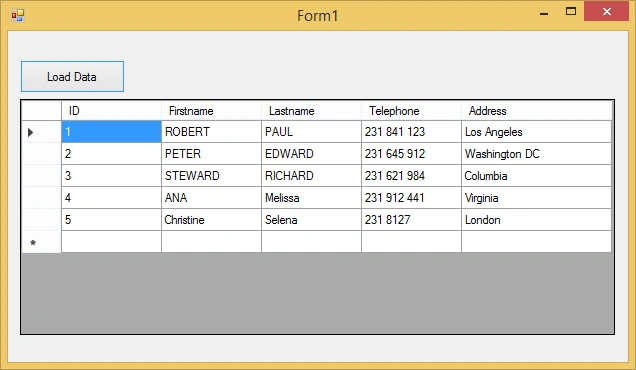
We have explained how to make a program in C# datagridview load data from a database. For those of you who want to download the source code of the program, you also can. Hopefully this discussion was helpful to you.
You can see Load Datagridview From Database C# from the Github project Here.
Thank you for reading this article! I hope it was useful to you. Visit My Github about .Net Csharp Here.
Emmanuel ChengulaPosted Nov 4, 2022, 9:26 AM
Try out this: https://www.csharpporgramming.com/sqltocsen.aspx
Aliuu AliuPosted Feb 18, 2022, 12:04 AM
Hello Sir Can you explain and for update Delete Insert ExecuteNonQuery With One Button im seeing in class also ExecuteNonQuery
Arsalan AhmadiPosted Sep 22, 2021, 1:27 PM
Hello sir. first of all, I wanted to thank you for your great article. i tried many articles but this one was the clearest one :-) now i have another problem that i liked to as you, i tried many options but I did not find the soloution. so I was wondering can you help me please? https://stackoverflow.com/questions/69252500/can-not-add-data-model-into-my-project-c-sharp-wpf-mysql?noredirect=1#comment122452470_69252500 Thank you
Rajanikant HawaldarPosted Feb 27, 2020, 12:50 AM
Nice Article, These areas you can improve by editing your article =>Remove unnecessary using, Provide properly name to class and button name, remove empty row which is displaying at UI, naming updateDatagrid should be UpdateDatagrid, Remove MySql.Data.MySqlClient from MySql.Data.MySqlClient.MySqlConnection because your already using namespace at usings, Provide name to form text instead Form1, At catch block Exception object name err is indicates wrong meaning because run time you get exception it make sense if can rename it to ex. I hope my catches improves you thanks.
TORNE DILIPPosted Feb 23, 2020, 7:02 AM
FULL CONTROLLER CODE FOR MVC:- using System;using System.Collections.Generic; using System.Linq; using System.Web; using System.Web.Mvc; using crudmyway.Models; namespace crudmyway.Controllers { public class DefaultController : Controller { Database1Entities de = new Database1Entities(); // GET: Default public ActionResult register() { List<registration> reg; using (de = new Database1Entities()) { reg = de.registration.ToList(); } return View(reg); } [HttpPost] public ActionResult register(registration reg) { if (!string.IsNullOrWhiteSpace(reg.name) && !string.IsNullOrWhiteSpace(reg.phone) && !string.IsNullOrWhiteSpace(reg.email)) { using (de = new Database1Entities()) { if (reg.Id == 0) { registration r = new registration(); r.name = reg.name; r.phone = reg.phone; r.email = reg.email; de.registration.Add(r); de.SaveChanges(); } else { registration r = de.registration.Where(x => x.Id == reg.Id).FirstOrDefault(); r.name = reg.name; r.phone = reg.phone; r.email = reg.email; de.SaveChanges(); } } } return RedirectToAction("register"); } public JsonResult Edituser(int Id) { using (de = new Database1Entities()) { var re = de.registration.Where(x => x.Id == Id).FirstOrDefault(); return Json(new { success = true, detail = re }, JsonRequestBehavior.AllowGet); } } public string Deleteuser(int Id) { string message = string.Empty; using (de = new Database1Entities()) { var re = de.registration.Where(x => x.Id == Id).FirstOrDefault(); if (re != null) { var delt = de.registration.Remove(re); de.SaveChanges(); // Log("DeleteUser", "Delete " + deleteId.deleteIdName + " Deleted By UserID = " + entity.fname + " With DateTime = " + DateTime.Now); message = "Success# " + delt.name + " User deleted successfully!"; } else { message = "Error# User not found!"; } } return message; } } }
TORNE DILIPPosted Feb 23, 2020, 6:59 AM
FULL HTML CODE FOR CRUDE:- @model IEnumerable<crudmyway.Models.registration>@{ ViewBag.Title = "register"; } <h2>register</h2> <html> <head> <title>my page</title> <style> .error{ color:red } </style> </head> <body> <div> <table style="width:100%"> <tr> <th>Name</th> <th>Phone</th> <th>Email</th> </tr> @foreach (var v in Model) { <tr> @*<td>@v.Id</td>*@ <td>@v.name</td> <td>@v.phone</td> <td>@v.email</td> <td><a onclick="Edit(@v.Id) ">EDIT</a></td> <td><a onclick="Delete(@v.Id) ">Delete</a></td> </tr> } </table> <div> <button type="button" class="btn btn-primary" data-toggle="modal" data-target="#myModal">INSERT</button> </div> </div> <!-- The Modal --> <div class="modal" id="myModal"> <div class="modal-dialog"> <div class="modal-content"> <!-- Modal Header --> <div class="modal-header"> <h4 class="modal-title">Modal Heading</h4> </div> @using (Html.BeginForm("register", "Default", FormMethod.Post, new { @id = "userform"})) { <!-- Modal body --> <div class="form-group"> <div class="form-control"> @Html.Hidden("Id") @Html.Label("Name") @Html.TextBox("name") </div> <div class="form-control"> @Html.Label("Phone") @Html.TextBox("phone") </div> <div class="form-control"> @Html.Label("Email") @Html.TextBox("email") </div> </div> <!-- Modal footer --> <div class="modal-footer"> <button type="submit" class="btn btn-info">submit</button> <button type="button" class="btn btn-danger" data-dismiss="modal">Close</button> </div> } </div> </div> </div> </body> </html> <script src="~/Scripts/jquery.validate.js"></script> <script src="~/Scripts/jquery.validate-vsdoc.js"></script> <script src="~/Scripts/jquery-1.10.2.min.js"></script> <script src="~/Scripts/jquery-1.10.2.js"></script> <script src="~/Scripts/jquery.validate.min.js"></script> <script src="~/Scripts/respond.js"></script> <script src="~/Scripts/respond.min.js"></script> <script type="text/javascript"> function Edit(Id) { if(Id>0) { $.ajax({ type: 'get', data: { Id: Id }, datatype: 'json', url: '@Url.Action("Edituser","Default")', success:function(data) { if(data.success==true) { $("#Id").val(data.detail.Id); $("#name").val(data.detail.name); $("#phone").val(data.detail.phone); $("#email").val(data.detail.email); $('#myModal').modal("show"); } }, //error:function(event,xhr,options,exc) //{ // alert('Error :' + options); //} }); } } function Delete(Id) { var Url = '@Url.Action("DeleteUser", "Default")'; $.post(Url, { Id: Id }, function (data) { if (data.startsWith("Success#")) { location.reload(); } else { alert(data); } }); } $("#userform").validate ({ rules: { name: { required:true, }, phone: { required:true, }, email: { required:true, } }, messages: { name: { required:"Enter Name", }, phone: { required:"enter phone", }, email: { required:"enter email", } } }); </script>
TORNE DILIPPosted Feb 23, 2020, 6:59 AM
FULL HTML CODE FOR CRUD:-