

Linq provides standard query operators like filtering, sorting, grouping, aggregation, and concatenations, and it has many operators to achive many types of functionalities, which are called extension methods, in LINQ.
In this article I will cover a few of them because it has many, and I will come up with part two very soon. Here I will explains LINQ standard query operators like projection, filtering, grouping, and sorting.
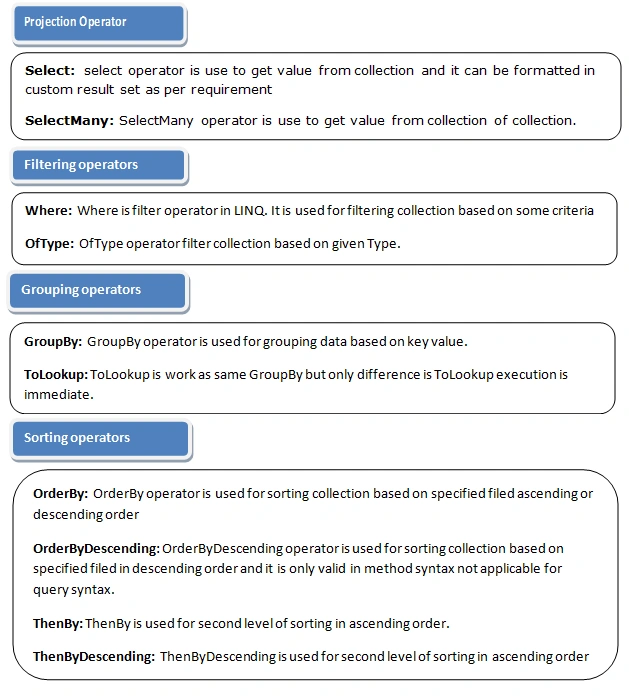
Projection Operator
Select and selectMany are projection operators.
- Select operator is used to fetch values from collections, and selectMany operator is used for fetching values from collections of a collection.
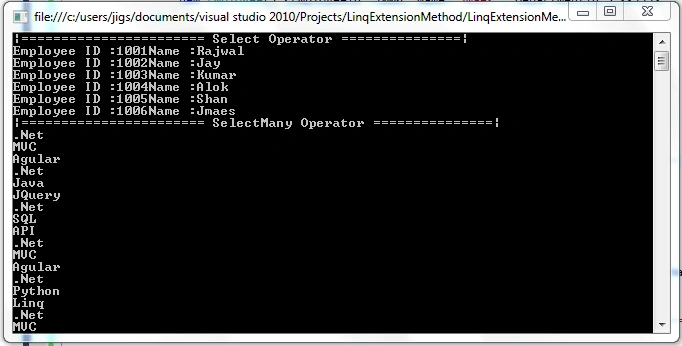
- The first example is for select operator where I have used select operator to fetch employee id and employee name from employee list.
- The second example is for selectMany where I have used the selectMany operator for fetching skills belonging to employees where skills are listed inside employee class. It means selectMany returns values from lists inside a list.
- List < Employee > employeeList = new List < Employee > () {
- new Employee() {
- EmployeeId = 1001, Name = "Rajwal", DepartmentId = 101, skills = new List < string > {
- ".Net",
- "MVC",
- "Agular"
- }
- },
- new Employee() {
- EmployeeId = 1002, Name = "Jay", DepartmentId = 101, skills = new List < string > {
- ".Net",
- "Java",
- "JQuery"
- }
- },
- new Employee() {
- EmployeeId = 1003, Name = "Kumar", DepartmentId = 101, skills = new List < string > {
- ".Net",
- "SQL",
- "API"
- }
- },
- new Employee() {
- EmployeeId = 1004, Name = "Alok", DepartmentId = 102, skills = new List < string > {
- ".Net",
- "MVC",
- "Agular"
- }
- },
- new Employee() {
- EmployeeId = 1005, Name = "Shan", DepartmentId = 102, skills = new List < string > {
- ".Net",
- "Python",
- "Linq"
- }
- },
- new Employee() {
- EmployeeId = 1006, Name = "Jmaes", DepartmentId = 103, skills = new List < string > {
- ".Net",
- "MVC",
- "Agular"
- }
- }
- };
- List < Department > deparmentList = new List < Department > () {
- new Department() {
- DepartmentId = 101, DepartmentName = "IT"
- },
- new Department() {
- DepartmentId = 102, DepartmentName = "HR"
- },
- new Department() {
- DepartmentId = 103, DepartmentName = "Account"
- },
- };
- Console.WriteLine("======================= Select Operator ===============");
- var selectResult = from emp in employeeList
- select emp;
- foreach(var item in selectResult) {
- Console.WriteLine("Employee ID :" + item.EmployeeId + "Name :" + item.Name);
- }
- Console.WriteLine("======================= SelectMany Operator ===============");
- var resuleSelectMany = employeeList.SelectMany(emp => emp.skills);
- foreach(var item in resuleSelectMany) {
- Console.WriteLine(item);
- }
Filtering operators are used for filtering collections based on specified conditions. There are two filtering operators -- Where and OfType<>.
Where does the same thing as the where clause in SQL server. Where filters collections based on specified conditions, as in the below example
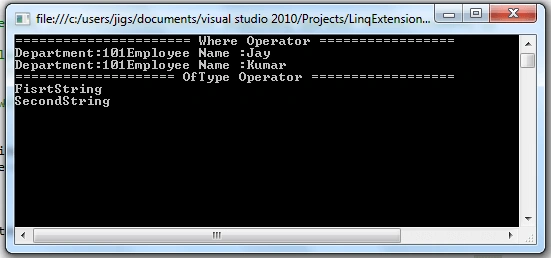
I have used the where clause with department Id so it will filter collections based on deparment and return values which have the same deparmentid =100.
OfType filters collections based on specified types. Here in the below example I have used OfType<string> so it will give me all string type values from a collection. The output of the below example is FirstString and Secondstring because I have only two string values in collection.
- Console.WriteLine("====================== Where Operator =================");
- var resultWhere = from emp in employeeList
- where emp.DepartmentId == 1001
- select emp.Name;
- foreach (var item in resultWhere)
- {
- Console.WriteLine(item);
- }
- Console.WriteLine("==================== OfType Operator ==================");
- ArrayList arryList = new ArrayList();
- arryList.Add(new int[1]);
- arryList.Add(new StringBuilder());
- arryList.Add(new string[1]);
- arryList.Add("FisrtString");
- arryList.Add("SecondString");
- var ofTypeResult = arryList.OfType<string>();
- foreach (var item in ofTypeResult)
- {
- Console.WriteLine(item);
- }
In SQL, group by clause works the same way grouping operator does in LINQ. Groupby Implemets Igrouping<TKey,TSource> interface. TKey is key values and TSource is a list of values which match with the given grouping key.
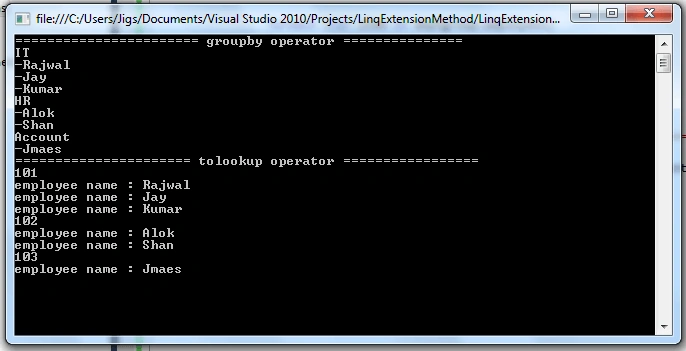
GroupBy returns the group of elements based on a given group key value. Here in the below example you can see the list of employees belongs to the same department so it will return the employee list based on department.
LookUp aslo does the same thing as GroupBy; the difference is that Lookup is an immediate execution. One more things to note about Lookup is that it is valid only in method syntax ,not in query sntax.
- Console.WriteLine("======================= GroupBy Operator ===============");
- var resultGroupBy = from dept in deparmentList
- join emp in employeeList
- on dept.DepartmentId equals emp.DepartmentId
- into employeeGroup
- select new
- {
- Employees = employeeGroup,
- Department = dept.DepartmentName
- };
- foreach (var deptGroup in resultGroupBy)
- {
- Console.WriteLine(deptGroup.Department);
- foreach (var item in deptGroup.Employees)
- {
- Console.WriteLine("-" + item.Name);
- }
- }
- Console.WriteLine("====================== ToLookup Operator =================");
- var resultToLookUp = employeeList.ToLookup(emp => emp.DepartmentId);
- foreach (var group in resultToLookUp)
- {
- Console.WriteLine(group.Key);
- foreach (var item in group)
- {
- Console.WriteLine("Employee Name : " + item.Name);
- }
- }
Sorting Operator
Sorting operators are used for arranging elements in collections, either by ascending or descending order. LINQ supports the below operators to arrage element either by ascending or descending order in collection.
OerderBy sorts the collection in ascending or descending order based on a given column/field. Default sorting is ascending order because in LINQ, the ascending keyword is optional; it will sort collection in ascending order by default.
OrderByDescending sorts the collection in descending order based on specified fields.
ThenByDescending operator is also the second level of sorting operator, which will sort collections in descending order based on specified fields.
Reverse operator sorts collection in reverse order
- Console.WriteLine("====================== OrderBy Operator ================");
- var resultOrderBy = from emp in employeeList
- orderby emp.Name
- select new { emp.Name };
- foreach (var item in resultOrderBy)
- {
- Console.WriteLine(item.Name);
- }
- Console.WriteLine("====================== OrderByDescending Operator =================");
- var resultOrderByDescending = employeeList.OrderByDescending(emp => emp.Name);
- foreach (var item in resultOrderByDescending)
- {
- Console.WriteLine(item.Name);
- }
- Console.WriteLine("====================== ThenBy Operator =================");
- var resultThenBy = employeeList.OrderBy(emp => emp.DepartmentId).ThenBy(emp => emp.Name);
- foreach (var item in resultThenBy)
- {
- Console.WriteLine(item.Name);
- }
- Console.WriteLine("====================== ThenByDescending Operator =================");
- var resultThenByDescending = employeeList.OrderBy(emp => emp.DepartmentId).ThenByDescending(emp => emp.Name);
- foreach (var item in resultThenByDescending)
- {
- Console.WriteLine(item.Name);
- }
- Console.ReadLine();
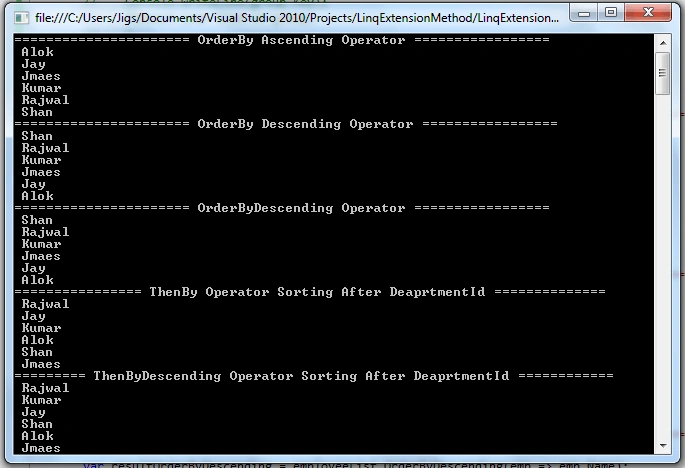
LINQ provides many extension methods for filtering, grouping, sorting and many more which will make developers' lives easy. We can use the above operators with lamda expression and it make s it simpler to retrieve data, filter data, and arrange data in a collection.
To learn more about C# 7.0 features:
Thank you for reading.
Happy learning.
Silviya SheebaPosted Jun 18, 2025, 10:47 AM
This article provides an excellent explanation of Extension Methods! I gained valuable insights and learned many new methods. Thank you for sharing such an informative piece—please continue writing more articles like this!
Kaushal PareekPosted Aug 8, 2018, 10:17 PM
Thank you for the information. Very well explained
Abhishek MishraPosted Aug 6, 2018, 10:47 AM
Nice one. Liked it.
Biswabid RathPosted Aug 6, 2018, 10:45 AM
Nice article .. Thank you for sharing ..
Jignesh KumarPosted Aug 6, 2018, 3:48 AM
maha lakshmi Thank you...
maha lakshmiPosted Aug 6, 2018, 2:42 AM
Nice article