

Some years ago, I read an article by C. L. Moffatt (link) where he explained, in a very clear and concise way, the types of joins in SQL and the idea of writing a similar article for LinQ has been going round and round in my head since then. Now, I have decided to do it.
I have seen many questions and answers about this topic in the forums but I couldn´t find any which embrace it all. It is my intention to overcome these missing topics with the next lines.
I'll try to make your life easier by adding a sample project, where everything mentioned in the article has been applied. In addition, it includes an extension class that will be useful for those, who don´t want to spent too much time in coding each and every concept.
Index
- Installation
- Using the code
- Inner Join
- Left Join
- Right Join
- Full Outer Join
- Left Excluding Join
- Right Excluding Join
- Full Outer Excluding Join
The Best Solution (for me)
Application Testing
Installation
LinQ Extended Joins refers to an open source project and your code is available in GitHub.
Your installation is very simple and we will add a NuGet Package.

Add it, using MoralesLarios.Linq in the class.
Using the code
I will use two classes to demonstrate my examples, which are given below.
- public class Person
- {
- public string ID { get; set; }
- public string Name { get; set; }
- public int Age { get; set; }
- public double Salary { get; set; }
- public DateTime Born { get; set; }
- public int IdAddress { get; set; }
- }
- public class Address
- {
- public int IdAddress { get; set; }
- public string Street { get; set; }
- public int Num { get; set; }
- public string City { get; set; }
- }
These are the default values for Person class.
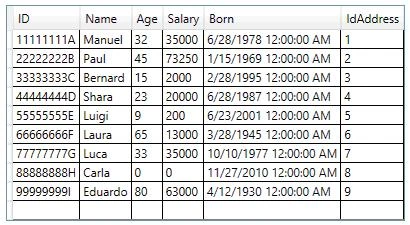
These are the default values for the Address Class.
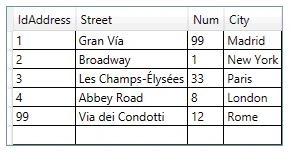
My extension methods library has six extension methods. The main method INNER JOIN was developed in LINQ based library. The methods given below will be explained,
- Inner Join
- Left JOIN
- Right Join
- Full Outer Join
- Left Join excluding Inner Join
- Right Join excluding Right Join excluding Inner Join
- Full Outer Join excluding Inner Join
INNER JOIN

This is the main method, which has been implemented in .NET Framework, so there is no extension method for it.
- var result = from p in Person.BuiltPersons()
- join a in Address.BuiltAddresses()
- on p.IdAddress equals a.IdAddress
- select new
- {
- Name = a.MyPerson.Name,
- Age = a.MyPerson.Age,
- PersonIdAddress = a.MyPerson.IdAddress,
- AddressIdAddress = a.MyAddress.IdAddress,
- Street = a.MyAddress.Street
- };
Lambda Expression
- var result = from p in Person.BuiltPersons()
- join a in Address.BuiltAddresses()
- on p.IdAddress equals a.IdAddress
- select new
- {
- Name = a.MyPerson.Name,
- Age = a.MyPerson.Age,
- PersonIdAddress = a.MyPerson.IdAddress,
- AddressIdAddress = a.MyAddress.IdAddress,
- Street = a.MyAddress.Street
- };
As we can see, the extension method has 5 main parts, which will be shared for the rest of the extension methods, which are given
- Is the main Collection.
- Is the inner Collection.
- Is the PK.
- Is the FK.
- Is the type for the result collection.
Result of the previous query is given below.
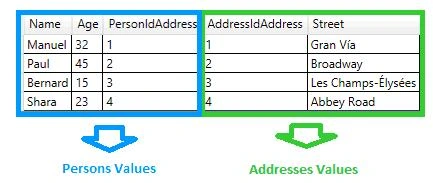
As we can see, PersonIdAddresses value matches with the AddressIdAddesses.
Left Join
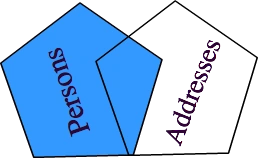
Extension Method
- public static IEnumerable<TResult>
- LeftJoin<TSource, TInner, TKey, TResult>(this IEnumerable<TSource> source,
- IEnumerable<TInner> inner,
- Func<TSource, TKey> pk,
- Func<TInner, TKey> fk,
- Func<TSource, TInner, TResult> result)
- where TSource : class where TInner : class
- {
- IEnumerable<TResult> _result = Enumerable.Empty<TResult>();
- _result = from s in source
- join i in inner
- on pk(s) equals fk(i) into joinData
- from left in joinData.DefaultIfEmpty()
- select result(s, left);
- return _result;
- }
Lambda expression
- var resultJoint = Person.BuiltPersons().LeftJoin( /// Source Collection
- Address.BuiltAddresses(), /// Inner Collection
- p => p.IdAddress, /// PK
- a => a.IdAddress, /// FK
- (p, a) => new { MyPerson = p, MyAddress = a }) /// Result Collection
- .Select(a => new
- {
- Name = a.MyPerson.Name,
- Age = a.MyPerson.Age,
- PersonIdAddress = a.MyPerson.IdAddress,
- AddressIdAddress = (a.MyAddress != null ? a.MyAddress.IdAddress : -1),
- Street = (a.MyAddress != null ? a.MyAddress.Street : "Null-Value")
- });
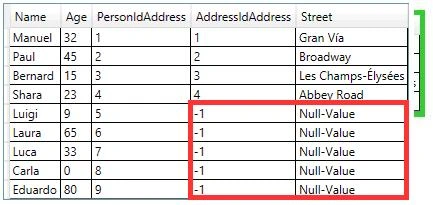
We have to pay attention here that at the moment of call, the select method builds our new result type; where we must control the values returned by the Address class, because the returned object can be null and in this case, the reading of any of its properties would throw a NullReferenceException.
Result of the previous query is given below.
Right Join
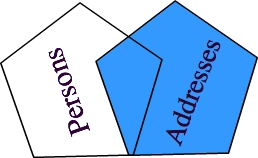
Extension Method
- public static IEnumerable<TResult>
- RightJoin<TSource, TInner, TKey, TResult>(this IEnumerable<TSource> source,
- IEnumerable<TInner> inner,
- Func<TSource, TKey> pk,
- Func<TInner, TKey> fk,
- Func<TSource, TInner, TResult> result)
- where TSource : class where TInner : class
- {
- IEnumerable<TResult> _result = Enumerable.Empty<TResult>();
- _result = from i in inner
- join s in source
- on fk(i) equals pk(s) into joinData
- from right in joinData.DefaultIfEmpty()
- select result(right, i);
- return _result;
- }
Lambda Expression
- var resultJoint = Person.BuiltPersons().RightJoin( /// Source Collection
- Address.BuiltAddresses(), /// Inner Collection
- p => p.IdAddress, /// PK
- a => a.IdAddress, /// FK
- (p, a) => new { MyPerson = p, MyAddress = a }) /// Result Collection
- .Select(a => new
- {
- Name = (a.MyPerson != null ? a.MyPerson.Name : "Null-Value"),
- Age = (a.MyPerson != null ? a.MyPerson.Age : -1),
- PersonIdAddress = (a.MyPerson != null ? a.MyPerson.IdAddress : -1),
- AddressIdAddress = a.MyAddress.IdAddress,
- Street = a.MyAddress.Street
- });
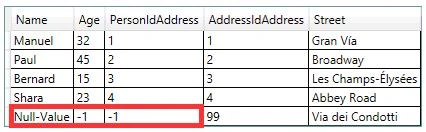
Note that we must coltrol null values in Person class in order to avoid the exceptions.
Result of the previous query is given below.
Full Outer Join
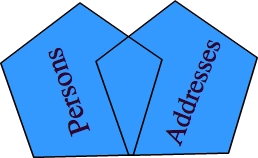
Extension Method
- public static IEnumerable<TResult>
- FullOuterJoinJoin<TSource, TInner, TKey, TResult>(this IEnumerable<TSource> source,
- IEnumerable<TInner> inner,
- Func<TSource, TKey> pk,
- Func<TInner, TKey> fk,
- Func<TSource, TInner, TResult> result)
- where TSource : class where TInner : class
- {
- var left = source.LeftJoin(inner, pk, fk, result).ToList();
- var right = source.RightJoin(inner, pk, fk, result).ToList();
- return left.Union(right);
- }
Lambda Expression
- var resultJoint = Person.BuiltPersons().FullOuterJoinJoin( /// Source Collection
- Address.BuiltAddresses(), /// Inner Collection
- p => p.IdAddress, /// PK
- a => a.IdAddress, /// FK
- (p, a) => new { MyPerson = p, MyAddress = a }) /// Result Collection
- .Select(a => new
- {
- Name = (a.MyPerson != null ? a.MyPerson.Name : "Null-Value"),
- Age = (a.MyPerson != null ? a.MyPerson.Age : -1),
- PersonIdAddress = (a.MyPerson != null ? a.MyPerson.IdAddress : -1),
- AddressIdAddress = (a.MyAddress != null ? a.MyAddress.IdAddress : -1),
- Street = (a.MyAddress != null ? a.MyAddress.Street : "Null-Value")
- });
Note that we must control null values in both classes.
Result of the previous query is given below.
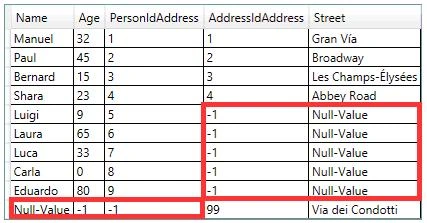
Left Excluding Join

Extension Method
- public static IEnumerable<TResult>
- LeftExcludingJoin<TSource, TInner, TKey, TResult>(this IEnumerable<TSource> source,
- IEnumerable<TInner> inner,
- Func<TSource, TKey> pk,
- Func<TInner, TKey> fk,
- Func<TSource, TInner, TResult> result)
- where TSource : class where TInner : class
- {
- IEnumerable<TResult> _result = Enumerable.Empty<TResult>();
- _result = from s in source
- join i in inner
- on pk(s) equals fk(i) into joinData
- from left in joinData.DefaultIfEmpty()
- where left == null
- select result(s, left);
- return _result;
- }
Lambda Expression
- var resultJoint = Person.BuiltPersons().LeftExcludingJoin( /// Source Collection
- Address.BuiltAddresses(), /// Inner Collection
- p => p.IdAddress, /// PK
- a => a.IdAddress, /// FK
- (p, a) => new { MyPerson = p, MyAddress = a }) /// Result Collection
- .Select(a => new
- {
- Name = a.MyPerson.Name,
- Age = a.MyPerson.Age,
- PersonIdAddress = a.MyPerson.IdAddress,
- AddressIdAddress = (a.MyAddress != null ? a.MyAddress.IdAddress : -1),
- Street = (a.MyAddress != null ? a.MyAddress.Street : "Null-Value")
- });
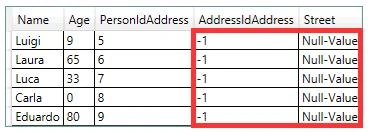
Note that we must control null values in an Address class.
Result of the previous query is given below.
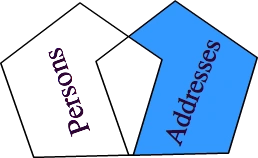
Right Excluding Join
Extension Method
- public static IEnumerable<TResult>
- RightExcludingJoin<TSource, TInner, TKey, TResult>(this IEnumerable<TSource> source,
- IEnumerable<TInner> inner,
- Func<TSource, TKey> pk,
- Func<TInner, TKey> fk,
- Func<TSource, TInner, TResult> result)
- where TSource : class where TInner : class
- {
- IEnumerable<TResult> _result = Enumerable.Empty<TResult>();
- _result = from i in inner
- join s in source
- on fk(i) equals pk(s) into joinData
- from right in joinData.DefaultIfEmpty()
- where right == null
- select result(right, i);
- return _result;
- }
Lambda Expression
- var resultJoint = Person.BuiltPersons().RightExcludingJoin( /// Source Collection
- Address.BuiltAddresses(), /// Inner Collection
- p => p.IdAddress, /// PK
- a => a.IdAddress, /// FK
- (p, a) => new { MyPerson = p, MyAddress = a }) /// Result Collection
- .Select(a => new
- {
- Name = (a.MyPerson != null ? a.MyPerson.Name : "Null-Value"),
- Age = (a.MyPerson != null ? a.MyPerson.Age : -1),
- PersonIdAddress = (a.MyPerson != null ? a.MyPerson.IdAddress : -1),
- AddressIdAddress = a.MyAddress.IdAddress,
- Street = a.MyAddress.Street
- });
Note that we must control null values in Person class.
Results of the previous query,

Full Outer Excluding Join
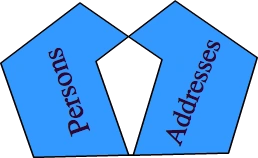
Extension Method
- public static IEnumerable<TResult>
- FulltExcludingJoin<TSource, TInner, TKey, TResult>(this IEnumerable<TSource> source,
- IEnumerable<TInner> inner,
- Func<TSource, TKey> pk,
- Func<TInner, TKey> fk,
- Func<TSource, TInner, TResult> result)
- where TSource : class where TInner : class
- {
- var left = source.LeftExcludingJoin(inner, pk, fk, result).ToList();
- var right = source.RightExcludingJoin(inner, pk, fk, result).ToList();
- return left.Union(right);
- }
Lambda Expression
- var resultJoint = Person.BuiltPersons().FulltExcludingJoin( /// Source Collection
- Address.BuiltAddresses(), /// Inner Collection
- p => p.IdAddress, /// PK
- a => a.IdAddress, /// FK
- (p, a) => new { MyPerson = p, MyAddress = a }) /// Result Collection
- .Select(a => new
- {
- Name = (a.MyPerson != null ? a.MyPerson.Name : "Null-Value"),
- Age = (a.MyPerson != null ? a.MyPerson.Age : -1),
- PersonIdAddress = (a.MyPerson != null ? a.MyPerson.IdAddress : -1),
- AddressIdAddress = (a.MyAddress != null ? a.MyAddress.IdAddress : -1),
- Street = (a.MyAddress != null ? a.MyAddress.Street : "Null-Value")
- });
Note that we must control null values in both the classes.
Result of the previous query is given below.
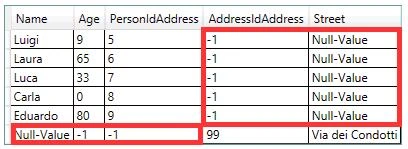
-- THE BEST SOLUTION
I believe that is the best solution for an OOPS developer.
- var GroupPersons = this.Persons.GroupJoin(this.Addresses, /// Inner Collection
- p => p.IdAddress, /// PK
- a => a.IdAddress, /// FK
- (p, a) => /// Result Collection
- new {
- MyPerson = p,
- Addresses = a.Select(ad => ad).ToList()
- }).ToList();
- or
- var GroupAddresses = this.Addresses.GroupJoin(this.Persons, /// Inner Collection
- a => a.IdAddress, /// PK
- p => p.IdAddress, /// FK
- (a, p) => /// Result Collection
- new {
- MyAddress = a,
- Persons = p.Select(ps => ps).ToList()
- }).ToList();
Code to fill the treview is given below.
- foreach (var data in GroupPersons)
- {
- TreeViewItem tbi = new TreeViewItem{ Header = data.MyPerson };
- this.treePersons.Items.Add(tbi);
- foreach (var d in data.Addresses)
- {
- TreeViewItem tbiChild =
- new TreeViewItem { Header = d , Background = Brushes.Gainsboro };
- this.treePersons.Items.OfType<TreeViewItem>().Last().Items.Add(tbiChild);
- }
- }
- or
- foreach (var data in GroupAddresses)
- {
- TreeViewItem tbi = new TreeViewItem{ Header = data.MyAddress };
- this.treeAddresses.Items.Add(tbi);
- foreach (var d in data.Persons)
- {
- TreeViewItem tbiChild =
- new TreeViewItem { Header = d , Background = Brushes.Gainsboro };
- this.treeAddresses.Items.OfType<TreeViewItem>().Last().Items.Add(tbiChild);
- }
- }
Results are given below.
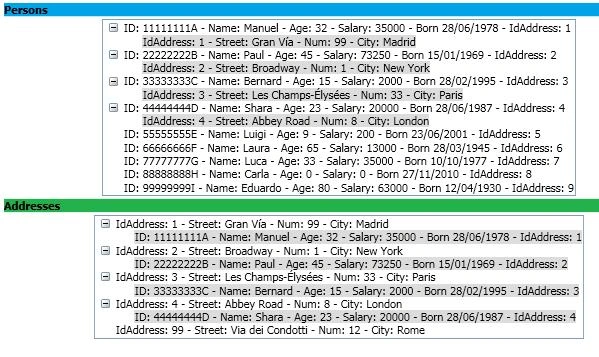
We changed the IdAddress values and we must do that in order to see more clearly.
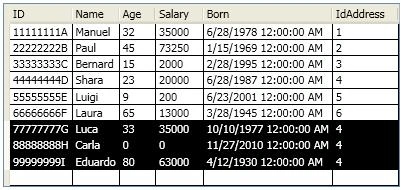
The result is given below.
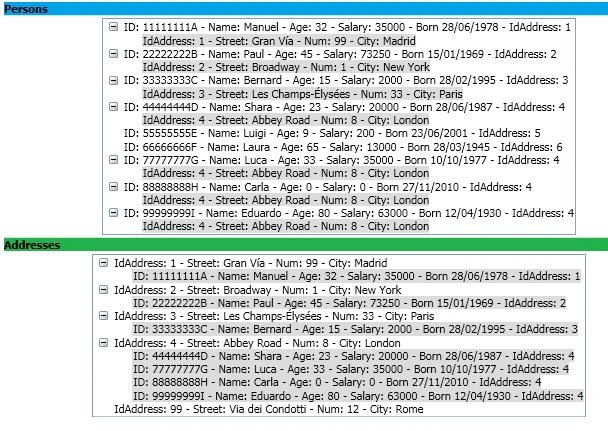
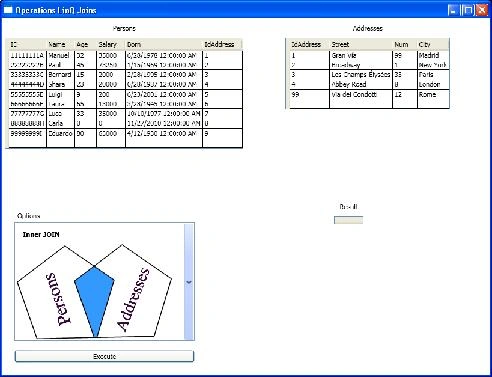
Application Testing
In the Test Application, we can change the values of the Person and Address collections and choose the join to apply so that the changes will be applied on the result collections.
Gopi KrishnanPosted Jun 13, 2019, 8:50 AM
Explained everything in detail, good job