

Here I will explain how to connect a ListBox with a database. It is the same as linking a combo box with a database.
Step 1: Form
Drag and drop a List Box from the Toolbox.

Step 2: Code
Now make a function for filling the list box from the database and call this method in the constructor.
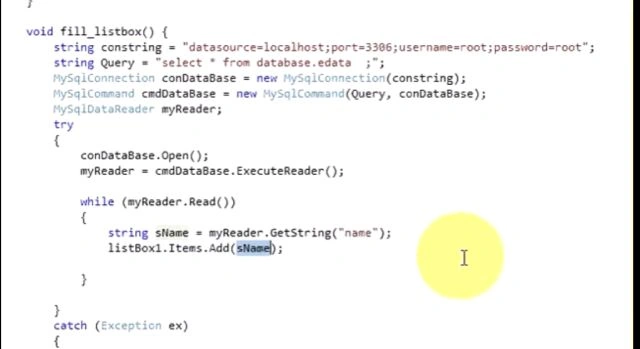
void fillListBox()
{
string str = "server = MUNESH\\SQL2008R2;Database=datastore;UID=sa;Password=123;";
SqlConnection con = new SqlConnection(str);
string query = "select * from tablename";
SqlCommand cmd = new SqlCommand( query,con);
SqlDataReader dbr;
try
{
con.Open();
dbr = cmd.ExecuteReader();
while(dbr.Read())
{
string sname = (string) myreader["name"];; //name is coming from database
Listbox1.items.Add(sname);
}
}
catch(Exception es)
{
messagebox.show(es.Message);
}
}
public Form2()
{
InitializeComponent();
FillListBox();
}
Step 3: Run
Now run your application.
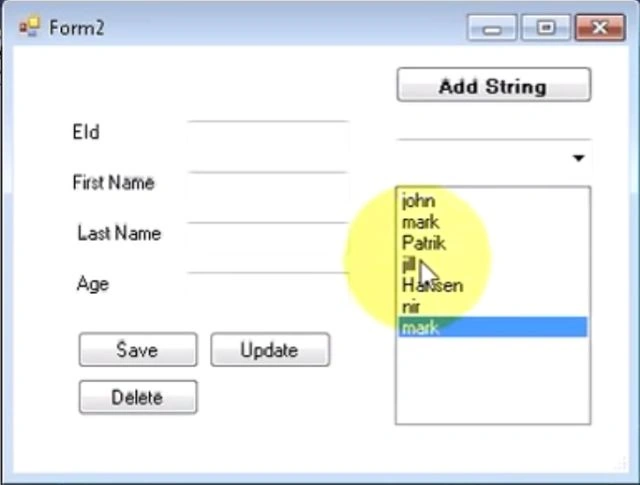
You can also go to my blog_munesh .
Mukesh Kumar TiwariPosted Apr 21, 2014, 8:29 AM
Good..........