

Introduction
In this article, I will use Web API2. It explains how to create your Web API2 Application in Visual Studio 2013.
The Web API2 is the second version of the Web API. In the original Web API there were two ways to create a response, the first one is to return a specific object instance, then it was changed to an "HttpResponseMessage" by the Web API pipeline. The other was the response could be returned as a raw "HttpResponseMessage".
But the Web API2 includes a new way for creating the response, "IHttpActionResult".
Now let's see the example of creating the Web API2 application using Visual Studio 2013.
Step 1
- Start Visual Studio 2013.
- From the Start Window select "New Project".
- Select "Installed" -> "Templates" -> "Visual C#" -> "Web" and select ASP.NET Web Application.
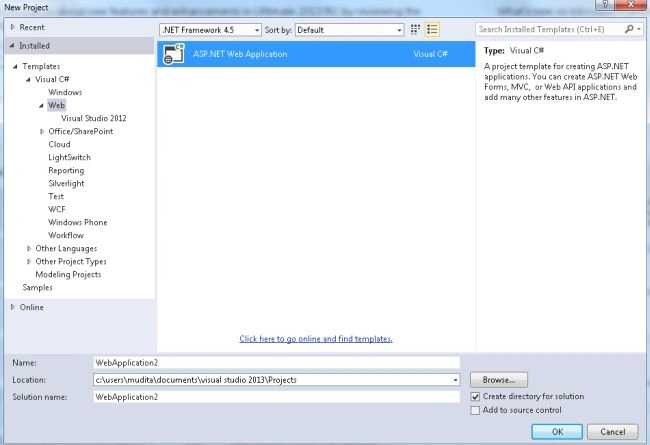
- From the ASP.Net project window select "Empty" and select the "Web API" check box.
- Click on the "Create Project" button.
Step 2
Create a Model Class.
- In the "Solution Explorer".
- Right-click on the Model Folder.
- Select "Add" -> "Class".
- Select "Installed" -> "Visual C#" and select class.
Add the following code:
- using System;
- using System.Collections.Generic;
- using System.Linq;
- using System.Net;
- using System.Net.Http;
- using System.Web.Http;
- using WebApplication2.Models;
- namespace WebApplication2.Controllers
- {
- public class CustomersController : ApiController
- {
- Customer[] customers = new Customer[]
- {
- new Customer { ID = 1, Name = "Smith",Address = "Kanpur", contact = 7859 },
- new Customer { ID = 2, Name = "Jhon", Address = "Lucknow", contact = 2345 },
- new Customer { ID = 3, Name = "Tanya", Address = "Delhi", contact = 6748 }
- };
- public IEnumerable<Customer> GetAllCustomers()
- {
- return customers;
- }
- public IHttpActionResult GetCustomer(int id)
- {
- var customer = customers.FirstOrDefault((p) => p.ID == id);
- if (customer == null)
- {
- return NotFound();
- }
- return Ok(customer);
- }
- }
- }
In the code above we use the "IHttpActionResult" method in the Web API2. It is the new way for creating the response in the Web API2.
Step 3
Create a Controller:
-
In the "Solution Explorer".
-
Right-click on the "Controller" folder.
-
Select "Add" -> "Scaffold".

-
From the window select "Web API2 Controller- Empty'.
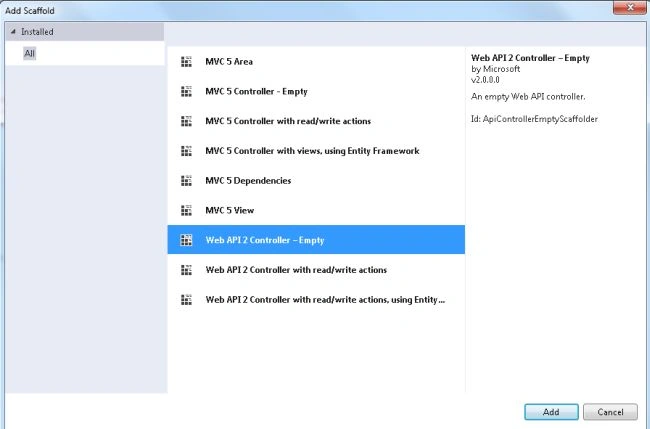
Click on the "Add" button.
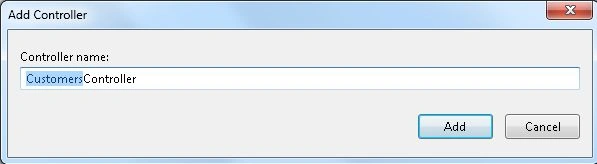
Now change the name of the Controller and click on the "Add" button.
Add the following code:
- using System;
- using System.Collections.Generic;
- using System.Linq;
- using System.Net;
- using System.Net.Http;
- using System.Web.Http;
- using WebApplication2.Models;
- namespace WebApplication2.Controllers
- {
- public class CustomersController : ApiController
- {
- Customer[] customers = new Customer[]
- {
- new Customer { ID = 1, Name = "Smith",Address = "Kanpur", contact = 7859 },
- new Customer { ID = 2, Name = "Jhon", Address = "Lucknow", contact = 2345 },
- new Customer { ID = 3, Name = "Tanya", Address = "Delhi", contact = 6748 }
- };
- public IEnumerable<Customer> GetAllCustomers()
- {
- return customers;
- }
- public IHttpActionResult GetCustomer(int id)
- {
- var customer = customers.FirstOrDefault((p) => p.ID == id);
- if (customer == null)
- {
- return NotFound();
- }
- return Ok(customer);
- }
- }
- }
Step 4
Add an HTML page to the project as in the following:
-
Right-click on the project.
-
Select "Add" -> "New Item".
-
Select "Installed" -> "Visual C#" -> "Web".
Select "HTML Page".
-
Click on the "Add" button.
Add the following code:
- <!DOCTYPE html>
- <html xmlns="http://www.w3.org/1999/xhtml">
- <head>
- <title></title>
- </head>
- <body>
- <div>
- <h2>All Customers</h2>
- <ul id="customers" />
- </div>
- <div>
- <h2>Search by ID</h2>
- <input type="text" id="custId" size="5" />
- <input type="button" value="Search" onclick="find();" />
- <p id="customer" />
- </div>
- <script src="Scripts/jquery-2.0.3.min.js"></script>
- <script>
- var uri = 'api/customers';
- $(document).ready(function () {
- $.getJSON(uri)
- .done(function (data) {
- $.each(data, function (key, prds) {
- $('<li>', { text: formatItem(prds) }).appendTo('#customers');
- });
- });
- });
- function formatItem(prds) {
- return prds.Name +' '+ prds.contact;
- }
- function find() {
- var id = $('#custId').val();
- $.getJSON(uri + '/' + id)
- .done(function (data) {
- $('#customer').text(formatItem(data));
- })
- .fail(function (jqXHR, textStatus, err) {
- $('#customer').text('Error: ' + err);
- });
- }
- </script>
- </body>
- </html>
Step 5
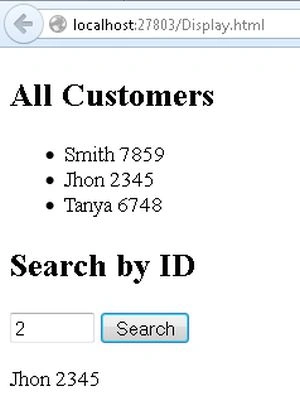
Execute the application:
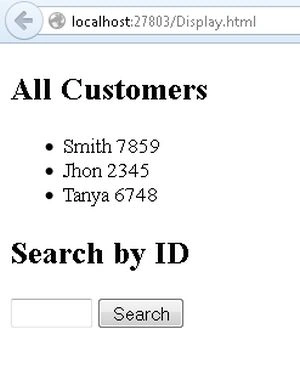
Get the Customer by ID.
sunil sharmaPosted Jun 2, 2017, 7:10 AM
Hi , mudita . you've done MCA from Rama ,KNP.