

You can programmatically add records to a table in ServiceNow by creating a POST API for the table. This article will show you how to use Postman to create and test a POST table API.
For clarity, screenshots are added at each stage.

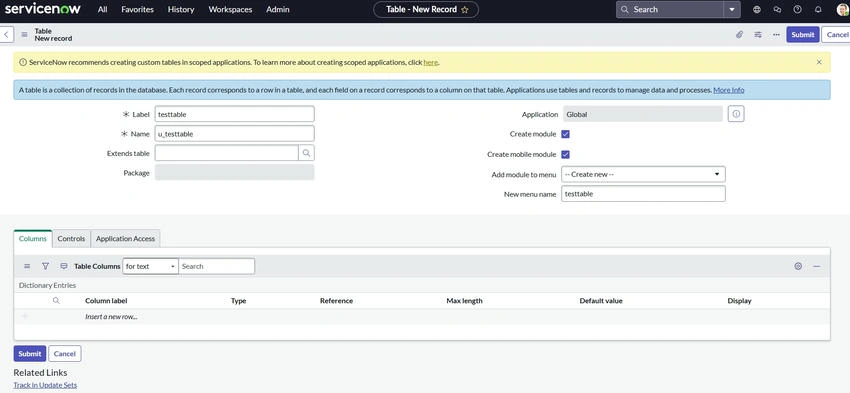
Step 1. Open ServiceNow and navigate to the Table
- Open your ServiceNow instance and log in.
- Locate the table for which you wish to develop the API using the Application Navigator if you'd like to use a different table.
- Go to Tables under System Definition.
- To create a custom table, click New.
- Name the table and specify its fields.
Step 2. Give the Table API Access
- Go to System Definition > Tables to open the table configuration.
- Find your table and pick it.
- Enable the Allow Access via Web Services option in the table settings to make sure the table may be accessed via an API.
- Click "Save."
Step 3. Create the POST API
- Go to REST API Explorer under System Web Services.
- From the dropdown menu, choose the table you wish to work with.
- Select the HTTP method POST.
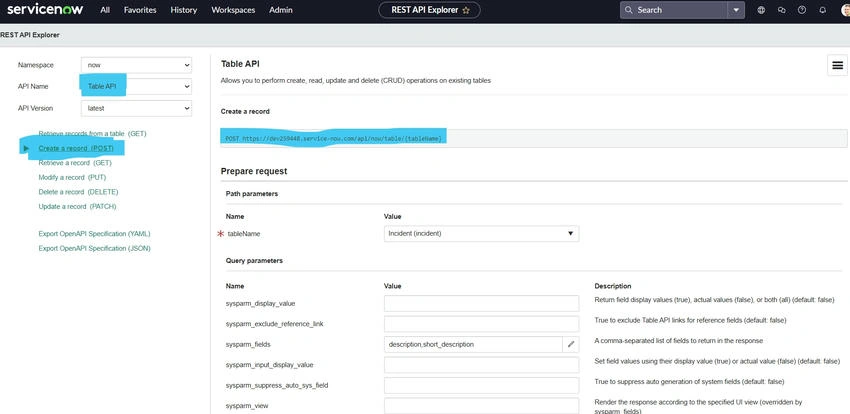
- Define the JSON payload in the Request Body section, like below.
{ "short_description" : "Testing post" , "description" : "Testing post" } - To test the API in ServiceNow, click Send.
Step 4. Set up authentication for the API
- Verify that the person using the API has the appropriate roles. Usually, the user needs the proper table permissions or the rest_api_explorer role.
- To manage the user's roles, go to System Security > Roles.
Step 5. Use Postman to test the API
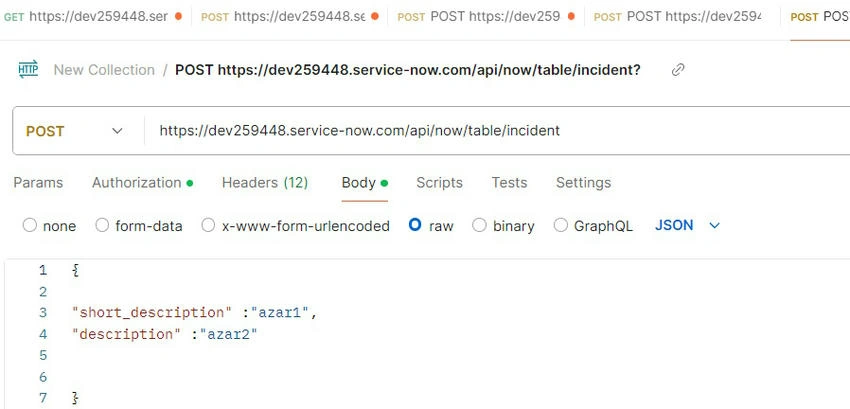
1. Make a fresh request
- Create a new request in Postman.
- Select POST as the request method.
- After entering the URL of your ServiceNow instance, type /api/now/table/.
- An example of an endpoint might be https://.service-now.com/api/now/table/incident
2. Establish Headers
Add the following to the Headers tab.
- Type of Content.
- Application/JSON
- Accept: json/application.
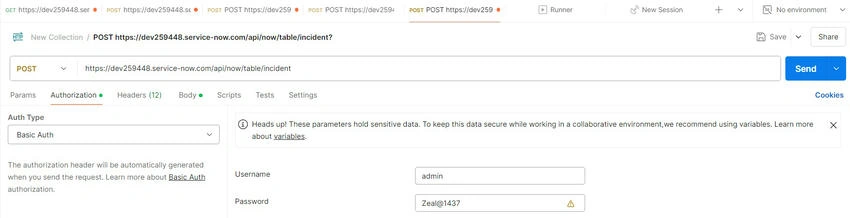
3. Include Authentication
- Pick Basic Auth from the Authorization tab.
- Enter your password and ServiceNow username.
- like eg
- Username - admin, password - welcome123'
4. Include the payload in JSON
- Click on the Body tab.
- Choose raw and select JSON as the payload type.
- Paste the JSON that follows.
{
  "short_description": "Testing post",
  "description": "Testing post"
}
5. Send the Request
Click Send to execute the request.
Step 6. Confirm the Answer
- Look for the status code in the Postman response window. A 201 Created answer will be returned if the request is successful.
- The information about the newly generated record, including the sys_id, will be included in the response body.

Step 7. Verify the ServiceNow record
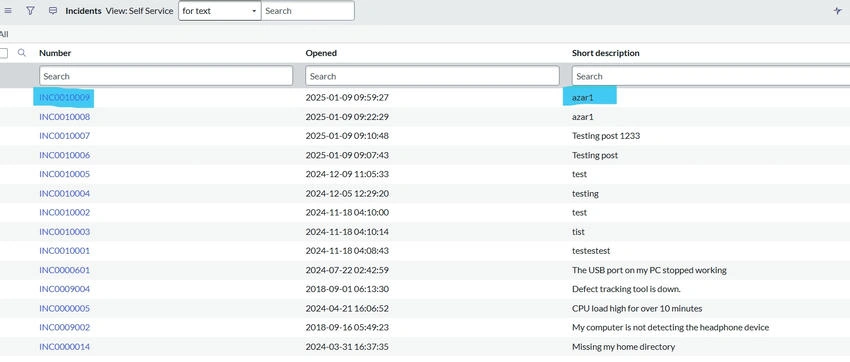
- Return to ServiceNow and navigate back to the table.
- Check to see if the values in the JSON payload were used to build the new record.
Best practices
- Use Scoped Applications: To improve version control and maintainability, encapsulate your table and API functionality.
- Use Access Control: Put ACLs (Access Control Rules) into place to limit access to private information and guarantee safe API use.
- Test in Development: Prior to implementing API changes in production, always test them in a development or sandbox instance.
- Log API Usage: To keep an eye on API usage and spot possible problems, turn on logging.
- Verify Inputs: Use server-side validation to make sure that incoming data follows the specified formats and limitations.
- Optimize Performance: To make API interactions with big tables run more smoothly, use indexing and effective queries.
- Document API Endpoints: Keep your API documentation current, covering error codes, expected answers, and payload structure.
- Utilize ServiceNow's API capabilities: To improve API functionality, make use of response filtering, query parameters, and other integrated capabilities.
- Secure Credentials: Use environment variables or secret management technologies for authentication instead of hard-coding sensitive credentials.
- Limit Data Exposure: To lower the chance of overexposure, use table-specific API views to reveal just the fields that are required.
- Monitor and Audit: To spot odd activity or security breaches, keep a close eye on audit logs and API usage.
- Use Rate Limiting: By establishing rate limitations, you may prevent your instance from becoming overloaded with too many API queries.
In the next article, let's see how to handle these parameters dynamically from a diff service instance; until then, bye happy learning.
Join the conversation! Your thoughts help the community grow.