

Introduction
Today, in this article let's play around with one of the interesting and most useful concepts of design patterns, which will be hosted in a web app.
Question: What is Bridge Pattern?
In simple terms "It decouples abstraction from its implementation logic and creates a bridge to access the content data logic". I think we are now good to go and implement this wonderful concept.
Step 1: The complete code of Default.aspx looks like this:
<%@ Page Language="C#" AutoEventWireup="true" CodeBehind="Default.aspx.cs" Inherits="BridgePatternApplication._Default" %>
<!DOCTYPE html PUBLIC "-//W3C//DTD XHTML 1.0 Transitional//EN" "http://www.w3.org/TR/xhtml1/DTD/xhtml1-transitional.dtd">
<html xmlns="http://www.w3.org/1999/xhtml">
<head id="Head1" runat="server">
<title></title>
</head>
<body>
<form id="form1" runat="server">
<div>
<h1 style="text-align: center; font-family: Verdana; font-size: large; color: Maroon">
Bridge Pattern - Design Patterns</h1>
<center>
<table>
<tr>
<td>
<asp:Label ID="Label1" runat="server" Text="Please Enter First Number" Font-Size="Small" Font-Bold="true" Font-Italic="true" Font-Names="Verdana"></asp:Label>
</td>
<td>
<asp:TextBox ID="TextBox1" runat="server"></asp:TextBox>
</td>
</tr>
<tr>
<td>
<asp:Label ID="Label2" runat="server" Text="Please Enter Second Number" Font-Size="Small" Font-Bold="true" Font-Italic="true" Font-Names="Verdana"></asp:Label>
</td>
<td>
<asp:TextBox ID="TextBox2" runat="server"></asp:TextBox>
</td>
</tr>
<tr>
<td colspan="2">
<asp:Button ID="Button1" runat="server" Text="Addition" Width="165px" Font-Names="Verdana" BackColor="Orange" OnClick="Button1_Click" />
</td>
</tr>
<tr>
<td colspan="2">
<asp:Button ID="Button2" runat="server" Text="Subtraction" Width="165px" Font-Names="Verdana"
BackColor="Orange" OnClick="Button2_Click" />
</td>
</tr>
<tr>
<td colspan="2">
<asp:Button ID="Button3" runat="server" Text="Multiplication" Width="165px" Font-Names="Verdana" BackColor="Orange" OnClick="Button3_Click" />
</td>
</tr>
<tr>
<td colspan="2">
<asp:Button ID="Button4" runat="server" Text="Division" Width="165px" Font-Names="Verdana"
BackColor="Orange" OnClick="Button4_Click" />
</td>
</tr>
</table>
<table>
<tr>
<td colspan="2">
<asp:Label ID="lblResult" runat="server" Font-Names="Verdana" ForeColor="Brown"></asp:Label>
</td>
</tr>
</table>
</center>
</div>
</form>
</body>
</html>
Step 2: The complete code of IArthmetic.cs looks like this:
using System;
using System.Collections.Generic;
using System.Linq;
using System.Text;
namespace BridgePatternApplication
{
public interface IArthmetic
{
double Arthmetic(double a, double b);
}
}
Step 3: The complete code of IArthmeticOperation.cs looks like this:
using System;
using System.Collections.Generic;
using System.Linq;
using System.Text;
namespace BridgePatternApplication
{
public interface IArthmeticOperation
{
void Addition(); void Subtraction(); void Multiplication(); void Division();
}
}
Step 4: The complete code of AdditionClass.cs looks like this:
using System;
using System.Collections.Generic;
using System.Linq;
using System.Web;
namespace BridgePatternApplication
{
public class AdditionClass : IArthmetic
{
public double Arthmetic(double a, double b)
{ return a + b;
}
}
}
Step 5: The complete code of SubtractionClass.cs looks like this:
using System;
using System.Collections.Generic;
using System.Linq;
using System.Web;
namespace BridgePatternApplication
{
public class SubtractionClass : IArthmetic
{
public double Arthmetic(double a, double b)
{
return a - b;
}
}
}
Step 6: The complete code of MultiplicationClass.cs looks like this:
using System;
using System.Collections.Generic;
using System.Linq;
using System.Web;
namespace BridgePatternApplication
{
public class MultiplicationClass : IArthmetic
{
public double Arthmetic(double a, double b)
{
return a * b;
}
}
}
Step 7: The complete code of DivisionClass.cs looks like this:
using System;
using System.Collections.Generic;
using System.Linq;
using System.Web;
namespace BridgePatternApplication
{
public class DivisionClass : IArthmetic
{
public double Arthmetic(double a, double b)
{
return a / b;
}
}
}
Step 8: The complete code of Default.aspx.cs looks like this:
using System;
using System.Collections.Generic;
using System.Linq;
using System.Web;
using System.Web.UI;
using System.Web.UI.WebControls;namespace BridgePatternApplication
{public partial class _Default : System.Web.UI.Page, IArthmeticOperation
{
protected void Page_Load(object sender, EventArgs e)
{
TextBox1.Focus();
}
protected void Button1_Click(object sender, EventArgs e)
{
if (string.IsNullOrEmpty(TextBox1.Text) || string.IsNullOrEmpty(TextBox2.Text)){lblResult.Text = "Please Enter Some Values";
}
else{setArthmetic(objAddition);Addition();
}
}
protected void Button2_Click(object sender, EventArgs e)
{
if (string.IsNullOrEmpty(TextBox1.Text) || string.IsNullOrEmpty(TextBox2.Text))
{
lblResult.Text = "Please Enter Some Values";}else{setArthmetic(objSubtraction);Subtraction();
}
}
protected void Button3_Click(object sender, EventArgs e)
{
if (string.IsNullOrEmpty(TextBox1.Text) || string.IsNullOrEmpty(TextBox2.Text))
{
lblResult.Text = "Please Enter Some Values";}else{setArthmetic(objMultiplication);Multiplication();
}
}
protected void Button4_Click(object sender, EventArgs e)
{
if (string.IsNullOrEmpty(TextBox1.Text) || string.IsNullOrEmpty(TextBox2.Text)){lblResult.Text = "Please Enter Some Values";
}
else
{
setArthmetic(objDivision);Division();
}
}
#region Public Methodspublic void setArthmetic(IArthmetic arthmetic)
{
this.arthmeticComponent = arthmetic;
}
public void Addition()
{
lblResult.Text = "Addition Result of "+TextBox1.Text+" and "+TextBox2.Text+" is: <b>"+arthmeticComponent.Arthmetic(Convert.ToDouble(TextBox1.Text), Convert.ToDouble(TextBox2.Text)).ToString()+"</b>";TextBox1.Text = "";TextBox2.Text = "";
}
public void Subtraction()
{
lblResult.Text = "Subtraction Result of " + TextBox1.Text + " and " + TextBox2.Text + " is: <b>" + arthmeticComponent.Arthmetic(Convert.ToDouble(TextBox1.Text), Convert.ToDouble(TextBox2.Text)).ToString() + "</b>";TextBox1.Text = "";TextBox2.Text = "";
}
public void Multiplication()
{
lblResult.Text = "Multiplication Result of " + TextBox1.Text + " and " + TextBox2.Text + " is: <b>" + arthmeticComponent.Arthmetic(Convert.ToDouble(TextBox1.Text), Convert.ToDouble(TextBox2.Text)).ToString() + "</b>";TextBox1.Text = "";TextBox2.Text = "";
}
public void Division()
{
lblResult.Text = "Division Result of " + TextBox1.Text + " and " + TextBox2.Text + " is: <b>" + arthmeticComponent.Arthmetic(Convert.ToDouble(TextBox1.Text), Convert.ToDouble(TextBox2.Text)).ToString() + "</b>";TextBox1.Text = "";TextBox2.Text = "";
}
#endregion
#region Instance Variablesprotected IArthmetic arthmeticComponent;
AdditionClass objAddition = new AdditionClass();SubtractionClass objSubtraction = new SubtractionClass();
MultiplicationClass objMultiplication = new MultiplicationClass()
DivisionClass objDivision = new DivisionClass();
#endregion}
}
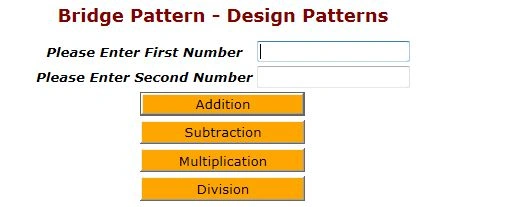
Step 9: The output of the application looks like this:
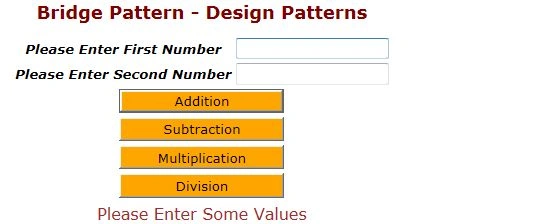
Step 10: The output of the nothing entered application looks like this:
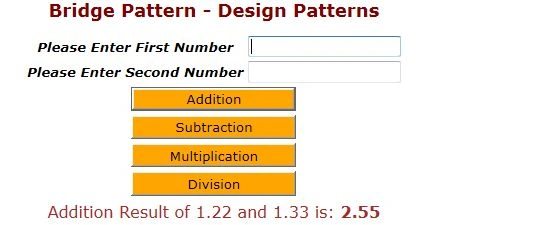
Step 11: The output of the addition operation application looks like this:
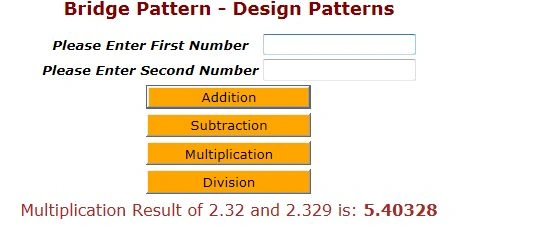
Step 12: The output of the multiplication operation application looks like this:
I hope this article is useful for you. I look forward for your comments and feedback.
Join the conversation! Your thoughts help the community grow.