

Before reading this article, I highly recommend reading the previous parts of the series.
- Learn Universal Windows Programming Via Modern C++
- Learn Universal Windows Programming Via Modern C++ (Button Control)
- Learn Universal Windows Programming Via Modern C++ (StackPanel)
- Learn Universal Windows Programming Via Modern C++ (CheckBox)
- Learn Universal Windows Programming Via Modern C++ (RadioButton)
- Learn Universal Windows Programming Via Modern C++ (Combobox)
- Learn Universal Windows Programming Via Modern C++ (Border)
- Learn Universal Windows Programming Via Modern C++ (CommandBar)
- Learn Universal Windows Programming Via Modern C++ (SplitView Control)
- Learn Universal Windows Programming Via Modern C++ (AutoSuggestBox)
- Learn Universal Windows Programming Via Modern C++ (ContentDialog)
- Learn Universal Windows Programming Via Modern C++ (Grid Control)
- Learn Universal Windows Programming Via Modern C++ (RelativePanel)
ProgressBar control
ProgressBar indicates that some operation is going on in the background. Just update the graphical indication in the GUI, ex: Copy one folder to another folder. Windows OS shows in one popup window what’s going on.
In this article, I am going to explain how to implement ProgressBar control in Modern C++/WinRT.
ProgressBar has divided into two types.
- Repeating Style(Pattern)
- ProgressBar fill based on the value;
ProgressBar Repeating Style
To implement the repeating style, set IsIndeterminate value as true. That’s it. It will display the indication like below.
- ProgressBar pBar;
- pBar.IsIndeterminate(true);
- pBar.Foreground(SolidColorBrush(Colors::Red()));

ProgressBar is filled based on the value
This feature shows the percentage as a status (Fill the value) based on the value. To use this feature, we have to set the three important properties as given below.
Properties
- Minimum - Minimum value for Bar value
- Maximum - Maximum value for Bar.
- Value - Value is indicated current fill value (how many percents it has completed)
Note - Value property should be within Minimum and Maximum range.
- ProgressBar pBar;
- pBar.Minimum(0);
- pBar.Maximum(100);
- pBar.Value(value);
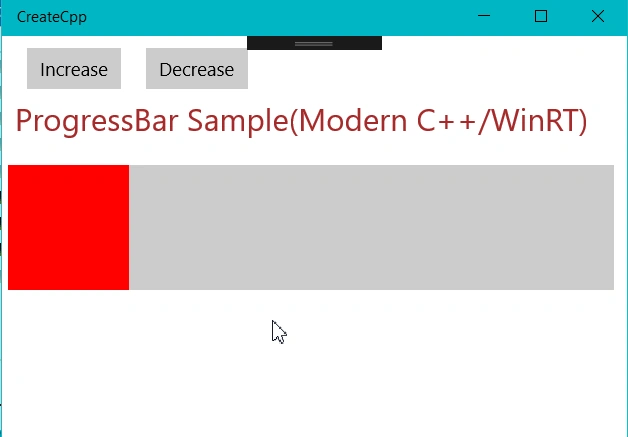
Let's see one simple example
Concept: If the background work ( Background: Click the button ) is completed 40%, then show percentage as RedColor. If 80% is completed, show it in yellow color, and if it is 100% completed, show the green color in the ProgressBar control.
- #include "pch.h"
- using namespace winrt;
- using namespace Windows::ApplicationModel;
- using namespace Windows::ApplicationModel::Activation;
- using namespace Windows::Foundation;
- using namespace Windows::UI;
- using namespace Windows::UI::Xaml;
- using namespace Windows::UI::Xaml::Controls;
- using namespace Windows::UI::Xaml::Controls::Primitives;
- using namespace Windows::UI::Xaml::Interop;
- using namespace Windows::UI::Xaml::Navigation;
- using namespace Windows::UI::Xaml::Media;
- using namespace Windows::Media;
- using namespace Windows::Media::Core;
- using namespace Windows::Storage;
- using namespace Windows::Storage::Pickers;
- struct App :ApplicationT<App>
- {
- TextBlock txtStatus;
- ProgressBar pBar;
- int value = 20;
- IInspectable CreateInspectable(hstring strCaption)
- {
- return PropertyValue::CreateString(strCaption);
- }
- void BtnClick(IInspectable const & sender, const RoutedEventArgs &args)
- {
- Button btnTag = sender.as<Button>();
- pBar.ShowError(false);
- auto demo = btnTag.Tag();
- IPropertyValue tagId = btnTag.Tag().as<IPropertyValue>();
- if(tagId.GetInt16() == 1)
- {
- value += 10;
- if (value > 100)
- value = 0;
- }
- else if (tagId.GetInt16() == 2)
- {
- value -= 10;
- if (value < 0)
- value = 0;
- }
- else if (tagId.GetInt16() == 3)
- {
- pBar.ShowError(true);
- }
- if (value <= 40)
- pBar.Foreground(SolidColorBrush(Colors::Red()));
- else if (value <= 80)
- pBar.Foreground(SolidColorBrush(Colors::Yellow()));
- else if (value <= 100)
- pBar.Foreground(SolidColorBrush(Colors::Green()));
- pBar.Value(value);
- }
- TextBlock CreateTextBlock(hstring text)
- {
- TextBlock txtBlock;
- txtBlock.Text(text);
- txtBlock.FontFamily(FontFamily(L"Segoe UI Semibold"));
- txtBlock.TextAlignment(TextAlignment::Left);
- txtBlock.FontSize(35);
- txtBlock.Foreground(SolidColorBrush(Colors::Brown()));
- txtBlock.Margin(CreateThickness(10, 10, 0, 0));
- return txtBlock;
- }
- Thickness CreateThickness(int left, int top, int right, int bottom)
- {
- Thickness thick;
- thick.Left = left;
- thick.Top = top;
- thick.Right = right;
- thick.Bottom = bottom;
- return thick;
- }
- void OnLaunched(LaunchActivatedEventArgs const&)
- {
- Button BtnIncrease,BtnDecrease,BtnError;
- auto captionText = PropertyValue::CreateString(L"Increase");
- BtnIncrease.Content(captionText);
- BtnIncrease.Click({ this,&App::BtnClick });
- BtnIncrease.Margin(CreateThickness(20, 10, 0, 0));
- BtnIncrease.Tag(PropertyValue::CreateInt32(1));
- captionText = PropertyValue::CreateString(L"Decrease");
- BtnDecrease.Content(captionText);
- BtnDecrease.Click({ this,&App::BtnClick });
- BtnDecrease.Margin(CreateThickness(20, 10, 0, 0));
- BtnDecrease.Tag(PropertyValue::CreateInt32(2));
- auto txtheader = CreateTextBlock(L"ProgressBar Sample(Modern C++/WinRT)");
- txtheader.FontSize(25);
- StackPanel btnPanel;
- btnPanel.Orientation(Orientation::Horizontal);
- btnPanel.Children().Append(BtnIncrease);
- btnPanel.Children().Append(BtnDecrease);
- StackPanel sContentPanel;
- //sContentPanel.Children().Append(txtarticleheader);
- sContentPanel.Children().Append(btnPanel);
- sContentPanel.Orientation(Orientation::Vertical);
- sContentPanel.VerticalAlignment(VerticalAlignment::Top);
- pBar.Minimum(0);
- pBar.Maximum(100);
- pBar.Value(value);
- pBar.Height(100);
- pBar.Margin(CreateThickness(5, 20, 10, 0));
- pBar.IsIndeterminate(false);
- pBar.Foreground(SolidColorBrush(Colors::Red()));
- StackPanel mainPanel;
- mainPanel.Children().Append(sContentPanel);
- mainPanel.Children().Append(txtheader);
- mainPanel.Children().Append(pBar);
- Window window = Window::Current();
- window.Content(mainPanel);
- window.Activate();
- }
- };
- int __stdcall wWinMain(HINSTANCE, HINSTANCE, PWSTR, int)
- {
- Application::Start([](auto &&) {make<App>(); });
- return 0;
- }
Join the conversation! Your thoughts help the community grow.