

Before reading this article, I highly recommend reading the previous parts of the series.
- Learn Universal Windows Programming Via Modern C++
- Learn Universal Windows Programming Via Modern C++ (Button Control)
- Learn Universal Windows Programming Via Modern C++ (Stackpanel)
Check Box
Check Box control is use to select or deselect the items based on the user choice
ex - Installing Visual Studio software , user can select the software component to be installed or not
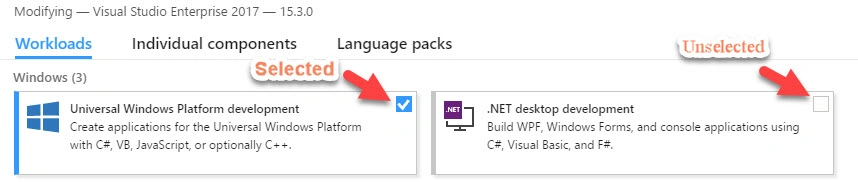
This control has three selection processes & each one has its own event,
- Selected - Items are selected, value returns as true
- Unselected - Items are unselected, value returns as false
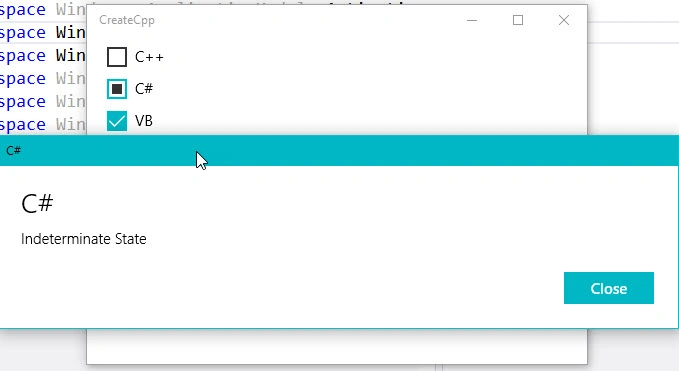
- Indeterminate - Items has been both selected and Unselected, value returns as null state.
1. Selected 2. Unselected 3. Indeterminate, Selected and Unselected property handle in the IsChecked property and Indeterminate property handle in the IsThreeState property, If IsChecked property contains whether itis true or false , IsThreeState is set as null
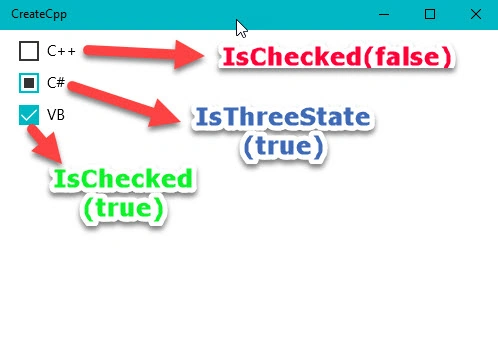
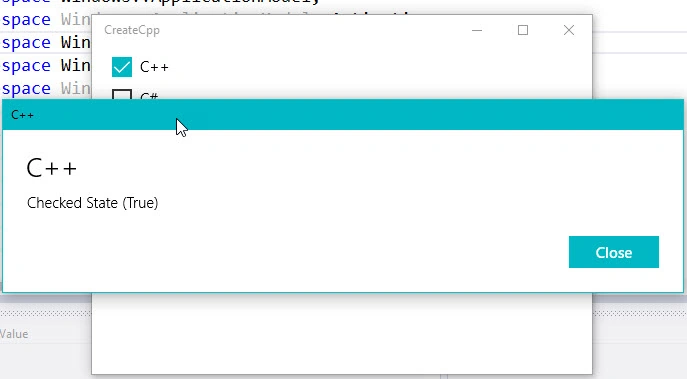
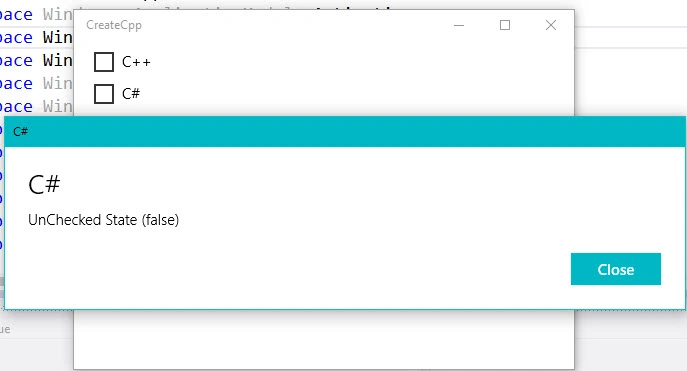
Each property it has its own event handler , Checked, Unchecked and Indeterminate events, event has implemented in the same way as button control event
Indeterminate events will fire , when the items in the ThreeState (select and unselect mode).
- CheckBox chkBox;
- chkBox.Checked(&ChkBoxCheckedClick);
- void App::ChkBoxCheckedClick(IInspectable const & sender, const RoutedEventArgs &args)
- {
- }
- #include "pch.h"
- using namespace winrt;
- using namespace Windows::ApplicationModel;
- using namespace Windows::ApplicationModel::Activation;
- using namespace Windows::Foundation;
- using namespace Windows::UI;
- using namespace Windows::UI::Xaml;
- using namespace Windows::UI::Xaml::Controls;
- using namespace Windows::UI::Xaml::Controls::Primitives;
- using namespace Windows::UI::Xaml::Interop;
- using namespace Windows::UI::Xaml::Media;
- using namespace Windows::UI::Xaml::Navigation;
- using namespace Windows::UI::Popups;
- using namespace Windows::Storage;
- struct App:ApplicationT<App>
- {
- public:
- virtual ~App() = default;
- static IInspectable MakeString(hstring);
- static CheckBox CreateCheckBox(hstring,bool,bool);
- static bool CheckBoxStatus(IInspectable const& sender);
- static void OnLaunched(LaunchActivatedEventArgs const&);
- static void ChkBoxCheckedClick(IInspectable const & sender, const RoutedEventArgs &args);
- static void ChkBoxUnCheckedClick(IInspectable const & sender, const RoutedEventArgs &args);
- static void ChkBoxIndeterminateClick(IInspectable const & sender, const RoutedEventArgs &args);
- static hstring GetChkBoxName(IInspectable const& sender);
- };
- IInspectable App::MakeString(hstring captionText)
- {
- return PropertyValue::CreateString(captionText);
- }
- CheckBox App::CreateCheckBox(hstring captionText,bool threeState,bool isChecked)
- {
- CheckBox chkBox;
- chkBox.Content(MakeString(captionText));
- if (threeState)
- chkBox.IsThreeState(threeState);
- else
- chkBox.IsChecked(isChecked);
- chkBox.Checked(&ChkBoxCheckedClick);
- chkBox.Unchecked(&ChkBoxUnCheckedClick);
- chkBox.Indeterminate(&ChkBoxIndeterminateClick);
- return chkBox;
- }
- bool App::CheckBoxStatus(IInspectable const& sender)
- {
- CheckBox chkBox = sender.as<CheckBox>();
- IReference<bool> value = chkBox.IsChecked();
- auto isSeleted = value.Value();
- return isSeleted;
- }
- void App::ChkBoxUnCheckedClick(IInspectable const & sender, const RoutedEventArgs &args)
- {
- auto ChkStatus = CheckBoxStatus(sender);
- auto chkName = GetChkBoxName(sender);
- MessageDialog msgDlg(L"UnChecked State (false)", chkName);
- msgDlg.ShowAsync();
- }
- void App::ChkBoxIndeterminateClick(IInspectable const & sender, const RoutedEventArgs &args)
- {
- CheckBox chkBox = sender.as<CheckBox>();
- auto value = chkBox.IsThreeState();
- if(value)
- {
- auto chkName = GetChkBoxName(sender);
- MessageDialog msgDlg(L"Indeterminate State", chkName);
- msgDlg.ShowAsync();
- }
- }
- hstring App::GetChkBoxName(IInspectable const& sender)
- {
- CheckBox chkBox = sender.as<CheckBox>();
- IPropertyValue IValue = chkBox.Content().as<IPropertyValue>();
- return IValue.GetString();
- }
- void App::ChkBoxCheckedClick(IInspectable const & sender, const RoutedEventArgs &args)
- {
- auto ChkStatus = CheckBoxStatus(sender);
- auto chkName = GetChkBoxName(sender);
- MessageDialog msgDlg(L"Checked State (True)", chkName);
- msgDlg.ShowAsync();
- }
- void App::OnLaunched(LaunchActivatedEventArgs const&)
- {
- auto chkBox1 = CreateCheckBox(L"C++",false,false);
- auto chkBox2 = CreateCheckBox(L"C#", true,false);
- auto chkBox3 = CreateCheckBox(L"VB", false, true);
- Thickness margin;
- margin.Bottom = 0;
- margin.Left = 20;
- margin.Right = 0;
- margin.Top = 5;
- StackPanel sPanel;
- sPanel.Margin(margin);
- sPanel.Children().Append(chkBox1);
- sPanel.Children().Append(chkBox2);
- sPanel.Children().Append(chkBox3);
- Window window = Window::Current();
- window.Content(sPanel);
- window.Activate();
- }
- int __stdcall wWinMain(HINSTANCE,HINSTANCE,PWSTR,int)
- {
- Application::Start([](auto &&) {make<App>(); });
- return 0;
- }
Operator and IPropertyValue
“as” operator
- hstring App::GetChkBoxName(IInspectable const& sender)
- {
- CheckBox chkBox = sender.as<CheckBox>();
- }
IPropertyValue
As you can remember in the button control , we are using the IInspectable to set the content of the text ( check box also works the same way). Now , we will see how to get the value from the IInspectable interface. We use IPropertyValue. Using the as operator , we can convert to IPropertyValue , from IPropertyValue , we can get the string
- hstring App::GetChkBoxName(IInspectable const& sender)
- {
- CheckBox chkBox = sender.as<CheckBox>();
- IPropertyValue IValue = chkBox.Content().as<IPropertyValue>();
- return IValue.GetString();
- }
auto keyword - auto keyword is used to automatically deduce the data type. It's like var keyword in C#
ex - see in the below code IsThreeState() value is assgined to the "value" property in the left side and declares the auto complie time. Auto property replaces the bool datatype.
- CheckBox chkBox = sender.as<CheckBox>();
- auto value = chkBox.IsThreeState();
I hope you understood operator , IPropertyValue and Auto keywords usage.
Join the conversation! Your thoughts help the community grow.