
Introduction
- <android.support.v4.widget.DrawerLayout
- xmlns:android="http://schemas.android.com/apk/res/android"
- android:id="@+id/drawer_layout"
- android:layout_width="match_parent"
- android:layout_height="match_parent">
- <!-- The main content view -->
- <FrameLayout
- android:id="@+id/content_frame"
- android:layout_width="match_parent"
- android:layout_height="match_parent" />
- <!-- The navigation drawer -->
- <!-- should not be larger than 320 to show content -->
- <ListView android:id="@+id/left_drawer"
- android:layout_width="180dp"
- android:layout_height="match_parent"
- android:layout_gravity="start"
- android:choiceMode="singleChoice"
- android:divider="@android:color/transparent"
- android:dividerHeight="0dp"
- android:background="#111"/>
- </android.support.v4.widget.DrawerLayout>
Step 2
Create another XML file and write this:
- <?xml version="1.0" encoding="utf-8"?>
- <LinearLayout xmlns:android="http://schemas.android.com/apk/res/android
- android:layout_width="match_parent"
- android:layout_height="match_parent"
- android:orientation="vertical" >
- <TextView
- android:id="@+id/textView1"
- android:layout_width="wrap_content"
- android:layout_height="match_parent"
- android:text="Placeholder Text"
- android:layout_gravity="center"
- android:textAppearance="?android:attr/textAppearanceLarge" />
- </LinearLayout>
Step 3
Create a Java class file and write this:
- package com.myactionbarnavigation;
- import android.annotation.TargetApi;
- import android.app.ActionBar;
- import android.app.Activity;
- import android.app.Fragment;
- import android.app.FragmentManager;
- import android.content.res.Configuration;
- import android.os.Build;
- import android.os.Bundle;
- import android.support.v4.app.ActionBarDrawerToggle;
- import android.support.v4.widget.DrawerLayout;
- import android.view.Menu;
- import android.view.MenuItem;
- import android.view.View;
- import android.widget.AdapterView;
- import android.widget.ArrayAdapter;
- import android.widget.ListView;
- import android.widget.Toast;
- public class MainActivity extends Activity {
- private String[] Titles;
- private DrawerLayout Drawer;
- private ListView List;
- private ActionBarDrawerToggle Toggle;
- private CharSequence titles;
- @TargetApi(Build.VERSION_CODES.ICE_CREAM_SANDWICH)
- @Override
- public void onCreate(Bundle savedInstanceState) {
- super.onCreate(savedInstanceState);
- setContentView(R.layout.activity_main);
- ActionBar Bar = getActionBar();
- // actionBar.setDisplayShowTitleEnabled(false);
- // Bar.setDisplayShowHomeEnabled(false);
- // actionBar.setDisplayShowCustomEnabled(true);
- titles = getActionBar().getTitle();
- Titles = getResources().getStringArray(R.array.operating_systems);
- System.out.println(Titles.length);
- Drawer = (DrawerLayout) findViewById(R.id.drawer_layout);
- List = (ListView) findViewById(R.id.left_drawer);
- // Set the adapter for the list view
- List.setAdapter(new ArrayAdapter<String>(this,
- android.R.layout.simple_list_item_1,android.R.id.text1, Titles));
- // Set the list's click listener|
- List.setOnItemClickListener(new DrawerItemClickListener());
- Drawer = (DrawerLayout) findViewById(R.id.drawer_layout);
- Toggle = new ActionBarDrawerToggle(this, /* host Activity */
- Drawer, /* DrawerLayout object */
- R.drawable.image, /* nav drawer icon to replace 'Up' caret */
- R.string.drawer_open, /* "open drawer" description */
- R.string.drawer_close /* "close drawer" description */) {
- /** Called when a drawer has settled in a completely closed state. */
- public void onDrawerClosed(View v) {
- getActionBar().setTitle(titles);
- }
- /** Called when a drawer has settled in a completely open state. */
- public void onDrawerOpened(View drawerview) {
- getActionBar().setTitle("Open Drawer");
- }
- };
- // Set the drawer toggle as the DrawerListener
- Drawer.setDrawerListener(Toggle);
- getActionBar().setDisplayHomeAsUpEnabled(true);
- getActionBar().setHomeButtonEnabled(true);
- }
- private class DrawerItemClickListener implements ListView.OnItemClickListener {
- @Override
- public void onItemClick(AdapterView parent, View v, int i, long id) {
- selectItem(i);
- }
- }
- @Override
- protected void onPostCreate(Bundle savedInstanceState) {
- super.onPostCreate(savedInstanceState);
- // Sync the toggle state after onRestoreInstanceState has occurred.
- Toggle.syncState();
- }
- @Override
- public void onConfigurationChanged(Configuration Config) {
- super.onConfigurationChanged(Config);
- Toggle.onConfigurationChanged(Config);
- }
- @Override
- public boolean onCreateOptionsMenu(Menu menu) {
- getMenuInflater().inflate(R.menu.main, menu);
- return super.onCreateOptionsMenu(menu);
- }
- @Override
- public boolean onOptionsItemSelected(MenuItem Item) {
- // the event to ActionBarDrawerToggle, if it returns
- // true, then it has handled the app icon touch event
- if (Toggle.onOptionsItemSelected(Item)) {
- return true;
- }
- // Handle your other action bar items...
- switch (Item.getItemId()) {
- case R.id.action_settings:
- Toast.makeText(this, "Settings selected", Toast.LENGTH_LONG).show();
- break;
- default:
- break;
- }
- return super.onOptionsItemSelected(Item);
- }
- /** Swaps fragments in the main content view */
- @TargetApi(Build.VERSION_CODES.HONEYCOMB)
- private void selectItem(int i) {
- // Create a new fragment and specify the planet to show based on position
- Fragment fragment = new Second();
- Bundle args = new Bundle();
- args.putInt(Second.ARG, i);
- fragment.setArguments(args);
- // Insert the fragment by replacing any existing fragment
- FragmentManager fragmentManager = getFragmentManager();
- fragmentManager.beginTransaction().replace(R.id.framelayout, fragment).commit() ;
- // Highlight the selected item, update the title, and close the drawer
- List.setItemChecked(i, true);
- getActionBar().setTitle((Titles[i]));
- Drawer.closeDrawer(List);
- }
- }
Step 4
Create a Java class file and write this:
- package com.myactionbarnavigation;
- import android.annotation.TargetApi;
- import android.app.Fragment;
- import android.os.Build;
- import android.os.Bundle;
- import android.view.LayoutInflater;
- import android.view.View;
- import android.view.ViewGroup;
- import android.widget.TextView;
- @TargetApi(Build.VERSION_CODES.HONEYCOMB)
- public class Second extends Fragment {
- public static final String ARG= "O";
- private String string;
- @Override
- public View onCreateView(LayoutInflater i, ViewGroup c,
- Bundle savedInstanceState) {
- View view = i.inflate(R.layout.second, null);
- TextView textView = (TextView) view.findViewById(R.id.textView1);
- textView.setText(string);
- return view;
- }
- @TargetApi(Build.VERSION_CODES.HONEYCOMB)
- @Override
- public void onActivityCreated(Bundle savedInstanceState) {
- super.onActivityCreated(savedInstanceState);
- }
- @Override
- public void setArguments(Bundle a) {
- string = a.getString(ARG);
- }
- }
Step 5
Write this inside the String.Xml file:
- <?xml version="1.0" encoding="utf-8"?>
- <resources>
- <string name="app_name"></string>
- <string name="action_settings">Settings</string>
- <string name="action_update">Update</string>
- <string name="drawer_open">Open Drawer</string>
- <string name="drawer_close">Close Drawer</string>
- <string name="hello_world">Hello world!</string>
- <string-array name="operating_systems">
- <item >Android</item>
- <item >iPhone</item>
- <item >Windows Mobile</item>
- </string-array>
- </resources>
Step 6
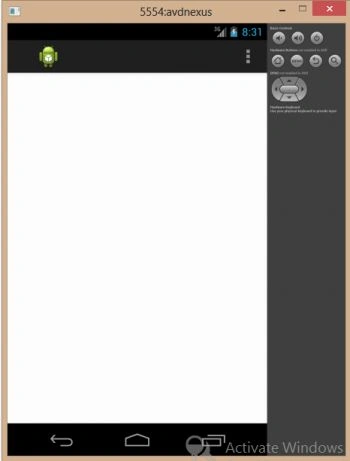
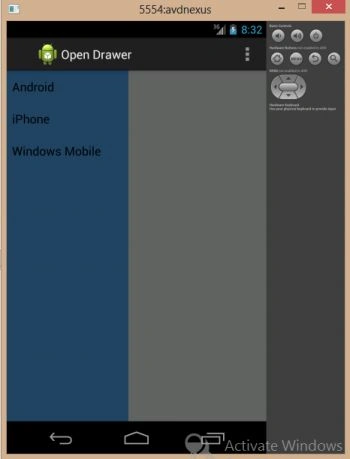
Join the conversation! Your thoughts help the community grow.