

Introduction
This article demonstrates how to use Agular dynamic localization in MVC using Angular i18n package in Visual Studio 2017.
Localization
Localization is a very important part of region based applications. It customizes your application for given culture and locale. So, this localization can change dynamically using Angular Dynamic Locale Module.
By following the below steps, you can use Angular file upload in MVC.
- Create MVC Project
- Configure Angular i18n & Dynamic Locale
- Work in Angular i18n & Dynamic Locale
Create MVC Project
Open Visual Studio 2017.
Go to New menu > click New & project. Now, it will open New Project window.
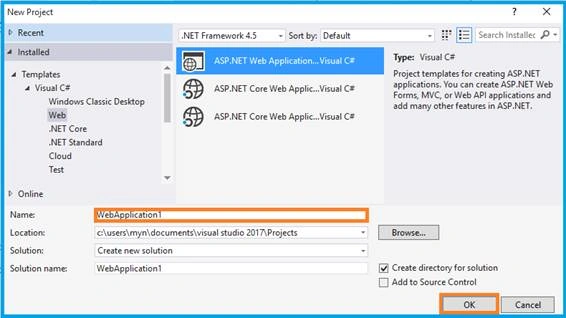
You can select ASP.NET Web Application on Framework 4.5. Enter the name of project in “Solution name” textbox, then click OK button.
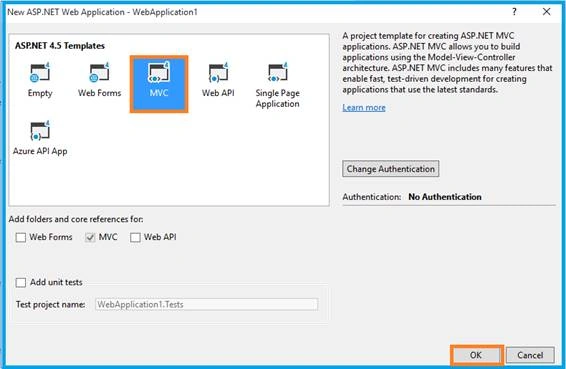
One more window should be appearing. Select MVC Template in this popup & click OK button. Now, start cropping the image.
Configure Angular i18n & Dynamic Locale
You can download the plug-in from
Or you can install from npm. If you try npm, don’t forget to install Node JS. Then, use the following commands.
npm install angular-i18n
npm install angular-dynamic-locale
Open the _Layout.cshtml and must refer the .js file from downloaded folder to this View page.
- <link rel="stylesheet" href="//netdna.bootstrapcdn.com/bootstrap/3.3.5/css/bootstrap.min.css" />
- <script src="~/Scripts/jquery-1.10.2.min.js"></script>
- <script src="~/Scripts/bootstrap.min.js"></script>
- <script src="~/PlugIn/angular/angular.min.js"></script>
- <script src="~/PlugIn/angular-dynamic-locale/dist/tmhDynamicLocale.js"></script>
- <script src="~/PlugIn/angular-ui-router/release/angular-ui-router.js"></script>
Link your Angular configurable file.
- <script src="~/App/App.module.js"></script>
- <script src="~/App/App.config.js"></script>
- <script src="~/App/LocaleController.js"></script>
Angular Module
You will need to include the module as a dependency on your application.
- var Locale = angular.module(Locale, ['ui.router', 'tmh.dynamicLocale']);
If you have any doubt in configuration, visit the following articles -
- Learn Basics Of MVC Using AngularJS
- Learn MVC Using Angular UI-Route
- Learn MVC Using Angular Role Based Login
- Learn MVC Using Angular Datatable
- Learn MVC Using Angular Crystal Report
- Learn MVC Using Angular Pie Chart
- Learn MVC Using Angular Flot Chart
- Learn MVC Using Angular xEditable
- Learn MVC Using Angular Idle
- Learn MVC Using Angular Wizard
- Learn MVC Using Angular - Maps
- Learn MVC Using Angular Bootstrap Nav Tree
- Learn MVC Using Angular Image Crop
- Learn MVC Using Angular UI Select
- Learn MVC Using Angular File Upload
- Learn MVC Using Angular UI Calender
- Learn MVC Using Angular PDF File Viewer
- Learn MVC Using Angular Dynamic Control in datatable
- Learn MVC Using Angular And Web API And Deploy To IIS
Work in Angular i18n & Dynamic Locale
“Locale” is my Angular module name. so, I have added the “ng-app”.
- <div class="container body-content" ng-app=" Locale">
- @RenderBody()
- </div>
Html Code
- <div ng-controller="LocalizationController" class="container container-md">
- <div class="row">
- <div class="col-md-5">
- Select a locale
- <select ng-model="model.selectedLocale"
- ng-options="key as value for (key, value) in availableLocales"
- ng-change="changeLocale(model.selectedLocale)" class="form-control"></select>
- </div>
- <div class="col-md-7">
- <table class="table table-responsive table-bordered">
- <tr>
- <td>
- Selected locale id:
- </td>
- <td>
- {{model.selectedLocale}}
- </td>
- </tr><tr>
- <td>
- Current locale id:
- </td>
- <td>
- {{$locale.id}}
- </td>
- </tr>
- <tr>
- <td>
- A big number:
- </td>
- <td>
- {{1234567890 | number}}
- </td>
- </tr>
- <tr>
- <td>
- The Epoch was on:
- </td>
- <td>
- {{0 | date}}
- </td>
- </tr>
- <tr>
- <td>
- One million:
- </td>
- <td>
- {{1000000 | currency}}
- </td>
- </tr>
- </table>
- </div>
- </div>
- </div>
Angular Config
This module expects for the Angular locales to present at 'angular-i18n/angular-locale_{{locale}}.js'. If the locales are at another URL, this can be changed at tmhDynamicLocaleProvider using localeLocationPattern (string).
- .module('Locale')
- .config(localeConfig);
- function localeConfig(tmhDynamicLocaleProvider) {
- tmhDynamicLocaleProvider.localeLocationPattern('Plugin/angular-i18n/angular-locale_{{locale}}.js');
- }
Angular Controller
Angular initiates the locale in dropdown and set to the locale id as “en” Angular.
- .module('Locale')
- .controller('LocalizationController', LocalizationController);
- function LocalizationController($rootScope, tmhDynamicLocale, $locale) {
- $rootScope.availableLocales = {
- 'en': 'English',
- 'es': 'Spanish',
- 'de': 'German',
- 'fr': 'French',
- 'ar': 'Arabic',
- 'ja': 'Japanese',
- 'ko': 'Korean',
- 'zh': 'Chinese'};
- $rootScope.model = {selectedLocale: 'en'};
- $rootScope.$locale = $locale;
- $rootScope.changeLocale = tmhDynamicLocale.set;
- }
When using, tmhDynamicLocale.set will return a promise that will be resolved when the locale is loaded and will resolve to the new locale
Click F5 button and Run the application. Now, it will open the browser where you can see the result.
Output 1
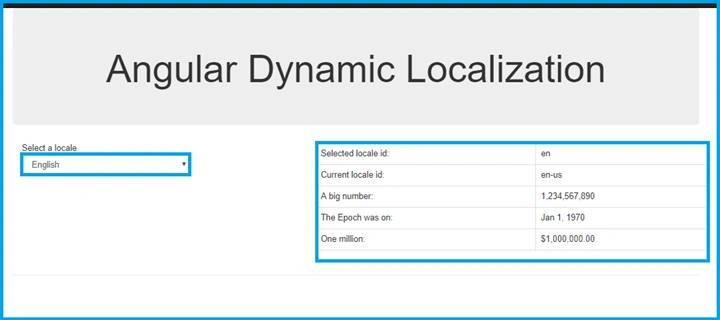
I have loaded default locale as English.
Output 2
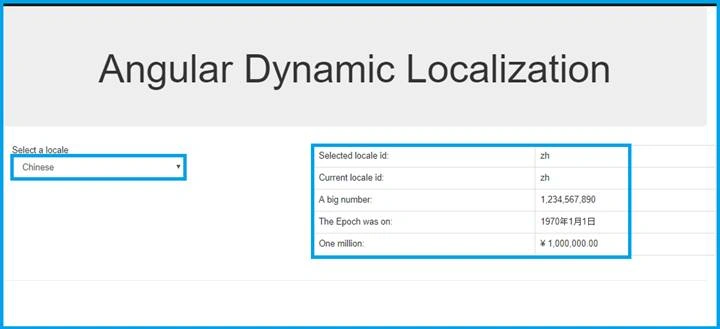
I have changed locale as Chinese, so the data is changed to Chinese.
Conclusion
In this article, we have seen dynamic localization using Angular i18n. If you have any queries, please tell me through the comments section.
Akash SainiPosted Apr 27, 2018, 9:33 AM
Nice post any Localization post for angular 5