

Introduction
In this article, we will learn MVC using Angular data binding for dynamic control in datatable from server side Web API using visual studio 2017
In this article we are going to
- Create Database
- Create Store procedure
- Create MVC Application
- Using Angular Datatable Dynamic Control
Create Database
Open SQL Server 2016, Then Click “New Query” window & Run the below query.
- USE [master]
- GO
- CREATE DATABASE [test]
- CONTAINMENT = NONE
- ON PRIMARY
- ( NAME = N'test', FILENAME = N'C:\Program Files\Microsoft SQL Server\MSSQL13.MSSQLSERVER\MSSQL\DATA\test.mdf' , SIZE = 8192KB , MAXSIZE = UNLIMITED, FILEGROWTH = 65536KB ),
- FILEGROUP [DocFiles] CONTAINS FILESTREAM DEFAULT
- ( NAME = N'FileStream', FILENAME = N'C:\Program Files\Microsoft SQL Server\MSSQL13.MSSQLSERVER\MSSQL\DATA\FileStream' , MAXSIZE = UNLIMITED)
- LOG ON
- ( NAME = N'test_log', FILENAME = N'C:\Program Files\Microsoft SQL Server\MSSQL13.MSSQLSERVER\MSSQL\DATA\test_log.ldf' , SIZE = 8192KB , MAXSIZE = 2048GB , FILEGROWTH = 65536KB )
- GO
- ALTER DATABASE [test] SET COMPATIBILITY_LEVEL = 130
- GO
- IF (1 = FULLTEXTSERVICEPROPERTY('IsFullTextInstalled'))
- begin
- EXEC [test].[dbo].[sp_fulltext_database] @action = 'enable'
- end
- GO
- ALTER DATABASE [test] SET ANSI_NULL_DEFAULT OFF
- GO
- ALTER DATABASE [test] SET ANSI_NULLS OFF
- GO
- ALTER DATABASE [test] SET ANSI_PADDING OFF
- GO
- ALTER DATABASE [test] SET ANSI_WARNINGS OFF
- GO
- ALTER DATABASE [test] SET ARITHABORT OFF
- GO
- ALTER DATABASE [test] SET AUTO_CLOSE OFF
- GO
- ALTER DATABASE [test] SET AUTO_SHRINK OFF
- GO
- ALTER DATABASE [test] SET AUTO_UPDATE_STATISTICS ON
- GO
- ALTER DATABASE [test] SET CURSOR_CLOSE_ON_COMMIT OFF
- GO
- ALTER DATABASE [test] SET CURSOR_DEFAULT GLOBAL
- GO
- ALTER DATABASE [test] SET CONCAT_NULL_YIELDS_NULL OFF
- GO
- ALTER DATABASE [test] SET NUMERIC_ROUNDABORT OFF
- GO
- ALTER DATABASE [test] SET QUOTED_IDENTIFIER OFF
- GO
- ALTER DATABASE [test] SET RECURSIVE_TRIGGERS OFF
- GO
- ALTER DATABASE [test] SET DISABLE_BROKER
- GO
- ALTER DATABASE [test] SET AUTO_UPDATE_STATISTICS_ASYNC OFF
- GO
- ALTER DATABASE [test] SET DATE_CORRELATION_OPTIMIZATION OFF
- GO
- ALTER DATABASE [test] SET TRUSTWORTHY OFF
- GO
- ALTER DATABASE [test] SET ALLOW_SNAPSHOT_ISOLATION OFF
- GO
- ALTER DATABASE [test] SET PARAMETERIZATION SIMPLE
- GO
- ALTER DATABASE [test] SET READ_COMMITTED_SNAPSHOT OFF
- GO
- ALTER DATABASE [test] SET HONOR_BROKER_PRIORITY OFF
- GO
- ALTER DATABASE [test] SET RECOVERY FULL
- GO
- ALTER DATABASE [test] SET MULTI_USER
- GO
- ALTER DATABASE [test] SET PAGE_VERIFY CHECKSUM
- GO
- ALTER DATABASE [test] SET DB_CHAINING OFF
- GO
- ALTER DATABASE [test] SET FILESTREAM( NON_TRANSACTED_ACCESS = FULL, DIRECTORY_NAME = N'DocFileDirctory' )
- GO
- ALTER DATABASE [test] SET TARGET_RECOVERY_TIME = 60 SECONDS
- GO
- ALTER DATABASE [test] SET DELAYED_DURABILITY = DISABLED
- GO
- EXEC sys.sp_db_vardecimal_storage_format N'test', N'ON'
- GO
- ALTER DATABASE [test] SET QUERY_STORE = OFF
- GO
Create Table
I will create a new table based on employee info.
- CREATE TABLE [dbo].[EmpMaster](
- [Row_id] [numeric](18, 0) IDENTITY(1,1) NOT NULL,
- [Emp_Code] [varchar](10) NULL,
- [Emp_FName] [varchar](50) NULL,
- [Emp_LName] [varchar](50) NULL,
- [Emp_Status] [bit] NULL,
- [Emp_DOB] [datetime] NULL,
- [Emp_Maritalstatus] [varchar](10) NULL,
- [Emp_Role] [varchar](50) NULL,
- [Emp_Department] [varchar](50) NULL,
- [Emp_Address] [varchar](500) NULL,
- [Emp_Profilestatus] [int] NULL,
- [Emp_Expriance] [int] NULL,
- [Create_By] [varchar](50) NULL,
- [Create_Date] [datetime] NULL
- ) ON [PRIMARY]
After creating the table add some data
- SET IDENTITY_INSERT [dbo].[EmpMaster] ON
- GO
- INSERT [dbo].[EmpMaster] ([Row_id], [Emp_Code], [Emp_FName], [Emp_LName], [Emp_Status], [Emp_DOB], [Emp_Maritalstatus], [Emp_Role], [Emp_Department], [Emp_Address], [Emp_Profilestatus], [Emp_Expriance], [Create_By], [Create_Date]) VALUES (CAST(1 AS Numeric(18, 0)), N'1000', N'Amit ', N'Sharma', 1, CAST(N'1958-04-20T00:00:00.000' AS DateTime), N'Married', N'Admin', N'Dev', N'California', 100, 20, N'Thiru', CAST(N'2017-07-24T00:00:00.000' AS DateTime))
- GO
- INSERT [dbo].[EmpMaster] ([Row_id], [Emp_Code], [Emp_FName], [Emp_LName], [Emp_Status], [Emp_DOB], [Emp_Maritalstatus], [Emp_Role], [Emp_Department], [Emp_Address], [Emp_Profilestatus], [Emp_Expriance], [Create_By], [Create_Date]) VALUES (CAST(2 AS Numeric(18, 0)), N'2000', N'Erik ', N'Dietrich', 0, CAST(N'1988-05-10T00:00:00.000' AS DateTime), N'Married', N'Employee', N'Dev', N'Washington', 50, 10, N'Thiru', CAST(N'2017-07-24T00:00:00.000' AS DateTime))
- GO
- INSERT [dbo].[EmpMaster] ([Row_id], [Emp_Code], [Emp_FName], [Emp_LName], [Emp_Status], [Emp_DOB], [Emp_Maritalstatus], [Emp_Role], [Emp_Department], [Emp_Address], [Emp_Profilestatus], [Emp_Expriance], [Create_By], [Create_Date]) VALUES (CAST(3 AS Numeric(18, 0)), N'3000', N'Abdul ', N'Azeez', 1, CAST(N'1990-02-14T00:00:00.000' AS DateTime), N'UnMarried', N'Employee', N'Dev', N'Michigan', 80, 8, N'Thiru', CAST(N'2017-07-24T00:00:00.000' AS DateTime))
- GO
- INSERT [dbo].[EmpMaster] ([Row_id], [Emp_Code], [Emp_FName], [Emp_LName], [Emp_Status], [Emp_DOB], [Emp_Maritalstatus], [Emp_Role], [Emp_Department], [Emp_Address], [Emp_Profilestatus], [Emp_Expriance], [Create_By], [Create_Date]) VALUES (CAST(4 AS Numeric(18, 0)), N'4000', N'Dizzy', N'Dee', 1, CAST(N'1995-01-10T00:00:00.000' AS DateTime), N'UnMarried', N'Employee', N'Test', N'Kentucky', 90, 5, N'Thiru', CAST(N'2017-07-24T00:00:00.000' AS DateTime))
- GO
- INSERT [dbo].[EmpMaster] ([Row_id], [Emp_Code], [Emp_FName], [Emp_LName], [Emp_Status], [Emp_DOB], [Emp_Maritalstatus], [Emp_Role], [Emp_Department], [Emp_Address], [Emp_Profilestatus], [Emp_Expriance], [Create_By], [Create_Date]) VALUES (CAST(5 AS Numeric(18, 0)), N'5000', N'John ', N'Sonmez ', 1, CAST(N'1989-05-10T00:00:00.000' AS DateTime), N'Married', N'Employee', N'Test', N'North Carolina', 0, 2, N'Thiru', CAST(N'2017-07-24T00:00:00.000' AS DateTime))
- GO
Create Store procedure
I have written the store procedure for my data operations so run the below SP. In this procedure, I have gathered different data for dynamic control
- CREATE PROCEDURE [dbo].[PC_EmpMaster]
- @Row_id BIGINT=NULL,
- @MODE VARCHAR(10)=NULL
- AS
- BEGIN
- SET NOCOUNT ON;
- IF(@MODE ='GET')
- BEGIN SELECT Row_id,Emp_Code,Emp_FName,Emp_LName,Emp_Status,CONVERT(VARCHAR(10), CONVERT( DATE ,Emp_DOB)) AS Emp_DOB,Emp_Maritalstatus,Emp_Profilestatus,Emp_Expriance,Emp_Address,Create_By,Create_Date AS Create_Date FROM EmpMaster
- END
- ELSE IF(@MODE ='GETBYID')
- BEGIN
- SELECT Emp_Code,Emp_FName,Emp_LName,Emp_Role,Emp_Department,Emp_Address FROM EmpMaster WHERE Row_id=@Row_id
- END
- SET NOCOUNT OFF;
- END
Open Visual Studio 2017
Go to New menu >Click New & project. Now it will open New Project Window
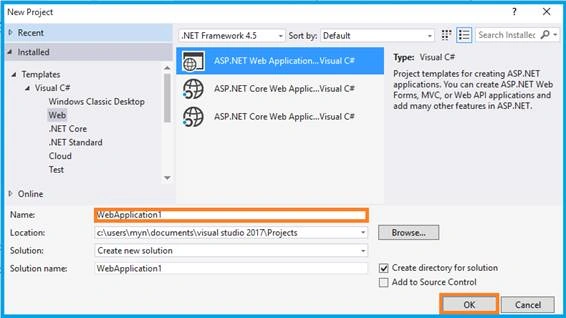
You can select ASP.NET Web Application on Framework 4.5. Enter the name of project in “Solution name” textbox then click ok button.
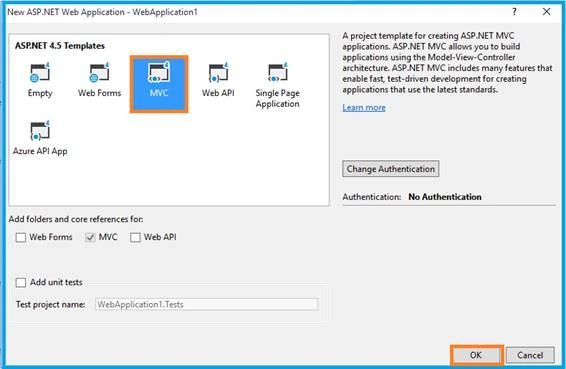
One more Window should appear. Select MVC Template in this popup & Click ok button.
After creating project click the below link you can download plug in files.
Then inject “datatable” key word in Angular modular
- angular.module('uiroute',['ui.router', 'datatables']);
Create & design HTML page with Table, in there mention as “datatable="ng".Then Binding the Server data
- <table datatable="ng" class="table-responsive table-bordered table-striped ">
- <thead style="background :rgb(142, 28, 123); color: white;">
- <tr>
- <th>
- </th>
- <th >
- Row ID #
- </th>
- <th >
- Employee Code
- </th>
- <th >
- Employee Name
- </th>
- <th >
- Date of Birth
- </th>
- <th >
- Marital Status
- </th>
- <th >
- Total Exprience
- </th>
- <th >
- Profile Status
- </th>
- <th >
- Employee Status
- </th>
- <th >
- Employee Address
- </th>
- <th>
- Created By
- </th>
- <th>
- Created Date
- </th>
- </tr>
- </thead>
- <tbody>
- <tr ng-repeat-start="Grid in LoadData" style="cursor:pointer">
- <td style="width:1% !important">
- <input type="checkbox" ng-model="Grid.isChecked" id="chk1_{{$index}}">
- <label for="chk1_{{$index}}"></label>
- <div style="display:none"></div>
- </td>
- <td>
- {{Grid.Row_id}}
- </td>
- <td class="SubGrid">
- {{Grid.Emp_Code}} <span ng-click="SubGrid(Grid.Row_id,$index)" class="caret"></span>
- </td>
- <td>{{Grid.Emp_FName}} {{Grid.Emp_LName}} </td>
- <td>{{Grid.Emp_DOB}}</td>
- <td align="center">
- <span class="label label-success" ng-show="Grid.Emp_Maritalstatus === 'UnMarried'">{{Grid.Emp_Maritalstatus}}</span>
- <span class="label label-info" ng-show="Grid.Emp_Maritalstatus !== 'UnMarried'">{{Grid.Emp_Maritalstatus}}</span>
- </td>
- <td>
- <span class="label label-danger">{{Grid.Emp_Expriance}}</span>
- </td>
- <td>{{Grid.Emp_Profilestatus}}
- <div class="c100 p{{Grid.Emp_Profilestatus}} blue small">
- <span>{{Grid.Emp_Profilestatus}} %</span>
- <div class="slice">
- <div class="bar"></div>
- <div class="fill"></div>
- </div>
- </div>
- <i class="glyphicon glyphicon-ok " style="color:green" ng-show="Grid.Emp_Profilestatus ===100"></i>
- <i class="glyphicon glyphicon-remove" style="color:red" ng-show="Grid.Emp_Profilestatus < 100"></i>
- </td>
- <td>
- <input type="checkbox" ng-model="Grid.Emp_Status" id="chk1_{{$index}}">
- <label for="chk1_{{$index}}"></label>
- <div style="display:none"></div>
- </td>
- <td>
- <input type="text" class="control-label" ng-disabled="!Grid.Emp_Status" ng-model="Grid.Emp_Address"/>
- </td>
- <td>{{Grid.Create_By}}</td>
- <td>{{Grid.Create_Date }}</td>
- </tr>
- <tr ng-show="ShowGrid==={{$index}}" ng-repeat-end>
- <td></td>
- <td colspan="6">
- <div class="col-sm-1"></div>
- <div class="col-lg-11" style=" border: 1px solid #e1e1e1;">
- <table class="table table-hover" style="padding-top:5px">
- <thead style="background-color: #563cbc;color:white;">
- <tr>
- <th style="width: 150px;background-color: #563cbc;color:white; ">
- First Name
- </th>
- <th style="width: 150px; background-color: #563cbc;color:white;">
- Last Name
- </th>
- <th style="width: 150px; background-color: #563cbc;color:white;">
- Department
- </th>
- <th style="width: 150px;background-color: #563cbc;color:white; ">
- Role
- </th>
- </tr>
- </thead>
- <tbody style="height: 150px !important;">
- <tr ng-repeat="SG in SubGrid">
- <td style="width: 150px;">{{SG.Emp_FName}}</td>
- <td style="width: 150px;">{{SG.Emp_LName}}</td>
- <td style="width: 150px;">{{SG.Emp_Department}}</td>
- <td style="width: 150px;">{{SG.Emp_Role}}</td>
- </tr>
- </tbody>
- </table>
- </div>
- </td>
- </tr>
- </tbody>
- </table>
Using Angular Datatable
Create “Model” folder in solution explorer & create new class in model folder.
- public class ParamModel
- {
- public string Mode { get; set; }
- public long Row_id { get; set; }
- }
Write below method in home controller. ”LoadData” displays the data in datatable.
- [HttpPost]
- #region LoadData
- public async Task<JsonResult> LoadData(BookModel Param)
- {
- var result = await Task.Run(() =>
- {
- try
- {
- HttpResponseMessage response = HttpClient.PostAsJsonAsync(apiUrl + "/GetEmployeeDetails", Param).Result;
- if (response.IsSuccessStatusCode)
- {
- var responseData = response.Content.ReadAsStringAsync().Result;
- return Json(responseData, JsonRequestBehavior.AllowGet);
- }
- else
- {
- return Json("Error", JsonRequestBehavior.AllowGet);
- }
- }
- catch (Exception ex)
- {
- return Json("Error" + ex.ToString(), JsonRequestBehavior.AllowGet);
- }
- });
- return result;
- }
- #endregion
In this method, I have called Web API function with async Method. My previous articles “Learn Web API Using SQL Helper Class” will help you learn how to create & consume web APIs. So just, refer to the API URL like below in Web.config file
- <add key="APIUrl" value="http://localhost:53490/api" />
Create an angular controller & service for getting data from server side.
Angular Controller
- $scope.loadTable = function () {
- var Param={
- Mode:'GET'
- }
- var ServiceData = BookService.loadGrid(Param);
- ServiceData.then(function (response) {
- var result = JSON.parse(response.data);
- $scope.LoadData = result.loadEmployeeList;
- }, function () {
- });
- }
- $scope.loadTable();
- $scope.LoadById = function (Row_id)
- {
- var Param = {
- Row_id: Row_id,
- Mode: 'GETBYID'
- }
- var ServiceData = BookService.loadGrid(Param);
- ServiceData.then(function (response) {
- var result = JSON.parse(response.data);
- $scope.SubGrid = result.loadEmployeeList;
- }, function () {
- });
- }
- $scope.SubGrid = function (Row_id,index)
- {
- if ($scope.ShowGrid == index) {
- $scope.ShowGrid = -1;
- $scope.SubGrid = {};
- } else {
- $scope.ShowGrid = index;
- $scope.LoadById(Row_id);
- }
- }
Angular Service
- this.loadGrid = function (Param) {
- var response = $http({
- method: "post",
- url: "Home/LoadData",
- data: JSON.stringify(Param),
- dataType: "json"
- });
- return response;
- }
Do not forget to refer to the plug in files, in the same way as the JS file .
Plug In
- <script src="~/Plugin/jQuery/jquery-2.2.3.min.js"></script>
- <script src="~/Plugin/datatables/media/js/jquery.dataTables.js"></script>
- <script src="~/Plugin/angular/angular.min.js"></script>
- <script src="~/Plugin/angular-ui-router/release/angular-ui-router.min.js"></script>
- <script src="~/Plugin/angular-datatables/dist/angular-datatables.js"></script>
My Files
- <script src="~/App/App.module.js"></script>
- <script src="~/App/App.config.js"></script>
- <script src="~/App/EmpController.js"></script>
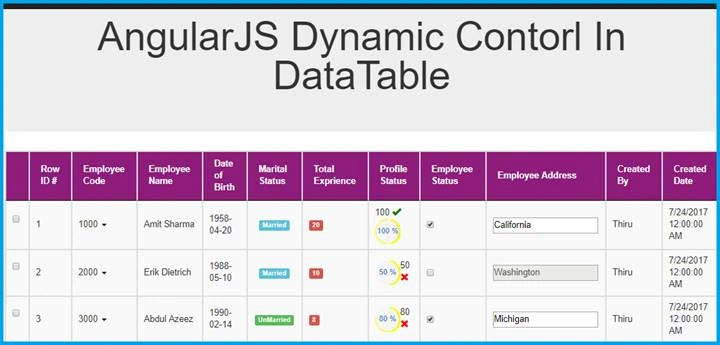
Once you have finished the above process now your datatable is ready to load, so run the application.
Output 1
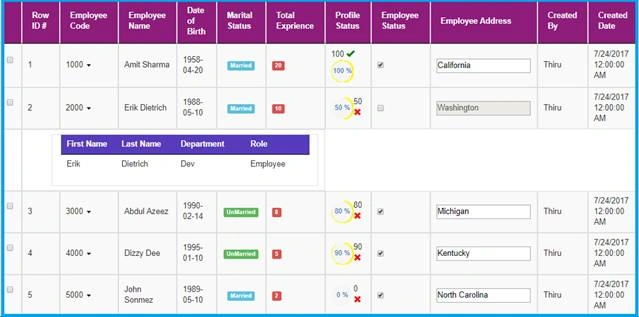
If you click Employee Code near Arrow Button, It will open Sub table also.
Output 2
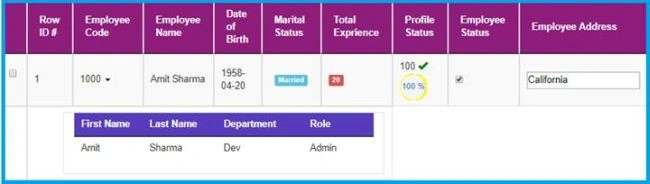
See my pervious Angular JS Articles
- Learn Basics Of MVC Using AngularJS
- Learn MVC Using Angular UI-Route
- Learn MVC Using Angular Role Based Login
- Learn MVC Using Angular Datatable
- Learn MVC Using Angular Crystal Report
- Learn MVC Using Angular Pie Chart
- Learn MVC Using Angular Flot Chart
- Learn MVC Using Angular xEditable
- Learn MVC Using Angular Idle
- Learn MVC Using Angular Wizard
- Learn MVC Using Angular - Maps
- Learn MVC Using Angular Bootstrap Nav Tree
- Learn MVC Using Angular Image Crop
- Learn MVC Using Angular UI Select
- Learn MVC Using Angular File Upload
- Learn MVC Using Angular UI Calender
- Learn MVC Using Angular Pdf File Viewer
Conclusion
In this article, we have learned about MVC using dynamic control datatable. If you have any queries, please tell me through the comments section because your comments are very valuable.
Happy Coding!...
Zeeshan AzimPosted Jul 27, 2017, 5:52 AM
Larkay tabahi kerdi tumne. Very good work.