

Introduction
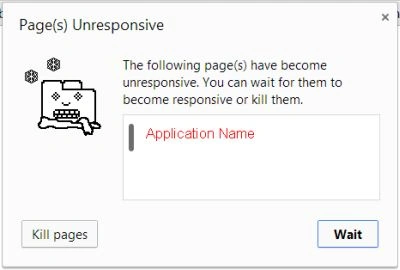
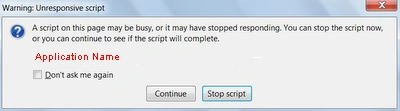

Web Workers
- Dedicated workers
- Shared workers
Dedicated workers
- A dedicated worker is accessible from the parent script that created it
- Wide browser support: All
- It is simply tied to its main connection
Shared workers
- A shared worker can be accessed from any script of the same origin.
- Limited browser support: Chrome 4.0+, Safari 5.0+ and Opera 10.6+.
- It can work with multiple connections.
Basically Web Workers work in the following three steps:
- First, it should be executed on separate threads
- It should be hosted in separate files from the main page
- Finally, a Worker object needs to be instantiated to call them
If I were to say in a single line how to start working with Web Workers then simply you just need to create a new Worker object in your main page and call the Worker constructor and pass the URI of the Worker script as in the following:
var worker = new Worker('MyWorker.js');
After creating the worker, start it by calling the postMessage() method:
worker.postMessage()
Now, what next? Next is, how to communicate through your worker. As I mentioned above postMessage() is used to start the worker and it only accepts a single argument, a string or JSON object depending on the browser.
In the following code snippet, I pass 'Hello World' to a worker and the worker simply returns the message.
- var worker = new Worker('MyWorker.js');
- worker.addEventListener('message', function (e) {
- console.log('Worker says: ', e.data);
- }, false);
- worker.postMessage('Hello World');
As you saw I specified MyWorker.js when the worker is created, so what does this js file do?
The MyWorker.js file is our main worker that handles the message. Now, you can see in the following code snippet a self-reference of the global scope for the worker and messages are received using addEventListener() as in the following:
- self.addEventListener('message', function (e) {
- self.postMessage(e.data);
- }, false); = 90
Let's use an example to learn how to exactly work with Web Workers.
Here I am creating an application to pass messages using JSON objects.
First, create an HTML5 application and design depending on your requirements, I do something like:
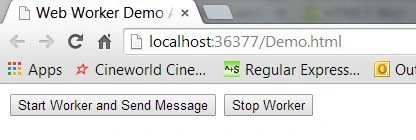 Use the following code for the design:
- <button id="Start" onclick="start()">Start Worker and Send Message</button>
- <button id="Stop" onclick="stop()">Stop Worker</button><br />
- <br />
- <output id="Message"></output>
Then create two functions for starting and stopping the worker
- function start() {
- worker.postMessage({
- 'cmd': 'start',
- 'msg': 'Hi this is Web Worker Demo App'
- });
- }
- function stop() {
- worker.postMessage({
- 'cmd': 'stop',
- 'msg': 'Thank You'
- });
- }
And then create and start the worker as in the following:
- var worker = new Worker('MyWorker.js');
- worker.addEventListener('message', function (e) {
- document.getElementById('Message').textContent = e.data;
- }, false);
Now create a new js file; I named here MyWorker.js, in this js file define the cases inside the addEventListener() method to handling the start and stop the process of the worker.
- var data = e.data;
- switch (data.cmd) {
- case 'start':
- self.postMessage('Worker Started :' + data.msg);
- break;
- case 'stop':
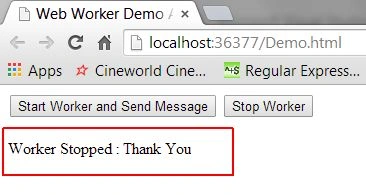
- self.postMessage('Worker Stopped :' + data.msg);
- self.close();
- break;
- };
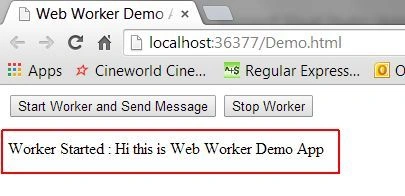
Done, the following is my complete code.
Demo.html
- <!DOCTYPE html>
- <html>
- <head>
- <title>Web Worker Demo App</title>
- <script type="text/javascript">
- function start() {
- worker.postMessage({ 'cmd': 'start', 'msg': 'Hi this is Web Worker Demo App' });
- }
- function stop() {
- worker.postMessage({ 'cmd': 'stop', 'msg': 'Thank You' });
- }
- var worker = new Worker('MyWorker.js');
- worker.addEventListener('message', function (e) {
- document.getElementById('Message').textContent = e.data;
- }, false);
- </script>
- </head>
- <body>
- <div>
- <button id="Start" onclick="start()">Start Worker and Send Message</button>
- <button id="Stop" onclick="stop()">Stop Worker</button><br />
- <br />
- <output id="Message"></output>
- </div>
- </body>
- </html>
- self.addEventListener('message', function (e) {
- var data = e.data;
- switch (data.cmd) {
- case 'start':
- self.postMessage('Worker Started :' + data.msg);
- break;
- case 'stop':
- self.postMessage('Worker Stopped :' + data.msg);
- self.close();
- break;
- };
- }, false);
Join the conversation! Your thoughts help the community grow.