

In my last article about the proxy pattern we have completed the structural category. It's time to move toward the final category, which is the behavioral category.
Agenda
- What is Mediator Pattern?
- When to use Mediator Pattern?
- How to use Mediator Pattern?
- Class diagram
Previous Articles
- Design Patterns - Introduction
- Learn Design Pattern - Singleton Pattern
- Learn Design Pattern - Factory Method Pattern
- Learn Design Pattern - Abstract Factory Pattern
- Learn Design Pattern - Builder Pattern
- Learn Design Pattern - Prototype Pattern
- Learn Design Pattern - Adapter Pattern
- Learn Design Pattern - Composite Pattern
- Learn Design Pattern - Decorator Pattern
- Learn Design Pattern – Facade Pattern
- Learn Design Pattern - Flyweight Pattern
- Learn Design Pattern - Bridge Pattern
- Learn Design Pattern – Proxy Pattern
(I have also conducted online training on design patterns and other. NET based technologies. You can contact me at 9870148461 or at [email protected])
What is mediator pattern?
- According to the GOF the "Mediator Pattern defines an object that encapsulates how a set of objects interact."
- Mediator promotes loose coupling by keeping objects from referring to each other explicitly, and it let's you vary their interaction independently.
When to use?
Consider a situation where we have many classes encapsulating specific logic inside them (like invoicing, inventory management, payroll).
Usually these classes interact with each other. Over a period of time communication among these classes can become increasingly complex and the communication logic becomes scattered throughout multiple classes which creates management hell.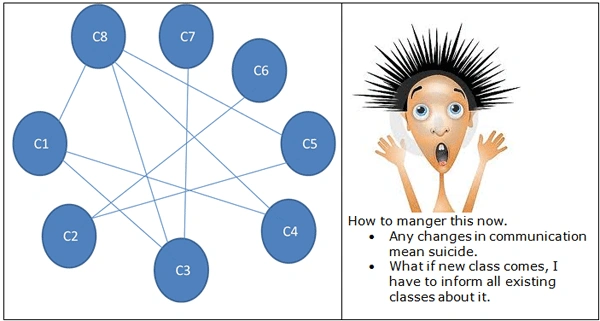
C# Corner Mumbai group
- Includes great people like Akshay Patel and Kamal Rawat lead by one and only Shivprasad Koirala.
Just one and half month ago I joined this group and I was previously completely unaware of people like Akshay and Kamal. Imagine if there were no Shivprasda sir, how difficult it would have been for me to connect with other members in the group.
In short if he was not there then communication with any member in the group would be very difficult.
- Try to recollect those School/College Days when we and a couple of our friends decided to go for a trip. Whenever there were changes in the plan, we used to start informing each other about the changes. But accidently, we always used to miss someone or the other and used to start blaming each other. In our case my friend Raghu used to say "I thought Sai will contact me" and Sai used to say "I thought Ashish will contact me" and even Ashish used to say "I thought Raghu will contact me" and finally we would end up with nothing.
In the first scenario there is Shivprasad sir who is acting as a Mediator and controlling the communication between other members. Whereas in the second scenario there is no Mediator so the interaction was difficult and so everything gets messed.
In short if there is no mediator then every object must know about every other object. (They are tightly coupled.)
For online training contact [email protected]
Chat application using Mediator Pattern
Let's build a small chat-based application.
Note:
- This will not be a real-time chat application. A real chat application requires sockets or other network-based programming along with a Mediator pattern.
- A Mediator Pattern or any other design pattern we have already discussed are not rules, and its not even mandatory that it be used in every application. Try to understand your problem first and then see which design pattern satisfies your requirements.
Let's start coding
Our application may have two kinds of chat users. One who used to communicate via Mobile and another via Desktop/Laptop.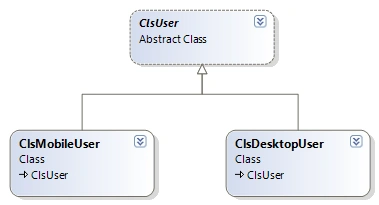
Final Output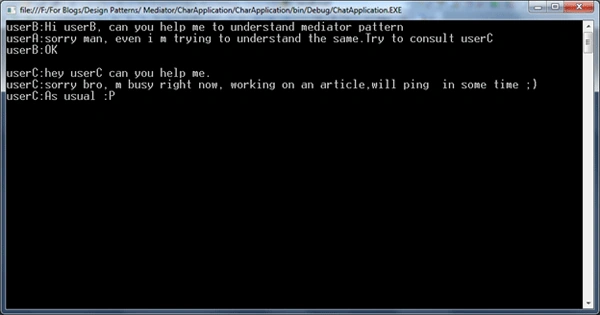
Step 1
Create an abstract user, as:
public abstract class ClsUser
{
internal string userName
{
get;
set;
}
internal ClsAbstractMediator objMediator;
public ClsUser(string userName)
{
this.userName = userName;
}
public abstract void Send(string toUser, string message);
public abstract void Receive(string fromUser, string message);
}
Step 2
Create an abstract mediator, as:
public abstract class ClsAbstractMediator
{
public abstract void AddUser(ClsUser user);
public abstract void RemoveUser(string userName);
public abstract void SendMessage(string fromUser, string toUser, string message);
}
Step 3
Create concreate users, as:
public class ClsDesktopUser : ClsUser
{
public override void Receive(string fromUser, string message)
{
Console.WriteLine(this.userName + ":" + message);
}
public override void Send(string toUser, string message)
{
objMediator.SendMessage(toUser, this.userName, message);
}
}
public class ClsMobileUser : ClsUser
{
public override void Receive(string fromUser, string message)
{
Console.WriteLine(this.userName + ":" + message);
}
public override void Send(string toUser, string message)
{
objMediator.SendMessage(this.userName, toUser, message);
}
}
Step 4
The final Client Code:
ClsAbstractMediator objMediator = new ClsMediator();
ClsUser userA = new ClsMobileUser("userA");
ClsUser userB = new ClsMobileUser("userB");
ClsUser userC = new ClsDesktopUser("userC");
ClsUser userD= new ClsDesktopUser("userD");
objMediator.AddUser(userA);
objMediator.AddUser(userB);
objMediator.AddUser(userC);
objMediator.AddUser(userD);
userA.Send("userB", "Hi userB, can you help me to understand mediator pattern");
userB.Send("userA", "sorry man, even i m trying to understand the same.Try to consult userC");
userA.Send("userB", "OK\n");
userA.Send("userC", "hey userC can you help me.");
userC.Send("userA","sorry bro, m busy right now, working on an article,will ping in some time ;)");
userC.Send("userA","As usual :P");
Now users are interacting with each other with the help of a mediator.
(You can see that if we want, we can even change the mediator easily as we are working with interfaces (ClsAbstractMediator) instead of concrete classes (ClsMediator)).
Class Diagram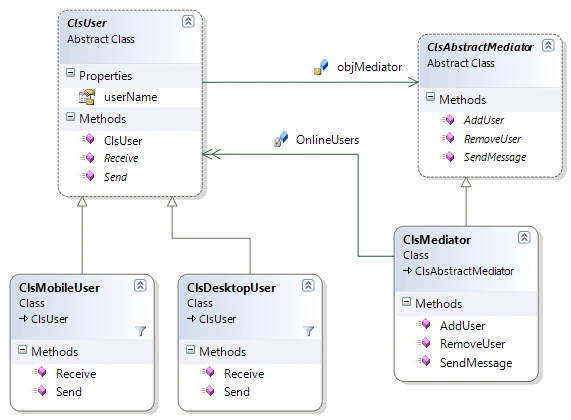
Hope all of you enjoyed reading this article.
Feedbacks and suggestions are always welcome.
Subscribe for my all article updates at
https://www.facebook.com/pages/Blogs-By-Sukesh-Marla/168078149903213
Keep learning and keep coding.
Vishnu YPosted Feb 12, 2014, 11:44 PM
Nice article with a simple and straight forward example.
cqcmdwymPosted Jul 1, 2013, 4:09 AM
wonderful article
Sukesh MarlaPosted Oct 15, 2012, 1:11 AM
thanks megha,shruti and anshika
Anshika MittalPosted Oct 14, 2012, 11:59 PM
Very nice article and explanation Sukesh..
Shruti GuptaPosted Oct 14, 2012, 11:51 PM
Very good article..
Megha GoyalPosted Oct 14, 2012, 11:26 PM
It is really understable article.I'll try this..