

Before diving into modules the following links are recommended:
- AngularJS: A Complete Client Side Solution
- Understanding AngularJS Directives
- Data Binding in AngularJS
- Controller in AngularJS
- AngularJS Expressions: Part 5
- AngularJS $http Service: Part 6
AngularJS Modules
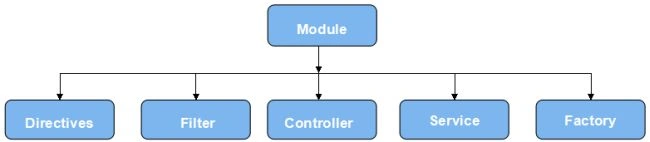
We have various parts in our applications, like controllers, directives, services, filters and so on. These parts are contained within a container called Modules. All the application controllers should belong to the module to define our application.
Advantages
What most of the web applications actually runs is a main method that is responsible for instantiation and the mapping of the various parts of the application. As we know, there is no such main method in AngularJS, in this scenario the concept of Modules comes into play where it declaratively specifies the roadmap of application bootstapping.
Angularjs also solves the issues of global value, such as global varialbles or global functions in which they can easily be destroyed by other scripts.
Besides this, there are the following additional advantages of using modules in applications.
- the application becomes more readable.
- It makes the application unit testing process faster since it loads relevant modules.
- Reusuability of code can be done.
- Easier to understand.
- Keeps a clean global namespace.
Creating AngularJS
- var module1 = angular.module('module1', []); //creating a module
- <!DOCTYPE html>
- <html ng-app="module1" xmlns="http://www.w3.org/1999/xhtml">
- <head>
- <title></title>
- <script src="http://ajax.googleapis.com/ajax/libs/angularjs/1.2.26/angular.min.js"></script>
- </head>
- <body>
- <script>
- // Angularjs script here
- </script>
- </body>
- </html>
- <!DOCTYPE html>
- <html>
- <head>
- <title>Module</title>
- <script src="angular.min.js"></script>
- </head>
- <body>
- <div ng-app="" ng-controller="detailscontroller">
- {{ Name + " " + dept }}
- </div>
- <script>
- function detailscontroller($scope) {
- $scope.Name = "iShriss";
- $scope.dept = "IT";
- }
- </script>
- </body>
- </html>
Using Module
- <!DOCTYPE html>
- <html>
- <head><title>using module</title>
- <script src="http://ajax.googleapis.com/ajax/libs/angularjs/1.2.26/angular.min.js"></script>
- </head>
- <body>
- <div ng-app="module1" ng-controller="detailscontroller">
- {{ Name + " " + dept }}
- </div>
- <script>
- var module1 = angular.module("module1", []);
- module1.controller("detailscontroller", function ($scope) {
- $scope.Name = "iShriss";
- $scope.dept = "IT";
- });
- </script>
- </body>
- </html>
Let's create a module.
- var module1 = angular.module("module1", []);
In the application angular.module('module1 '.[]) will actually create the module module1 and also override the existing module with the same name whereas angular.module('module1') retrieves the existing module module1.
- var module1 = angular.module('module1', []); //creating a module
- // adding some directives and services
- module1.service('Service1', ...);
- module1.directive('Directive1', ...);
- // overwrites both myService and myDirective by creating a new module
- var module1 = angular.module('module1', []);
We can define dependent modules using [] parameter in the module definition. After building the module, let's create a controller file.
- module1.controller("detailscontroller", function ($scope) {
- $scope.Name = "iShriss";
- $scope.dept = "IT";
So far so good ? Yes. We at least know what AngularJS Modules are, how they work and how they are used in applications. We also touched on the advantanges of using modules in applications, if the motive of this article is worthwhile.
Happy Coding folks!
Join the conversation! Your thoughts help the community grow.