

In this article you will come to know about the followings things,
- What is Views?
- Why we should use Views?
- What is System Views?
- What is User Defined Views?
- Syntax of User Views
- Step by Step View Creation & Execution.
- Single Table View
- Multiple Table View
What is Views?
As the name implies, VIEWS. SQL SELECT query is created only for viewing/display purposes. Views is a virtual table only used for viewing purpose. Views is created with the help of individual table or joining of tables. In short, in view we can join the fields from one or more database tables.
You can create multiple views of one table and one view with multiple tables.
View gives you the power to decide what column(s) / fields(s) display or not. We can easily maintain and display the column(s) as per privileges of user.
Why should we use views?
Views allow administrator and user to only view the records of tables. Insert, Update and Delete functionality restriction can be implemented with views very easily; that's why we should use VIEW.
By the way Single Table View can be used to Insert, Update and Delete the records. But multiple table VIEW cannot Update, Insert and Delete the records.
What is System Views?
Those views attached with system database and provide a detailed view of System Database called System Views.
Two types of System Views,
- Information Schema
- Catalog View
What is User Defined Views?
The View created by a user for specific tasksare called User Defined Views.
Mostly user defined views are created on user defined database not on system database.
Syntax of User Views
Single Table View
- CREATE VIEW <view_name> AS
- SELECT <column1>, <column2>. . .
- FROM <table>
- WHERE conditions;
MultiTable View
- CREATE VIEW <view_name> AS
- SELECT <column1>, <column2>. . .
- FROM <table> Join <Table>
- WHERE conditions;
Step by Step View Creation
Create Table
- ---tblEmployees Create Script
- USE [MbkTest]
- GO
- /****** Object: Table [dbo].[tblEmployees] Script Date: 26-Dec-19 12:07:27 PM ******/
- SET ANSI_NULLS ON
- GO
- SET QUOTED_IDENTIFIER ON
- GO
- SET ANSI_PADDING ON
- GO
- CREATE TABLE [dbo].[tblEmployees](
- [EmployeeID] [int] IDENTITY(1,1) NOT NULL,
- [PhoneNumber] [varchar](50) NULL,
- [SkillID] [int] NULL,
- [YearsExperience] [int] NULL,
- [EmployeeName] [nvarchar](50) NULL,
- PRIMARY KEY CLUSTERED
- (
- [EmployeeID] ASC
- )WITH (PAD_INDEX = OFF, STATISTICS_NORECOMPUTE = OFF, IGNORE_DUP_KEY = OFF, ALLOW_ROW_LOCKS = ON, ALLOW_PAGE_LOCKS = ON) ON [PRIMARY]
- ) ON [PRIMARY]
- GO
- SET ANSI_PADDING OFF
- GO
- ----tblSkills Create script
- /****** Object: Table [dbo].[tblSkills] Script Date: 26-Dec-19 3:54:52 PM ******/
- SET ANSI_NULLS ON
- GO
- SET QUOTED_IDENTIFIER ON
- GO
- SET ANSI_PADDING ON
- GO
- CREATE TABLE [dbo].[tblSkills](
- [SkillID] [int] IDENTITY(1,1) NOT NULL,
- [Title] [varchar](50) NULL,
- PRIMARY KEY CLUSTERED
- (
- [SkillID] ASC
- )WITH (PAD_INDEX = OFF, STATISTICS_NORECOMPUTE = OFF, IGNORE_DUP_KEY = OFF, ALLOW_ROW_LOCKS = ON, ALLOW_PAGE_LOCKS = ON) ON [PRIMARY]
- ) ON [PRIMARY]
- GO
- SET ANSI_PADDING OFF
- GO
Sample Datas
- ---tblEmployees Sample Records
- GO
- SET IDENTITY_INSERT [dbo].[tblEmployees] ON
- INSERT [dbo].[tblEmployees] ([EmployeeID], [PhoneNumber], [SkillID], [YearsExperience], [EmployeeName]) VALUES (1, N'9869569634', 2, 11, N'Suhana Kalla')
- INSERT [dbo].[tblEmployees] ([EmployeeID], [PhoneNumber], [SkillID], [YearsExperience], [EmployeeName]) VALUES (2, N'9869166077', 8, 14, N'Ashish Kalla')
- INSERT [dbo].[tblEmployees] ([EmployeeID], [PhoneNumber], [SkillID], [YearsExperience], [EmployeeName]) VALUES (3, N'9869569634', 1, 24, N'Manoj Kalla')
- INSERT [dbo].[tblEmployees] ([EmployeeID], [PhoneNumber], [SkillID], [YearsExperience], [EmployeeName]) VALUES (4, N'9969359746', 6, 20, N'Nirupama Kalla')
- INSERT [dbo].[tblEmployees] ([EmployeeID], [PhoneNumber], [SkillID], [YearsExperience], [EmployeeName]) VALUES (5, N'9869166012', 7, 28, N'Rajesh Bohra')
- INSERT [dbo].[tblEmployees] ([EmployeeID], [PhoneNumber], [SkillID], [YearsExperience], [EmployeeName]) VALUES (6, N'9261166012', 5, 18, N'Murli Vyas')
- INSERT [dbo].[tblEmployees] ([EmployeeID], [PhoneNumber], [SkillID], [YearsExperience], [EmployeeName]) VALUES (7, N'9161569634', 2, 5, N'Magan Shukla')
- INSERT [dbo].[tblEmployees] ([EmployeeID], [PhoneNumber], [SkillID], [YearsExperience], [EmployeeName]) VALUES (8, N'9219166077', 4, 7, N'Jagat Pratap')
- INSERT [dbo].[tblEmployees] ([EmployeeID], [PhoneNumber], [SkillID], [YearsExperience], [EmployeeName]) VALUES (9, N'9459569634', 6, 10, N'Suresh Kamalkar')
- INSERT [dbo].[tblEmployees] ([EmployeeID], [PhoneNumber], [SkillID], [YearsExperience], [EmployeeName]) VALUES (10, N'9687359746', 8, 2, N'Hari Vidhan')
- SET IDENTITY_INSERT [dbo].[tblEmployees] OFF
- ---tblSkills Sample Records
- SET IDENTITY_INSERT [dbo].[tblSkills] ON
- INSERT [dbo].[tblSkills] ([SkillID], [Title]) VALUES (1, N'Visual Foxpro')
- INSERT [dbo].[tblSkills] ([SkillID], [Title]) VALUES (2, N'C#')
- INSERT [dbo].[tblSkills] ([SkillID], [Title]) VALUES (3, N'VB.NET')
- INSERT [dbo].[tblSkills] ([SkillID], [Title]) VALUES (4, N'Delphi')
- INSERT [dbo].[tblSkills] ([SkillID], [Title]) VALUES (5, N'Java')
- INSERT [dbo].[tblSkills] ([SkillID], [Title]) VALUES (6, N'Power Builder')
- INSERT [dbo].[tblSkills] ([SkillID], [Title]) VALUES (7, N'COBOL')
- INSERT [dbo].[tblSkills] ([SkillID], [Title]) VALUES (8, N'Python')
- SET IDENTITY_INSERT [dbo].[tblSkills] OFF
Creating Single Table View
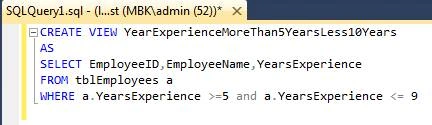
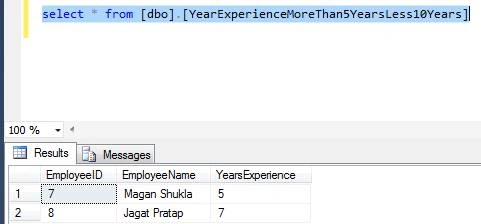
You can see in view we had used a single table called tblEmployees and only three columns are shown in output. Columns are EmployeeID, EmployeeName, and YearsExperience.
VIEW COMMAND
- CREATE VIEW YearExperienceMoreThan5YearsLess10Years
- AS
- SELECT EmployeeID, EmployeeName,YearsExperience
- FROM tblEmployees a
- WHERE a.YearsExperience >= 5 and a.YearsExperience <= 9
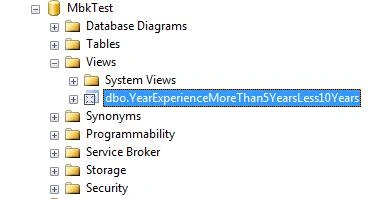
Refresh your database
Output - Testing View
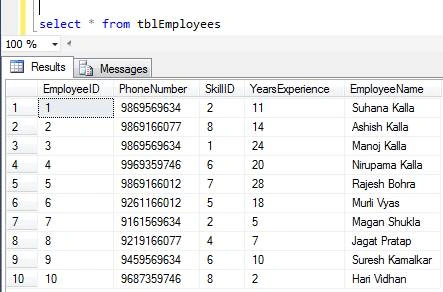
You can see all records of tblEmployees :
Command
select * from tblEmployees
Now we execute/run our VIEW called,
Command
select * from [dbo].[YearExperienceMoreThan5YearsLess10Years]
Creating Multiple Table View
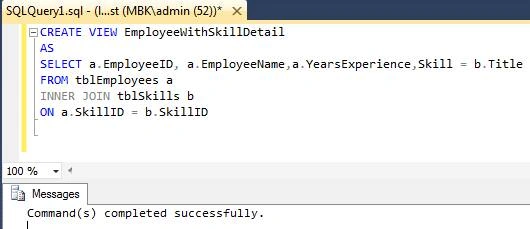
You can see in view we had used two tables,
- tblEmployees
- tblSkills
We had shown the following columns,
- EmployeeID
- EmployeeName
- YearsExperience
- Skills
VIEW COMMAND
- CREATE VIEW EmployeeWithSkillDetail
- AS
- SELECT a.EmployeeID, a.EmployeeName,a.YearsExperience,Skill = b.Title
- FROM tblEmployees a
- INNER JOIN tblSkills b
- ON a.SkillID = b.SkillID
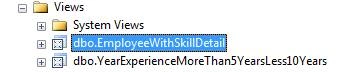
Refresh Database and see view is created successfully,
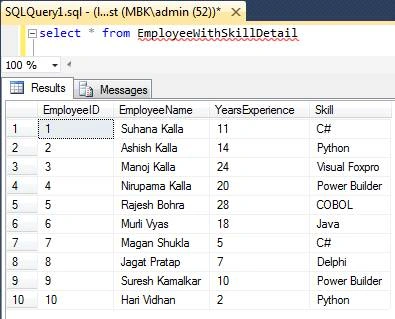
OUTPUT
Now we execute/run our VIEW called,
Command
select * from [dbo].[EmployeeWithSkillDetail]
Happy Coding. .
Sourav Kumar DasPosted Jan 6, 2020, 3:28 AM
Nice and useful article.
Amit MohantyPosted Jan 5, 2020, 11:20 PM
Nice article.
Zulqadar IdrishiPosted Jan 5, 2020, 10:37 PM
Very Helpful And Easy to Understand Article
Dipak NilePosted Jan 5, 2020, 8:20 PM
Nice Explanation.
Chittaranjan SwainPosted Jan 3, 2020, 12:07 PM
Nice article.