

Introduction
Hello Guys,
In this article, I will tell you about Pivot in SQL. In this article we will discuss what is Pivot, the syntax of Pivot, how to implement Pivot, how to Implement dynamic columns in Pivot, and much more. I hope this article helps you.
What Is a Pivot Clause?
Pivot is a relational operation available in SQL server that allows users to convert row-level data to the column level. A Pivot clause allows you to write cross-tabulation. This means that you can aggregate your results and rotate rows into columns.
Syntax
- SELECT Column_Name AS < Column_Name_alias>,
- [pivot_value1], [pivot_value2], ... [pivot_value_n]
- FROM
- (
- <TableName>) AS < TableName_alias>
- PIVOT
- (
- aggregate_function(<aggregate_column>)
- FOR <pivot_column>
- IN ([pivot_value1], [pivot_value2], ... [pivot_value_n])
- ) AS <pivot_table_alias>;
Syntax Explanation
- Column_Name
This column is the table column that shows up as the first column in a Pivot table. It's mostly a column that has unique data used as the first column in a Pivot table.
- Column_Name_alias
This is alias of that column. In simple words, the value of this is shown as a label in header of this column.
- Pivot Values
This is your column values, not the column name but a unique value inside your column. This value can be any number.
- TableName and TableName_alias
This is your table name on which you want to perform the Pivot operation and the alias is a label that works as a table name.
- Pivot
Using this clause we can create a pivot table.
- Aggregate Function and Aggregate Column
If you perform a Pivot clause, you need to use aggregate functions like MIN(), MAX(), SUM(), AVG(), COUNT(), etc. if you do not use the aggregate function, then it will generate a syntax error and you can only use one column in this section.
- pivot_column
This is the column that contains Pivot values.
Create Table to Perform Operation on It
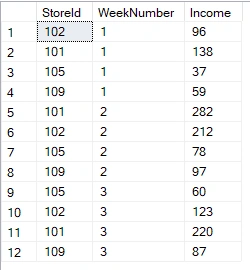
Here we create a table called StoreTbl which has three columns, StoreId : The ID of Store, WeekNumber : Week number of collection, and Income : Total income of that week.
- CREATE TABLE StoreTbl
- (
- [StoreId] int,
- [WeekNumber] int,
- [Income] int
- );
Insert Data in Table
Now we insert some data in our table.
- INSERT INTO StoreTbl
- (
- [StoreId],
- [WeekNumber], [Income]
- )
- VALUES
- (102, 1, 96),
- (101, 1, 138),
- (105, 1, 37),
- (109, 1, 59),
- (101, 2, 282),
- (102, 2, 212),
- (105, 2, 78),
- (109, 2, 97),
- (105, 3, 60),
- (102, 3, 123),
- (101, 3, 220),
- (109, 3, 87);
We have the table data shown in the below image.
Create a Pivot Table
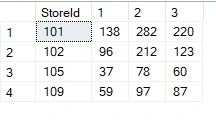
Using the below query, we can create a Pivot table.
- select StoreId,[1],[2],[3] from
- (
- select * from StoreTbl
- ) ST
- PIVOT
- (
- SUM(Income) for WeekNumber in ([1],[2],[3])
- )as StorePivot
Output
Use Dynamic Pivot Column
In many scenarios, we don’t how which value can be used as a pivot column because we have lots of data, and creating columns one by one is difficult. In this case, we define dynamic Pivot columns to create a Pivot table. Let’s take the below example:
- Declare @ColumnName nvarchar(max)
- Declare @SQLQuery nvarchar(max)
- select @ColumnName=STUFF((select distinct ',['+ cast( WeekNumber as nvarchar)+']' from StoreTbl for xml path ('') ),1,1,'')
- print 'Column Names ....'
- print @ColumnName
- set @SQLQuery= 'select StoreId,'+@ColumnName+' from (
- select * from StoreTbl )
- ST
- PIVOT (
- SUM(Income) for WeekNumber in ('+@ColumnName+')
- )as StorePivot'
- print 'SQL Query ......'
- print @SQLQuery
- EXEC SP_EXECUTESQL @SQLQuery
Explanation
- In the above query, we declare two variables, ColumnName and SQLQuery.
- Then we assign the distinct value of the Week column to the ColumnName variable with comma separation and enclose it in a big bracket. Using this, we get data like [1],[2],[3]. We can use this data as a Pivot column.
- Then we create a query in single quotes because we assign Pivot columns in variable and if we execute the direct query with a variable, then we get a syntax error.
- Like syntax, we create queries to generate a Pivot table.
- In the end, we execute an SQLQuery variable and get the same output as we get above.
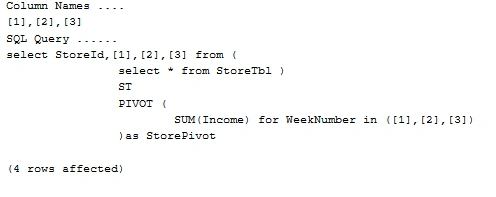
After executing the above query, we get the following print lines in the message tab.
I hope you find this article useful and get some help. If you like this article, please share it with your friends. Thank you.
Nikunj SatasiyaPosted Jan 12, 2021, 9:40 AM
Nice Explanation Yogesh, Thank you for sharing this article with us. I also have written one article on PIVOT and UNPIVOT that you may like to read. Link: https://www.codingvila.com/2019/05/pivot-and-unpivot-in-sql-server-with-example.html