
Introduction to Extension-method
Extension-method gives you the power to add new methods to existing types. You don’t have to create a new derived-type. You can write an extension-method of any data-type you want. It’s just like writing a simple function of a specific class. These are static methods. We can extend any class or interface to write our own extension-method but remember, we cannot override the existing ones. Even if we have the same name and signature of our own extension-method as of the existing one, then our method cannot be called in any case. So, make sure that whenever you write your extension-method, name and signature should differ from the existing ones.
Examples
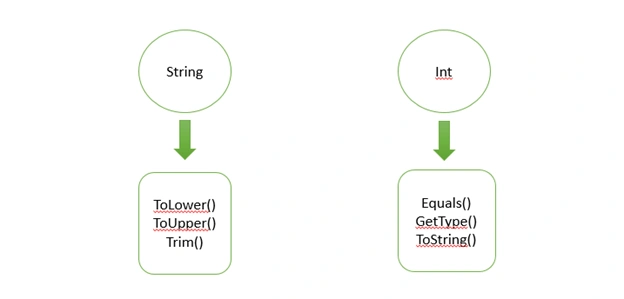
Reason to use Extension-method
If your application requires some task that you have to perform repeatedly on certain specific data type then writing extension-method for that is the best way to do it. For example, if your application is managing some accounts then the best practice to write value is through thousands of separator. So, now you know that amount will always be of specific data-type, let’s say ‘float’ and you always have to show amount through thousands operator. Now, it’s the best way to extend the ‘interface’ of ‘float’ and write a method for it and once you do that, that method will be accessible in your whole application and you can utilize it wherever you want.
Utilizing your Extension-method
It’s too simple to call your extension method. Just declare a variable of a type for which you have written extension-method. After variable, put a dot (.) and then you can see your extension-method appearing in IntelliSense. I will show you an example later on.
Benefits of Extension-method
There are a couple of advantages if we write our extension method.
- If you are using any third-party library and you want to add a method to that, then you can do it without recompiling the original code with the help of extension-method.
- Your code remains clean and readable with an extension-method. It’s very easy, not only for you but for everyone to read and understand your code. Because after variable you just place a dot and your method starts appearing.
Implementing Extension-method
Some of us already have an experience of writing extension methods in C# but in this article, I will show you how to write extension-methods in typescript. It’s very easy and simple.
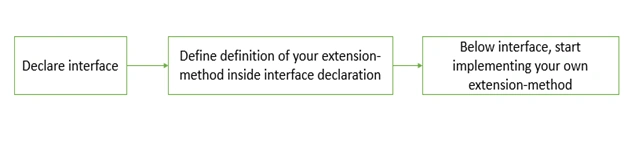
There are a few things you have to do for it. Firstly, you define the interface of the type for which you want to write the extension-method. In that interface, you declare the definition of extension-method which includes two things; 1) name, 2) return type. These steps can be illustrated as,
- interface Number {
- thousandsSeperator(): String;
- }
After that, below the interface, you start writing your own extension-method.
- Number.prototype.thousandsSeperator = function(): string {
- return Number(this).toString().replace(/\B(?=(\d{3})+(?!\d))/g, ',');
- }
As you can see, I have written a very simple extension-method in which I have used a regular expression to determine if 3 digits have passed through. If yes, then I just replace the comma after that and this is achieved using ‘replace’ function which is pre-defined in the ‘String’ type.
Now, you have written your own extension-method. To utilize it, you just use it like the other built-in functions like.
- number: Number;
- result: String;
- this.number = 123456789;
- this.result = this.number.thousandsSeperator();
You can see the result yourself after running this.
This solution worked if you are writing the function and utilizing it in the same file. What if, you have to make a separate file in which you define all your extension-methods and then use any of them in any other file you want?
For that, you have to first declare the interface globally and then export your all extension-methods. And when you want to use them, just import the file of extension-methods and you can use any function from that.

Let’s take the same example as above.
- declare global {
- interface Number {
- thousandsSeperator(): String;
- }
- }
- Number.prototype.thousandsSeperator = function(): string {
- return Number(this).toString().replace(/\B(?=(\d{3})+(?!\d))/g, ',');
- }
- export {};
So, what does the ‘declare global’ and ‘export{};’ do?
In simple words, it declares your file globally i.e. throughout the application. And export makes this function importable in any file so you have to make these two changes to use your extension-methods in any file of your application.
In another file, where you want to import this. Import it like this,
- import './extension-method/extension-method.component'
- number: Number;
- result: String;
- this.number = 123456789;
- this.result = this.number.thousandsSeperator();
When this code will be executed, we can see the value of the result will be: 123,456,789
So, this is how you can write and use your own extension-methods in your application. This was a basic example to do it. It’s really easy and simple but once you do it, your code remains clean and readable.
Jens MelgaardPosted Mar 8, 2021, 3:59 PM
This is not extension methods, as you know them from C#, and it is just horrible advice to give. It is generally discouraged adding to existing prototype objects in JavaScript as there can be dire consequences down the road. One post out there that describes a bit of the negative impact: https://flaviocopes.com/javascript-why-not-modify-object-prototype/ and go search, you can find plenty more.
Ben BaloyiPosted Nov 20, 2018, 3:47 AM
Export { }; declare global { interface StringConstructor { Empty: string; WhiteSpace: string; isNullOrEmpty(val: string): boolean; isNullOrWhiteSpace(val: string): boolean; contains(base: string, val: string): boolean; cut(val: string, startIndex: number, endIndex: number): string; remove(base: string, val: string): string; replaceAll(base: string, val: string, replaceWith: string): string; } } String.Empty = ''; String.WhiteSpace = ' '; String.isNullOrEmpty = function (val: any): boolean { if (val === undefined || val === null || val.trim() === String.Empty) { return true; } return false; };
La' BellePosted Aug 28, 2018, 4:49 AM
Hi, thx for the article. Though i have a query. What if i want to declare an extension method on a third party class library and the use both the original class method along with my own extension methods from anywhere in my project. With your example, it seems that you need to have the interface declarations first, but surely we wont be able to edit the original library definition without compiling it right? Also, extension method in C# allows static non-instance calls for eg. "Number.thousandsSeperator(this.number);". With your implementation, we must always use instance methods.