

Introduction
Let’s develop a simple C# console application to perform lazy loading with generic method.
Getting Started
In ASP.NET 5 we can create console applications. To create a new console application, we first open Visual Studio 2015. Create it using File-> New-> Project.
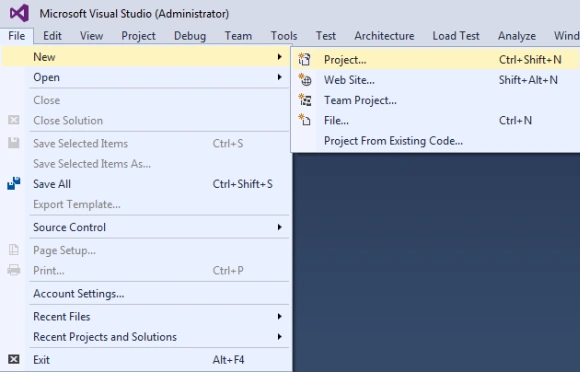
Now we will select the ASP.NET 5 Console Application because we will create the console application and click on the OK button.
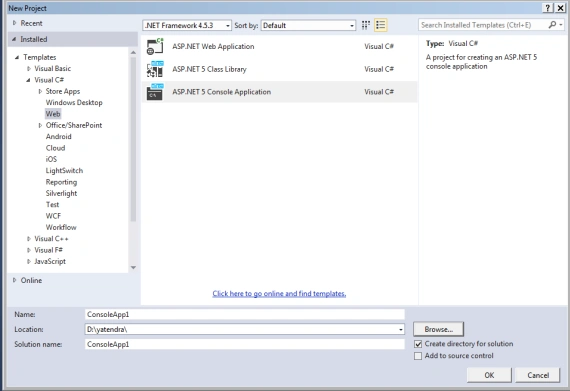
We need to include the following references in our application.
- using System;
- using System.Collections.Generic;
- using System.Linq;
- EducationProfile<T> – To define class members.
- Candiate<T> = Initialize lazy loading in the class.
- CallLazyLoading = call the function
- static void Main(string[] args)
- {
- try
- {
- CallLazyLoading();
- }
- catch (Exception Ex)
- {
- Console.WriteLine("Error:" + Ex.Message);
- }
- Console.ReadKey();
- }
Initilaze the Class
The first-class definition for the EducationProfile<T> is given below
- public class EducationProfile<T>
- {
- public T Id { get; set; }
- public T Class { get; set; }
- public T PassingYear { get; set; }
- }
The second-class definition for the Candiate<T> is given below
- public class Candiate < T > {
- public T Name {
- get;
- set;
- }
- public T EducationProfileId {
- get;
- set;
- }
- public Lazy < List < EducationProfile < string >>> educationProfilesList = new Lazy < List < EducationProfile < string >>> ();
- public Candiate(T name, T id) {
- //Initializing Candiate Object
- Name = name;
- EducationProfileId = id;
- educationProfilesList = new Lazy < List < EducationProfile < string >>> (() => {
- return GetEducationProfileList(id);
- });
- //Initialization done
- }
- private List < EducationProfile < string >> GetEducationProfileList(T id) {
- //Loading EducationProiles
- List < EducationProfile < string >> EducationList = new List < EducationProfile < string >> ();
- Parallel.For(100, 110, (int i) => {
- EducationProfile < string > educationprofile = new EducationProfile < string > ();
- educationprofile.Id = i.ToString();
- educationprofile.Class = "MCA";
- educationprofile.PassingYear = "2012";
- EducationList.Add(educationprofile);
- });
- return EducationList;
- }
- }
Initialize the Method
The method definition for the CallLazyLoading() is given below
- public static void CallLazyLoading()
- {
- Candiate<string> candiate = new Candiate<string>("Nirmal dayal", "1");
- Console.WriteLine("Name:{0}", candiate.Name);
- Console.WriteLine("\n");
- foreach (EducationProfile<string> eduProfile in candiate.educationProfilesList.Value)
- {
- Console.WriteLine("Id:{0}", eduProfile.Id);
- Console.WriteLine("Degree:{0}", eduProfile.Class);
- Console.WriteLine("Passing Year:{0}", eduProfile.PassingYear);
- Console.WriteLine("\n");
- }
- }
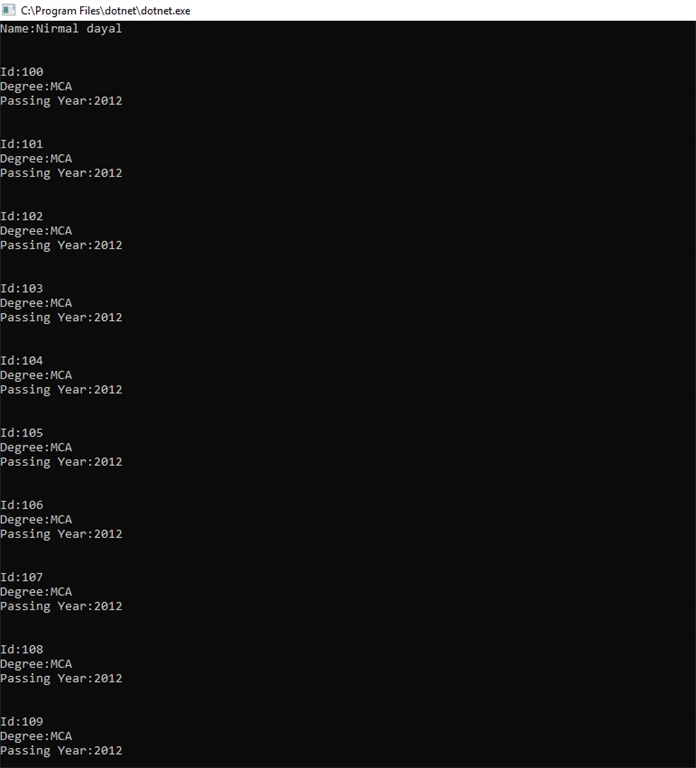
I hope this article is helpful for the design of lazy loading with generic class when you want to begin working in the ASP.NET 5 console applications. Thanks for reading this article.
Sourav Kumar DasPosted Nov 13, 2019, 3:54 AM
Nice Article Sir.