

Introduction
Lazy loading is a performance optimization technique for both web and mobile applications. In this article, we are going to explore what lazy loading is and how to implement lazy loading in React applications.
Lazy Loading
- Lazy loading is an important concept in modern web apps which allows us to load only the resources (scripts, images, etc.) we really needed.
- Instead of loading the entire web page and rendering in browser all at once, just render the critical component first, then render the remaining components later or when required.
Advantages
- Reduce the initial page loading time due to avoid the import all scripts in the applications.
- Reduce the bandwidth for users due to minimizing the resource loading.
- It does cost-effective in terms of reducing the load time and bandwidth.
How to implement Lazy Loading in React Applications
React has built-in support for lazy loading components. There are two features to implement lazy loading in React applications.
- React.lazy()
- React.Suspense
React.lazy()
- React.lazy() is the function that allows implementing the dynamic import for regular components in React.
- It is introduced in React 16.6.
React.lazy() eliminates the use of a third-party library such as react-loadable for lazy loading.
//Declare
const User = React.lazy(() => import('./User.js'));

//Consume
<div>
    <User/>
</div>
React.Suspense
- React.suspense has a fallback property which takes the react element that wants to render while the component is being loaded using React.lazy.
- Basically, it is wrapped in lazy components.
Multiple lazy components can be wrapped with the one suspense component.
<div>
    <Suspense fallback={<div>loading...</div>}
        <User/>
    </Suspense>
</div>
Example
I have created a simple application for lazy loading. In this application, there are two components "Product" and "Brand" which are loaded inside the "Layout" component.
<div>
    <div>
      <Product />
    </div>
    <div>
      <React.Suspense fallback={<div>Loading...</div>}>
        <BrandComponent />
      </React.Suspense>
    </div>
</div>
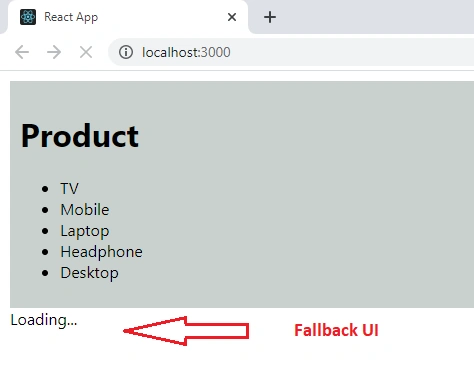
The "Product" component will load initially.
<div>
  <Product />
</div>
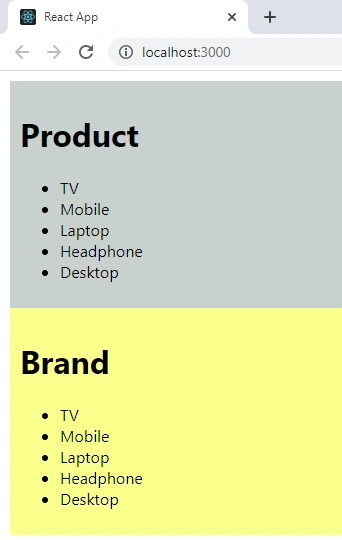
The "Brand" component will load after 5 seconds using React.lazy().
const BrandComponent = React.lazy(
  () =>
    new Promise((resolve, reject) =>
      setTimeout(() => resolve(import("./Brand")), 5000)
    )
);
<div>
  <React.Suspense fallback={<div>Loading...</div>}>
    <BrandComponent />
  </React.Suspense>
</div>
Added below fallback UI to display while "Brand" component being loaded using React.Suspense.
<React.Suspense fallback={<div>Loading...</div>}>
Initial load of the application,
After 5 seconds,
Summary
- Lazy loading is one of the performance optimization techniques in web applications.
- Lazy loading can be done using React.lazy() and React.Suspense in React applications.
I hope you have liked it and learned about lazy loading and implement lazy loading in React applications.
Join the conversation! Your thoughts help the community grow.