

Let me explain the following terms:
- Layout View: Master Page type of functionalities.
- View: Content Page.
- Partial View: User Control.
Layout View
It is used for the display of some part of the web page constant, such as header and footer, and sometimes, the left side bar or the right side bar. It has a common UI component which is shareable on all the pages.
Layout view is a parent container in which view and partial view renders on the client side.
In Inside Layout view, you will find @RenderBody(). This function will render view.
View
This is similar in type to the content page. We can display the content with or without Layout view(Master page). Sometimes, we are required to use the Layout view and sometimes it is not required.
In the view file, which uses layout view, there is no basic <HTML> , <HEAD> and <BODY> tags because it uses LayoutView tag.
If you are creating VIEW without Layout view, then the view file is created with full HTML tags like <HTML> , <HEAD> and <BODY> , because this is an individual view file.
Partial View
The Partial view is similar to the User control of Webform terminology.
Example
We want to display the current balance of the user and the number of days left for the events on the page.
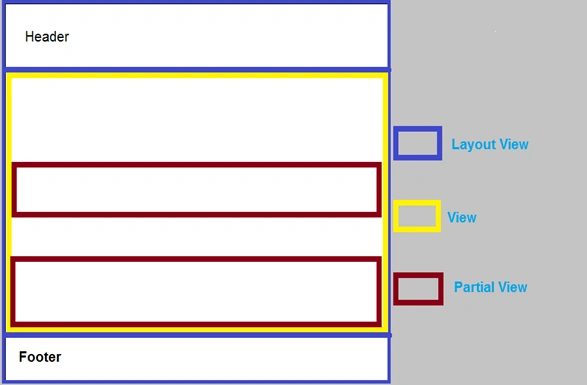
As you can see in the image above:
- Indigo(Blue) line is a Layout view.
- Yellow line is a view.
- Purple line is a Partial view.
- To create a Layout view.
- To create a View under Layout view.
- To create a Partial view
Steps to create Layout, View, and Partial View
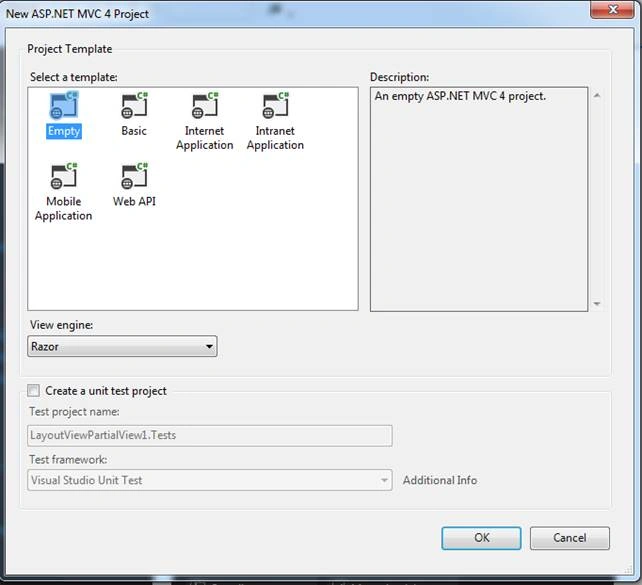
To learn about views, I created an empty MVC4 project.
- Create ASP.NET MVC4 Web Application named: LayoutViewPartialView,
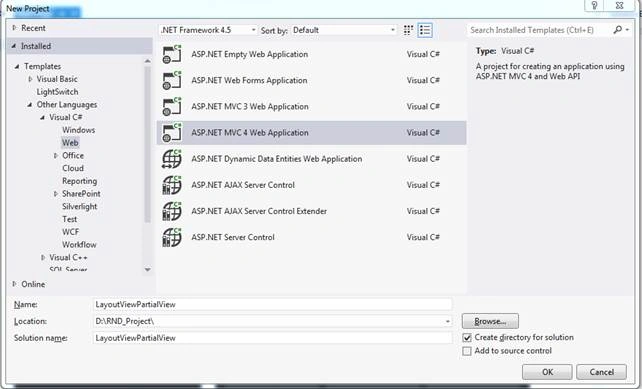
- Select Empty, as shown below:
Now, we will create the following things:
- A Layout view.
- Aview under Layout view
- APartial view
Layout View Example
- Right click on the View Folder.
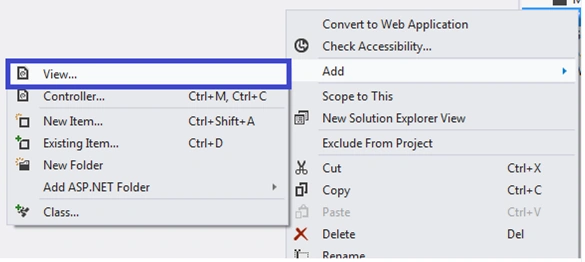
- Select View
After selecting view, you will get the following screenshot: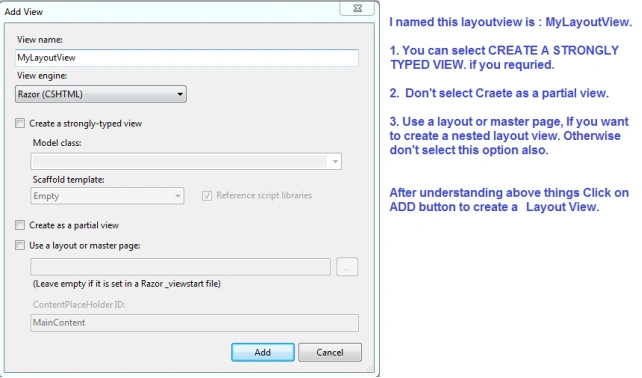
Create Layout View contents:
- @{
- Layout = null;
- }
- <!DOCTYPE html>
- <html>
- <head>
- <meta name="viewport" content="width=device-width" />
- <title>MyLayoutView</title>
- </head>
- <body>
- <div></div>
- </body>
- </html>
- <!DOCTYPE html>
- <html>
- <head>
- <meta name="viewport" content="width=device-width" />
- <title>MyLayoutView</title>
- </head>
- <body>
- <div>
- @RenderBody()
- </div>
- </body>
- </html>
- @ {
- Layout = null;
- }
I put @RenderBody, because VIEW (content pages) will render there.
@RenderBody()
View Example
Now, we are going to create View, which is under LayoutView.
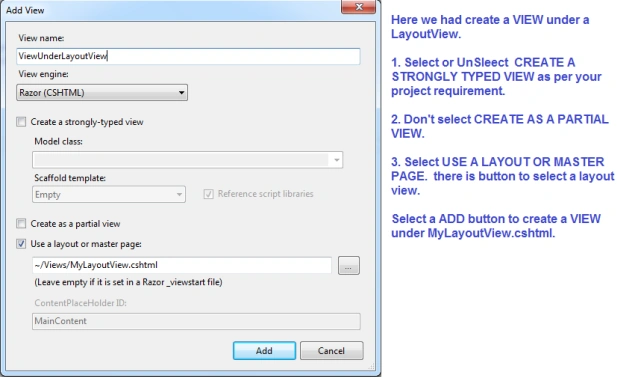
By default, LayoutView.cshtml will display as shown below:
- @{
- ViewBag.Title = "ViewUnderLayoutView";
- Layout = "~/Views/MyLayoutView.cshtml";
- }
- <h2>ViewUnderLayoutView</h2>
Now, we are going to create Partial view, which is under Layout View / View.
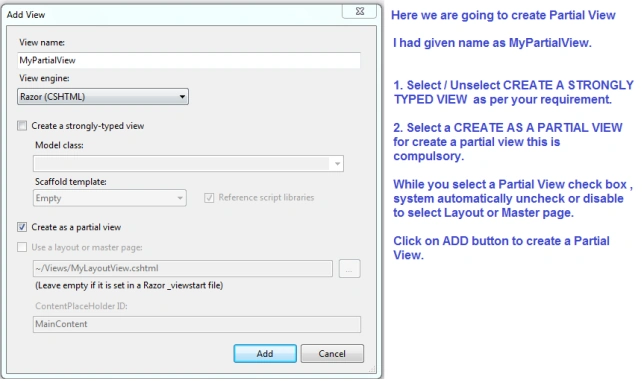
There is no predefined text that will come in MyPartialView.cshtml file.
Shobana JPosted Jul 7, 2016, 6:49 AM
NICE ONE
Roshan MulePosted Jul 3, 2016, 2:29 AM
I am fine. how are you sir? i start learn mvc. Thank you sir your every article is very good and helpful.
Manoj KallaPosted Jun 27, 2016, 1:24 AM
Sure , Roshan I will publish soon.. How are you?
Roshan MulePosted Jun 26, 2016, 4:59 AM
Very nice article sir, Thank you. sir please publish some article on asp.net mvc,i am waiting for your asp.net mvc article.
Santhakumar MunuswamyPosted Jun 25, 2016, 2:23 AM
Thank you for nice article
Vignesh ManiPosted Jun 17, 2016, 5:19 AM
Nice one
Hari ShankerPosted Jun 17, 2016, 4:08 AM
Nice
Maruthi PalllamalliPosted Jun 17, 2016, 1:50 AM
I am having one question here that is about partial views, It is like web user controls. I can use user controls on different web pages, so can i use same partial views on different view layouts ? if not means why should we called it as user controls ?
Manoj KallaPosted Jun 17, 2016, 1:11 AM
Thank You.. All My Dear Friends
Debasis SahaPosted Jun 17, 2016, 12:50 AM
Nice one..
RajaPosted Jun 17, 2016, 12:48 AM
Nice Share...
Thiruppathi RPosted Jun 16, 2016, 11:07 PM
Nice...
Dominique CejaPosted Jun 16, 2016, 12:48 PM
Thanks