

Introduction
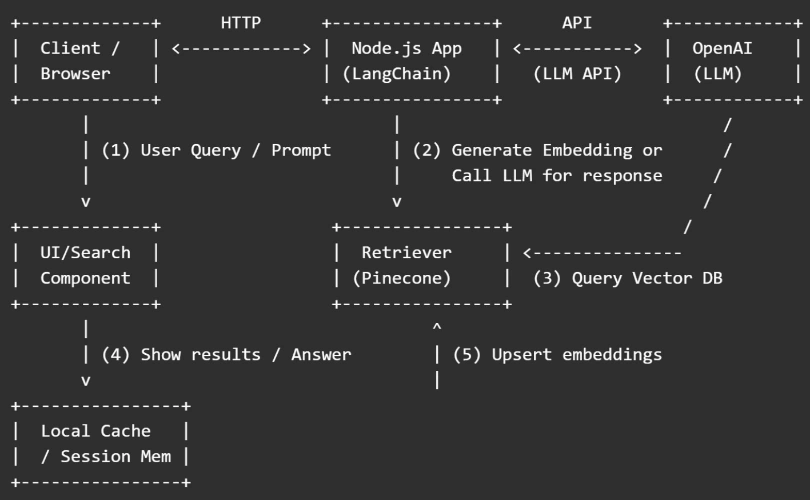
This article presents a clear and simple diagram, along with an explanation, of the data flow when using LangChain, OpenAI, and Pinecone together in a Node.js application. The diagram is followed by step-by-step notes, where the role of each component is explained.
ASCII Data Flow Diagram
Want to Build This Architecture in Code?
If you're ready to turn this diagram into a working Node.js application, check out this companion tutorial:
How to Use LangChain with OpenAI and Pinecone in Node.js
It walks you through setting up LangChain, connecting to OpenAI and Pinecone, and building a Retrieval-Augmented Generation (RAG) pipeline — step by step, with beginner-friendly code and explanations tailored for developers in India and beyond.
Step-by-step Explanation
1. Client / Browser
The user types a question in the web app (for example, "Show me the policy about refunds").
The front-end sends that text to your Node.js backend (via an API call).
Keywords:
user query,frontend,Node.js API,RAG user input.
2. Node.js App (LangChain Layer)
LangChain organizes the flow: it decides whether to call the vector store (Pinecone) or call OpenAI directly.
If the app uses Retrieval-Augmented Generation (RAG), LangChain first calls the embedding model (OpenAI Embeddings) to convert the user query into a vector.
Keywords:
LangChain orchestration,LLM orchestration Node.js,RAG in Node.js.
3. Pinecone (Vector Database)
The Node.js app (via LangChain) sends the query vector to Pinecone to find similar document vectors.
Pinecone returns the most similar text chunks (with IDs and optional metadata).
These chunks become “context” for the LLM.
Keywords:
Pinecone vector search,semantic search Pinecone,vector DB Node.js.
4. Call OpenAI LLM with Context
LangChain takes the retrieved chunks and the user query and builds a prompt.
The prompt is sent to OpenAI (GPT-4 or GPT-3.5) to generate an answer that uses the retrieved context.
The LLM returns the final natural-language response.
Keywords:
OpenAI prompt,LLM context,GPT-4 Node.js.
5. Upsert / Indexing (Uploading Documents)
When you add new documents, your app breaks each document into small chunks, computes embeddings (with OpenAI Embeddings), and upserts them into Pinecone.
This process is called indexing or embedding ingestion.
Keywords:
upsert Pinecone,embeddings ingestion,document chunking.
6. Caching & Session Memory
To save costs and reduce latency, cache recent responses or embeddings in local cache (Redis or in-memory) before calling OpenAI or Pinecone again.
Keywords:
cache OpenAI responses,session memory LangChain,Redis for LLM apps.
Example Sequence with Real Calls (Simplified)
Client -> POST /query { "question": "How do refunds work?" }
Server (LangChain): embed = OpenAIEmbeddings.embedQuery(question)
Server -> Pinecone.query({ vector: embed, topK: 3 }) => returns docChunks
Server: prompt = buildPrompt(docChunks, question)
Server -> OpenAI.complete(prompt) => returns answer
Server -> Respond to client with answer
Security, Cost, and Performance Notes
Security: Keep API keys in environment variables. Use server-side calls (do not expose OpenAI keys to the browser).
Cost: Embedding + LLM calls cost money (tokens). Use caching, limit topK, and batch embeddings to save costs.
Latency: Vector search + LLM calls add latency. Use async workers or streaming to improve user experience.
Quick Checklist for Implementation
Create OpenAI and Pinecone accounts and API keys
Initialize a Node.js project and install
langchain,openai, and@pinecone-database/pineconeBuild ingestion pipeline: chunk -> embed -> upsert
Build query pipeline: embed query -> pinecone query -> construct prompt -> call LLM
Add caching, rate limits, and logging
Monitor cost and performance
Summary:
This article provides a clear, overview of the how LangChain, OpenAI, and Pinecone work together in a Node.js app, using an ASCII diagram and step-by-step explanation. It walks readers through the data flow of a Retrieval-Augmented Generation (RAG) system, showing how user queries are processed, embedded, searched in Pinecone, and answered via OpenAI’s LLMs. Each component’s role—client, LangChain orchestration, Pinecone vector search, OpenAI prompt generation, and caching—is explained in simple terms. The guide also includes real API call sequences, performance tips, and implementation checklists, making it ideal for developers in India and beyond building intelligent, scalable AI apps.
Join the conversation! Your thoughts help the community grow.