

Abstract
The concept of functional programming was introduced in .NET 3.0 in the form of lambda expressions where we can succinctly define function objects for use at any time. However, C# endorsed this capability via delegates earlier, whereby you create a function object. Lambda expressions provide a more natural way to create and invoke a function. Lambda expressions are a syntax whereby you can declare anonymous functions (delegates) by joining two actions simultaneously, their creation and a connection, into one expressive statement in the code.
Lambda Expressions
Lambda expressions are unnamed and are defined using the lambda operator (=>). They are very similar to anonymous methods, however more flexible and encapsulates code without the normal function keyword signature. The left-hand side of the lambda operator is typically, the input and right-hand side points to code to be executed. Lambda expressions are useful, while LINQ queries, less verbose, eliminate the need for anonymous methods where the delegate type is typically employed in C# code to achieve a specific feat. The following code snippet adds two numerics using delegate types.
Listing 1: Lambda expression sample code (calculating addition)
- class Program
- {
- // delegates
- delegate int test(int x, int y);
- static void Main(string[] args)
- {
- // Lambda expression
- test mthd = (x, y) => { return x + y; };
- //method calling with parameters
- Console.WriteLine("Addition is {0}",mthd(20,30));
- Console.ReadKey();
- }
- }
Listing 2: Lambda expressions without curly braces
- // delegates
- delegate int test(int x);
- static void Main(string[] args)
- {
- // Lambda expression
- test mthd = x => x * x;
- //method calling with parameters
- Console.WriteLine("Square is {0}",mthd(20));
- }
Listing 3: Lambda expressions with local variable reference in the scope
- class Program
- {
- // delegates
- delegate double CalArea(double r);
- static void Main(string[] args)
- {
- double pi = 3.14;
- // Lambda expression
- CalArea mthd = r => pi * r * r;
- //method calling with parameters
- Console.WriteLine("\n\nArea is = {0}",mthd(7));
- Console.ReadKey();
- }
- }
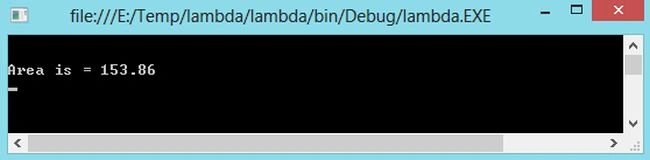
Figure 1: Area Calculation Output
Lambda expressions are nothing more than a very exact way to write anonymous methods and ultimately simplify how we work especially, with the, .NET delegate's types. The following code uses lambda expressions to simplify the call to FindAll even more. When we make use of lambda syntax, there is no trace of underlying delegate objects.
Listing 4: Data searching using lambda expressions
- class Program
- {
- static void Main(string[] args)
- {
- searchData();
- Console.ReadKey();
- }
- static void searchData()
- {
- List<int> lst = new List<int>();
- lst.AddRange(new int[] {21,22,18,10,35,42,23,24,25});
- List<int> even = lst.FindAll(i => (i % 2)== 0);
- Console.WriteLine("\nEven Number Listing\n");
- foreach(int evNumber in even)
- {
- Console.WriteLine("{0}\t", evNumber);
- }
- }
- }
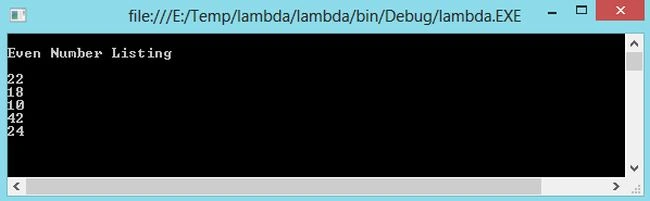
Figure 2: Even Numbers listing
A lambda expression can be used anywhere you would have used an anonymous method or delegate type. The C# compiler translates the expression into a standard anonymous method making use of the delegate type implicitly that can be verified using ILDASM.EXE as in the following:
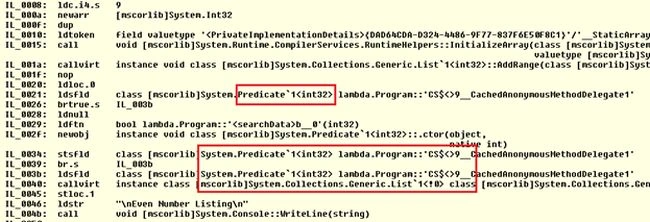
Figure 3: predicate<> in IL code
More specifically, examine our previous code in which a lambda expression was used as:
- List<int> even = lst.FindAll(i => (i % 2)== 0);
- List<int> even = lst.FindAll(delegate (int i));
This chapter has introduced the theory behind lambda expressions as well as illustrates its syntax of expressions. We have been provided with an understanding of how lambda expressions are replacements for anonymous methods. We have also seen how to convert lambda expressions, with and without statement bodies, into delegates.
Muhammad Asif ShahzadPosted Mar 1, 2018, 10:52 PM
Nice article very helpfull
Gaurav Kumar AroraPosted Nov 16, 2014, 3:10 AM
Ajay Yadav - great explanation. Keep writing good stuff :)
Mahsa HassankashiPosted Nov 15, 2014, 5:25 AM
Thank you
Joginder BangerPosted Nov 15, 2014, 4:12 AM
List<int> lst = new List<int>(); lst.AddRange(new int[] {21,22,18,10,35,42,23,24,25}); List<int> even = lst.FindAll(i => (i % 2)== 0); Console.WriteLine("\nEven Number Listing\n"); foreach(int evNumber in even) { Console.WriteLine("{0}\t", evNumber); } sir how can get even value with any loop like lst.findAll(i=>(i%2)==0).select(i=>i)