

This is the second part in a short series about aspects of KnockoutJS. First part can be viewed from here>>
The article provides simple walk-through instruction on working with arrays in KnockoutJS, and demonstrates how to save KnockoutJS JSON data from the client browser to server using a mapped ViewModel object.
Setup
This example uses a simple MVC project with no other dependencies other than KnockoutJS and some supporting libraries. Our example will use a basic model of a sales-person that has many customers each who can have many orders.
Server-side code
The following is the simple model we will use to represent the "Sales person".
Sales person can sell in many regions
Sales person can sell to many customers, customers can have many orders
The following code sets up this simple model server-side.
- public class SalesPerson
- {
- public string FirstName { get; set; }
- public string LastName { get; set; }
- public List<region> Regions {get; set;}
- public List<customer> Customers {get; set;}
- public SalesPerson()
- {
- Regions = new List<region>();
- Customers = new List<customer>();
- }
- }
- public class Region
- {
- public int ID { get; set;}
- public string SortOrder { get; set; }
- public string Name { get; set; }
- }
- public class Customer
- {
- public int ID { get; set; }
- public string SortOrder { get; set; }
- public string Name { get; set; }
- public List<order> Orders { get; set; }
- public Customer()
- {
- Orders = new List<order>();
- }
- }
- public class Order
- {
- public int ID { get; set; }
- public string Date { get; set; }
- public string Value { get; set; }
- }
- public ActionResult Index()
- {
- return View();
- }
- public JsonResult SaveModel(SalesPerson SalesPerson)
- {
- // the JSON Knockout Model string sent in, maps directly to the "SalesPerson"
- // model defined in SharedModel.cs
- var s = SalesPerson; // we can work with the Data model here - save to
- // database / update, etc.
- return null;
- }
- public ActionResult Index()
- {
- // create the model
- SalesPerson aalesPersonModel = new SalesPerson
- return View(salesPersonModel);
- }
- @Html.Raw(Json.Encode(Model))
Client-side code
The first thing we will do client side, is set up a JavaScript file in our MVC project to mirror our server-side model, and give it some functionality.
If we work backwards up the model tree we can see more clearly how things are created.
Customers can have many orders, so lets discuss that first.
- var Order = function {
- var self = this;
- self.ID = ko.observable();
- self.Date = ko.observable();
- self.Value = ko.observable();
- });
- }
Here is the updated model:
- var Order = function (data) {
- var self = this;
- if (data != null) {
- ko.mapping.fromJS(data, {}, self);
- } else {
- self.ID = ko.observable();
- self.Date = ko.observable().extend({
- required: true
- });
- self.Value = ko.observable().extend({
- required: true
- });
- }
- self.Value.extend({
- required: {
- message: '* Value needed'
- }
- });
- }
- var Customer = function (data) {
- var self = this;
- if (data != null) {
- ko.mapping.fromJS(data, { Orders: orderMapping }, self);
- } else {
- self.ID = ko.observable();
- self.SortOrder = ko.observable();
- self.Name = ko.observable().extend({
- required: true
- });
- self.Orders = ko.observable(); // array of Orders
- self.OrdersTotal = ko.computed(function () {
- return self.FirstName() + " " + self.LastName();
- }, self);
- }
- var orderMapping = {
- create: function (options) {
- return new Order(options.data);
- }
- };
- self.Name.extend({
- required: {
- message: '* Name needed'
- }
- });
Knockout maintains an internal index of its array items, therefore when you call an action to do on an array item, it happens in the context of the currently selected item. This means we dont have to worry about sending in the selected-index of an item to delete/inset/update/etc.
This method is called by the "x" beside each existing order record, and when called, deletes the selected item form the array stack.
- self.removeOrder = function (Order) {
- self.Orders.remove(Order);
- }
- self.addOrder = function () {
- self.Orders.push(new Order({
- ID: null,
- Date: "",
- Value: ""
- }));
- }
- self.addCustomer = function () {
- self.Customers.push(new Customer({
- ID: null,
- Name: "",
- Orders: []
- }));
- }
- // load data into model
- self.loadInlineData = function () {
- ko.mapping.fromJS(modeldata, { Regions: regionMapping, Customers: customerMapping }, self);
- }
Note the options - it says load data from the object modeldata, and when you enter a sub-object called regions, use regionsmapping method to unwrap it. Likewise with customers, use customermapping.
The downloadable code gives further details.
Mark-up
The data binding of Knockout is simple and powerful. By adding attributes to mark-up tags, we bind to the data-model and any data in the model gets rendered in the browser for us.
Sales person (top level details) mark-up
- Sales person
- First name:
- <input data-bind="value:FirstName" />
- Last name:
- <input data-bind="value:LastName" />
Regions mark-up
The tag control-flow operator "foreach" tells Knockout "for each array item 'region', render the contents of this div container". Note also the data-bind method "$parent.removeRegion" which calls a simple delete method in the model
- <div data-bind="foreach:Regions">
- <div class="Regionbox">Region: <input data-bind="value:Name" /> <a data-bind="click: $parent.removeRegion" href="#">x</a>
Customers mark-up
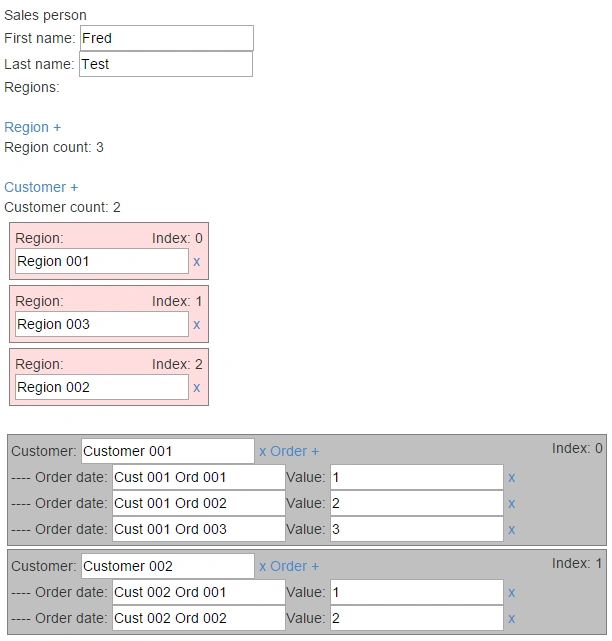
The customers mark-up carries the same patterns as previous code. What is important to note in this section of code is that there is a "for each" data-bind *within* a "for each" ... its nested. We are therefore saying "render this mark-up for each customer record you find, and for each customer record you find, render each 'customer.order' record you find."
The other new concept in this block of code is the data-bind "$index". This attribute tells knockout to render the "array index" of the current item.
- <div data-bind="foreach:Customers">
- <div class="Customerbox">
- Customer:
- <input data-bind="value:Name" /> <a href="#" data-bind="click: $parent.removeCustomer">x</a>
Sortable plugin
Before we move to the data exchange part of this example, lets look at one more useful plugin when working with Kncokout arrays and lists. Its "Knockout Sortable", provided by the very talented Ryan Niemeyer.
- <div data-bind="sortable:Regions">
- <div class="Regionbox">Region: <input data-bind="value:Name" /> <a data-bind="click: $parent.removeRegion" href="#">x</a>

Sending data to MVC server
Sending the datamodel from client to server is achieved using a simple Ajax call. The main trick to serialising data form Knockout is to use the "ToJSON" method. In our case as we have nested array objects we will pass this through the mapping methods.
- self.saveDataToServer = function (){
- var DataToSend = ko.mapping.toJSON(self);
- $.ajax({
- type: 'post',
- url: '/home/SaveModel',
- contentType: 'application/json',
- data: DataToSend,
- success: function (dataReceived) {
- alert('sent: ' + dataReceived)
- },
- fail: function (dataReceived) {
- alert('fail: ' + dataReceived)
- }
- });
- };
- public JsonResult SaveModel(SalesPerson SalesPerson)
- {
- // the JSON Knockout Model string sent in, maps directly
- // to the "SalesPerson" model defined in SharedModel.cs
- var s = SalesPerson; // we can work with the Data
- // model here - save to database / update, etc.
- return null;
- }
Ravi KandelPosted Aug 14, 2016, 3:11 AM
Thanks
Vignesh ManiPosted Jul 19, 2016, 8:29 AM
Good one sir
Rupesh KahanePosted Jul 19, 2016, 7:47 AM
Very nice explanation... easy to understand. Thanks for sharing
Shobana JPosted Jul 19, 2016, 2:31 AM
Nice one
kalu singh raoPosted Jul 19, 2016, 1:24 AM
Nice...