

Here we are going to see how we can implement some basic validations using KnockoutJS. As we mentioned in the title, we are going to create a validation demo in two ways.
- Without using any plugin, our own custom way
- Using an existing plugin, in an easy way
If you are totally new to KnockoutJS, I strongly recommend you read my previous post where I have shared some basics of KnockoutJS. We will be using Visual Studio for our development.
Download source code
Background
As I have been working on a project where we use KnockoutJS, it was my duty to implement some validation on an existing page. This article shows the ways I have tried to implement the same - like I said above, using a plugin and without using a plugin. Now, let’s go and implement the same in your application too. Shall we?
Create a HTML page
To work with KnockoutJS, we need a page. Let’s create it first. Before we do that, please do not forget to install KnockoutJS and jQuery from NuGet.
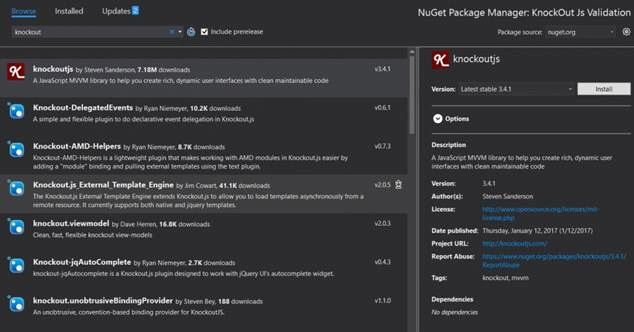
Installing_KnockOut_JS_from_NuGet
- <!DOCTYPE html>
- <html>
- <head>
- <title></title>
- <meta charset="utf-8" /> </head>
- <body> </body>
- </html>
- <script src="Validations-Without-Plugin.js"></script>
Let’s begin our tutorial – KnockoutJS validation without using a plugin
Open your JS file (Validations-Without-Plugin.js) where we are going to write our scripts. As a first step, we need to create our View Model and bind it using applyBindings function.
- $(function() {
- function myViewModel(firstName, lastName, email) {
- this.txtFirstName = ko.observable(firstName);
- this.txtLastName = ko.observable(lastName);
- this.txtEmail = ko.observable(email);
- };
- ko.applyBindings(new myViewModel("Sibeesh", "Venu", "[email protected]"));
- });
- <!DOCTYPE html>
- <html>
- <head>
- <title>KnockOut JS Validations</title>
- <meta charset="utf-8" />
- <script src="Scripts/jquery-3.1.1.min.js"></script>
- <script src="Scripts/knockout-3.4.1.js"></script>
- <script src="Scripts/Validations-Without-Plugin.js"></script>
- </head>
- <body>
- <table>
- <caption>Knockout JS Validation</caption>
- <tr>
- <td> First Name: <input type="text" id="txtFirstName" name="txtFirstName" data-bind='value: txtFirstName' /> </td>
- </tr>
- <tr>
- <td> Last Name: <input type="text" id="txtLastName" name="txtLastName" data-bind='value: txtLastName' /> </td>
- </tr>
- <tr>
- <td> Email: <input type="text" id="txtEmail" name="txtEmail" data-bind='value: txtEmail' /> </td>
- </tr>
- <tr>
- <td> <input type="button" value="Submit" /> </td>
- </tr>
- </table>
- </body>
- </html>
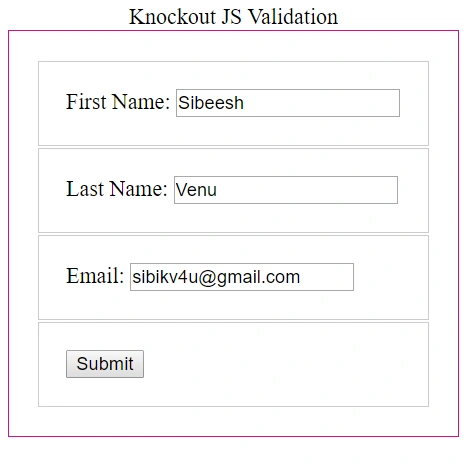
Knockout_JS_Observables_Updated
So far, everything is good. Now, it is time to update our View Model and create some extenders.
KnockoutJS extenders are the easy way to give some additional functionalities to your observables. It can be anything and in this case, we are to create some validations for our observables or our controls.
We can create the extenders and update the View as preceding.
- $(function() {
- ko.extenders.isRequired = function(elm, customMessage) {
- //add some sub-observables to our observable
- elm.hasError = ko.observable();
- elm.message = ko.observable();
- //This is the function to validate the value entered in the text boxes
- function validateValueEntered(valEntered) {
- elm.hasError(valEntered ? false : true);
- //If the custom message is not given, the default one is taken
- elm.message(valEntered ? "" : customMessage || "I am required");
- }
- //Call the validation function for the initial validation
- validateValueEntered(elm());
- //Validate the value whenever there is a change in value
- elm.subscribe(validateValueEntered);
- return elm;
- };
- ko.extenders.isEmail = function(elm, customMessage) {
- //add some sub-observables to our observable
- elm.hasError = ko.observable();
- elm.message = ko.observable();
- //This is the function to validate the value entered in the text boxes
- function validateEmail(valEntered) {
- var emailPattern = /^(([^<>()\[\]\\.,;:\s@"]+(\.[^<>()\[\]\\.,;:\s@"]+)*)|(".+"))@((\[[0-9]{1,3}\.[0-9]{1,3}\.[0-9]{1,3}\.[0-9]{1,3}])|(([a-zA-Z\-0-9]+\.)+[a-zA-Z]{2,}))$/;
- //If the value entered is a valid mail id, return fals or return true
- elm.hasError((emailPattern.test(valEntered) === false) ? true : false);
- //If not a valid mail id, return custom message
- elm.message((emailPattern.test(valEntered) === true) ? "" : customMessage);
- }
- //Call the validation function for the initial validation
- validateEmail(elm());
- //Validate the value whenever there is a change in value
- elm.subscribe(validateEmail);
- return elm;
- };
- function myViewModel(firstName, lastName, email) {
- this.txtFirstName = ko.observable(firstName).extend({
- isRequired: "You missed First Name"
- });
- this.txtLastName = ko.observable(lastName).extend({
- isRequired: ""
- });
- this.txtEmail = ko.observable(email).extend({
- isEmail: "Not a valid mail id"
- });
- };
- ko.applyBindings(new myViewModel("Sibeesh", "Venu", "[email protected]"));
- });
- <!DOCTYPE html>
- <html>
- <head>
- <title>KnockOut JS Validations</title>
- <meta charset="utf-8" />
- <script src="Scripts/jquery-3.1.1.min.js"></script>
- <script src="Scripts/knockout-3.4.1.js"></script>
- <script src="Scripts/Validations-Without-Plugin.js"></script>
- <style>
- .error {
- color: #D8000C;
- background-color: #FFBABA;
- font-family: cursive;
- }
- table {
- border: 1px solid #c71585;
- padding: 20px;
- }
- td {
- border: 1px solid #ccc;
- padding: 20px;
- }
- </style>
- </head>
- <body>
- <table>
- <caption>Knockout JS Validation</caption>
- <tr>
- <td> First Name: <input type="text" id="txtFirstName" name="txtFirstName" data-bind='value: txtFirstName, valueUpdate: "afterkeydown"' /> <span class="error" data-bind='visible: txtFirstName.hasError, text: txtFirstName.message'></span> </td>
- </tr>
- <tr>
- <td> Last Name: <input type="text" id="txtLastName" name="txtLastName" data-bind='value: txtLastName, valueUpdate: "afterkeydown"' /> <span class="error" data-bind='visible: txtLastName.hasError, text: txtLastName.message'></span> </td>
- </tr>
- <tr>
- <td> Email: <input type="text" id="txtEmail" name="txtEmail" data-bind='value: txtEmail, valueUpdate: "afterkeydown"' /> <span class="error" data-bind='visible: txtEmail.hasError, text: txtEmail.message'></span> </td>
- </tr>
- <tr>
- <td> <input type="button" value="Submit" /> </td>
- </tr>
- </table>
- </body>
- </html>

Knockout JS validation without a plugin demo
Knockout JS validation using a plugin - The easy way
As we are going to use a plugin, we need to install it from the NuGet first. You can always get the plugin from here.
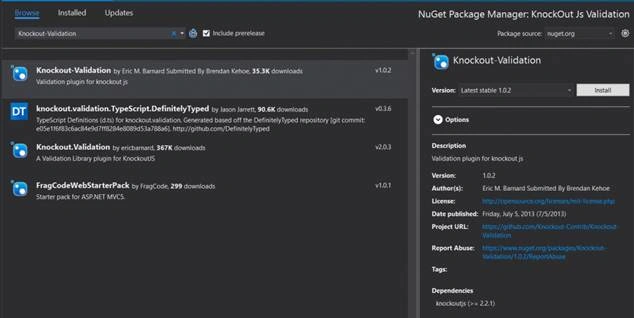
Knockout_Validation_JS_from_NuGet
Can we create our View Model now?
- $(function() {
- function myViewModel(firstName, lastName, email) {
- this.txtFirstName = ko.observable(firstName).extend({
- required: true
- });
- this.txtLastName = ko.observable(lastName).extend({
- required: false
- });
- this.txtEmail = ko.observable(email).extend({
- email: true
- });
- };
- ko.applyBindings(new myViewModel("Sibeesh", "Venu", "[email protected]"));
- });
- <!DOCTYPE html>
- <html>
- <head>
- <title>KnockOut JS Validations</title>
- <meta charset="utf-8" />
- <script src="Scripts/jquery-3.1.1.min.js"></script>
- <script src="Scripts/knockout-3.4.1.js"></script>
- <script src="Scripts/knockout.validation.js"></script>
- <script src="Scripts/Validations-Plugin.js"></script>
- <style>
- table {
- border: 1px solid #c71585;
- padding: 20px;
- }
- td {
- border: 1px solid #ccc;
- padding: 20px;
- }
- </style>
- </head>
- <body>
- <table>
- <caption>Knockout JS Validation</caption>
- <tr>
- <td> First Name: <input type="text" id="txtFirstName" name="txtFirstName" data-bind='value: txtFirstName' /> </td>
- </tr>
- <tr>
- <td> Last Name: <input type="text" id="txtLastName" name="txtLastName" data-bind='value: txtLastName' /> </td>
- </tr>
- <tr>
- <td> Email: <input type="text" id="txtEmail" name="txtEmail" data-bind='value: txtEmail' /> </td>
- </tr>
- <tr>
- <td> <input type="button" value="Submit" /> </td>
- </tr>
- </table>
- </body>
- </html>

Knockout JS validation with plugin demo
That’s all for today. You can always download the source code attached to see the complete code and application. Happy coding!.
References
See also
Conclusion
Did I miss anything that you think was needed? Did you find this post useful? Please share with me your valuable suggestions and feedback. Please see this article in my blog here.
Your turn.
A blog isn’t a blog without comments, but do try to stay on topic. If you have a question unrelated to this post, you’re better off posting it on C# Corner, Code Project, Stack Overflow, ASP.Net Forum instead of commenting here. Tweet or email me a link to your question there and I’ll definitely try to help if I can.
Vignesh SuriyanPosted Mar 15, 2017, 8:32 AM
Its, really Working, thanks for the article Sibeesh Venu
Fabio Silva LimaPosted Mar 7, 2017, 6:10 AM
Greate job! I love knockoutjs