

In this article, I am going to explain about Const, ReadOnly, & static ReadOnly keywords in C#.
Const keyword
It is used to declare a constant field and is also known as Compile-Time Constant. A constant field cannot be modified. So, if you want to assign a value to a variable that may be changed at any time in the future, please don't define it as constant. Constant variables, once declared, can never be changed further, i.e., neither in constructors nor in any method. Its value should only be assigned during its declaration time. It can only be used along with built-in C# types.
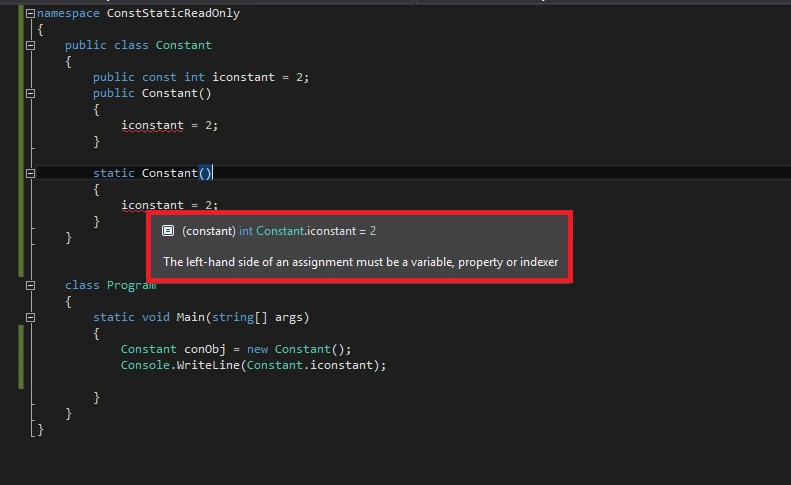
As from the above image, it can be seen that constant value once assigned cannot be changed in any of the constructors.
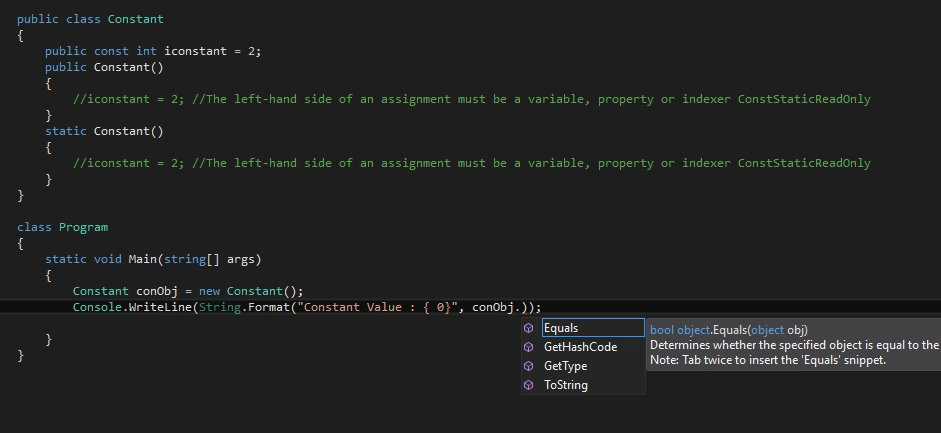
From the above image, it can be seen that constant is not accessible by object reference. It is directly accessible by using a class name. That means, const is by default static and it should not be used along with the static keyword. Below is the example of using const keyword.
Programming Example 1 - using const keyword
Const keyword
It is used to declare a constant field and is also known as Compile-Time Constant. A constant field cannot be modified. So, if you want to assign a value to a variable that may be changed at any time in the future, please don't define it as constant. Constant variables, once declared, can never be changed further, i.e., neither in constructors nor in any method. Its value should only be assigned during its declaration time. It can only be used along with built-in C# types.
As from the above image, it can be seen that constant value once assigned cannot be changed in any of the constructors.
From the above image, it can be seen that constant is not accessible by object reference. It is directly accessible by using a class name. That means, const is by default static and it should not be used along with the static keyword. Below is the example of using const keyword.
Programming Example 1 - using const keyword
- using System;
- namespace ConstStaticReadOnly {
- public class Constant {
- public
- const int iconstant = 2;
- public Constant() {
- //iconstant = 2; //The left-hand side of an assignment must be a variable, property or indexer ConstStaticReadOnly
- }
- static Constant() {
- //iconstant = 2; //The left-hand side of an assignment must be a variable, property or indexer ConstStaticReadOnly
- }
- }
- class Program {
- static void Main(string[] args) {
- Constant conObj = new Constant();
- Console.WriteLine(String.Format("Constant Value : { 0}", Constant.iconstant));
- }
- }
- }
Output
Constant Value: 2
ReadOnly Keyword
It is a modifier that can be applied to fields. Read-only is also known as Runtime constant because during runtime, its value can be changed. Value can be assigned either during the declaration of a variable or in constructors as shown below.
Constant Value: 2
ReadOnly Keyword
It is a modifier that can be applied to fields. Read-only is also known as Runtime constant because during runtime, its value can be changed. Value can be assigned either during the declaration of a variable or in constructors as shown below.
- When the variable is initialized at the time of declaration:

- For an instance variable field, it will be assigned only in instance constructor:
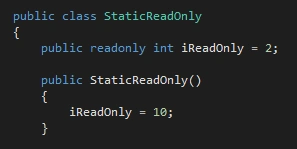
- For static variable field, it will be assigned only in a static constructor:
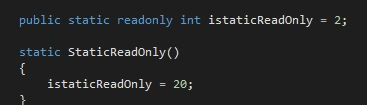
Programming Example 2 - using ReadOnly & Static ReadOnly keyword
Output
ReadOnly Value: 10
Static ReadOnly Value: 20
Conclusion
I hope you enjoyed the article.
Thank you!
- using System;
- namespace ConstStaticReadOnly {
- public class StaticReadOnly {
- public readonly int iReadOnly = 2;
- public static readonly int istaticReadOnly = 2;
- public StaticReadOnly() {
- iReadOnly = 10;
- //istaticReadOnly = 20; //compile time error as static variable value cannot be assigned in instance construtor
- }
- static StaticReadOnly() {
- istaticReadOnly = 20;
- //iReadOnly = 20; //compile time error as instance variable value cannot be assigned in static construtor, only static value should be assigned
- }
- }
- class Program {
- static void Main(string[] args) {
- StaticReadOnly stReadObj = new StaticReadOnly();
- Console.WriteLine(String.Format("ReadOnly Value : {0}", stReadObj.iReadOnly));
- Console.WriteLine(String.Format("Static ReadOnly Value : {0}", StaticReadOnly.istaticReadOnly));
- }
- }
- }
ReadOnly Value: 10
Static ReadOnly Value: 20
Conclusion
I hope you enjoyed the article.
Thank you!
SandyPosted Mar 22, 2018, 7:27 AM
Very nice article but i have one doubt that is there is any difference related to performance and memory?Can we use static variable in Web Applcation?
Bhavesh JadavPosted Mar 21, 2018, 6:40 AM
Very nice clarification about constant, readonly and static keywords, thanks to share it.
Satish Kumar VadlavalliPosted Mar 20, 2018, 11:34 PM
I like your style of writing :)