

Introduction
If you are new to Kafka, I would recommend you learn about why Kafka came into existence in software development. Then you can visit this article, Getting Started With Apache Kafka: Introductory Guide.
Kafka Terminologies
From below onwards, we will be having a quick high-level overview of different Kafka terminologies and their related components.
- Kafka Cluster: At the heart of Kafka, we have a Kafka cluster. A Kafka cluster generally consists of multiple brokers.

- Brokers: A broker is what all the Kafka clients will interact with. Having just the clusters doesn't add any value.
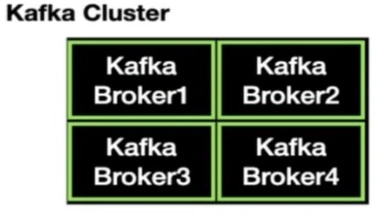
- Apache Zookeeper: In order to manage multiple brokers, we need a zookeeper. Basically, Zookeeper keeps track of the health of the brokers and manages the cluster for us.

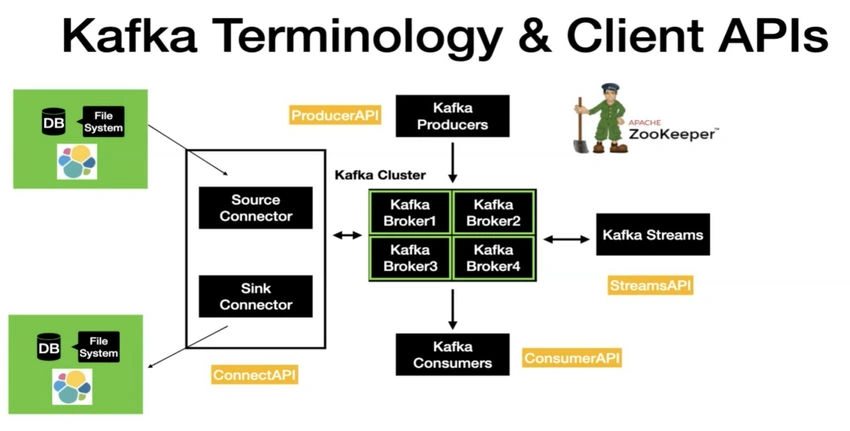
- Kafka Producer: The very first client is the Kafka producer. A Kafka producer is a way to write and produce new data into Kafka. The client uses the producer API to write the data into Kafka. In general, a Producer produces a message on the topic if something outside invokes the producer.

- Kafka Consumer: After the data is written into Kafka. We need to consume the data from Kafka. Kafka consumers come to consume the messages. They use the Consumer API to consume the message from the Kafka cluster. The behavior of Kafka consumers is to pull continuously for new messages.

Note. Kafka Consumers and producers are basic client APIs through which we can interact with Kafka.
Kafka Client APIs
There are two advanced client APIs that come with Kafka.
- Kafka Connect: There are two different types of connectors: Source, Connector, and Sink Connector.
- Source Connector: The source Connector is used to pull the data from an external data source, such as a database file system or Elasticsearch, into the Kafka topic.
- Sink Connector: The opposite of the same is done using the Sink Connector.
- Kafka Streams: It is used to take the data from Kafka, perform simple to complex transformations on it, and put it back into Kafka.
Note. With Kafka Connect, we can perform the data movement in and out of Kafka without writing a single line of code.
If I have to summarize this as a whole, we have four client APIs such as the Producer API, Consumer API, Connect API, and Streams API, using which we can interact with Apache Kafka, and in one frame, it will look like this.
Kafka Topics and Partitions
- Kafka Topic: A Kafka topic is an entity in Kafka, and it has a name. A quick analogy is to think of a topic as a table in a database. Topics, in general, live inside the Kafka Broker. Kafka clients use the topic name to produce and consume messages.
- Partitions: Partitions are where the message is located inside the topic. Each topic, in general, can have one or more partitions.
- Each partition is an ordered, immutable sequence of records. That means once a record is produced, it cannot be changed at all.
- Each partition is independent of the others, and that's why the offset in different partitions starts with zero, and it continues to grow independently.
- Offset: Each record has a number associated with it, i.e. partition numbers. That number is called an offset. Offset is generated when a record is published to the Kafka topic.
Points to remember
- Ordering is guaranteed only at the partition level.
- This means that if we have a use case where we would like to publish and read the records in a certain order, then we have to make sure to publish the records in the same partition.
- All records are persisted in a physical log file where the Kafka is installed. It is similar to a commit log file that we find with database transactions, but this one is a distributed log file.
Internal Working of Apache Kafka
Now, let's put these concepts together and then see how they work. Since we know all the important terminologies and concepts of Kafka, we can combine them and see how it works internally.
In Kafka, we have the producer and consumer. We have the Kafka producer because the producer is what is fundamentally needed to produce a new record in Kafka. Producers, in general, produce a message on the topic if something outside invokes a producer. The producer has complete control over which partition the message is going to go.
The producer uses the topic name to produce a message, so when the message is sent from the producer, it first reaches the Kafka topic.
Once the poll notices this message, it is consumed by the consumer, and the consumer does some processing on the retrieved record. The behavior of Kafka consumers is to pull continuously for new messages. So, the consumer is pulling the broker using the topic name.
So, if we have a use case where we would like to publish and read the records in a certain order, then we have to make sure to publish the records to the same partition. Let's say we are sending a new message that goes to Partition Zero.
Now, the offset is incremented from 1 to 1, and it gets appended to the existing log. Then, we are going to send another message to partition one: the offset is increased from 1 to 2, and it is appended to the partition log, and it continues to do the same as new records are produced into the Kafka topics.
One quick thing to note out here is that even though the record is read by the consumer, the message still resides inside the Kafka as per the defined retention time.
Conclusion
This makes it to the end of the article, where we learned some concepts, which are mentioned below.
- Kafka Terminologies
- Kafka Client APIs, Kafka Connect and Streams.
- Kafka Topics and Partitions
- Working of Kafka
Disclaimer on photos used: All photos used in the above article are either taken from Udemy or Google. Copyright is authorized to respective owners.
Join the conversation! Your thoughts help the community grow.