

Note: This article was originally published on 04/05/2021.
These two articles are to discuss JSON Patch.
A: Introduction
In the ASP.NET fields, both MVC and Web API modules, we are fimilar with creating the controller based on the output entity object to get CRUD actions for us, i.e., the Verbs: GET, POST, PUT, and DELETE:
- GET --- Select
- POST --- Create
- PUT --- Update
- DELETE --- Delete
These methods are used to access database.
Actually, there is one more Verb: Patch, available. Then we have the Verbs like this
The Methods and Verbs
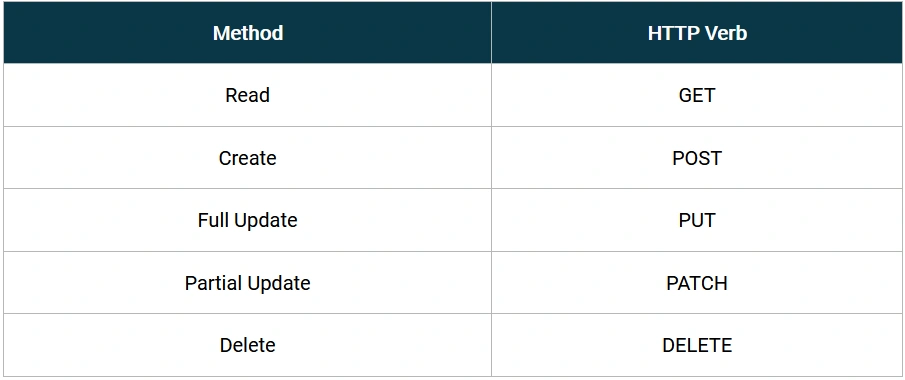
The patch method is responsible to the patial update. We will discuss this issue in this article. We will discuss in the order below:
- A - Introduction
- B - What is Patch
- Full Update vs. Patial Update
- What is JSON Patch?
- How Json Patch works?
- C - Patch Implementation in ASP.NET Core Web API, in Memory
- Configure the App
- Add PATCH related files (Entities and Controller)
- Discussion of Operations
- Add Operation
- Remove Operation
- Replace Operation
- Move Operation
- Copy Operation
- Test Operation
- Implementation in ASP.NET Core Web API, for Database
- not finished yet, see Json Patch (2) In ASP.NET Core web API for Database
B: What is Patch
1, Full Update vs. Patial Update
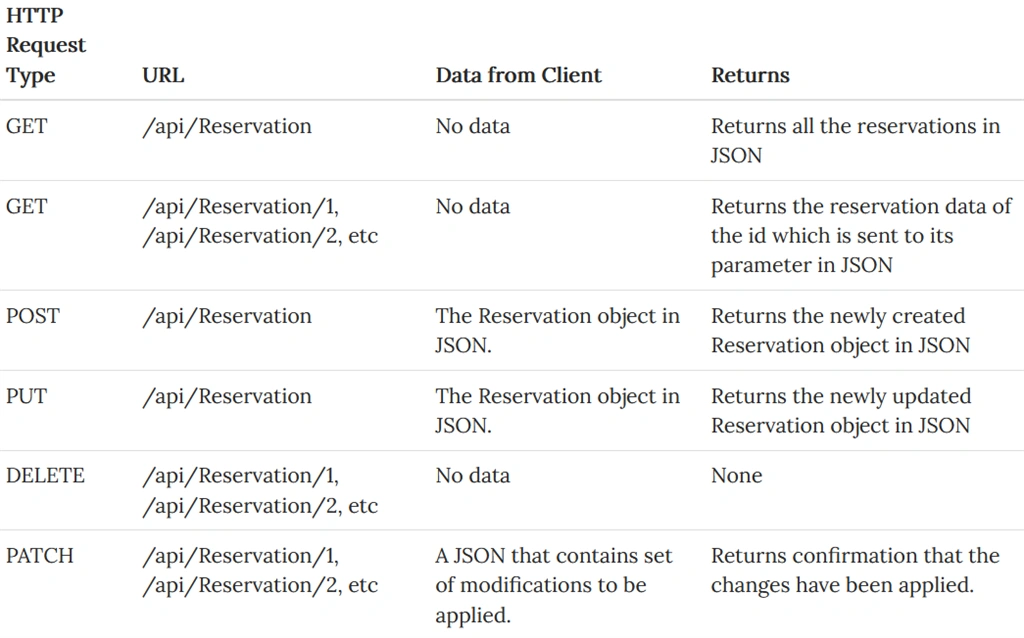
The Verb PUT update the database the whole record. However, sometimes, the client only want to update one field or partial fields in the records, sometimes, client side even does not have full info to update the records in whole, in this situation, a partial update is a better solution or required, that is what PATCH jumps in.
Therefore, the HTTP Verbs will be like this,
2, What is JSON Patch?
JSON Patch is a format for describing changes to a JSON document. It can be used to avoid sending a whole document when only a part has changed. When used in combination with the HTTP PATCH method, it allows partial updates for HTTP APIs in a standards compliant way.
JSON Patch is specified in RFC 6902 from the IETF.
3, How Json Patch works?
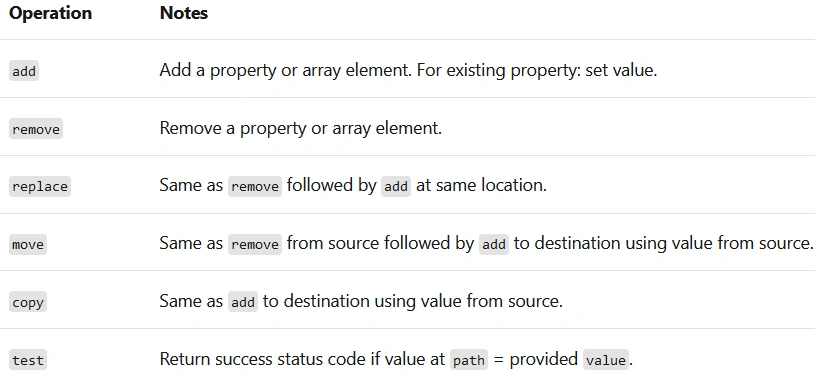
A JSON Patch document is just a JSON file containing an array of patch operations. The patch operations supported by JSON Patch are “add”, “remove”, “replace”, “move”, “copy” and “test”. The operations are applied in order: if any of them fail then the whole patch operation should abort.
C: Patch Implementation in ASP.NET Core Web API, in Memory
We will demo the PATCH result in ASP.NET Core Web API app with Swagger support.
1, Configure the App
Step 1: Create an ASP.NET Core MVC application
We use the current version of Visual Studio 2019 16.9.3 and .NET 5.0 SDK to Create an ASP.NET Core Web API app, see here for details.
Step 2: Configure app
To enable JSON Patch support, we need to install the Microsoft.AspNetCore.Mvc.NewtonsoftJson from NuGet package
2, Add PATCH related files:
Step 1: Add two entity classes:
Add two classes: Customer and Order:
using System.Collections.Generic;

namespace JsonPatchSample.Models
{
    public class Customer
    {
        public string CustomerName { get; set; }
        public List<Order> Orders { get; set; }
    }
}
namespace JsonPatchSample.Models
{
    public class Order
    {
        public string OrderName { get; set; }
        public string OrderType { get; set; }
    }
}
Step 2: Add a Controller:
Add a tmpty controller named as: HomeController with following code:
using JsonPatchSample.Models;
using Microsoft.AspNetCore.JsonPatch;
using Microsoft.AspNetCore.Mvc;
using System.Collections.Generic;
using System.Dynamic;

namespace JsonPatchSample.Controllers
{
    [Route("jsonpatch/[action]")]
    [ApiController]
    public class HomeController : ControllerBase
    {
        [HttpGet]
        public IActionResult JsonPatchWithModelState()
        {
            var customer = CreateCustomer();
            return new ObjectResult(customer);
        }

        [HttpPatch]
        public IActionResult JsonPatchWithModelState(
            [FromBody] JsonPatchDocument<Customer> patchDoc)
        {
            if (patchDoc != null)
            {
                var customer = CreateCustomer();

                patchDoc.ApplyTo(customer, ModelState);

                if (!ModelState.IsValid)
                {
                    return BadRequest(ModelState);
                }

                return new ObjectResult(customer);
            }
            else
            {
                return BadRequest(ModelState);
            }
        }

        private Customer CreateCustomer()
        {
            return new Customer
            {
                CustomerName = "John",
                Orders = new List<Order>()
                {
                    new Order
                    {
                        OrderName = "Order0"
                    },
                    new Order
                    {
                        OrderName = "Order1"
                    }
                }
            };
        }
    }
}
3, Discussion of Operations:
Run the App:
For the .NET Core 5.0, there is a very good Swagger support for PATCH. If you run a previous version of .NET Core, it might not be the same.
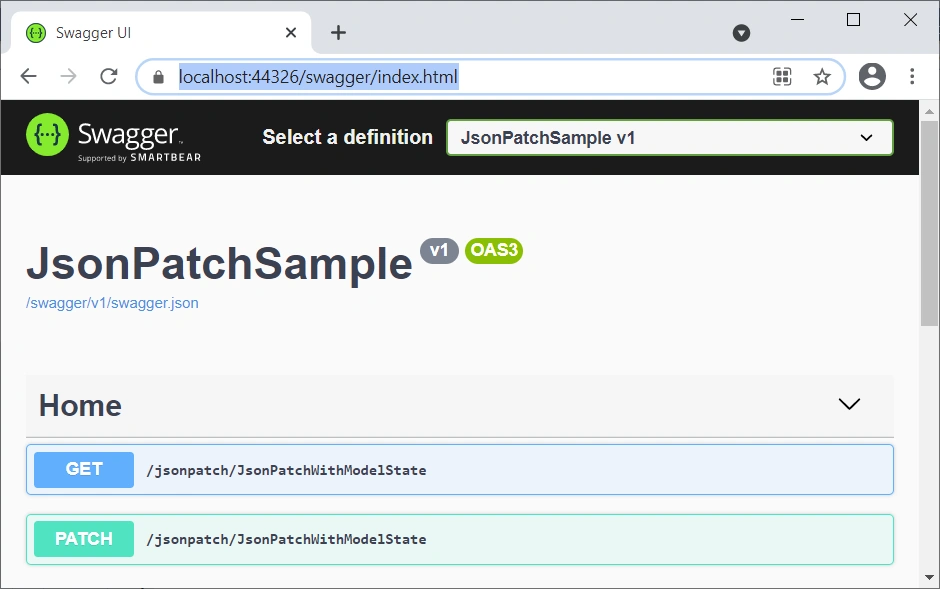
Run the App, we have two action methods: GET and PATCH. Run the GET, we will get the Original input data:
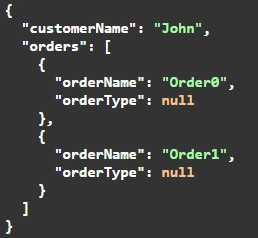
Run PATCH, we will run the PATCH operations: “add”, “remove”, “replace”, “move”, “copy” and “test”, one by one, all results are against to the original one above:
1. The add operation
- If
pathpoints to an array element: inserts new element before the one specified bypath. - If
pathpoints to a property: sets the property value. - If
pathpoints to a nonexistent location:- If the resource to patch is a dynamic object: adds a property.
- If the resource to patch is a static object: the request fails.
The following sample patch document sets the value of CustomerName and adds an Order object to the end of the Orders array.
[
  {
    "op": "add",
    "path": "/customerName",
    "value": "Barry"
  },
  {
    "op": "add",
    "path": "/orders/-",
    "value": {
      "orderName": "Order2",
      "orderType": null
    }
  }
]
Shown in app like this,
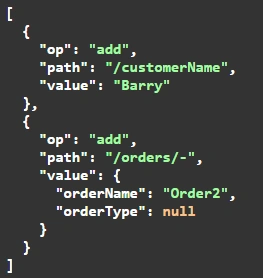
In the preceding JSON:
- The
opproperty indicates the type of operation. - The
pathproperty indicates the element to update. - The
valueproperty provides the new value.
Then we got the result:
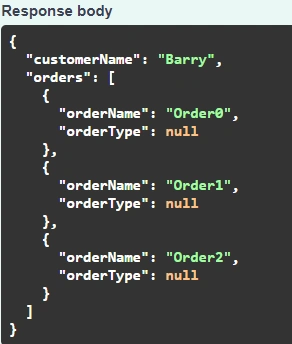
The changes made by applying a JSON Patch document to a resource are atomic. If any operation in the list fails, no operation in the list is applied.
2. The remove operation
- If
pathpoints to an array element: removes the element. - If
pathpoints to a property:- If resource to patch is a dynamic object: removes the property.
- If resource to patch is a static object:
- If the property is nullable: sets it to null.
- If the property is non-nullable, sets it to
default<T>.
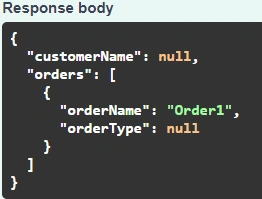
The following sample patch document sets CustomerName to null and deletes Orders[0]:
JSON
[
  {
    "op": "remove",
    "path": "/customerName"
  },
  {
    "op": "remove",
    "path": "/orders/0"
  }
]
Then we got the result:
3. The replace operation
This operation is functionally the same as a remove followed by an add.
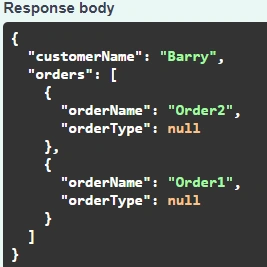
The following sample patch document sets the value of CustomerName and replaces Orders[0]with a new Order object:
JSON
[
  {
    "op": "replace",
    "path": "/customerName",
    "value": "Barry"
  },
  {
    "op": "replace",
    "path": "/orders/0",
    "value": {
      "orderName": "Order2",
      "orderType": null
    }
  }
]
Then we got the result:
4. The move operation
- If
pathpoints to an array element: copiesfromelement to location ofpathelement, then runs aremoveoperation on thefromelement. - If
pathpoints to a property: copies value offromproperty topathproperty, then runs aremoveoperation on thefromproperty. - If
pathpoints to a nonexistent property:- If the resource to patch is a static object: the request fails.
- If the resource to patch is a dynamic object: copies
fromproperty to location indicated bypath, then runs aremoveoperation on thefromproperty.
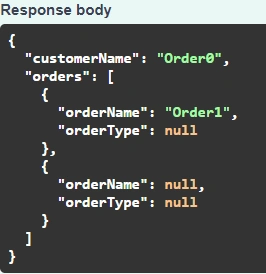
The following sample patch document:
- Copies the value of
Orders[0].OrderNametoCustomerName. - Sets
Orders[0].OrderNameto null. - Moves
Orders[1]to beforeOrders[0].
JSON
[
  {
    "op": "move",
    "from": "/orders/0/orderName",
    "path": "/customerName"
  },
  {
    "op": "move",
    "from": "/orders/1",
    "path": "/orders/0"
  }
]
Then we got the result:
5. The copy operation
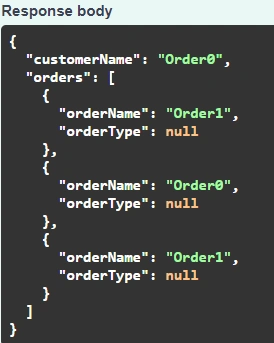
This operation is functionally the same as a move operation without the final remove step.
The following sample patch document:
- Copies the value of
Orders[0].OrderNametoCustomerName. - Inserts a copy of
Orders[1]beforeOrders[0].
JSON
[
  {
    "op": "copy",
    "from": "/orders/0/orderName",
    "path": "/customerName"
  },
  {
    "op": "copy",
    "from": "/orders/1",
    "path": "/orders/0"
  }
]
Then we got the result:
6. The test operation
If the value at the location indicated by path is different from the value provided in value, the request fails. In that case, the whole PATCH request fails even if all other operations in the patch document would otherwise succeed.
The test operation is commonly used to prevent an update when there's a concurrency conflict.
The following sample patch document has no effect if the initial value of CustomerName is "John", because the test fails:
JSON
[
  {
    "op": "test",
    "path": "/customerName",
    "value": "Nancy"
  },
  {
    "op": "add",
    "path": "/customerName",
    "value": "Barry"
  }
]
Then we got the result:

D: Patch Implementation in ASP.NET Core Web API, for Database
Now we run PATCH for View Models/DTOs from memory, and then we need to apply those patches back onto a database. Years ago, people use Automapper to do the job, and now with .NET Core 5.0 (at least), we can do it just by the Microsoft code. We will demo a short sample here.
It seems even I just introduce the conclusion, this article wil bel still too long, I'd rather leave it to a new article as part II of this one.
Summary
Thia article described the PATCH concept briefly, and discussed the 6 PATCH operations associated with a ASP.NET Core Web API App. We will discuss the PATCH Implementation in ASP.NET Core Web API, for Database, in the next article of part II of this article.
Reference
- What is JSON Patch?, --- jsonpatch.com/
- JsonPatch in ASP.NET Core web API --- MS
- Consume Web API By MVC In .NET Core (1), Server And Framework --- Mine
- JSON Patch With ASP.NET Core --- otnetcoretutorials.com with automapper
- automapper
Join the conversation! Your thoughts help the community grow.