

Before reading this article, I highly recommend reading my previous parts:
Resizable is used to set size of an element using mouse. Resizable have draggable resizer handlers. We can specify one or more handles as well as min and max width and height.
Code:
- <htmlxmlns="http://www.w3.org/1999/xhtml">
- <headrunat="server">
- <title></title>
- <script>
- $(document).ready(function()
- {
- $("#div1").resizable();
- })
- </script>
- <style>
- #div1 {
- background-color: blueviolet;
- height: 100px;
- width: 150px;
- margin-left: 50px;
- margin-top: 30px;
- font-size: 24px;
- text-align: center;
- padding-top: 50px;
- margin-left: 450px;
- margin-top: 100px;
- }
- </style>
- </head>
- <body>
- <formid="form1" runat="server">
- <div>
- <divid="div1"><span>Resize Me!</span></div>
- </div>
- </form>
- </body>
- </html>

Options
| Option | Description | Example |
| alsoResize | It define that One or more elements to resize synchronously with the resizable element. | $("#res1").resizable({ alsoResize:"#res2" }); |
| animate | Define animates to the final size after resizing. | $("#res1").resizable({ animate: true }); |
| animateDuration | Define the time in which animation will complete. This option is used only when animate option is true. By default its value is "slow". | $("#res1").resizable({ animateDuration: "slow" }); |
| animateEasing | Define which easing to apply when using the animate option. By default its value is "swing". | $("#res1").resizable({ animate:true, animateDuration: "slow", animateEasing: "easeOutBounce" }); |
| aspectRatio | Define that whether to keep the aspect (height and width) ratio for the item. By default its value is false. | $("#res1").resizable({ animate:true, aspectRatio:true }); |
| autoHide | It is used to hide the magnification icon or handles. It will appear when the mouse is over the item. By default its value is false. | $("#res1").resizable({ autoHide: true }); |
| cancel | Prevents resizing from starting on specified elements. By default its value is input, textarea, button , select , option | $("#res1").resizable({ cancel: "#text" }); |
| containment | Constrains resizing to within the bounds of the specified element or region. | $("#res1").resizable({ containment: "parent" }); |
| delay | Define time in milliseconds to start the resizing. It specified that resizing will not start until after mouse is moved beyond duration. | $("#res1").resizable({ delay:200 }); |
| disabled | Disabled the resizable by define true. | $("#res1").resizable({ disabled: true }); |
| distance | It specified that resizing will not start until after mouse is moved beyond distance. | $("#res1").resizable({ distance: 30 }); |
| ghost | Define a semi-transparent helper element is shown for resizing. | $("#res1").resizable({ ghost: true }); |
| grid | Snaps the resizing element to a grid, every x and y pixels using array [x,y] | $("#res1").resizable({ grid: [20, 10] }); |
| handles | This option is a character string indicating which sides or angles of the element can be resized. A comma delimited list of any of the following: n, e, s, w, ne, se, sw, nw, all | $("#res1").resizable({ handles: { 'ne': '#negrip', 'se': '#segrip', 'sw': '#swgrip', 'nw': '#nwgrip' } }); |
| maxHeight | The maximum height the resizable should be allowed to resize to. Default value is null. | $("#res1").resizable({ maxHeight:420 }); |
| maxWidth | The maximum width the resizable should be allowed to resize to. Default value is null. | $("#res1").resizable({ maxWidth:420 }); |
| minHeight | The minimum width the resizable should be allowed to resize to. Default value is 10. | $("#res1").resizable({ minHeight:120 }); |
| minWidth | The minimum width the resizable should be allowed to resize to. Default value is 10. | $("#res1").resizable({ minWidth:120 }); |
Methods
| Method Name | Description | Example |
| destroy | Removes the resizable functionality completely. This will return the element back to its pre-init state. | $("#res1").resizable("destroy"); |
| disable | Disable the resizable element | $("#res1").resizable("disable"); |
| enable | Enable the resizable element | $("#res1").resizable("enable"); |
| instance | Return the instance object of resizable element. If element does not have an associated instance then it will return “undefined” | $("#res1").resizable("instance"); |
| option | Return an object contain key/value pairs representing the current resizable options. | varObj_= $("#res1").resizable("option"); |
| option(optionName) | Get value of specified option | varObj_=$("#res1").resizable("option", "disabled") |
| option(optionName, Value) | Set value of specified option | $("#res1").resizable( "option", "disabled", true ); |
| widget | Return a jQuery Object | varObj_= $("#res1").resizable("widget"); |
Events
| Event | Description | Example |
| create(event, ui) | Triggered when the resizable is created | $("#res1").resizable({ create: function (event, ui) { } }); |
| resize(event, ui) | riggered triggered when the handler of resizable element is dragged. ui object contain element, helper, originalElement, originalPosition, position, size property. | T $("#res1").resizable({ resize: function (event, ui) { } }); |
| start(event,ui) | Triggered at the start of a resize operation.ui object contain element, helper, originalElement, originalPosition, position, size property. | $("#res1").resizable({ start: function (event, ui) { } }); |
| stop(event, ui) | Triggered at the end of a resize operation. ui object contain element, helper, originalElement, originalPosition, position, size property. | $("#res1").resizable({ stop: function (event, ui) { } }); |
Now we will take some examples.
Example 1
- <headrunat="server">
- <title></title>
- <script>
- $(document).ready(function()
- {
- $('#Resizable1').resizable(
- {
- handles:
- {
- 'ne': '#neg',
- 'se': '#seg',
- 'sw': '#swg',
- 'nw': '#nwg'
- }
- });
- })
- </script>
- <style>
- #Resizable1 {
- border: 1pxsolid#000000;
- width: 300px;
- height: 40px;
- overflow: hidden;
- background-color: cornsilk;
- margin-left: 200px;
- margin-top: 100px;
- }
- #nwg,
- #neg,
- #swg,
- #seg {
- width: 10px;
- height: 10px;
- background-color: #ffffff;
- border: 1pxsolid#000000;
- }
- #segrip {
- right: -5px;
- bottom: -5px;
- }
- </style>
- </head>
- <body>
- <formid="form1" runat="server">
- <divid='Resizable1'>
- <h1>You Can Resize in any Direction</h1> Title
- <divclass="ui-resizable-handle ui-resizable-nw" id="nwg">
- </div>
- <divclass="ui-resizable-handle ui-resizable-ne" id="neg">
- </div>
- <divclass="ui-resizable-handle ui-resizable-sw" id="swg">
- </div>
- <divclass="ui-resizable-handle ui-resizable-se" id="seg">
- </div>
- </div>
- </form>
- </body>
- </html>
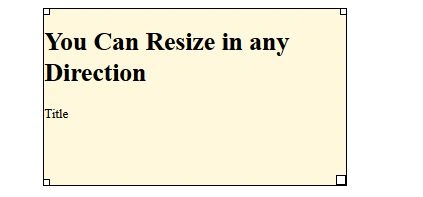
Example 2
- <headrunat="server">
- <title></title>
- <script>
- $(document).ready(function()
- {
- $('#Resizable1').resizable(
- {
- handles: 's',
- ghost: true,
- animate: true,
- animateDuration: "slow",
- stop: function(event, ui)
- {
- $(this).css("width", '');
- }
- });
- })
- </script>
- <style>
- #Resizable1 {
- border: 1pxsolid#000000;
- width: 300px;
- height: 240px;
- overflow: hidden;
- background-color: darkmagenta;
- margin-left: 200px;
- margin-top: 100px;
- }
- </style>
- </head>
- <body>
- <formid="form1" runat="server">
- <divid='Resizable1'>
- <h1>You Can Resize only in vertical Direction</h1> </div>
- </form>
- </body>
- </html>
At the time of dragging:
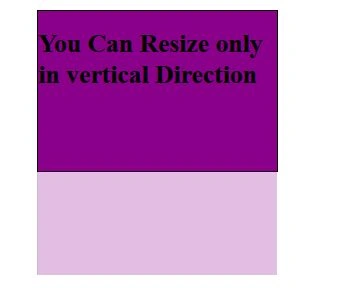
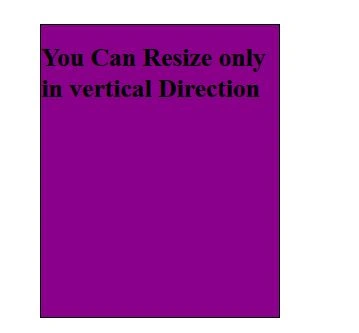
Above effect is obtained because we use “ghost” option. Final result a resized div.
Example 3
- <htmlxmlns="http://www.w3.org/1999/xhtml">
- <headrunat="server">
- <title></title>
- <script>
- $(document).ready(function()
- {
- $("#res1").resizable(
- {
- containment: "#res2",
- minHeight: 170,
- minWidth: 200
- });
- })
- </script>
- <style>
- #res2 {
- background-color: blueviolet;
- height: 300px;
- width: 450px;
- margin-left: 50px;
- margin-top: 30px;
- font-size: 24px;
- text-align: center;
- padding-top: 50px;
- margin-left: 450px;
- margin-top: 100px;
- }
- #res1 {
- background-color: blueviolet;
- height: 100px;
- width: 150px;
- margin-left: 50px;
- margin-top: 30px;
- font-size: 24px;
- text-align: center;
- padding-top: 50px;
- </style>
- </head>
- <body>
- <formid="form1" runat="server">
- <div>
- <divid="res2" class="square" style="background-color:orange">
- <divid="res1" class="square">I can resize within outher Container </div>
- </div>
- </div>
- </form>
- </body>
- </html>
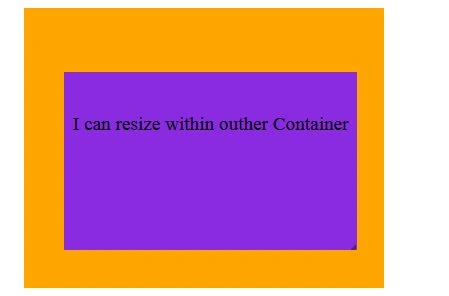
In the above example inner resizable element can only resize with boundary of outer element because we define the assign outer div (res2) as containment of inner div (res1).
Example 4:
- <headrunat="server">
- <title></title>
- <script>
- $(document).ready(function()
- {
- $("#res1").resizable(
- {
- create: function(event, ui)
- {
- $("<br/><b>Resizable has been created </b>").appendTo("#div2")
- },
- resize: function(event, ui)
- {
- $(" <br/><b>Resizable has been resized</b>").appendTo("#div2")
- },
- start: function(event, ui)
- {
- $("<br/><b>Resizable has been started</b>").appendTo("#div2")
- },
- stop: function(event, ui)
- {
- $("<br/><b>Resizable has been stoped</b>").appendTo("#div2")
- }
- });
- })
- </script>
- <style>
- #res1 {
- background-color: blueviolet;
- height: 100px;
- width: 150px;
- margin-left: 50px;
- margin-top: 30px;
- font-size: 24px;
- text-align: center;
- padding-top: 50px;
- </style>
- </head>
- <body>
- <formid="form1" runat="server">
- <div>
- <divid="res1" class="square">I can resize within outher Container </div>
- <divid="div2" style="font-size:20px;color:blue">
- </div>
- </div>
- </form>
- </body>
- </html>
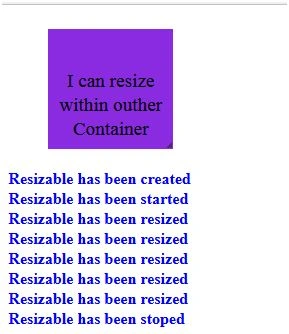
In above example we created event listener for create, start, stop and resize event. Each event will append some to “div2”.
Thanks for reading the article.
Manoj KallaPosted Jan 8, 2016, 7:12 AM
Very good article
Pankaj Kumar ChoudharyPosted Jan 7, 2016, 1:06 PM
Thanks Sir................
Debasis SahaPosted Jan 6, 2016, 11:52 PM
Good One..