

Introduction
In this article, I shall demonstrate how to use the jQuery progress bar in ASP.NET using ajax.
Before going through this article I strongly recommend you go through the basics of jQuery. For reference, there are many articles on c-sharpcorner.com.
I shall start with a very small ASP.NET design.
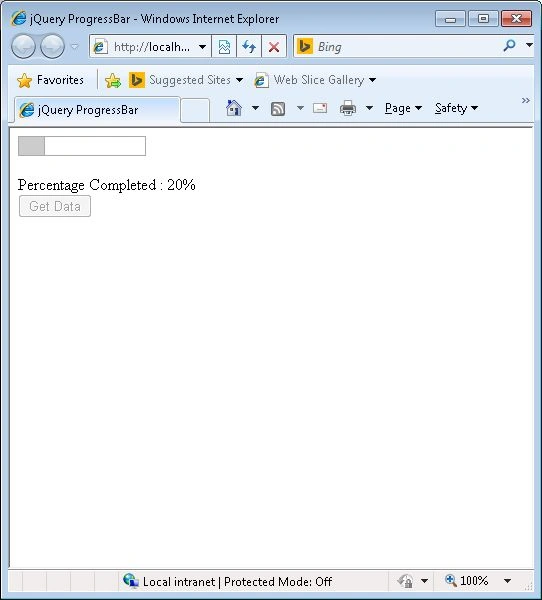
Our page consists of the button control. On a button click, a method on the page is invoked. Until the method execution is done the progress bar is updated in the design.
Code Sample
Step 1: Page Design
- <body>
- <form id="form1" runat="server">
- <div id="progressbar"></div>
- <div id="result"></div><br />
- <asp:Label runat="server" ID="lbldisp" Text= "Percentage Completed : "/>
- <asp:Label runat="server" ID="lblStatus" />
- <br />
- <asp:Button ID="btnGetData" runat="server" Text="Get Data" />
- </form>
- </body>
Step 2: Import the jQuery and CSS references.
- <link type="text/css" href="CSS/ui.all.css" rel="stylesheet" />
- <script type="text/javascript" src="Scripts/jquery-1.3.2.js"></script>
- <script type="text/javascript" src="Scripts/ui.core.js"></script>
- <script type="text/javascript" src="Scripts/ui.progressbar.js"></script>
Step 3: Progress Bar set up code.
- <script type="text/javascript" language="javascript">
- $(document).ready(function () {
- // jquery Progress bar function.
- $("#progressbar").progressbar({ value: 0 });
- $("#lbldisp").hide();
- //button click event
- $("#btnGetData").click(function () {
- $("#btnGetData").attr("disabled", "disabled")
- $("#lbldisp").show();
- //call back function
- var intervalID = setInterval(updateProgress, 250);
- $.ajax({
- type: "POST",
- url: "Default.aspx/GetText",
- data: "{}",
- contentType: "application/json; charset=utf-8",
- dataType: "json",
- async: true,
- success: function (msg) {
- $("#progressbar").progressbar("value", 100);
- $("#lblStatus").hide();
- $("#lbldisp").hide();
- $("#result").text(msg.d);
- clearInterval(intervalID);
- }
- });
- return false;
- });
- });
- /This function is the callback function which is executed in every 250 milli seconds. Until the ajax call is success this method is invoked and the progressbar value is changed.
- function updateProgress() {
- var value = $("#progressbar").progressbar("option", "value");
- if (value < 100) {
- $("#progressbar").progressbar("value", value + 1);
- $("#lblStatus").text((value + 1).toString() +"%");
- }
- }
- </script>
On the button click event, the setInterval function is invoked with 2 parameters as input.
- UpdateProgress function
- Delay: 250 milliseconds.
The setInterval function calls the updateProgress function every 250 milliseconds.
Using the jQuery ajax functionality the GetText method in the Default.aspx code is called.
- [System.Web.Services.WebMethod]
- public static string GetText()
- {
- for (int i = 0; i < 10; i ++)
- {
- // In actual projects this action may be a database operation.
- //For demsonstration I have made this loop to sleep.
- Thread.Sleep(2600);
- }
- return "Download Complete...";
- }
I have commented the code in such a way that it helps to understand the functionality.
For a better understanding, I have shared the source code.
Output
Matheus AndradePosted Apr 5, 2018, 8:36 AM
Perfect, thats what i needed and i couldnt find an good example. thanks man.
Shahrier EmonPosted Apr 6, 2017, 3:38 PM
Do you have an update to this solution which works with later version of JQuery?
Rob GerwingPosted May 8, 2015, 1:06 PM
As Alex mention, there's no way to define interval inside a loop, the demo sets time specific to a finishing time specified in the threading. There's no logical use for this. Your demo works, no way to correlate status code behind status or current record comparison to totals records.
Gowtham RajamanickamPosted Apr 25, 2015, 6:12 AM
good
Gowtham RajamanickamPosted Apr 25, 2015, 6:12 AM
good
Alex GonsalesPosted Apr 21, 2015, 11:25 PM
The code is awesome, first of all, let me congratulate you for sharing and helping me with something very useful! On my FOR...LOOP I'm processing a lot of files and I would like to send the current filename to the screen instead of the percentage, is it possible and how?
christophe bernardPosted Mar 10, 2015, 5:38 AM
Hello nice article easy to understand, well write and clear but just one thing perhpas is it possible to have the entire solution in your rar.
vikas vikasPosted Jan 10, 2015, 8:53 PM
How can i dynamically set the progress bar
Rajneesh MasterPosted Dec 22, 2014, 3:22 AM
can u check its not working for child pages only for master pages
Orry RomualdezPosted Aug 26, 2014, 4:50 AM
Why Can't i do this one when i am putting the progress bar in a child page. it works only for me in the master page
jeby josephPosted Aug 1, 2014, 11:42 PM
is it wrking?
Khan Abrar AhmedPosted May 28, 2014, 8:01 AM
nice one,