

In this article we will learn how to work with jQuery Datatables with server side data. Here we are going to use a MVC application with jQuery and other required packages installed in it. If you are new to MVC, you can always get the tips/tricks/blogs about that here under MVC Tips. jQuery Datatable is a client side grid control which is lightweight and easy to use. But when it comes to a grid control, it must be usable when it supports the server side loading of data. This control is perfect for that. I guess it is enough for the introduction. Now we will start using our grid. I hope you will like this.
Create a MVC application
Click File, New, then Project and then select MVC application. Before going to start the coding part, make sure that all the required extensions/ references are installed. Below are the required things to start with.
- Datatables Package
- jQuery
You can add all the items mentioned above from NuGet. Right click on your project name and select Manage NuGet packages.
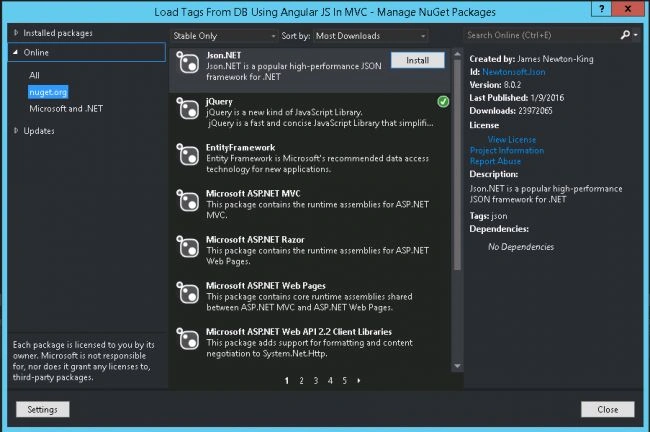
Figure: Manage NuGet Package Window
Once you have installed those items, please make sure that all the items (jQuery, Datatables JS files) are loaded in your scripts folder.
Using the code
Now let us add the needed references.
Include the references in your _Layout.cshtml
As we have already installed all the packages we need, now we need to add the references, right? After adding the reference, your _Layout.cshtml will look like below.
- <!DOCTYPE html>
- <html>
- <head>
- <meta charset="utf-8" />
- <meta name="viewport" content="width=device-width, initial-scale=1.0">
- <title>@ViewBag.Title - My ASP.NET Application</title>
- <link href="~/Content/Site.css" rel="stylesheet" type="text/css" />
- <link href="~/Content/bootstrap.min.css" rel="stylesheet" type="text/css" />
- <link href="~/Content/DataTables/css/jquery.dataTables.min.css" rel="stylesheet" />
- <script src="~/Scripts/modernizr-2.6.2.js"></script>
- <script src="~/scripts/jquery-2.2.0.min.js"></script>
- <script src="~/scripts/jquery-ui-1.10.2.min.js"></script>
- <script src="~/scripts/DataTables/jquery.dataTables.min.js"></script>
- <script src="~/scripts/MyScripts.js"></script>
- <script src="~/Scripts/bootstrap.min.js"></script>
- </head>
- <body>
- <div class="navbar navbar-inverse navbar-fixed-top">
- <div class="container">
- <div class="navbar-header">
- <button type="button" class="navbar-toggle" data-toggle="collapse" data-target=".navbar-collapse">
- <span class="icon-bar"></span>
- <span class="icon-bar"></span>
- <span class="icon-bar"></span>
- </button> @Html.ActionLink("jQuery Datatable With Server Side Data", "Index", "Home", new { area = "" }, new { @class = "navbar-brand" })
- </div>
- <div class="navbar-collapse collapse">
- <ul class="nav navbar-nav">
- </ul>
- </div>
- </div>
- </div>
- <div class="container body-content">
- @RenderBody()
- <hr />
- <footer>
- <p>© @DateTime.Now.Year - <a href="http://sibeeshpassion.com">Sibeesh Passion</a></p>
- </footer>
- </div>
- </body>
- </html>
Add a normal MVC controller
Now we will add a normal MVC controller in our app. Once you add that you can see an ActionResult is created for us.
- public ActionResult Index()
- {
- return View();
- }
- @{
- ViewBag.Title = "jQuery Datatable With Server Side Data";
- }
- <h2>jQuery Datatable With Server Side Data</h2>
- <table id="myGrid" class="table">
- <thead>
- <tr>
- <th>SalesOrderID</th>
- <th>SalesOrderDetailID</th>
- <th>CarrierTrackingNumber</th>
- <th>OrderQty</th>
- <th>ProductID</th>
- <th>UnitPrice</th>
- </tr>
- </thead>
- <tfoot>
- <tr>
- <th>SalesOrderID</th>
- <th>SalesOrderDetailID</th>
- <th>CarrierTrackingNumber</th>
- <th>OrderQty</th>
- <th>ProductID</th>
- <th>UnitPrice</th>
- </tr>
- </tfoot>
- </table>
So far the UI part is done, now it is time to set up our database and entity model. Are you ready?
Create a database
The following query can be used to create a database in your SQL Server.
- USE [master]
- GO
- /****** Object: Database [TrialsDB] Script Date: 17-Feb-16 10:21:17 PM ******/
- CREATE DATABASE [TrialsDB]
- CONTAINMENT = NONE
- ON PRIMARY
- ( NAME = N'TrialsDB', FILENAME = N'C:\Program Files\Microsoft SQL Server\MSSQL11.MSSQLSERVER\MSSQL\DATA\TrialsDB.mdf' , SIZE = 3072KB , MAXSIZE = UNLIMITED, FILEGROWTH = 1024KB )
- LOG ON
- ( NAME = N'TrialsDB_log', FILENAME = N'C:\Program Files\Microsoft SQL Server\MSSQL11.MSSQLSERVER\MSSQL\DATA\TrialsDB_log.ldf' , SIZE = 1024KB , MAXSIZE = 2048GB , FILEGROWTH = 10%)
- GO
- ALTER DATABASE [TrialsDB] SET COMPATIBILITY_LEVEL = 110
- GO
- IF (1 = FULLTEXTSERVICEPROPERTY('IsFullTextInstalled'))
- begin
- EXEC [TrialsDB].[dbo].[sp_fulltext_database] @action = 'enable'
- end
- GO
- ALTER DATABASE [TrialsDB] SET ANSI_NULL_DEFAULT OFF
- GO
- ALTER DATABASE [TrialsDB] SET ANSI_NULLS OFF
- GO
- ALTER DATABASE [TrialsDB] SET ANSI_PADDING OFF
- GO
- ALTER DATABASE [TrialsDB] SET ANSI_WARNINGS OFF
- GO
- ALTER DATABASE [TrialsDB] SET ARITHABORT OFF
- GO
- ALTER DATABASE [TrialsDB] SET AUTO_CLOSE OFF
- GO
- ALTER DATABASE [TrialsDB] SET AUTO_CREATE_STATISTICS ON
- GO
- ALTER DATABASE [TrialsDB] SET AUTO_SHRINK OFF
- GO
- ALTER DATABASE [TrialsDB] SET AUTO_UPDATE_STATISTICS ON
- GO
- ALTER DATABASE [TrialsDB] SET CURSOR_CLOSE_ON_COMMIT OFF
- GO
- ALTER DATABASE [TrialsDB] SET CURSOR_DEFAULT GLOBAL
- GO
- ALTER DATABASE [TrialsDB] SET CONCAT_NULL_YIELDS_NULL OFF
- GO
- ALTER DATABASE [TrialsDB] SET NUMERIC_ROUNDABORT OFF
- GO
- ALTER DATABASE [TrialsDB] SET QUOTED_IDENTIFIER OFF
- GO
- ALTER DATABASE [TrialsDB] SET RECURSIVE_TRIGGERS OFF
- GO
- ALTER DATABASE [TrialsDB] SET DISABLE_BROKER
- GO
- ALTER DATABASE [TrialsDB] SET AUTO_UPDATE_STATISTICS_ASYNC OFF
- GO
- ALTER DATABASE [TrialsDB] SET DATE_CORRELATION_OPTIMIZATION OFF
- GO
- ALTER DATABASE [TrialsDB] SET TRUSTWORTHY OFF
- GO
- ALTER DATABASE [TrialsDB] SET ALLOW_SNAPSHOT_ISOLATION OFF
- GO
- ALTER DATABASE [TrialsDB] SET PARAMETERIZATION SIMPLE
- GO
- ALTER DATABASE [TrialsDB] SET READ_COMMITTED_SNAPSHOT OFF
- GO
- ALTER DATABASE [TrialsDB] SET HONOR_BROKER_PRIORITY OFF
- GO
- ALTER DATABASE [TrialsDB] SET RECOVERY FULL
- GO
- ALTER DATABASE [TrialsDB] SET MULTI_USER
- GO
- ALTER DATABASE [TrialsDB] SET PAGE_VERIFY CHECKSUM
- GO
- ALTER DATABASE [TrialsDB] SET DB_CHAINING OFF
- GO
- ALTER DATABASE [TrialsDB] SET FILESTREAM( NON_TRANSACTED_ACCESS = OFF )
- GO
- ALTER DATABASE [TrialsDB] SET TARGET_RECOVERY_TIME = 0 SECONDS
- GO
- ALTER DATABASE [TrialsDB] SET READ_WRITE
- GO
Create table in database
Below is the query to create table in database.
- USE [TrialsDB]
- GO
- /****** Object: Table [dbo].[SalesOrderDetail] Script Date: 19-Feb-16 12:30:55 PM ******/
- SET ANSI_NULLS ON
- GO
- SET QUOTED_IDENTIFIER ON
- GO
- CREATE TABLE [dbo].[SalesOrderDetail](
- [SalesOrderID] [int] NOT NULL,
- [SalesOrderDetailID] [int] IDENTITY(1,1) NOT NULL,
- [CarrierTrackingNumber] [nvarchar](25) NULL,
- [OrderQty] [smallint] NOT NULL,
- [ProductID] [int] NOT NULL,
- [SpecialOfferID] [int] NOT NULL,
- [UnitPrice] [money] NOT NULL,
- [UnitPriceDiscount] [money] NOT NULL,
- [LineTotal] AS (isnull(([UnitPrice]*((1.0)-[UnitPriceDiscount]))*[OrderQty],(0.0))),
- [rowguid] [uniqueidentifier] ROWGUIDCOL NOT NULL,
- [ModifiedDate] [datetime] NOT NULL,
- CONSTRAINT [PK_SalesOrderDetail_SalesOrderID_SalesOrderDetailID] PRIMARY KEY CLUSTERED
- (
- [SalesOrderID] ASC,
- [SalesOrderDetailID] ASC
- )WITH (PAD_INDEX = OFF, STATISTICS_NORECOMPUTE = OFF, IGNORE_DUP_KEY = OFF, ALLOW_ROW_LOCKS = ON, ALLOW_PAGE_LOCKS = ON) ON [PRIMARY]
- ) ON [PRIMARY]
- GO
To insert the data, I will attach a database script file along with the download file, you can either run that or insert some data using the below query. By the way if you would like to know how to generate scripts with data in SQL Server, you can check here.
- USE [TrialsDB]
- GO
- INSERT INTO [dbo].[SalesOrderDetail]
- ([SalesOrderID]
- ,[CarrierTrackingNumber]
- ,[OrderQty]
- ,[ProductID]
- ,[SpecialOfferID]
- ,[UnitPrice]
- ,[UnitPriceDiscount]
- ,[rowguid]
- ,[ModifiedDate])
- VALUES
- (<SalesOrderID, int,>
- ,<CarrierTrackingNumber, nvarchar(25),>
- ,<OrderQty, smallint,>
- ,<ProductID, int,>
- ,<SpecialOfferID, int,>
- ,<UnitPrice, money,>
- ,<UnitPriceDiscount, money,>
- ,<rowguid, uniqueidentifier,>
- ,<ModifiedDate, datetime,>)
- GO
- USE [TrialsDB]
- GO
- /****** Object: StoredProcedure [dbo].[usp_Get_SalesOrderDetail] Script Date: 19-Feb-16 12:33:43 PM ******/
- SET ANSI_NULLS ON
- GO
- SET QUOTED_IDENTIFIER ON
- GO
- -- =============================================
- -- Author: <Author,Sibeesh Venu>
- -- Create date: <Create Date, 18-Feb-2016>
- -- Description: <Description,To fetch SalesOrderDetail>
- -- =============================================
- ALTER PROCEDURE [dbo].[usp_Get_SalesOrderDetail]
- AS
- BEGIN
- -- SET NOCOUNT ON added to prevent extra result sets from
- -- interfering with SELECT statements.
- SET NOCOUNT ON;
- -- Select statements for procedure here
- SELECT top(100) SalesOrderID,SalesOrderDetailID,CarrierTrackingNumber,OrderQty,ProductID,UnitPrice,ModifiedDate from dbo.SalesOrderDetail
- END
Create Entity Data Model
Right click on your model folder and click new, select ADO.NET Entity Data Model. Follow the steps given. Once you have done the processes, you can see the edmx file and other files in your model folder.
Now we will go back to our controller and add a new JsonResult which can be called via a new jQuery Ajax request. No worries, we will create that Ajax request later. Once you add the Jsonresult action, I hope your controller will look like this.
- using System;
- using System.Collections.Generic;
- using System.Linq;
- using System.Web;
- using System.Web.Mvc;
- using jQuery_Datatable_With_Server_Side_Data.Models;
- namespace jQuery_Datatable_With_Server_Side_Data.Controllers
- {
- public class HomeController: Controller
- {
- TrialsDBEntities tdb;
- Sales sa = new Sales();
- public ActionResult Index()
- {
- return View();
- }
- public JsonResult GetGata()
- {
- try
- {
- using(tdb = new TrialsDBEntities())
- {
- var myList = sa.GetSales(tdb);
- return Json(myList, JsonRequestBehavior.AllowGet);
- }
- }
- catch (Exception)
- {
- throw;
- }
- }
- }
- }
- using jQuery_Datatable_With_Server_Side_Data.Models;
- public object GetSales(TrialsDBEntities tdb)
- {
- try
- {
- var myList = ((from l in tdb.SalesOrderDetails select new
- {
- SalesOrderID = l.SalesOrderID,
- SalesOrderDetailID = l.SalesOrderDetailID,
- CarrierTrackingNumber = l.CarrierTrackingNumber,
- OrderQty = l.OrderQty,
- ProductID = l.ProductID,
- UnitPrice = l.UnitPrice
- }).OrderBy(l => l.SalesOrderID)).Take(100).ToList();
- return myList;
- }
- catch (Exception)
- {
- throw new NotImplementedException();
- }
- }
- public List < SalesOrderDetail > GetSalesSP(TrialsDBEntities tdb)
- {
- try
- {
- var myList = tdb.Database.SqlQuery < SalesOrderDetail > ("EXEC usp_Get_SalesOrderDetail").ToList();
- return myList;
- }
- catch (Exception)
- {
- throw new NotImplementedException();
- }
- }
- $(document).ready(function() {
- $('#myGrid').DataTable({
- "ajax": {
- "url": "../Home/GetGata/",
- "dataSrc": ""
- },
- "columns": [{
- "data": "SalesOrderID"
- }, {
- "data": "SalesOrderDetailID"
- }, {
- "data": "CarrierTrackingNumber"
- }, {
- "data": "OrderQty"
- }, {
- "data": "ProductID"
- }, {
- "data": "UnitPrice"
- }]
- });
- });
- [{"SalesOrderID":43659,"SalesOrderDetailID":2,"CarrierTrackingNumber":"4911-403C-98","OrderQty":1,"ProductID":776,"UnitPrice":2024.994},{"SalesOrderID":43659,"SalesOrderDetailID":3,"CarrierTrackingNumber":"4911-403C-98","OrderQty":3,"ProductID":777,"UnitPrice":2024.994},{"SalesOrderID":43659,"SalesOrderDetailID":4,"CarrierTrackingNumber":"4911-403C-98","OrderQty":1,"ProductID":778,"UnitPrice":2024.994},{"SalesOrderID":43659,"SalesOrderDetailID":5,"CarrierTrackingNumber":"4911-403C-98","OrderQty":1,"ProductID":771,"UnitPrice":2039.994},{"SalesOrderID":43659,"SalesOrderDetailID":6,"CarrierTrackingNumber":"4911-403C-98","OrderQty":1,"ProductID":772,"UnitPrice":2039.994},{"SalesOrderID":43659,"SalesOrderDetailID":7,"CarrierTrackingNumber":"4911-403C-98","OrderQty":2,"ProductID":773,"UnitPrice":2039.994},{"SalesOrderID":43659,"SalesOrderDetailID":8,"CarrierTrackingNumber":"4911-403C-98","OrderQty":1,"ProductID":774,"UnitPrice":2039.994},{"SalesOrderID":43659,"SalesOrderDetailID":9,"CarrierTrackingNumber":"4911-403C-98","OrderQty":3,"ProductID":714,"UnitPrice":28.8404},{"SalesOrderID":43659,"SalesOrderDetailID":10,"CarrierTrackingNumber":"4911-403C-98","OrderQty":1,"ProductID":716,"UnitPrice":28.8404}]
Output
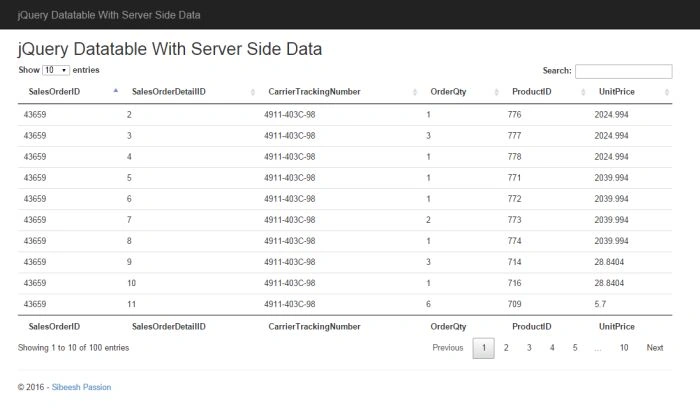
Figure: jQuery Datatable With Server Side Data
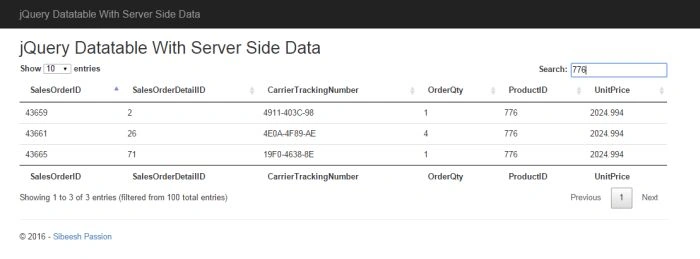
Figure: jQuery Datatable With Server Side Data Search
Did I miss anything that you may think is needed? Did you use jQuery Datatables in your application? Have you ever wanted to do this requirement? Did you find this post useful? I hope you liked this article. Please sharewith me your valuable suggestions and feedback.
Your turn. What do you think?
MaddyPosted Oct 25, 2018, 6:30 AM
Thanks much for the nice article. How do we add link button or text box in this?
Sibeesh VenuPosted Jul 14, 2016, 12:50 PM
Ravi Kandel Thanks much :)
Sibeesh VenuPosted Jul 14, 2016, 12:50 PM
Sthitaprajnya Debasis Nayak Thanks much :)
Sibeesh VenuPosted Jul 14, 2016, 12:50 PM
Manas Mohapatra Thanks much :)
Sibeesh VenuPosted Jul 14, 2016, 12:50 PM
Gowtham K Thanks much :)
Ravi KandelPosted Jul 14, 2016, 12:09 PM
Thanks for sharing.
Sthitaprajnya Debasis NayakPosted Mar 18, 2016, 6:07 AM
Nice Article !!!
Manas MohapatraPosted Feb 25, 2016, 11:54 PM
Good one
Gowtham KPosted Feb 24, 2016, 2:46 AM
Good One
Sibeesh VenuPosted Feb 24, 2016, 12:46 AM
Santhakumar Munuswamy Thank you
Santhakumar MunuswamyPosted Feb 23, 2016, 2:15 PM
Thanks for nice article
Sibeesh VenuPosted Feb 23, 2016, 9:13 AM
Shubham Kumar Thanks a lot
Sibeesh VenuPosted Feb 23, 2016, 9:13 AM
Rupali Shinde Thanks a lot
Sibeesh VenuPosted Feb 23, 2016, 9:13 AM
Raja T Thanks a lot
Shubham KumarPosted Feb 23, 2016, 5:27 AM
nice share sir
Rupali ShindePosted Feb 23, 2016, 5:06 AM
thanks for sharing
Raja TPosted Feb 23, 2016, 2:34 AM
Thanks for sharing!!
Sibeesh VenuPosted Feb 23, 2016, 12:40 AM
Dhanesh Nambiyar Thanks a lot
Sibeesh VenuPosted Feb 23, 2016, 12:40 AM
Pankaj Kumar Choudhary Thanks a lot
Sibeesh VenuPosted Feb 23, 2016, 12:39 AM
Humayun Kabir Mamun Thanks a lot
Sibeesh VenuPosted Feb 23, 2016, 12:39 AM
Vignesh Mani Thanks a lot
Sibeesh VenuPosted Feb 23, 2016, 12:39 AM
Aqib Shehzad Yes, it is possible for server side paging. You may get that example here: https://www.datatables.net/examples/
Sibeesh VenuPosted Feb 23, 2016, 12:36 AM
Aqib Shehzad Thanks a lot
Sibeesh VenuPosted Feb 23, 2016, 12:35 AM
Ehsan Sajjad Thanks a lot
Sibeesh VenuPosted Feb 23, 2016, 12:35 AM
Amit Singh Thanks a lot
Guest UserPosted Feb 22, 2016, 11:23 PM
Useful information... nice explanation
Pankaj Kumar ChoudharyPosted Feb 22, 2016, 10:44 PM
Nice Explanation Sir.......
Humayun Kabir MamunPosted Feb 22, 2016, 10:36 PM
Nice...
Vignesh ManiPosted Feb 22, 2016, 5:48 PM
Nice one
Muhammad Aqib ShehzadPosted Feb 22, 2016, 3:06 PM
please let me know One thing if i have a big data of almost 100,000 rows, more or less firstly what is the impact on his performance, secondly can we render it just like custom paging means can we control pagination, i want to display all 10 records of first page and then on click of second page, then new server side call generates which populate the data.
Muhammad Aqib ShehzadPosted Feb 22, 2016, 3:03 PM
nice post
Ehsan SajjadPosted Feb 22, 2016, 1:57 PM
good one
Amit Kumar SinghPosted Feb 22, 2016, 12:55 PM
Nice one