

Abstract
This is tutorial text on “prototypal inheritance” in JavaScript. Some theory is explained, and several JavaScript examples are shown, together with screenshots of “internals” from the DevTools debugger.
1. Introduction
Developers coming from some of the modern Object-Oriented languages like C++, Java, and C# to JavaScript find often JavaScript “dirty”, obscure, and full or archaic language expressions that are kept in language for historical backward compatibility. One thing in particular that you will find different is the “object inheritance model” in JavaScript which looks similar to the above OO languages but is inside radically different. While in modern languages like C++, Java, and C# the object inheritance model is “class-based”, in JavaScript is “instance-based”. This text is not meant to be a complete tutorial, but rather a clarification paper that presents a sufficient number of examples and screenshots from the Chrome DevTools debugger to clarify how inheritance is implemented internally. The intended audience is Intermediate JavaScript developers and above.
2. Theoretical background
Before some practical examples, some theoretical background is needed. We are focused on explaining and comprehending the basic concepts, leaving more details to further reading of references.
2.1. Simplified definitions
Here are some plain language explanations.
What is “class-based inheritance”?
Class-based inheritance is a paradigm/manner of object-oriented programming in which the reuse of functionality/code is done by a process of reusing existing classes. Here a “class” is a template for creating objects. Class is an abstract structure, rather than a specific instance. Some of the programming languages that use this paradigm are C++, Java, and C#.
What is “prototypal inheritance”?
Prototypal inheritance is a paradigm/manner of object-oriented programming in which the reuse of functionality/code is done by a process of reusing existing objects that serve as prototypes for new objects. A prototype object is not an abstract structure, but rather a specific instance. One of the programming languages that use this paradigm is JavaScript.
What is a “prototype object” in “prototypal inheritance”?
A prototype object is an instance of an object whose state and behavior are about to be reused in the process of “prototypal inheritance”.
Which is better, “prototypal inheritance” or “class-based inheritance?
Prototypal inheritance” was popular in the 1980s. Since the late 1990s, the “class-based inheritance” paradigm has become more popular.
2.2. Prototypal Inheritance in JavaScript
Here are some simplified explanations.
- How is prototypal inheritance implemented in JavaScript? Every object in JavaScript has a special internal hidden property [[Prototype]] that points to another object or is null.
- Can I read/write to [[Prototype]]? Property [[Prototype]] is more of a concept, but there are getters/setters to read/write to it, you need to read/write to getter/setter __proto__.
- Is there a “base class” for all objects in JavaScript? Well, there is not a “base class”, but a “base prototype object” since this is a prototypical inheritance paradigm. There is an object “Object” that serves as a base prototype object for all new objects in JavaScript. By default, every new object in JavaScript recursively in dept thru inheritance hierarchy points to an “Object” instance. So, every new object inherits methods and properties from the “Object” instance.
- JavaScript has the keyword “class” that enables the creation of new objects. Isn’t that “class-based inheritance”? ECMA Script 2015 (ES6) introduced classes as syntactic sugar over JavaScript's existing prototype-based inheritance. But, in the background is really the prototype-based inheritance.
2.3. Examples
The examples below are for a developer who already has some experience with JavaScript. The focus is more on the internals of how JavaScript internally represents objects, than on presenting/teaching JavaScript here. We demo the creation of objects in 3 different ways:
- Literal syntax
- Constructor function syntax
- Class syntax
These are not the only ways to create objects in JavaScript, but they present sufficient variety for this article. We used Chrome DevTools debugger to have a look into how objects and inheritance are represented internally. The source code of all examples is attached. Examples were executed on Chrome Version 116.0.5845.188 (Official Build) (64-bit).
3. Example01 Object - Literal syntax
3.1. Example code
Please consider the following example.
//Example 01
//Object - Literal syntax

let person1 = {
    name: "Mark",
    age: 21,
}
<!--
Output
Accessing object property:
person1.name:Mark
Calling method inherited from the prototype:
person1.toString():[object Object]
Accessing object prototype:
person1.__proto__.toString():[object Object]
person1.__proto__.constructor.name:Object
Checking if we are at the root of the inheritance:
person1.__proto__.__proto__:null
    -->
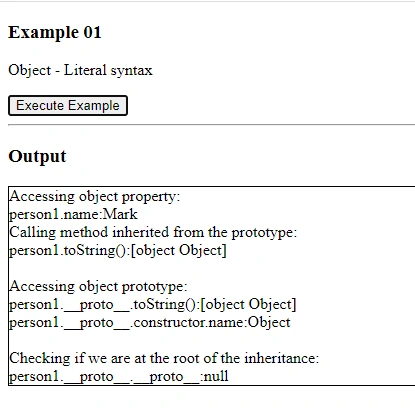
Here is the execution screen.
3.2. DevTools screenshots
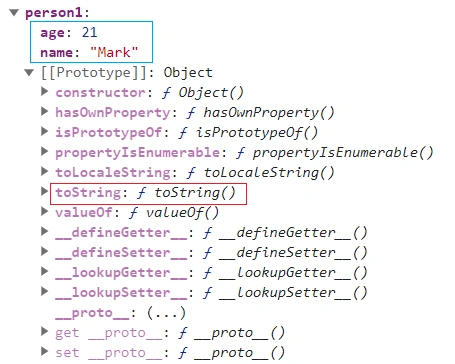
Here are some screenshots of Chrome DevTools during execution.
3.3. Example comments
- In this example, objects were created using traditional “Literal syntax”.
- The screenshot from the DevTools debugger outlines nicely all object person1 properties and methods.
- Even if it is not obvious from the syntax, both from execution results and DevTools it can be seen that the object person1 was assigned a prototype object “Object”. Please notice in DevTools property [[Prototype]] Object.
- Even thou object person1 does not define by itself method .toString(), it inherits it from prototype object “[[Prototype]] Object”, as it can be seen in the execution of the code person1.toString().
- It can be seen that using the expression person1.__proto__ we can access [[Prototype]] directly, its properties and methods.
4. Example02 Object - Constructor function syntax
4.1. Example code
Please consider the following example.
//Example 02
//Object - Constructor function syntax
function Person(name, age) {
    this.name = name;
    this.age = age;
}
let person1 = new Person("Mark", 21);
<!--
Output
Accessing object property:
person1.name:Mark
Calling method inherited from the prototype:
person1.toString():[object Object]
Checking object class:
person1 instanceof Person:true
Accessing object prototype:
person1.__proto__.toString():[object Object]
person1.__proto__.constructor.name:Person
Accessing object prototype’s prototype:
person1.__proto__.__proto__:[object Object]
person1.__proto__.__proto__.constructor.name:Object
Checking if we are at the root of the inheritance:
person1.__proto__.__proto__.__proto__:null
    -->
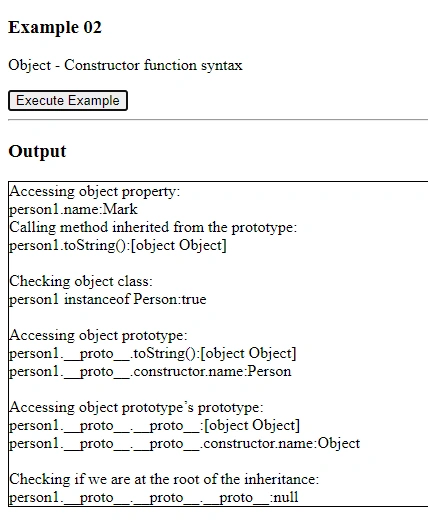
Here is the execution screen.
4.2. DevTools screenshots
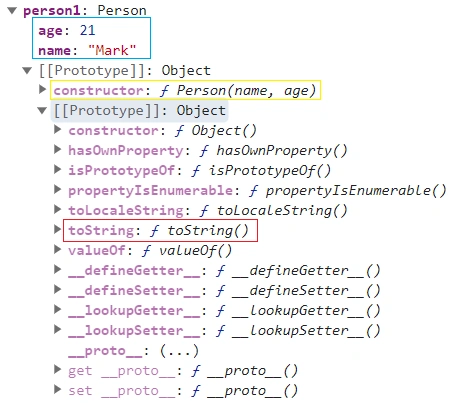
Here are some screenshots of Chrome DevTools during execution.
4.3. Example comments
- In this example, objects were created using “Constructor function syntax”.
- The screenshot from DevTools outlines nicely all object person1 properties and methods.
- Even if it is not obvious from the syntax, both from results and DevTools it can be seen that the object person1 was assigned a prototype object “Object”. Please notice in DevTools property [[Prototype]] Object.
- It is interesting to notice that we have 2 levels of prototype objects in dept. You can see that easily from DevTools, and from code execution of person1.__proto__ and person1.__proto__.__proto__. That can be explained easily, that is when objects are created with “constructor syntax”, JavaScript creates a prototype object that is going to act as a prototype object for all objects created with the same “constructor function”, and in that object saves a reference to that function, which can be seen in DevTools as a property/method “constructor: f Person()”.
- It can be seen that using the expression person1.__proto__ we can access [[Prototype]] directly, its properties and methods, and further into depth with person1.__proto__.__proto__.
- Even thou object person1 does not define by itself method .toString(), it inherits it from prototype object “[[Prototype]] Object”, this time from 2 levels dept, as it can be seen in the execution of person1.toString().
- One of my ask is, are objects person1 from this Example02 and from previous Example01 the same objects? Obviously, from DevTools it follows, that they do not have the same internal structure, which depends on how the objects are created. So, can we say that those objects are the same? Well, what you as a programmer care about is the “public interface” of an object, that is properties and methods that can be accessed from object reference person1. As objects person1 from this Example02 and from previous Example01 have “almost the same” public interface, we consider them to be the same.
5. Example03 Object - Class syntax
5.1. Example code
Please consider the following example.
//Example 03
//Object - Class syntax

class Person {
    constructor(name, age) {
        this.name = name;
        this.age = age;
    }
}

let person1 = new Person("Mark", 21);

<!--
Output
Accessing object property:
person1.name:Mark
Calling method inherited from the prototype:
person1.toString():[object Object]

Checking object class:
person1 instanceof Person:true

Accessing object prototype:
person1.__proto__.toString():[object Object]
person1.__proto__.constructor.name:Person

Accessing object prototype’s prototype:
person1.__proto__.__proto__:[object Object]
person1.__proto__.__proto__.constructor.name:Object

Checking if we are at the root of the inheritance:
person1.__proto__.__proto__.__proto__:null
    -->
Here is the execution screen.
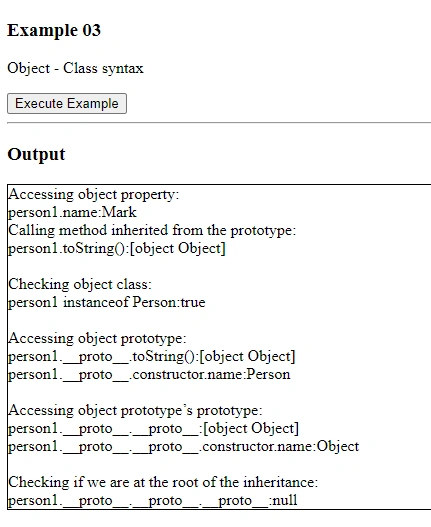
5.2. DevTools screenshots
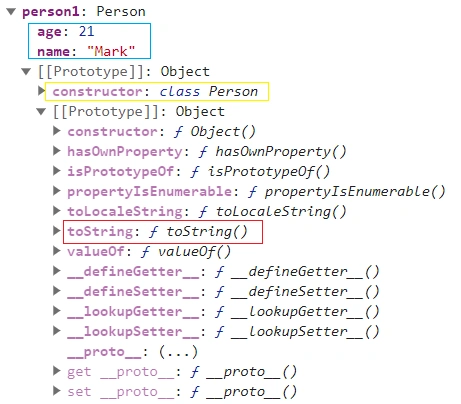
Here are some screenshots of Chrome DevTools during execution.
5.3. Example comments
- In this example, objects were created using “Class syntax”. ECMA Script 2015 (ES6) introduced classes as syntactic sugar over JavaScript's existing prototype-based inheritance.
- The screenshot from DevTools outlines nicely all object person1 properties and methods.
- Even if it is not obvious from the syntax, both from results and DevTools it can be seen that the object person1 was assigned a prototype object “Object”. Please notice in DevTools property [[Prototype]] Object.
- It is interesting to notice that we have 2 levels of prototype objects in dept. You can see that easily from DevTools, and from code execution of person1.__proto__ and person1.__proto__.__proto__. That can be explained easily, that when created with “class syntax”, JavaScript creates a prototype object that is going to act as a prototype object for all objects created with the same “class”, and in that object saves a reference to that function, which can be seen in DevTools as a property/method “constructor: class Person()”.
- It can be seen that using the expression person1.__proto__ we can access [[Prototype]] directly, its properties and methods, and further into depth with person1.__proto__.__proto__.
- Even thou object person1 does not define by itself method .toString(), it inherits it from prototype object [[Prototype]] Object, this time from 2 levels dept, as it can be seen in the execution of code person1.toString().
- One can see that objects person1 from Example03 and Example02 have almost the same internal structure, except that property in Example02 “constructor: f Person()” is now replaced with the property “constructor: class Person()”. Again, as described above, since objects person1 in Exampe01, Example02, and Example03 have almost the same “public interface”, we consider them to be the same object, no matter how they were created.
6. Example04 Multiple Objects - Literal syntax
6.1 Example code
Please consider the following example.
//Example 04
//Multiple Objects - Literal syntax
let person1 = {
    name: "Mark",
    age: 21,
    toString: function () {
        return `Person ${this.name}, old ${this.age} (ver1)`;
    },
}
let person2 = {
    name: "Novak",
    age: 36,
    toString: function () {
        return `Person ${this.name}, old ${this.age} (ver2)`;
    },
}
person1.city = "Belgrade";
person2.profession = "programmer";
person1.__proto__.country = "Serbia";
<!--
Output
Accessing person1:
person1.name:Mark
person1.city:Belgrade
person1.profession:undefined
person1.country:Serbia
person1.toString():Person Mark, old 21 (ver1)
Accessing person2:
person2.name:Novak
person2.city:undefined
person2.profession:programmer
person2.country:Serbia
person2.toString():Person Novak, old 36 (ver2)
    -->
Here is the execution screen.
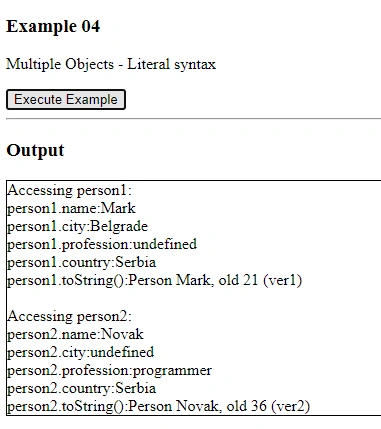
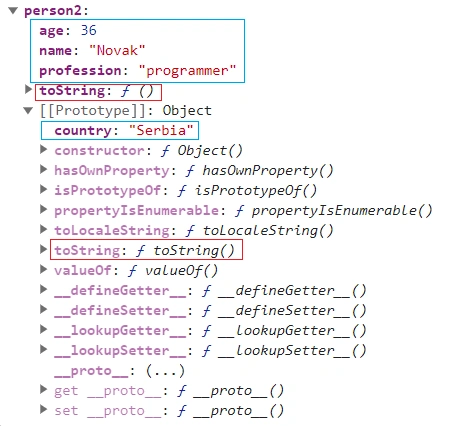
6.2. DevTools screenshots
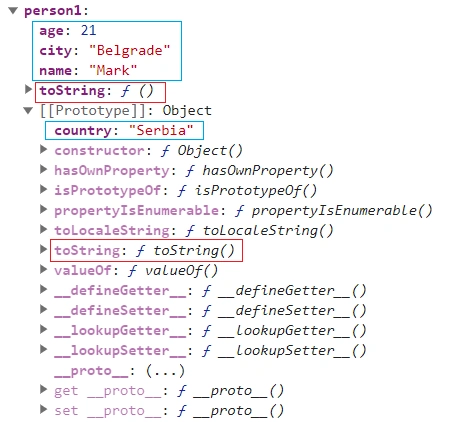
Here are some screenshots of Chrome DevTools during execution.
6.3. Example comments
- In this example we created 2 objects with the same public interface, using “Literal syntax”.
- Nothing in JavaScript's “literal syntax” enables us to indicate that those 2 objects are “of the same class”, and indeed JavaScript treats them as any other 2 different objects.
- Even if it is not obvious from the syntax, both from results and DevTools it can be seen that the objects person1 and person2 were assigned a prototype object “Object”. Please notice in DevTools property [[Prototype]] Object.
- While it might not be obvious from the DevTools screenshots, both objects now have the SAME prototype OBJECT INSTANCE “Object”. That might be a bit strange to a programmer coming from a classical “class-based inheritance” language like C++, Java, C#, and requires a mental step to adapt to the new paradigm. In the “class-based inheritance”, each object would get its own instance of the base object during construction, which is not the case now.
- So, they do have something in common, that is both inherit from “Object”. And as a result, both inherit the same properties and methods from the “Object”.
- We added some properties to each of them. Also, we played a bit with their common base prototype by adding a property to the common prototype in the expression `person1.__proto__.country = "Serbia"`.
- When executed, that expression will add a property to the “Object” object, since that is a prototype object in this case. Adding properties to "Object” is definitely something that SHOULD NOT be done in practice, since it adds properties to ALL objects in that JavaScript environment. We just wanted to show that it is possible, and that “Object” is just another object in JavaScript, like any other object. Also, that demonstrates that both objects person1 and person2 inherit from the same INSTANCE OF OBJECT “Object”. As a result, both objects person1 and person2 can now access that property, as can be seen from the execution results.
- We also added method .toString() to both objects person1 and person2. Each got a different version of the method, as can be seen from the execution. Each object now has its own method .toString() that shadows method .toString() inherited from the “Object”. Have a look at screenshots to see how DevTools represents that.
7. Example05 Multiple Objects - Constructor function syntax
7.1. Example code
Please consider the following example.
//Example 05
//Multiple Objects - Constructor function syntax
function Person(name, age) {
    this.name = name;
    this.age = age;
    this.toString = function () {
        return `Person ${this.name}, old ${this.age}`;
    }
}
let person1 = new Person("Mark", 21);
let person2 = new Person("Novak", 36);
person1.city = "Belgrade";
person2.profession = "programmer";
person1.__proto__.country = "Serbia";
<!--
Output
Accessing person1:
person1.name:Mark
person1.city:Belgrade
person1.profession:undefined
person1.country:Serbia
person1.toString():Person Mark, old 21
Accessing person2:
person2.name:Novak
person2.city:undefined
person2.profession:programmer
person2.country:Serbia
person2.toString():Person Novak, old 36
    -->
Here is the execution screen.
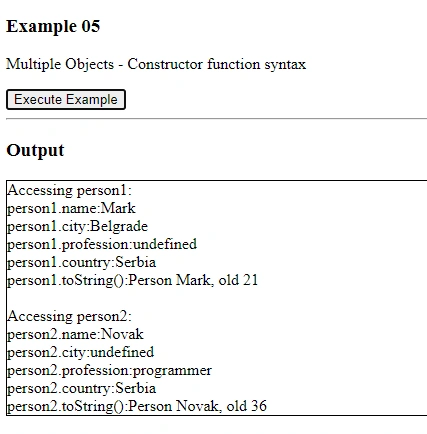
7.2. DevTools screenshots
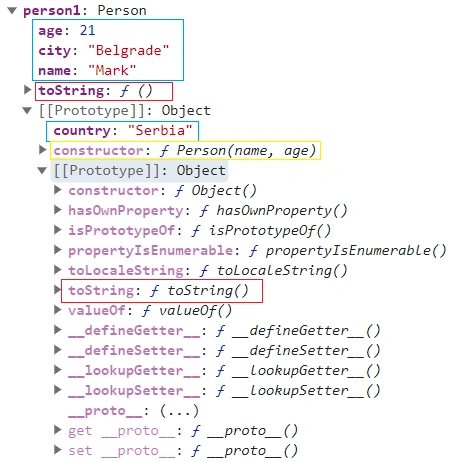
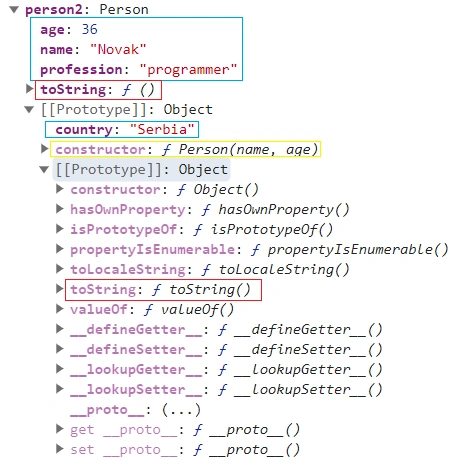
Here are some screenshots of Chrome DevTools during execution.
7.3. Example comments
- In this example, objects were created using “Constructor function syntax”.
- It is interesting to notice that we have 2 levels of prototype objects in dept. You can see that easily from DevTools, and from code execution of person1.__proto__ , person1.__proto__.__proto__, person2.__proto__ , person2.__proto__.__proto__. That can be explained easily, that when created with “constructor syntax”, JavaScript creates a prototype object that is going to act as a prototype object for all objects created with the same “constructor function”, and in that object saves a reference to that function, which can be seen in DevTools as a property/method “constructor: f Person()”.
- While it might not be obvious from the DevTools screenshots, both objects now have the SAME prototype hierarchy consisting of 2 objects. That might be a bit strange to a programmer coming from a classical “class-based inheritance” language like C++, Java, C#, and requires a mental step to adapt to the new paradigm. In the “class-based inheritance”, each object would get its own instance of the base object during construction, which is not the case now.
- We added some properties to each of them. Also, we played a bit with their common base prototype by adding a property to the common prototype in the expression ‘person1.__proto__.country = "Serbia"’.
- When executed, that expression will add a property to the first object in the prototype hierarchy, which acts as a prototype for all objects created with that constructor function. Also, that demonstrates that both objects person1 and person2 inherit from the same INSTANCE of “Object”. As a result, both objects person1 and person2 can now access that property, as can be seen from the execution results.
- We also added method .toString() inside the constructor function. That added.ToString() method to prototype object for the class, as can be seen from the DevTools. Each object now has method .toString() that shadows method .toString() inherited from the “Object”. Have a look at screenshots to see how DevTools represents that.
8. Example06 Multiple Objects - Class syntax
8.1. Example code
Please consider the following example.
//Example 06
//Multiple Objects - Class syntax
class Person {
    constructor(name, age) {
        this.name = name;
        this.age = age;
    }
    toString() {
            return `Person ${this.name}, old ${this.age}`;
    }
}
let person1 = new Person("Mark", 21);
let person2 = new Person("Novak", 36);
person1.city = "Belgrade";
person2.profession = "programmer";
person1.__proto__.country = "Serbia";
<!--
Output
Accessing person1:
person1.name:Mark
person1.city:Belgrade
person1.profession:undefined
person1.country:Serbia
person1.toString():Person Mark, old 21
Accessing person2:
person2.name:Novak
person2.city:undefined
person2.profession:programmer
person2.country:Serbia
person2.toString():Person Novak, old 36
    -->
Here is the execution screen.
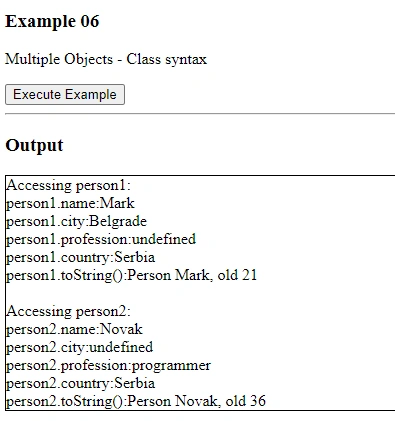
8.2. DevTools screenshots
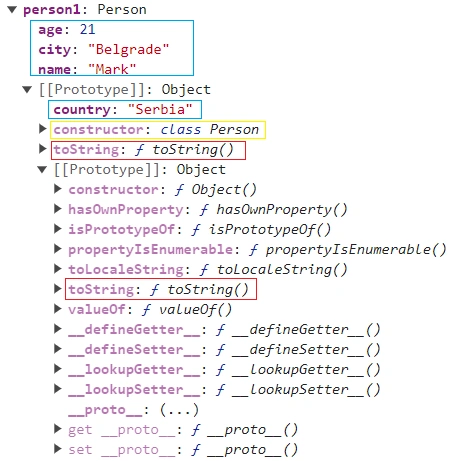
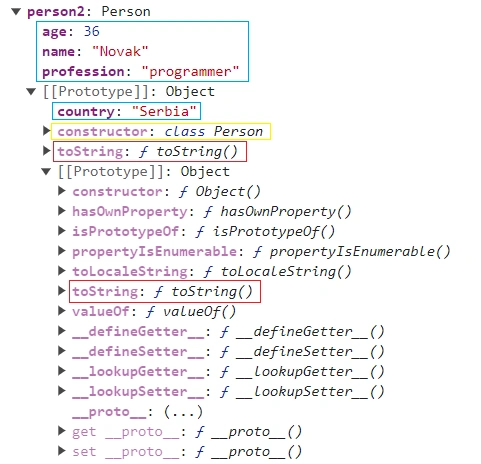
Here are some screenshots of Chrome DevTools during execution.
8.3. Example comments
- In this example, objects were created using “Class syntax”. ECMA Script 2015 (ES6) introduced classes as syntactic sugar over JavaScript's existing prototype-based inheritance.
- It is interesting to notice that we have 2 levels of prototype objects in dept. You can see that easily from DevTools, and from code execution of person1.__proto__ , person1.__proto__.__proto__, person2.__proto__ , person2.__proto__.__proto__. That can be explained easily, that when created with “constructor syntax”, JavaScript creates a prototype object that is going to act as a prototype object for all objects created with the same “class constructor”, and in that object saves a reference to that function, which can be seen in DevTools as a property/method “constructor: class Person”.
- While it might not be obvious from the DevTools screenshots, both objects now have the SAME prototype hierarchy consisting of 2 objects. . That might be a bit strange to a programmer coming from a classical “class-based inheritance” language like C++, Java, C#, and requires a mental step to adapt to the new paradigm. In the “class-based inheritance”, each object would get its own instance of the base object during construction, which is not the case now.
- We added some properties to each of them. Also, we played a bit with their common base prototype by adding a property to the common prototype in the expression ‘person1.__proto__.country = "Serbia"’.
- When executed, that expression will add a property to the first object in the prototype hierarchy, which acts as a prototype for all objects created with that constructor function. Also, that demonstrates that both objects person1 and person2 inherit from the same INSTANCE OBJECT. As a result, both objects person1 and person2 can now access that property, as can be seen from the execution results.
- We also added method .toString() inside the constructor function. That added.ToString() method to prototype object for the class, as can be seen from the DevTools. Each object now has method .toString() that shadows method .toString() inherited from the “Object”. Have a look at screenshots to see how DevTools represents that.
9. Example07 Object Inheritance - Literal syntax
9.1. Example code
Please consider the following example.
//Example 07
//Object Inheritance - Literal syntax
let person1 = {
    name: "Mark",
    age: 21,
    toString: function () {
        return `Person ${this.name}, old ${this.age} (ver1)`;
    },
}
let student1 = {
    course: "Computers",
}
student1.__proto__ = person1;
<!--
Output
Accessing object properties and methods:
student1.name:Mark
student1.course:Computers
student1.toString():Person Mark, old 21 (ver1)
Accessing object prototype:
student1.__proto__.toString():Person Mark, old 21 (ver1)
student1.__proto__.constructor.name:Object
Accessing object prototype’s prototype:
student1.__proto__.__proto__.toString():[object Object]
student1.__proto__.__proto__.constructor.name:Object
Checking if we are at the root of the inheritance:
student1.__proto__.__proto__.__proto__:null
    -->
Here is the execution screen.
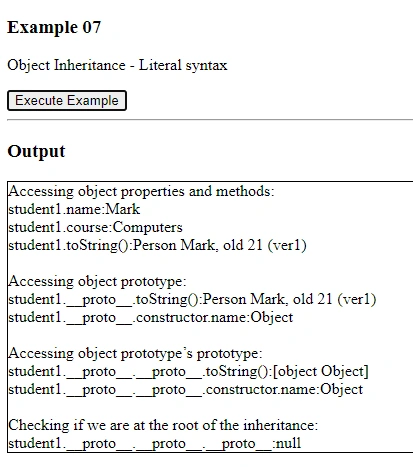
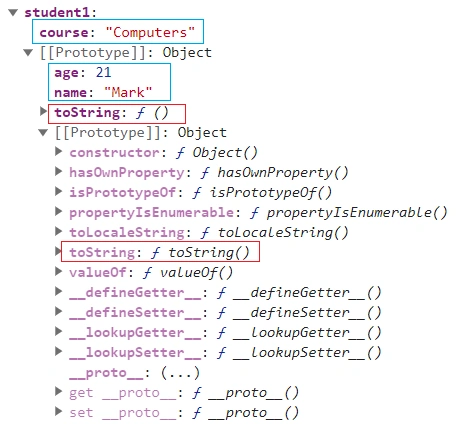
9.2. DevTools screenshots
Here are some screenshots of Chrome DevTools during execution.
9.3. Example comments
- In this example, objects were created using traditional “Literal syntax”.
- We created 2 objects, and object student1 inherits from object person1. The key expression in creating inheritance is “student1.__proto__ = person1;”
- From code execution, it can be seen that object student1 inherited properties and methods from object person1.
- DevTools screenshot nicely shows how object hierarchy is created.
- We also added method .toString() to object person1 and object student1 inherited it. Object student1 now has its own method .toString() that shadows method .toString() inherited from the “Object”. Have a look at screenshots to see how DevTools represents that.
10. Example08 Object Inheritance- Constructor function syntax
10.1. Example code
Please consider the following example.
//Example 08
//Object Inheritance- Constructor function syntax
function Person(name, age) {
    this.name = name;
    this.age = age;
    this.toString = function () {
        return `Person ${this.name}, old ${this.age}`;
    };
}
let person1 = new Person("Mark", 21);
function Student(course) {
    this.course = course;
}
Student.prototype = person1;
let student1 = new Student("Computers");
<!--
Output
Accessing object properties and methods:
student1.name:Mark
student1.course:Computers
student1.toString():Person Mark, old 21
Checking object class:
student1 instanceof Person:true
student1 instanceof Student:true
Accessing object prototype:
student1.__proto__.toString():Person Mark, old 21
student1.__proto__.constructor.name:Person
Accessing object prototype’s prototype:
student1.__proto__.__proto__.toString():[object Object]
student1.__proto__.__proto__.constructor.name:Person
Accessing object prototype’s prototype’s prototype:
student1.__proto__.__proto__.__proto__.toString():[object Object]
student1.__proto__.__proto__.__proto__.constructor.name:Object
Checking if we are at the root of the inheritance:
student1.__proto__.__proto__.__proto__.__proto__:null
    -->
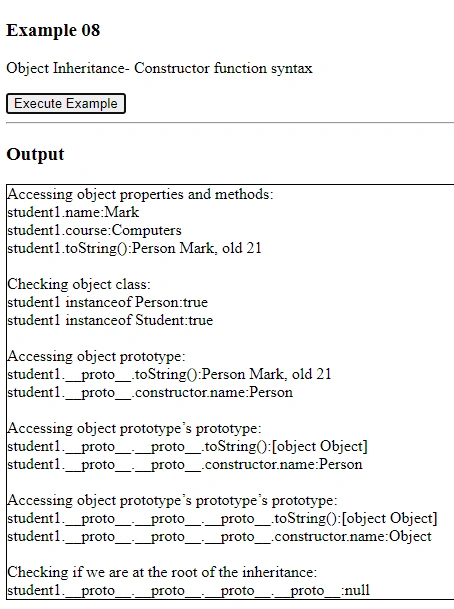
Here is the execution screen.
10.2. DevTools screenshots
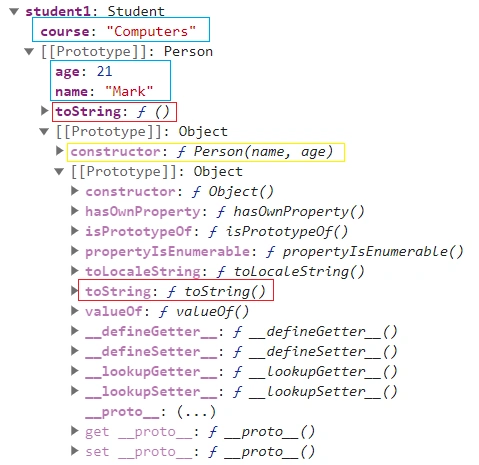
Here are some screenshots of Chrome DevTools during execution.
10.3. Example comments
- In this example, objects were created using “Constructor function syntax”.
- We created 2 objects, and object student1 inherits from object person1. The key expression in creating inheritance is “Student.prototype = person1;”
- From code execution, it can be seen that object student1 inherited properties and methods from object person1.
- DevTools screenshot nicely shows how object hierarchy is created.
- We also added method .toString() to object person1 and object student1 inherited it. Object student1 now has its own method .toString() that shadows method .toString() inherited from the “Object”. Have a look at screenshots to see how DevTools represents that.
11. Example09 Object Inheritance - Class syntax
11.1. Example code
Please consider the following example.
//Example 09
//Object Inheritance - Class syntax
class Person {
    constructor(name, age) {
        this.name = name;
        this.age = age;
    }
    toString() {
        return `Person ${this.name}, old ${this.age}`;
    };
}
class Student extends Person {
    constructor(course, name, age) {
        super(name, age);
        this.course = course;
    }
}
let student1 = new Student("Computers", "Mark", 21);
<!--
Output
Accessing object properties and methods:
student1.name:Mark
student1.course:Computers
student1.toString():Person Mark, old 21
Checking object class:
student1 instanceof Person:true
student1 instanceof Student:true
Accessing object prototype:
student1.__proto__.toString():Person undefined, old undefined
student1.__proto__.constructor.name:Student
Accessing object prototype's prototype:
student1.__proto__.__proto__.toString():Person undefined, old undefined
student1.__proto__.__proto__.constructor.name:Person
Accessing object prototype's prototype's prototype:
student1.__proto__.__proto__.__proto__.toString():[object Object]
student1.__proto__.__proto__.__proto__.constructor.name:Object
Checking if we are at the root of the inheritance:
student1.__proto__.__proto__.__proto__.__proto__:null
    -->
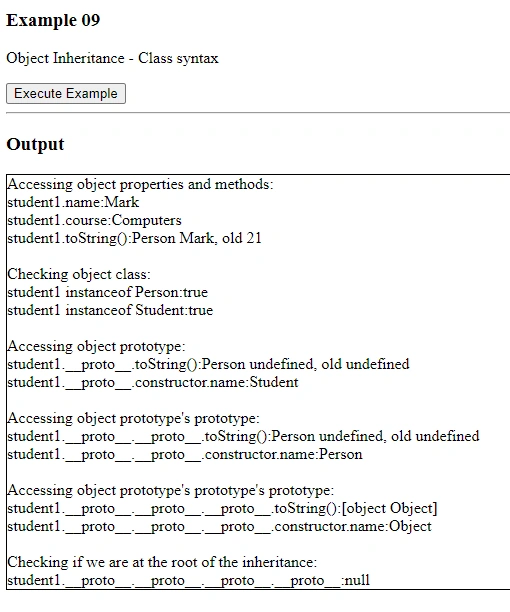
Here is the execution screen.
11.2. DevTools screenshots
Here are some screenshots of Chrome DevTools during execution.
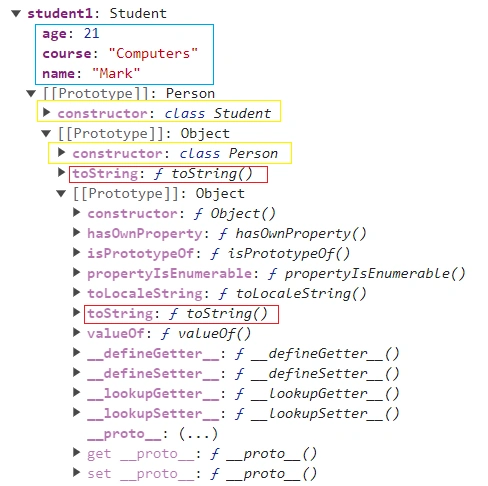
11.3. Example comments
- In this example, objects were created using “Class syntax”. ECMA Script 2015 (ES6) introduced classes as syntactic sugar over JavaScript's existing prototype-based inheritance.
- We created 2 classes, and class Student inherits from class Person. The key expression in creating inheritance is “extends Person”
- From code execution, it can be seen that object student1 of class Student inherited properties and methods from class Person.
- DevTools screenshot nicely shows how object hierarchy is created.
- We also added method .toString() to class Person and object student1 of class Student inherited it. Object student1 now has its own method .toString() that shadows method .toString() inherited from the “Object”. Have a look at screenshots to see how DevTools represents that.
12. Conclusion
We showed in number of examples in this text how “prototypical inheritance” in JavaScript works. This is by no means exhaustive text on the topic, objects can be created in different ways and there is more JavaScript material on the topic to be covered. But, our goals in this text were to focus on and show some basic principles and outline the internals of how JavaScript prototypical inheritance works.
13. References
- https://en.wikipedia.org/wiki/Prototype-based_programming
- https://en.wikipedia.org/wiki/Class-based_programming
- https://javascript.info/
- David Flanagan, JavaScript: The Definitive Guide, Seventh Edition, O’Reilly 2020.
Join the conversation! Your thoughts help the community grow.