

Introduction
JavaScript is designed to support asynchronous programming; it can handle numerous tasks concurrently. JavaScript callbacks are crucial because they let you run code after an asynchronous task completes. This article defines callbacks, explains their importance, and provides useful examples and code snippets to illustrate how to utilize them.
Callbacks What are they?
A callback is a function that is called after the main function has finished running and is supplied as an argument to another function. The callback function is passed as an argument to the main function, which then calls it to return the result when the main function has completed its work.
You can manage the results of asynchronous actions without blocking by using callbacks. This implies that your program can continue to operate while the process is in progress.
Callbacks Why are they used?
In order to handle the results of asynchronous operations without preventing the program from running, callbacks are necessary. Asynchronous tasks require time to complete, such as database queries and network requests. The software would stop until these activities were completed if they were synchronous, which would make for a slow user experience.
However, you can continue to run the program while these tasks are being completed in the background by using callbacks. The callback function manages the outcome after the task is completed. By doing this, the user experience is improved, and the software is kept responsive.
Syntax
function functionname(callback_functionname) {
    callback_functionname();
}
As an illustration
function welcomeNote(callback) {
    console.log("Hello Jaimin");
    if (callback != undefined) {
        callback();
    }
}

function userInfo() {
    console.log("C# Corner Profile:");
    console.log("Name: Jaimin Shethiya");
    console.log("Rank: 102");
}

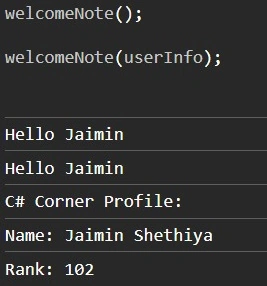
welcomeNote();

welcomeNote(userInfo);
Output
Crucial Points
- Asynchronous programming: Asynchronous actions do not impede the execution of the remainder of the program; instead, callbacks are utilized to handle their results. Rather, the program keeps running, and when the operation is finished, the callback function is called.
- Non-blocking: Non-blocking programming is made possible via callbacks; this means that the program doesn't pause to wait for an operation to finish before carrying on with its execution. Enhancing the functionality and responsiveness of programs is contingent upon this.
- Anonymous functions: Frequently utilized as callbacks, anonymous functions lack a name. In the first code example, an anonymous function is passed to setTimeout.
- Higher-order functions: A higher-order function is one that either returns a function as a result or accepts one or more functions as parameters. Because the main function in the aforementioned examples accepts a callback function as an argument, it is a higher-order function.
- Closure: Even after the outer function has returned, a closure function can access variables in its outer scope. Because of this, even after the main function has finished running, the callback function can still access variables and data from the main function.
Callback functions inside used another callback function
As an illustration
function currentDateTime() {
    console.log("Current date and time:", new Date());
}

function welcomeNote(callback) {
    console.log("Hello Jaimin");
    console.log("\n");

    if (callback != undefined) {
        callback(currentDateTime);
    }
}

function userInfo(callback) {
    if (callback != undefined) {
        callback();
    }
    console.log("\n");
    console.log("C# Corner Profile:");
    console.log("Name: Jaimin Shethiya");
    console.log("Rank: 102");
    console.log("\n");

    if (callback != undefined) {
        callback();
    }
}

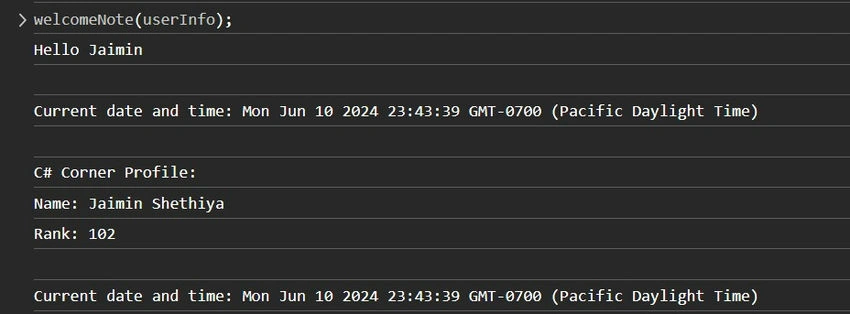
welcomeNote(userInfo);
Output
Note. When you have to wait for a lengthy result, the callback function comes in handy. For instance, it takes time for data to arrive when it comes from a server.
We learned the new technique and evolved together.
Happy coding!
Mariusz PostolPosted Jun 17, 2024, 7:39 PM
"You can manage the results of asynchronous actions " - is callback an asynchronous call? Not sure about the relationship. Can you explain?