

Itextsharp is an advanced tool library which is used for creating complex pdf repors. itext is used by different techonologies -- Android , .NET, Java and GAE developer use it to enhance their applications with PDF functionality. It creates documents and reports based on data from databases or xml files and Merge or split pages from existing PDF files.
How to use-Step 1
Download itextsharp.dll
Here is the link for download.
Namespace
- using iTextSharp.text;
- using iTextSharp.text.pdf;
First We use
- Document doc = new Document(PageSize.A4, 7f, 5f, 5f, 0f);
For set font style
- iTextSharp.text.Font mainFont = FontFactory.GetFont("Segoe UI",22, new iTextSharp.text.BaseColor(System.Drawing.ColorTranslator.FromHtml("#999")));
- iTextSharp.text.Font mainFont = FontFactory.GetFont("Segoe UI",22, new iTextSharp.text.BaseColor(System.Drawing.ColorTranslator.FromHtml("#999")));
For Paragraph
- Phrase mainPharse = new Phrase();
- Phrase mainPharse = new Phrase();
For image
- iTextSharp.text.Image mobileImage = iTextSharp.text.Image.GetInstance(HttpContext.Current.Server.MapPath("~/goodmorning.jpg"));
- mobileImage.ScaleToFit(10, 10);
- Chunk cmobImg = new Chunk(mobileImage, 0, -2);
Add References
- iTextSharp.text.dll
- iTextSharp.text.pdf.dll
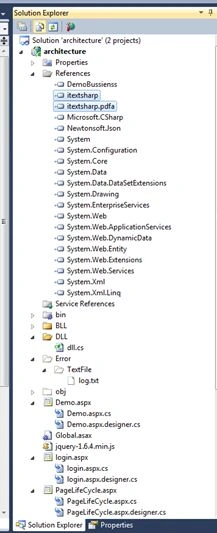
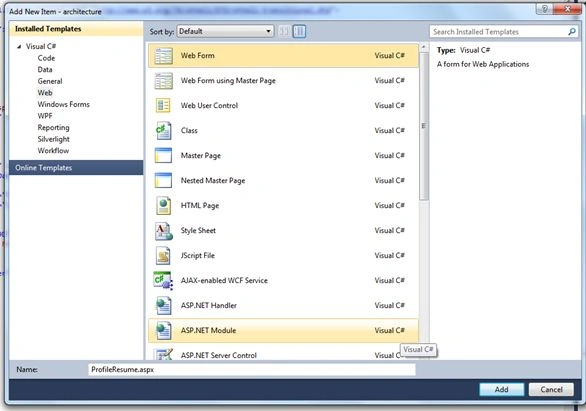
Add a aspx page with name profile name,
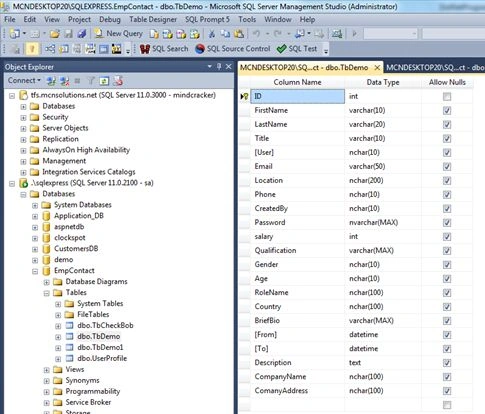
Add table in sql server,
Bind grid view from database. ---Source code for ProfileResume.aspx,
- <%@ Page Language="C#" AutoEventWireup="true" CodeBehind="ProfileResume.aspx.cs"
- Inherits="architecture.ProfileResume" %>
- using System;
- using System.Collections.Generic;
- using System.Linq;
- using System.Web;
- using System.Web.UI;
- using System.Web.UI.WebControls;
- using System.Data;
- using System.Configuration;
- using System.Data.SqlClient;
- using System.IO;
- using System.Collections;
- using System.Linq.Expressions;
- namespace architecture
- {
- public partial class ProfileResume: System.Web.UI.Page
- {
- public static string constr = ConfigurationManager.ConnectionStrings["ConString"].ConnectionString;
- protected void Page_Load(object sender, EventArgs e)
- {
- if (!IsPostBack)
- {
- ShowData();
- }
- }
- //method for Displaying Data in Gridview
- protected void ShowData()
- {
- SqlConnection con = new SqlConnection(constr);
- string str = "Select * from TbDemo; select * from TbDemo";
- con.Open();
- SqlCommand cmd = new SqlCommand(str, con);
- DataTable dt = new DataTable();
- SqlDataReader reader = cmd.ExecuteReader();
- dt.Load(reader);
- DataView dv = dt.DefaultView;
- gvlist.DataSource = dv;
- gvlist.DataBind();
- int i = 0;
- con.Close();
- }
- protected void Submit(object sender, EventArgs e)
- {
- using(SqlConnection connection = new SqlConnection(constr))
- {
- connection.Open();
- SqlCommand command = new SqlCommand("SELECT FirstName,LastName,Email FROM TbDemo", connection);
- SqlDataAdapter adapter = new SqlDataAdapter(command);
- SqlCommandBuilder builder = new SqlCommandBuilder(adapter);
- DataSet dataset = new DataSet();
- adapter.Fill(dataset);
- string line = new string('-', 40) + Environment.NewLine;
- Console.WriteLine(builder.GetUpdateCommand().CommandText);
- Console.WriteLine(line);
- Console.WriteLine(builder.GetDeleteCommand().CommandText);
- Console.WriteLine(line);
- Console.WriteLine(builder.GetInsertCommand().CommandText);
- Console.WriteLine(line);
- Console.ReadLine();
- // insert a row
- SqlCommand insert = builder.GetInsertCommand();
- insert.Parameters["@P1"].Value = "Ak";
- insert.Parameters["@P2"].Value = "KK";
- insert.Parameters["@P3"].Value = "Paul Kimmel";
- insert.ExecuteNonQuery();
- adapter.Fill(dataset);
- DataRow[] rows = dataset.Tables[0].Select("ID = '4'");
- if (rows.Length == 1) Console.WriteLine(rows[0]["FirstName"]);
- Console.ReadLine();
- }
- }
- protected void OnCommandPdf_click(object sender, GridViewCommandEventArgs e)
- {
- GridViewRow gvr = (GridViewRow)(((Button) e.CommandSource).NamingContainer);
- string id = e.CommandArgument.ToString();
- Response.Redirect("PdfProfile.aspx?Id=" + id);
- }
- }
- }
- using System;
- using System.Collections.Generic;
- using System.Linq;
- using System.Web;
- using System.Web.UI;
- using System.Web.UI.WebControls;
- using System.Data;
- using System.Configuration;
- using System.Data.SqlClient;
- using System.IO;
- using System.Collections;
- using System.Linq.Expressions;
- namespace architecture
- {
- public partial class ProfileResume: System.Web.UI.Page
- {
- public static string constr = ConfigurationManager.ConnectionStrings["ConString"].ConnectionString;
- protected void Page_Load(object sender, EventArgs e)
- {
- if (!IsPostBack)
- {
- ShowData();
- }
- }
- //method for Displaying Data in Gridview
- protected void ShowData()
- {
- SqlConnection con = new SqlConnection(constr);
- string str = "Select * from TbDemo; select * from TbDemo";
- con.Open();
- SqlCommand cmd = new SqlCommand(str, con);
- DataTable dt = new DataTable();
- SqlDataReader reader = cmd.ExecuteReader();
- dt.Load(reader);
- DataView dv = dt.DefaultView;
- gvlist.DataSource = dv;
- gvlist.DataBind();
- int i = 0;
- con.Close();
- }
- protected void Submit(object sender, EventArgs e)
- {
- using(SqlConnection connection = new SqlConnection(constr))
- {
- connection.Open();
- SqlCommand command = new SqlCommand("SELECT FirstName,LastName,Email FROM TbDemo", connection);
- SqlDataAdapter adapter = new SqlDataAdapter(command);
- SqlCommandBuilder builder = new SqlCommandBuilder(adapter);
- DataSet dataset = new DataSet();
- adapter.Fill(dataset);
- string line = new string('-', 40) + Environment.NewLine;
- Console.WriteLine(builder.GetUpdateCommand().CommandText);
- Console.WriteLine(line);
- Console.WriteLine(builder.GetDeleteCommand().CommandText);
- Console.WriteLine(line);
- Console.WriteLine(builder.GetInsertCommand().CommandText);
- Console.WriteLine(line);
- Console.ReadLine();
- // insert a row
- SqlCommand insert = builder.GetInsertCommand();
- insert.Parameters["@P1"].Value = "Ak";
- insert.Parameters["@P2"].Value = "KK";
- insert.Parameters["@P3"].Value = "Paul Kimmel";
- insert.ExecuteNonQuery();
- adapter.Fill(dataset);
- DataRow[] rows = dataset.Tables[0].Select("ID = '4'");
- if (rows.Length == 1) Console.WriteLine(rows[0]["FirstName"]);
- Console.ReadLine();
- }
- }
- protected void OnCommandPdf_click(object sender, GridViewCommandEventArgs e)
- {
- GridViewRow gvr = (GridViewRow)(((Button) e.CommandSource).NamingContainer);
- string id = e.CommandArgument.ToString();
- Response.Redirect("PdfProfile.aspx?Id=" + id);
- }
- }
- }
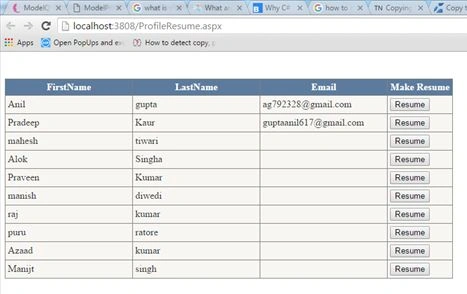
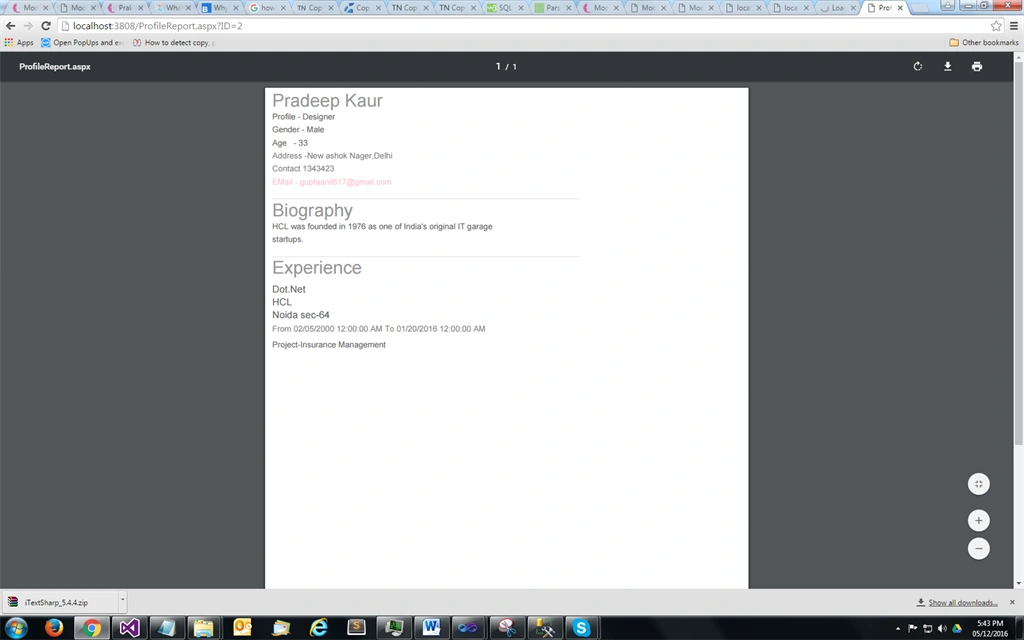
Click On make resume button for pdf Step a – add page PdfProfile.aspx,
- <%@ Page Language="C#" AutoEventWireup="true" CodeBehind="PdfProfile.aspx.cs" Inherits="architecture.PdfProfile" %>
- <!DOCTYPE html PUBLIC "-//W3C//DTD XHTML 1.0 Transitional//EN" "http://www.w3.org/TR/xhtml1/DTD/xhtml1-transitional.dtd">
- <html xmlns="http://www.w3.org/1999/xhtml">
- <head runat="server">
- <title></title>
- </head>
- <body>
- <form id="form1" runat="server">
- <div> </div>
- </form>
- </body>
- </html>
- using System;
- using System.Collections.Generic;
- using System.Linq;
- using System.Web;
- using System.Web.UI;
- using System.Web.UI.WebControls;
- using System.Data;
- using System.Configuration;
- using System.Data.SqlClient;
- using System.IO;
- using System.Collections;
- using iTextSharp.text;
- using iTextSharp.text.pdf;
- using System.Text;
- using System.Drawing;
- namespace architecture
- {
- public partial class PdfProfile: System.Web.UI.Page
- {
- public static string constr = ConfigurationManager.ConnectionStrings["ConString"].ConnectionString;
- protected void Page_Load(object sender, EventArgs e)
- {
- if (Request.QueryString["Id"] != null)
- {
- SqlConnection con = new SqlConnection(constr);
- Document doc = new Document(PageSize.A4, 7 f, 5 f, 5 f, 0 f);
- string str1 = "Select * from TbDemo where id='" + Request.QueryString["Id"] + "'";
- con.Open();
- SqlCommand cmd = new SqlCommand(str1, con);
- DataTable dt = new DataTable();
- SqlDataReader reader = cmd.ExecuteReader();
- dt.Load(reader);
- con.Close();
- //DataView dv = dt.DefaultView;
- string filePath = HttpContext.Current.Server.MapPath("~/Resume/" + Request.QueryString["Id"]);
- if (File.Exists(filePath + "/" + "UserProfile.pdf"))
- {
- Response.Redirect("~/ProfileReport.aspx?ID=" + Request.QueryString["Id"]);
- } else
- {
- try
- {
- //Create [Portfolio] directory If does not exist
- if (!Directory.Exists(filePath))
- {
- Directory.CreateDirectory(filePath);
- }
- string newFilePath = filePath + "\\" + "UserProfile.pdf"; //GetFileName(filePath, "UserProfile"); //
- PdfWriter writer = PdfWriter.GetInstance(doc, new FileStream(newFilePath, FileMode.Create));
- doc.Open();
- //Get the user photos to be show in pdf
- Int64 _userProfileID = Int64.Parse(Request.QueryString["Id"]);
- DataTable dtPhotos = dt;
- iTextSharp.text.Font mainFont = FontFactory.GetFont("Segoe UI", 22, new iTextSharp.text.BaseColor(System.Drawing.ColorTranslator.FromHtml("#999")));
- iTextSharp.text.Font infoFont1 = FontFactory.GetFont("Kalinga", 10, new iTextSharp.text.BaseColor(System.Drawing.ColorTranslator.FromHtml("#666")));
- iTextSharp.text.Font expHeadFond = FontFactory.GetFont("Calibri (Body)", 12, new iTextSharp.text.BaseColor(System.Drawing.ColorTranslator.FromHtml("#666")));
- PdfContentByte contentByte = writer.DirectContent;
- DataTable objDataTable = dt;
- ColumnText ct = new ColumnText(contentByte);
- //Create the font for show the name of user
- doc.Open();
- PdfPTable modelInfoTable = new PdfPTable(1);
- modelInfoTable.TotalWidth = 100 f;
- modelInfoTable.HorizontalAlignment = Element.ALIGN_LEFT;
- PdfPCell modelInfoCell1 = new PdfPCell()
- {
- BorderWidthBottom = 0 f, BorderWidthTop = 0 f, BorderWidthLeft = 0 f, BorderWidthRight = 0 f
- };
- //Set right hand the first heading
- Phrase mainPharse = new Phrase();
- Chunk mChunk = new Chunk(dt.Rows[0]["FirstName"].ToString() + " " + dt.Rows[0]["LastName"].ToString(), mainFont);
- mainPharse.Add(mChunk);
- mainPharse.Add(new Chunk(Environment.NewLine));
- //Set the user role
- Chunk infoChunk1 = new Chunk("Profile - " + dt.Rows[0]["RoleName"].ToString(), infoFont1);
- mainPharse.Add(infoChunk1);
- mainPharse.Add(new Chunk(Environment.NewLine));
- //Set the user Gender
- Chunk infoChunk21 = new Chunk("Gender - " + dt.Rows[0]["Gender"].ToString(), infoFont1);
- mainPharse.Add(infoChunk21);
- mainPharse.Add(new Chunk(Environment.NewLine));
- //Set the user age
- Chunk infoChunk22 = new Chunk("Age - " + dt.Rows[0]["Age"].ToString(), infoFont1);
- mainPharse.Add(infoChunk22);
- mainPharse.Add(new Chunk(Environment.NewLine));
- iTextSharp.text.Font infoFont2 = FontFactory.GetFont("Kalinga", 10, new iTextSharp.text.BaseColor(System.Drawing.ColorTranslator.FromHtml("#848282")));
- string Location = dt.Rows[0]["Location"].ToString() == string.Empty ? string.Empty : dt.Rows[0]["Location"].ToString();
- Chunk infoChunk2 = new Chunk("Address -" + Location, infoFont2);
- mainPharse.Add(infoChunk2);
- modelInfoCell1.AddElement(mainPharse);
- //Set the mobile image and number
- Phrase mobPhrase = new Phrase();
- // iTextSharp.text.Image mobileImage = iTextSharp.text.Image.GetInstance(HttpContext.Current.Server.MapPath("~/goodmorning.jpg"));
- // mobileImage.ScaleToFit(10, 10);
- //Chunk cmobImg = new Chunk(mobileImage, 0, -2);
- Chunk cmob = new Chunk("Contact " + dt.Rows[0]["Phone"].ToString(), infoFont2);
- //mobPhrase.Add(cmobImg);
- mobPhrase.Add(cmob);
- modelInfoCell1.AddElement(mobPhrase);
- //Set the message image and email id
- Phrase msgPhrase = new Phrase();
- // iTextSharp.text.Image msgImage = iTextSharp.text.Image.GetInstance(HttpContext.Current.Server.MapPath("~/goodmorning.jpg"));
- //msgImage.ScaleToFit(10, 10);
- //Chunk msgImg = new Chunk(msgImage, 0, -2);
- iTextSharp.text.Font msgFont = FontFactory.GetFont("Kalinga", 10, new iTextSharp.text.BaseColor(System.Drawing.Color.Pink));
- Chunk cmsg = new Chunk("EMail - " + dt.Rows[0]["Email"].ToString(), msgFont);
- //msgPhrase.Add(msgImg);
- msgPhrase.Add(cmsg);
- //Set the line after the user small information
- iTextSharp.text.Font lineFont = FontFactory.GetFont("Kalinga", 10, new iTextSharp.text.BaseColor(System.Drawing.ColorTranslator.FromHtml("#e8e8e8")));
- Chunk lineChunk = new Chunk("____________________________________________________________________", lineFont);
- msgPhrase.Add(new Chunk(Environment.NewLine));
- msgPhrase.Add(lineChunk);
- modelInfoCell1.AddElement(msgPhrase);
- modelInfoTable.AddCell(modelInfoCell1);
- //Set the biography
- PdfPCell cell1 = new PdfPCell() {
- BorderWidthBottom = 0 f, BorderWidthTop = 0 f, BorderWidthLeft = 0 f, BorderWidthRight = 0 f
- };
- cell1.PaddingTop = 5 f;
- Phrase bioPhrase = new Phrase();
- Chunk bioChunk = new Chunk("Biography", mainFont);
- bioPhrase.Add(bioChunk);
- bioPhrase.Add(new Chunk(Environment.NewLine));
- Chunk bioInfoChunk = new Chunk(dt.Rows[0]["BriefBio"].ToString(), infoFont1);
- bioPhrase.Add(bioInfoChunk);
- bioPhrase.Add(new Chunk(Environment.NewLine));
- bioPhrase.Add(lineChunk);
- cell1.AddElement(bioPhrase);
- modelInfoTable.AddCell(cell1);
- PdfPCell cellExp = new PdfPCell()
- {
- BorderWidthBottom = 0 f, BorderWidthTop = 0 f, BorderWidthLeft = 0 f, BorderWidthRight = 0 f
- };
- cellExp.PaddingTop = 5 f;
- Phrase ExperiencePhrase = new Phrase();
- Chunk ExperienceChunk = new Chunk("Experience", mainFont);
- ExperiencePhrase.Add(ExperienceChunk);
- cellExp.AddElement(ExperiencePhrase);
- modelInfoTable.AddCell(cellExp);
- if (dt.Rows.Count > 0)
- {
- for (int i = 0; i < dt.Rows.Count; i++)
- {
- //Set the experience
- PdfPCell expcell = new PdfPCell()
- {
- BorderWidthBottom = 0 f, BorderWidthTop = 0 f, BorderWidthLeft = 0 f, BorderWidthRight = 0 f
- };
- expcell.PaddingTop = 5 f;
- Phrase expPhrase = new Phrase();
- StringBuilder expStringBuilder = new StringBuilder();
- StringBuilder expStringBuilder1 = new StringBuilder();
- //Set the experience details
- expStringBuilder.Append(dt.Rows[i]["Title"].ToString() + Environment.NewLine);
- expStringBuilder.Append(dt.Rows[i]["CompanyName"].ToString() + Environment.NewLine);
- expStringBuilder.Append(dt.Rows[i]["ComanyAddress"].ToString() + Environment.NewLine);
- expStringBuilder1.Append("From " + dt.Rows[i]["From"].ToString() + " To " + dt.Rows[i]["to"].ToString() + Environment.NewLine);
- // expPhrase.Add(new Chunk(Environment.NewLine));
- Chunk expDetailChunk = new Chunk(expStringBuilder.ToString(), expHeadFond);
- expPhrase.Add(expDetailChunk);
- expPhrase.Add(new Chunk(expStringBuilder1.ToString(), infoFont2));
- expcell.AddElement(expPhrase);
- modelInfoTable.AddCell(expcell);
- if (dt.Rows[i]["Description"].ToString().Length > 600) {
- PdfPCell pCell1 = new PdfPCell()
- {
- BorderWidth = 0 f
- };
- PdfPCell pCell2 = new PdfPCell()
- {
- BorderWidth = 0 f
- };
- Phrase ph1 = new Phrase();
- Phrase ph2 = new Phrase();
- string experience1 = dt.Rows[i]["Description"].ToString().Substring(0, 599);
- string experience2 = dt.Rows[i]["Description"].ToString().Substring(599, dt.Rows[i]["Description"].ToString().Length - 600);
- ph1.Add(new Chunk(experience1, infoFont1));
- ph2.Add(new Chunk(experience2, infoFont1));
- pCell1.AddElement(ph1);
- pCell2.AddElement(ph2);
- modelInfoTable.AddCell(pCell1);
- modelInfoTable.AddCell(pCell2);
- } else {
- PdfPCell pCell1 = new PdfPCell()
- {
- BorderWidth = 0 f
- };
- Phrase ph1 = new Phrase();
- string experience1 = dt.Rows[i]["Description"].ToString();
- ph1.Add(new Chunk(experience1, infoFont1));
- pCell1.AddElement(ph1);
- modelInfoTable.AddCell(pCell1);
- }
- }
- }
- doc.Add(modelInfoTable);
- //Set the footer
- PdfPTable footerTable = new PdfPTable(1);
- footerTable.TotalWidth = 644 f;
- footerTable.LockedWidth = true;
- PdfPCell footerCell = new PdfPCell(new Phrase("Resume"));
- footerCell.BackgroundColor = new iTextSharp.text.BaseColor(Color.Black);
- iTextSharp.text.Image footerImage = iTextSharp.text.Image.GetInstance(HttpContext.Current.Server.MapPath("~/goodmorning.jpg"));
- footerImage.SpacingBefore = 5 f;
- footerImage.SpacingAfter = 5 f;
- footerImage.ScaleToFit(100 f, 22 f);
- footerCell.AddElement(footerImage);
- footerCell.MinimumHeight = 30 f;
- iTextSharp.text.Font newFont = FontFactory.GetFont("Segoe UI, Lucida Grande, Lucida Grande", 8, new iTextSharp.text.BaseColor(Color.White));
- Paragraph rightReservedLabel = new Paragraph("© " + DateTime.Now.Year + " Resume. All rights reserved.", newFont);
- footerCell.AddElement(rightReservedLabel);
- footerCell.PaddingLeft = 430 f;
- footerTable.AddCell(footerCell);
- footerTable.WriteSelectedRows(0, -1, 0, doc.PageSize.Height - 795, writer.DirectContent);
- } catch (Exception)
- {
- throw;
- } finally
- {
- doc.Close();
- }
- Response.Redirect("~/ProfileReport.aspx?ID=" + Request.QueryString["Id"]);
- }
- }
- }
- }
- }
- <%@ Page Language="C#" AutoEventWireup="true" CodeBehind="ProfileReport.aspx.cs" Inherits="architecture.ProfileReport" %>
- <!DOCTYPE html PUBLIC "-//W3C//DTD XHTML 1.0 Transitional//EN" "http://www.w3.org/TR/xhtml1/DTD/xhtml1-transitional.dtd">
- <html xmlns="http://www.w3.org/1999/xhtml">
- <head runat="server">
- <title></title>
- </head>
- <body>
- <form id="form1" runat="server">
- <div> </div>
- </form>
- </body>
- </html>
- using System;
- using System.Collections.Generic;
- using System.Linq;
- using System.Web;
- using System.Web.UI;
- using System.Web.UI.WebControls;
- using System.IO;
- using System.Net;
- namespace architecture
- {
- public partial class ProfileReport: System.Web.UI.Page
- {
- protected void Page_Load(object sender, EventArgs e)
- {
- string filePath = Server.MapPath(string.Concat("~/Resume/", Request.QueryString["Id"]));
- try
- {
- //Open pdf in web browser
- WebClient client = new WebClient();
- if (!string.IsNullOrEmpty(Request.QueryString["Id"]))
- {
- Byte[] buffer = client.DownloadData(filePath + "/" + "UserProfile.pdf");
- if (buffer != null) {
- HttpContext.Current.Response.ContentType = "application/pdf";
- HttpContext.Current.Response.AddHeader("content-length", buffer.Length.ToString());
- HttpContext.Current.Response.BinaryWrite(buffer);
- // HttpContext.Current.Response.End();
- HttpContext.Current.ApplicationInstance.CompleteRequest();
- }
- }
- } catch (Exception ex) {
- throw ex;
- }
- }
- }
- }
Delyan AlexandrovPosted Oct 22, 2019, 7:15 AM
Pardon me, for being not that much aware of the functionalities of this library. I want to build a PDF report output from 4 CSV input files. The thing is that the number of lines with values passed may differ - would there be a problem with such dynamic size of lines for a PDF report?
Ali HassanPosted Oct 15, 2019, 5:53 AM
How can i add the arabic language ??? arabic characters are separate and in reverse order .. i have added the font library Basefont basefont = ... !!! still arabic not showing properly !!!!
Hamid KhanPosted Sep 29, 2017, 3:41 AM
Very nice......................
Humayun Kabir MamunPosted May 22, 2016, 7:52 AM
Nice...
Kirtan ParmarPosted May 17, 2016, 2:48 PM
informative..
Kuppurasu NagarajPosted May 17, 2016, 11:05 AM
Nice sharing..
Raja TPosted May 17, 2016, 3:05 AM
Nice, Thanks for sharing
Sonu ChaudharyPosted May 16, 2016, 3:30 PM
good one...