

Introduction
JavaScript function and Repeater are at the heart of our article. I have used these in web applications for cart calculation.
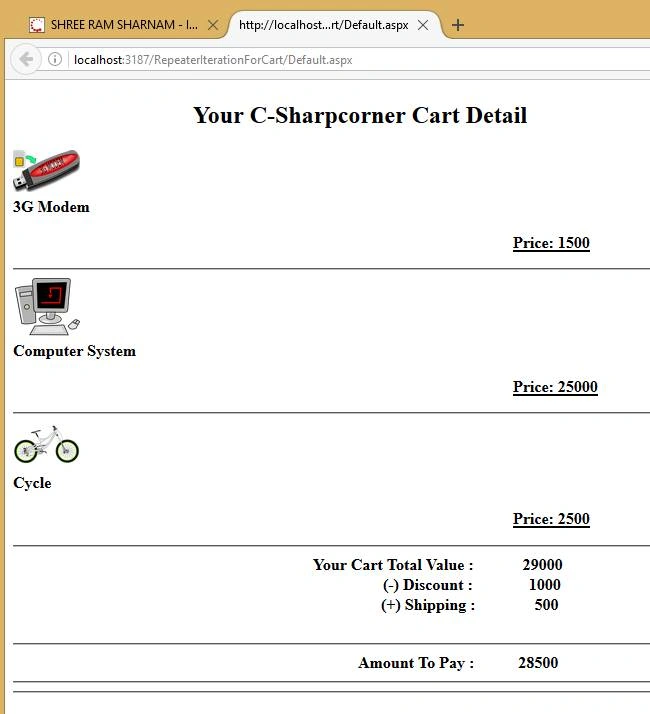
- Total Amount of Cart Item
- Less (-) Discount
- Add (+) Shipping Charges
- Amount To Pay
What is a Repeater?
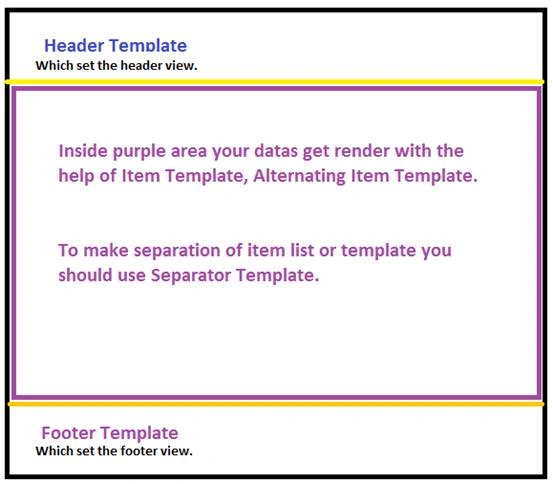
Repeater has the following templates
- Item Template- It renders your render data from the DataSource.
- Alternating Item Template- It allows you to change render behavior for altering the item template from the DataSource.
- Header Template- For setting your header.
- Footer Template- For setting your footer.
- Separator Template- It allows you to design separation between the two items. Here, you can use <HR> or anything else which is good for your page.
To know more about Repeater, the links given below are the Microsoft MSDN links for more details and examples.
https://msdn.microsoft.com/en-us/library/x8f2zez5(v=vs.85).aspx
https://msdn.microsoft.com/en-us/library/x8f2zez5(v=vs.140).aspx
 The naming convention of Repeater is rpt.
Example
The naming convention of Repeater is rpt.
Example
https://msdn.microsoft.com/en-us/library/x8f2zez5(v=vs.140).aspx
- <asp:Repeater ID="rptCartItem" runat="server">
- <HeaderTemplate>
- </HeaderTemplate>
- <ItemTemplate>
- </ItemTemplate>
- <AlternatingItemTemplate>
- </AlternatingItemTemplate>
- <SeparatorTemplate>
- </SeparatorTemplate>
- <FooterTemplate>
- </FooterTemplate>
- </asp:Repeater>
Step by Step
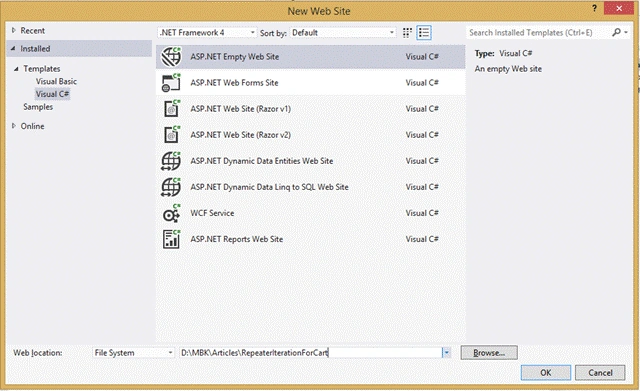
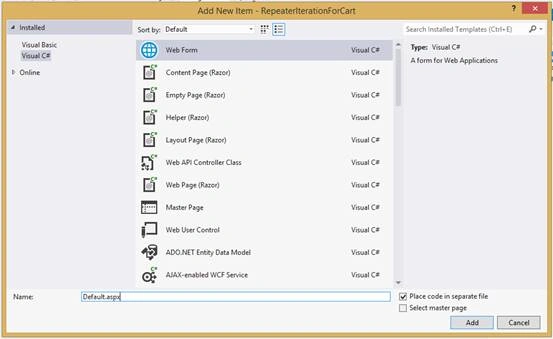
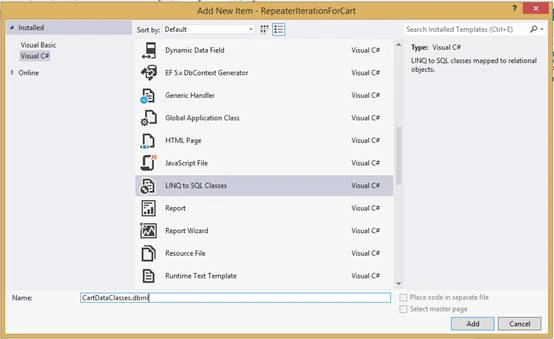
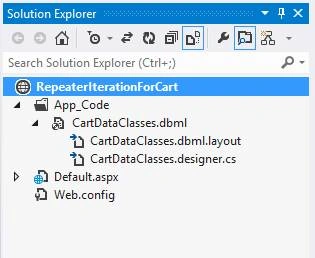
If in your solution App_Code, the folder is not created, then by pressing YES, this will create App_Code as well as add DBML file inside the same folder.
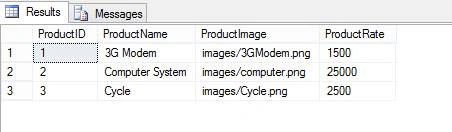
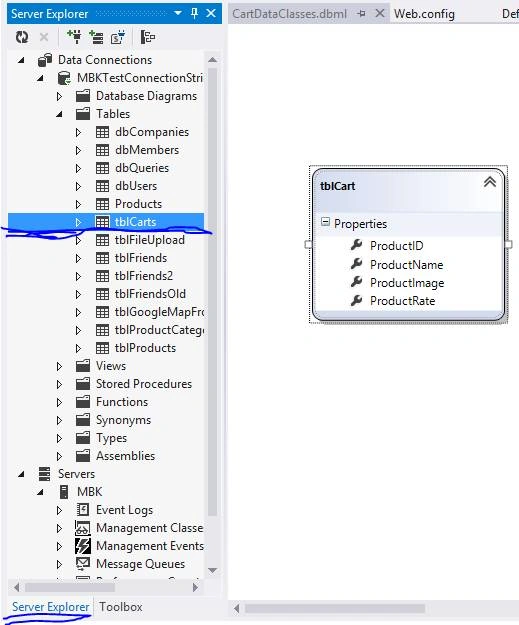
Create a table called tblCarts. The table structure of our carts is given below.
- USE [MBKTest]
- GO
- SET ANSI_NULLS ON
- GO
- SET QUOTED_IDENTIFIER ON
- GO
- CREATE TABLE [dbo].[tblCarts](
- [ProductID] [int] IDENTITY(1,1) NOT NULL,
- [ProductName] [nvarchar](50) NOT NULL,
- [ProductImage] [nvarchar] (1000) NOT NULL,
- [ProductRate] [int] NULL
- ) ON [PRIMARY]
- GO
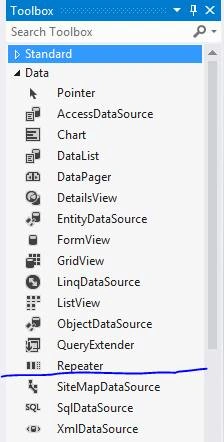
Inside Repeater, write the code given below.
- <asp:Repeater ID="rptCartItem" runat="server">
- <HeaderTemplate>
- </HeaderTemplate>
- <ItemTemplate>
- <div>
- <asp:Image ID="imgProduct" runat="server" ImageUrl='<%# Eval("ProductImage") %>' Width="5%" Height="7%" />
- <br />
- <b><asp:Label ID="lblProductName" runat="server" Text='<%# Eval("ProductName") %>'></asp:Label> </b>
- <p style="margin-left:500px"><b><u>Price: <asp:Label ID="lblProductRate" Class="pricecss" runat="server" Text='<%# Eval("ProductRate") %>'></asp:Label></b></u>
- </p>
- </div>
- </ItemTemplate>
- <SeparatorTemplate>
- <hr/>
- </SeparatorTemplate>
- <FooterTemplate>
- </FooterTemplate>
- </asp:Repeater>
Now, add the code given below in the back-end file.
- //initialize data class
- var db = new CartDataClassesDataContext();
- //Setting data from database
- rptCartItem.DataSource = db.tblCarts.ToList();
- rptCartItem.DataBind();
- //To call javascript function from code behind
- Page.ClientScript.RegisterStartupScript(this.GetType(),"RecalculateRepeater","RecalculateRepeater()",true);
Add the label for Total Price, Discount Amount, and Shipping, Amount To Pay.
- <span style = "padding-left:300px" > Your Cart Total Value: < /span>
- <asp: Label ID = "lblTotalPrice"
- style = "padding-left:45px"
- runat = "server"
- ClientIDMode = "Static" > < /asp:Label>
- <br / >
- <span style = "padding-left:370px" > (-) Discount: < /span>
- <asp: Label ID = "lblDiscountAmount"
- style = "padding-left:52px"
- runat = "server"
- ClientIDMode = "Static"
- Text = "1000" > < /asp:Label>
- <br / >
- <span style = "padding-left:368px" > (+) Shipping: < /span>
- <asp: Label ID = "lblShipping"
- style = "padding-left:55px"
- runat = "server"
- ClientIDMode = "Static"
- Text = "500" > < /asp:Label>
- <br / >
- <br / >
- <hr / >
- <span style = "padding-left:345px" > Amount To Pay: < /span>
- <asp: Label ID = "lblAmounttoPay"
- style = "padding-left:40px"
- runat = "server"
- ClientIDMode = "Static" > < /asp:Label>
The javaScript function is at the heart of this article. Let's understand the commands given below.
- <script>
- function RecalculateRepeater()
- {
- //Total SPAN in DOM
- var spans = document.getElementsByTagName('span');
- var l = spans.length;
- var sum = 0;
- //Iteration of SPAN in DOM
- for (var i = 0; i < l; i++) {
- var spanClass = spans[i].getAttribute("class");
- //Total value of SPAN which CLASS = pricecss
- if (spanClass === "pricecss") {
- /*do stuff to current spans[i] here*/
- sum += Number(spans[i].innerText);
- }
- }
- //This very straight forward code after getting SUM value.
- //TotPrice + Shipping - Discount
- var TotPrice = document.getElementById("lblTotalPrice");
- TotPrice.innerText = Number(sum);
- var Discount = Number(document.getElementById("lblDiscountAmount").innerText);
- var Shipping = Number(document.getElementById("lblShipping").innerText);
- var AmtPay = document.getElementById("lblAmounttoPay");
- AmtPay.innerText = (Number(TotPrice.innerText) + Shipping) - Discount;
- }
- </script>
Full Page Code of Default.aspx
- <%@ Page Language="C#" AutoEventWireup="true" CodeFile="Default.aspx.cs" Inherits="_Default" %>
- <!DOCTYPE html>
- <html xmlns="http://www.w3.org/1999/xhtml">
- <head runat="server">
- <title></title>
- <script>
- function RecalculateRepeater() {
- var spans = document.getElementsByTagName('span');
- var l = spans.length;
- var sum = 0;
- for (var i = 0; i < l; i++) {
- var spanClass = spans[i].getAttribute("class");
- if (spanClass === "pricecss") {
- /*do stuff to current spans[i] here*/
- sum += Number(spans[i].innerText);
- }
- }
- var TotPrice = document.getElementById("lblTotalPrice");
- TotPrice.innerText = Number(sum);
- var Discount = Number(document.getElementById("lblDiscountAmount").innerText);
- var Shipping = Number(document.getElementById("lblShipping").innerText);
- var AmtPay = document.getElementById("lblAmounttoPay");
- AmtPay.innerText = (Number(TotPrice.innerText) + Shipping) - Discount;
- }
- </script>
- </head>
- <body>
- <form id="form1" runat="server">
- <div>
- <h2 style="padding-left:180px">Your C-Sharpcorner Cart Detail </h2>
- <asp:Repeater ID="rptCartItem" runat="server">
- <HeaderTemplate>
- </HeaderTemplate>
- <ItemTemplate>
- <div>
- <asp:Image ID="imgProduct" runat="server" ImageUrl='<%# Eval("ProductImage") %>' Width="5%" Height="7%" />
- <br />
- <b><asp:Label ID="lblProductName" runat="server" Text='<%# Eval("ProductName") %>'></asp:Label> </b>
- <p style="margin-left:500px"><b><u>Price: <asp:Label ID="lblProductRate" Class="pricecss" runat="server" Text='<%# Eval("ProductRate") %>'></asp:Label></b></u>
- </p>
- </div>
- </ItemTemplate>
- <SeparatorTemplate>
- <hr/>
- </SeparatorTemplate>
- <FooterTemplate>
- </FooterTemplate>
- </asp:Repeater>
- <hr />
- <b>
- <span style="padding-left:300px">Your Cart Total Value :</span>
- <asp:Label ID="lblTotalPrice" style="padding-left:45px" runat="server" ClientIDMode="Static" ></asp:Label>
- <br />
- <span style="padding-left:370px">(-) Discount :</span>
- <asp:Label ID="lblDiscountAmount" style="padding-left:52px" runat="server" ClientIDMode="Static" Text="1000" ></asp:Label>
- <br />
- <span style="padding-left:368px">(+) Shipping :</span>
- <asp:Label ID="lblShipping" style="padding-left:55px" runat="server" ClientIDMode="Static" Text="500" ></asp:Label>
- <br />
- <br />
- <hr />
- <span style="padding-left:345px">Amount To Pay :</span>
- <asp:Label ID="lblAmounttoPay" style="padding-left:40px" runat="server" ClientIDMode="Static"></asp:Label>
- <hr />
- <hr />
- </b>
- </div>
- </form>
- </body>
- </html>
Full Page code of Default.aspx.cs
- using System;
- using System.Collections.Generic;
- using System.Linq;
- using System.Web;
- using System.Web.UI;
- using System.Web.UI.WebControls;
- public partial class _Default: System.Web.UI.Page
- {
- protected void Page_Load(object sender, EventArgs e)
- {
- //initialize data class
- var db = new CartDataClassesDataContext();
- //Setting data from database
- rptCartItem.DataSource = db.tblCarts.ToList();
- rptCartItem.DataBind();
- //To call javascript function from code behind
- Page.ClientScript.RegisterStartupScript(this.GetType(), "RecalculateRepeater", "RecalculateRepeater()", true);
- }
- }
Full Page code of Web.Config
- <?xml version="1.0"?>
- <!--
- For more information on how to configure your ASP.NET application, please visit
- http://go.microsoft.com/fwlink/?LinkId=169433
- -->
- <configuration>
- <connectionStrings>
- <add name="MBKTestConnectionString" connectionString="Data Source=192.168.1.50\sa;Initial Catalog=MBKTest;Persist Security Info=True;User ID=sa;Password=abc" providerName="System.Data.SqlClient" />
- </connectionStrings>
- <system.web>
- <compilation debug="true" targetFramework="4.0">
- <assemblies>
- <add assembly="System.Data.Linq, Version=4.0.0.0, Culture=neutral, PublicKeyToken=B77A5C561934E089" />
- </assemblies>
- </compilation>
- </system.web>
- </configuration>
Join the conversation! Your thoughts help the community grow.