

We have a library called “IntroJs” to implement this nice feature.
This post requires the basic understanding of AngularJS. Now we can dive into the implementation step by step.
Source code: Sample Application.
Step 1: Create a new ASP.NET web application empty project.
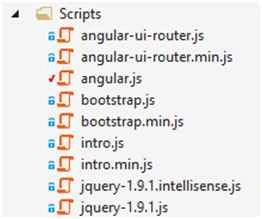
Step 2: Download and reference the required packages in index.html page.
Step 3: Create the application structure in the project. I usually prefer “By feature” based application structure for AngularJS application.
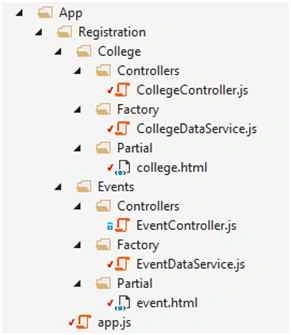
Step 4: Define angular module as “registrationModule” and we populate hard coded data from angular factory to controller then partial.
Let’s come to IntroJS library implementation for tour guided feature. For that we have created a button named “IntroJS Demo”. Using ng-click directive we can bind our button click event (here named it as IntroDemo) to the college.html partial.
IntroJS Implementation,
- Make sure we have given Intro.js and introjs.min.css as reference in the project.
- We have attributes called data-step and data-intro which is used in html pages to implement but here we use IntroJS through angular controller.
- The following first line will give us the instance of IntroJS library.
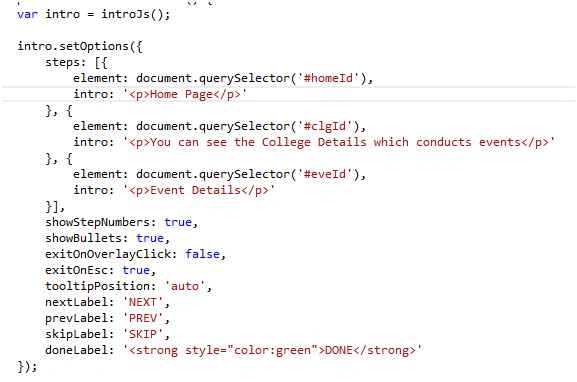
- IntroJS setOption method depicts which are all the html elements to be participated in the tour feature. Inside this method, we have steps property where we will give element id and content to be displayed for that element. Element Id must be specified in html page (partial). Here we have specified in college.html page.
- We can customize the tooltip position, step numbers and button content also. If we want to come out of the tour guided feature when we press on Esc then make ‘exitOnEsc’ to true. Likewise when we do mouse click while on tour based feature we can come out of it then make ‘exitOnOverlayClick’ to true.
Conclusion
I hope this post would help you guys. I respect your valuable comments which will motivate me to learn and share the knowledge with others.
Srinivasan K KPosted Nov 16, 2015, 8:19 PM
Anish Ansari thank you.
Anish AnsariPosted Nov 16, 2015, 12:41 AM
Great
Srinivasan K KPosted Nov 11, 2015, 8:52 AM
Harshad Pansuriya,Mukesh Kumar,Humayun Kabir Mamun,Debasis Saha ,Ajay Gandhi,Santhakumar Munuswamy Thank you all.
Santhakumar MunuswamyPosted Nov 11, 2015, 7:08 AM
Good one
Humayun Kabir MamunPosted Nov 10, 2015, 12:30 AM
Nice but need more explanation about IntroJS.
Ajay GandhiPosted Nov 9, 2015, 11:12 PM
Good
Mukesh KumarPosted Nov 9, 2015, 1:28 AM
Good Job
Debasis SahaPosted Nov 8, 2015, 11:51 PM
Nice Once..
Harshad PansuriyaPosted Nov 8, 2015, 11:04 PM
Nice one