
Introduction
In the "old" times, much of the user interaction with the web application was limited to plain vanilla controls such as text input boxes, checkboxes, radio buttons, lists, and the submit button. Almost all current-day web applications provide to the user a more sophisticated data entry. Various techniques using client-side scripts and/or CSS and/or third-party add-ons and/or server-side validations are used to give more semantics to the user data.
HTML 5 includes in it's standards some new input types that can be used within your web forms. These are commonly used data and provide a useful and standard interface resulting in a unified user experience and reduced errors.
The following are the details on the new input types along with the screenshots on supporting browsers. For using these new input types, do remember to first validate if the input type that you want to use is supported on the user's browser. In the code samples below, I have used the Opera browser (ver 11.51) since it has support for all these new input types. Different browsers may vary in the rendering of the controls.
Details
Dates:
Input Type: date
Description: selects the month, day and year. A calendar type entry is provided.
Syntax: <input type="date" name="payment_date" />
View (in Opera browser):
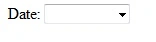
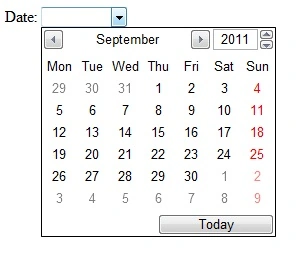
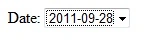
Image: Date input
Input Type: month
Description: selects the month and year. A calendar type entry is provided.
Syntax: <input type="month" name="birth_month" />
View (in Opera browser):
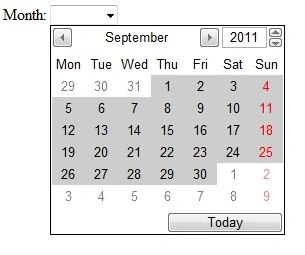
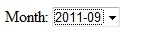
Image: Month input
Description: selects the week within a year. A calendar type entry is provided. The selection indicates the week number that has been selected.
Syntax: <input type="week" name="conference_week" />
View (in Opera browser):
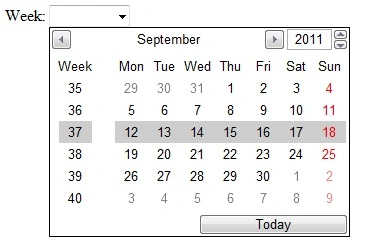
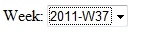
Description: selects the time (hours and minutes). A time selector is provided.
Syntax: <input type="time" name="pickup_time" />
View (in Opera browser):
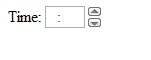

Description: selects the UTC time (hours and minutes), date, month and year. A calendar and a time selector are provided.
Syntax: <input type="datetime" name="departure_time" />
View (in Opera browser):

Description: selects the date, month, year and time (hours and minutes) for local time.
Syntax: <input type="datetime-local" name="pickup_time" />
View (in Opera browser):

Web
Input Type: email
Description: used for email address input. Value is validated to be of email format when the form is submitted. Some browsers can enable/add the @ and .com options in the input.
Syntax: <input type="email" name="customer_email" />
View (in Opera browser): The opera browser validated the entered email address after the submit button was clicked.

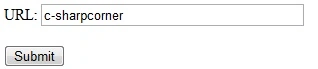
Description: used for URL address input. Value is validated to be of url format when the form is submitted. Some browsers can add the http:// prefix suffix to the input.
Syntax: <input type="url" name="homepage" />
View (in Opera browser):
Number
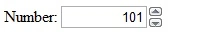
Input Type: number
Description: used for numeric input. Value is validated to be of numeric format when the form is submitted. You can also specify the range of numbers to be accepted.
Syntax: <input type="number" name="age" />
View (in Opera browser):
Description: used for selecting a number from a range of numbers. You can specify the range of numbers to be accepted. A slider bar is provided for the user.
Syntax: <input type="range" name="rating" min="1" max="5" />
View (in Opera browser):

Search
Input Type: search
Description: used for search fields. Behaves like a regular text field.
Syntax: <input type="search" name="catalog_search" />

Telephone Number
Input Type: tel
Description: used for telephone number input.
Syntax: <input type="tel" name="work_number" />

Color
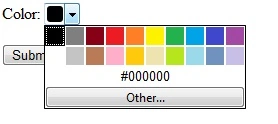
Input Type: color
Description: used for color specification. Some browsers provide a color picker and some user interfaces allow entry of hexadecimal color values.
Syntax: <input type="color" name="user_backcolor" />
- <!DOCTYPE
- HTML>
- <html>
- <body>
- <form action="."
- method="get">
- Date:
- <input type="date"
- name="payment_date" />
- Month:
- <input type="month" name="birth_month"
- />
- Week:
- <input type="week" name="conference_week" />
- Time:
- <input type="time" name="pickup_time" />
- DateTime:
- <input
- type="datetime" name="departure_time" />
- DateTime-local:
- <input
- type="datetime-local" name="pickup_time" />
- Email:
- <input type="email"
- name="customer_email" />
- URL:
- <input type="url" name="homepage"
- />
- Number:
- <input type="number" name="age" />
- Range:
- <input
- type="range" name="rating" min="1" max="5" />
- Search:
- <input
- type="search" name="catalog_search" />
- Telephone:
- <input
- type="tel" name="work_number" />
- Color:
- <input type="color"
- name="user_backcolor" />
- <BR/>
- <BR/>
- <input type="submit" />
- </form>
- </body>
- </html>
Conclusion
We went through the host of new input types introduced in the HTML5 standard. These input types help taking the web forms one level ahead in a standard consistent manner.
Happy Coding!
Jack OwensPosted Jul 16, 2013, 3:40 PM
Some to consider http://www.c-sharpcorner.com/UploadFile/867331/html5-input-types/
Dinesh BeniwalPosted Sep 9, 2011, 2:54 AM
Dipal, Some images are not showing can you upload again.