

In this article, I will introduce you to the MS Graph API which is a powerful way to interact with Office 365 data.
Here are the objectives of this article:
- What is MS Graph API?
- How did it come into the picture?
- What are its features, benefits and limitations?
- MS Graph Explorer
- MS Graph SDK
Let’s start with MS Graph API.
What is MS Graph API?
The official MS documentation defines MS Graph API as:
“You can use the Microsoft Graph API to interact with the data of millions of users in the Microsoft cloud. Use Microsoft Graph to build apps for organizations and consumers that connect to a wealth of resources, relationships, and intelligence, all through a single endpoint: https://graph.microsoft.com.”
In a nutshell, MS Graph API gives you a single REST API endpoint which you can call to interact with “almost anything” in Office 365.
How did it come into the picture?
Prior to MS Graph API, Microsoft had different APIs for its different Office 365 and cloud products. Outlook, OneDrive, OneNote, Yammer all had their different APIs to interact with them.
Consider the following steps involved while dealing with different Office 365 APIs in an application:
- Find the URL/endpoint of the API
- Authenticate / get access token
- Get results from the API
- Repeat for each service
- Manage multiple tokens for each API
It made a developer’s life difficult if one had to connect to many different APIs in an application.
As a solution, Microsoft launched the MS Graph API which is also called “One endpoint to rule them all”.
Why should you learn MS Graph API?
Office 365 is undoubtedly the most widely-used office produce worldwide. Millions of people are using the commercial versions of Office 365 suite or one or another of its products like Outlook, OneNote, etc.
On average, a user in any office will use 2-3 hours working on different Office suite products like Outlook, Excel, Project, etc. Millions of new emails, events, etc. are generated in Outlook and millions of files are stored on OneDrive.
If you want to access all this information stored in Office 365 or on Azure, then you need MS Graph API.
Advantages
- Single well-known resource
MS Graph API is the easiest way to interact with Office 365 data. Using MS Graph API, you can get mostly everything from a single endpoint https://graph.microsoft.com.
- Ease of development
It liberates a developer from calling different Office 365 APIs and doing multiple token management.
- Logical navigation
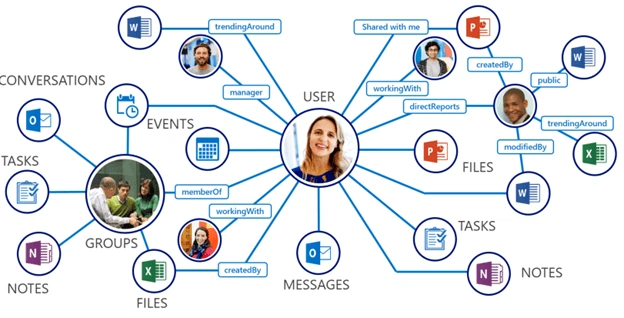
The entities of Office 365 are accessible in a logical way thru MS Graph API. Look again at the picture posted at the top of this article. You will see that once you access a user, all other entities related to it – files, messages, notes, etc. - are then accessible in a logical manner.
You don’t have to remember how an entity will be accessed, it follows a logical manner of graph structure.
- Platform flexibility
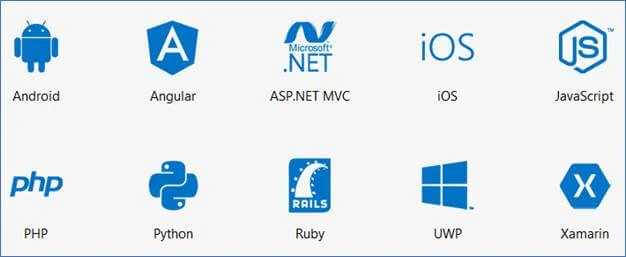
MS Graph API does not mandate you to learn a new programming language. It can work with many different languages/platforms and Microsoft has launched SDKs to work with different platforms. You can work with MS Graph API in Windows/Android/iOS platforms. You can read more on it in the last section of this article “MS Graph SDK”
Features
- MS Identity Stack
MS Graph API does not introduce any new authentication mechanisms where users have to go to register and then remember one more user name and password.
Instead, MS Graph API uses the Microsoft identity stack (which is used by 85% of Fortune 500 companies) which means that your users can login using the same familiar Azure AD / Microsoft Office 365 login credentials in your application.
MS Graph API uses Open ID Connect for authentication and OAUTH 2.0 for access tokens.
- Open Standards
MS Graph API is based on and it supports many open web standards making it flexible and highly interoperable. Some of these standards are: - REST
At the heart of MS Graph API implementation, any device/technology which is able to make an http call and interpret JSON can work with MS Graph API - JSON
Lightweight format for request and response data - OAUTH
Provides API access token management; MS Graph API supports OAUTH v2.0 - ODATA
MS Graph API supports open data protocol v4.0 which is also called “The best way to REST”. It uses URL query string operators to make simple, standard and readable expressions.
I have written some articles on using optional ODATA query parameters with MS Graph API which can be found here:
- Using optional query parameters with Microsoft Graph API – Part One
- Using optional query parameters with Microsoft Graph API – Part Two
- Webhooks
Using webhooks, MS Graph API can send you notification for any changes in entities to which you have subscribed. Instead of keeping on querying MS Graph API to see if there are any changes, you can use webhooks mechanism to have notifications sent to you in case of any action/event happening. For example, you can subscribe to get notified when a new message arrives.
- Intelligence & Insights
MS Graph API does not only do simple input and output operations on your organization’s Office 365 entities. Instead of that, MS Graph API also has intelligence inbuilt in it which can help you to find trending documents about a user, people frequently contacted, etc. It can also help you find the best meeting times in a team.
- Custom data extensions
You can extend MS Graph API results with custom data; i.e., you can add custom data to MS Graph without using any external data source. This is helpful when you want to store some custom data relevant to your application; e.g., profile setting or favorite theme, etc.
There are two types of extensions: Open extensions which are flexible and allow you to store any untyped data; and Schema extensions where you can define your own complex strongly typed schema, which can be shared between your different applications.
- Delta query
Using delta query, it become easier to track data changes in entities. Instead of getting a list of all entities and comparing them one by one to identify any changes, just fire a call using delta query which will give you only the changes; i.e., inserted, updated, deleted data since your last call.
- Batching
Using MS Graph API's JSON Batching you can combine multiple requests in one HTTP call and optimize application performance. Instead of looping thru multiple calls in your application, you can fire all related / unrelated calls in one batch in one go.
Limitations
The most visible one is some of its features are still in beta, but MS Graph team keeps launching new features live regularly.
For a list of all MS Graph API known issues, refer here.
MS Graph API Explorer
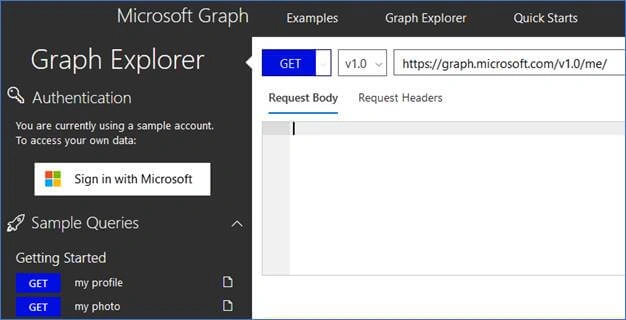
MS Graph API Explorer is a great tool to get started with MS Graph API and learn first-hand how it works. Graph Explorer is a developer sandbox where you can fire actual Graph API call and see its result.
You can access MS Graph API Explorer here.
I have written some articles on how to use MS Graph Explorer which can be found here:
- A First Look at The New Microsoft Graph Explorer - Part One
- A First Look at The New Microsoft Graph Explorer - Part Two
- A First Look at The New Microsoft Graph Explorer - Part Three
Microsoft Graph SDK
The MS Graph team has done some great work in launching SDKs for different platforms which makes development with MS Graph API easy.
You don’t have to code everything from scratch, ready-made codes are available in SDK.
The following SDKs are available:
If you are a Java developer, then recently Microsoft has launched Java SDK for MS Graph API in preview.
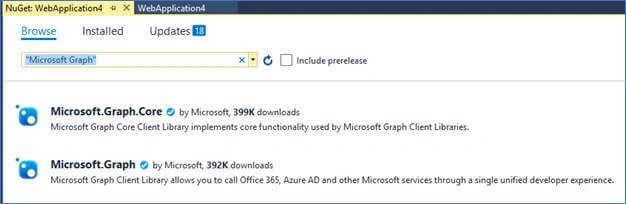
If you want to add MS Graph SDK in any of your C# applications, then open Visual Studio and simply search for “Microsoft Graph” in NuGet package manager to get started.
That’s it for an introduction to MS Graph API in this article. Wait for my next article where I will show how you can start programming in MS Graph API.
Until then the following links will be useful to get started with MS Graph API:
Bharat Bhushan KvPosted Apr 29, 2020, 5:13 AM
New Task in Planner is to be added as a New "Thread" in a Teams Channel All changes to the Task are to be "Posted" as Replies to the Thread in the Teams Channel Replies in Teams added a Comment into the Planner Task should also reflect onto my Teams Channel How to integrate Planner & Teams to achieve above points using MS Graph API?? Plz send me steps in detail!
Happy KathrotiyaPosted May 17, 2019, 6:34 AM
Hi Nilesh, i am created App with Azure-Active-Directory and App support account types (Accounts in any organizational directory and personal Microsoft accounts). After this i want to access other user's outlook contacts of OTHER TENANT. How it would be archive, can you provide step for do this in right manner.
JiovanniPosted Dec 3, 2018, 4:03 PM
Hi Nilesh, I have created a web app in azure with authentication, so when I open the site i am already logged in. My question is, in order to work with graph to get users from the AAD, do I have to create all connections as the example "MS graph Api Samples on GitHub"? or I can get the token from somewhere in the app I have created? or do you have a example how to work with Graph in an azure web app - authenticated? thanks
Paul IlacquaPosted Jul 28, 2018, 3:37 PM
I have mastered updating one drive files but cannot find info on SharePoint files, can you advise. I can get to the shared documents directory, but no info on adding or removing files.
Rushi MehtaPosted Apr 16, 2018, 1:19 AM
Ok thanks for the reply
Rushi MehtaPosted Apr 14, 2018, 5:02 AM
Hi Nilesh, I just want to ask that is this Microsoft graph is licenses or open source