

The Model Context Protocol (MCP) is a new standard for connecting AI assistants to the systems where data lives, including content repositories, business tools, and development environments. Its aim is to help frontier models produce better, more relevant responses.
MCP is an open protocol that standardizes how applications provide context to large language models (LLMs). Think of MCP like a USB-C port for AI applications. Just as USB-C offers a standardized way to connect your devices to various peripherals and accessories, MCP provides a standardized way to connect AI models to different data sources and tools. MCP enables you to build agents and complex workflows on top of LLMs and connects your models with the world.
MCP simply provides a standardized connection to streamline tool integration. Ultimately, the LLM determines which tools to call based on the context of the user’s request.
MCP provides
A growing list of pre-built integrations that your LLM can directly plug into
A standardized way to build custom integrations for AI applications
An open protocol that everyone is free to implement and use
The flexibility to change between different apps and take your context with you.
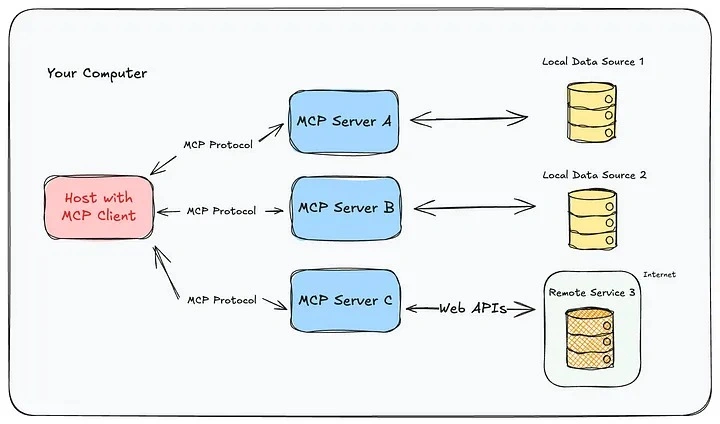
Here is a look at how MCP works under the hood.
MCP Host (on the left) is the AI-powered app, for example, Claude Desktop, an IDE, or another tool acting as an agent.
The host connects to multiple MCP Servers, each one exposing a different tool or resource.
Some servers access local resources (like a file system or database on your computer).
Others can reach out to remote resources (like APIs or cloud services on the internet).
MCP Servers
An MCP server is like a smart adapter for a tool or app. It knows how to take a request from an AI (like “Get today’s sales report”) and translate it into the commands that the tool understands. The external service provides context to the LLM by converting user requests into server actions.
Tell the AI what they can do (tool discovery)
Interpret and run commands
Format results that the AI can understand
Handle errors and give meaningful feedback
For example
A GitHub MCP server might turn “list my open pull requests” into a GitHub API call.
A File MCP server might take “save this summary as a text file” and write it to your desktop.
A YouTube MCP server could transcribe video links on demand.
MCP Clients
On the other side, an MCP client lives inside the AI assistant or app (like Claude or Cursor). When the AI wants to use a tool, it goes through this client to talk to the matching server. Communication in the MCP ecosystem between the host and server must go through a client. This client exists within the host and converts user requests into a structured format that the open protocol can process. Multiple clients can exist with a singular MCP host but each client has a 1:1 relationship with an MCP server.
For example
The cursor can use a client to interact with your local development environment.
Claude might use it to access files or read from a spreadsheet.
The client handles all the back-and-forth sending requests, receiving results, and passing them to the AI.
The MCP Protocol
The MCP protocol is what keeps everything in sync. It defines how the client and server communicate, what the messages look like, how actions are described, and how results are returned.
Can run locally (e.g., between your AI and your computer’s apps).
Can run over the internet (e.g., between your AI and an online tool).
Uses structured formats like JSON so everything stays clean and consistent.
MCP Servers act as wrappers or intermediaries that provide a standardized way to access various external systems, tools, and data sources. An MCP server can provide access to databases, CRMs like Salesforce, local file systems, and version control systems like GIT. The role of the server builder is to expose tools, resources, and prompts in a way that is consumable by any compatible client. Once an MCP server is built, it can be adopted by any MCP client, solving the “N times M problem” by reducing the need for individualized integrations. For tools, the server defines the available functions and their descriptions, allowing the client’s model to decide when to use them. For resources, the server defines and potentially creates or retrieves data that it exposes to the client application. For prompts, the server provides predefined templates for everyday interactions that the client application can trigger on behalf of the user.
The MCP protocol acts as the communication layer between these two components, standardizing how requests and responses are structured and exchanged. This separation offers several benefits, as it allows.
Seamless Integration : Clients can connect to a wide range of servers without needing to know the specifics of each underlying system.
Reusability : Server developers can build integrations once and have them accessible to many different client applications.
Separation of Concerns : Different teams can focus on building client applications or server integrations independently. For example, an infrastructure team can manage an MCP server for a vector database, which various AI application development teams can easily use.
Let’s conduct a small POC to understand MCP functionality by instructing an agent to perform random tasks based on the configured prompt. Let's assume that those tasks are interconnected by a server that implements respective executions.
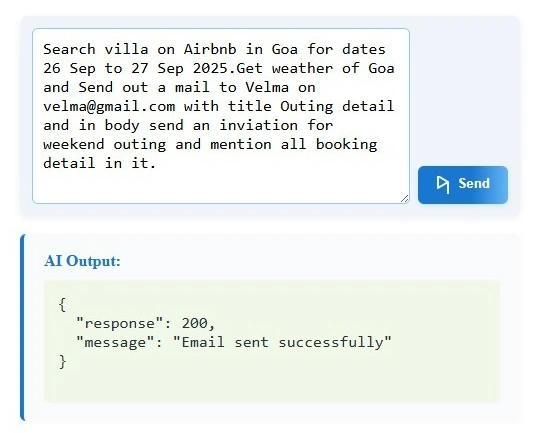
Here, we have written our prompt with a series of tasks to execute.
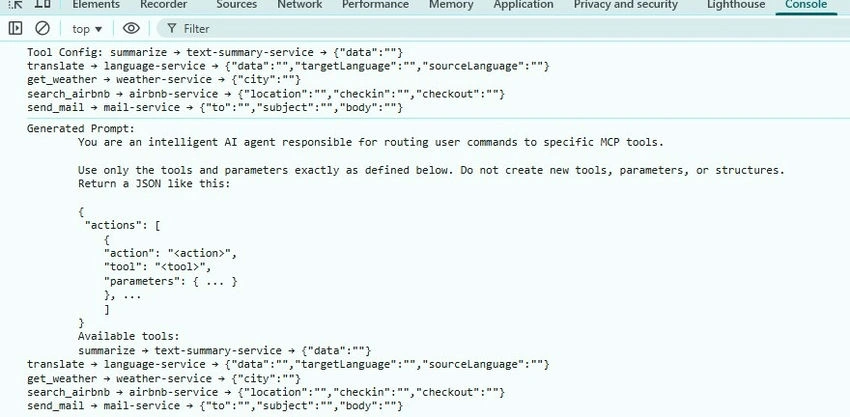
In the log, we have listed all configured MCP tools needed to execute the actions. Based on that, we have drafted a prompt and fetched object actions with their respective parameters to send an HTTP request to their particular MCP servers.
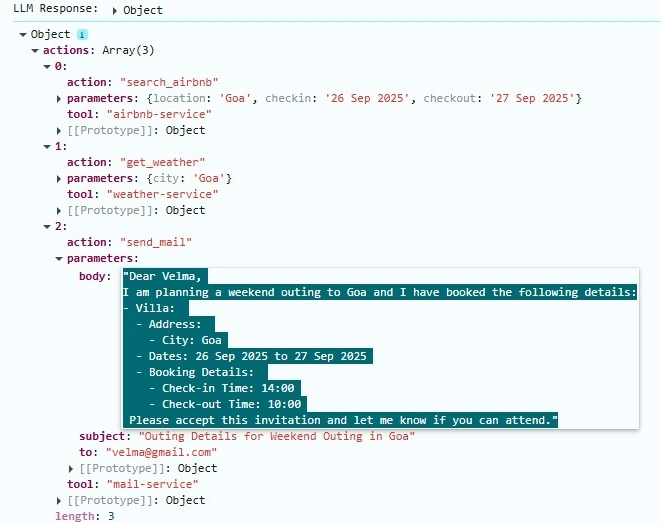
An AI assistant will generate or return the JSON object as we requested, with precise parameters configured in the MCP configuration tool file.
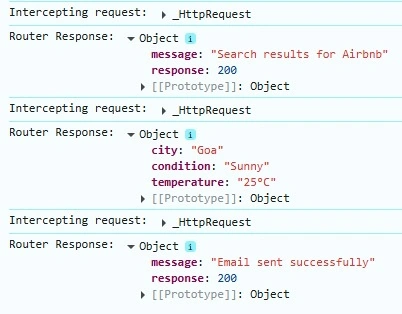
Based on the respective URLs, we will request that the MCP servers execute each task one after the other as a series of actions.
By this, we can summarize that with a single prompt, we can trigger multiple actions using the MCP server and protocol, which helps to interact and execute respective tasks.
Benefits of MCP for Stakeholders
For application developers, the MCP offers several key benefits.
Zero Additional Work for Server Connection : Once an application is MCP compatible, it can connect to any MCP server with zero additional work. This means developers don’t need to write specific integration logic for each new tool or data source they want their application to access, significantly reducing development time and effort.
Standardized Interface : MCP standardizes how AI applications interact with external systems through its three primary interfaces: prompts, tools, and resources. This provides a consistent way to access and utilize the capabilities offered by different servers, simplifying the development process and making it easier for developers to understand and integrate new functionalities.
Access to a Broad Ecosystem : By building an MCP client, developers gain access to a growing ecosystem of community-built and officially supported MCP servers. This allows them to easily integrate a wide range of functionalities, such as accessing databases, CRMs, local file systems, and more, without having to build these integrations themselves. The upcoming MCP registry API will further enhance this by providing a centralized way to discover and pull in MCP servers.
Focus on Core Application Logic: MCP enables application developers to concentrate on the core logic and user experience of their AI application, eliminating the need to spend time on integrating with various external systems. The protocol handles the underlying communication and standardization, freeing up developers to concentrate on the unique value proposition of their application. As Mahesh explained, developers can focus on the “agent Loop” and context management, while MCP handles the standardized way of bringing context in.
Leveraging Model Intelligence for Tool Use: The “tools” interface enables developers to expose functionalities to the language model within their application, allowing the model to decide when and how to invoke these tools intelligently. This reduces the need for developers to explicitly program every interaction with external systems, making the application more dynamic and responsive.
Richer User Interactions : The “resources” interface enables servers to expose data beyond simple text, including images and structured data. This enables application developers to create richer and more interactive experiences for their users.
Join the conversation! Your thoughts help the community grow.