
Introduction
The biggest challenge that programmers/developers/architects were facing for quite some time was how to transfer data from one system to another without having to worry about hardware or software requirements. Over this period we have seen many technologies attempting to make this requirement as simple as possible and finally now we have achieved it with the help of JSON.
JSON is an acronym for JavaScript Object Notation. Douglas Crockford originally specified the JSON format in the early 2000s. The features of JSON are as follows:
- JSON data is much easier to read by humans in comparison with that of XML which is also used to transfer data from one system to another.
- It is a lightweight data-interchange format.
- It follows Open Standard Format to transmit data objects that store information in “Key-Value Pair” pattern.
- It is a language-independent data format.
- JSON can be mapped more easily to object oriented systems.
- Files that contain JSON based data have a “.json” extension which can be read by any programming languages.
Typically a JSON looks like the following:
Example 1
- {
- “Name”:”Jojo”,
- “Age”: 23
- }
- Boolean
- Array
- Value
- Object
- Whitespace
- Null
The above example contains details for only one object. If we plan to have an array of objects, then the storage will look like this:
Example 2
- {
- “Employees”:[
- {“Name”:”PopatLal”, “Age”:25},
- {“Name”:”Santa Singh”, “Age”:27},
- {“Name”:”Banta Singh”, “Age”:28},
- {“Name”:”SohanLal”, “Age”:25},
- ]
- }
- We chose a basic template for this sample application. The solution explorer looks like this:
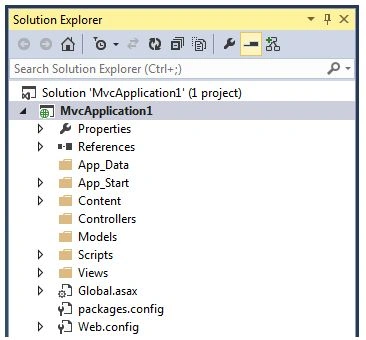
- Now we are creating a very simple application, whose purpose is to print a welcome message stating “Welcome to JSON”. To do this, we will add an MVC controller and add a method that will return a JSONResult. The code looks like the following:
- public JsonResultWelcomeMessage()
- {
- String message = "Welcome to JSON";
- returnJson(message, JsonRequestBehavior.AllowGet);
- }
- When you run this program, the output you would get, shall look like the following:

- This code now proves that we are able to view the JSON data, now we need to consume it on an HTML page and hence we will have to create a view for the same.
- Under the “DemoController”, we wrote an ActionResult method by the name “Index” and this method returns a view with the same name i.e. “Index.cshtml”.
- publicActionResult Index()
- {
- return View();
- }
- The HTML code in “Index.cshtml” looks like this:
- @{
- Layout = null;
- }
- <!DOCTYPE html>
- <html>
- <head>
- <meta name="viewport" content="width=device-width" />
- <title>Index</title>
- </head>
- <body>
- <div>
- <input type="button" id="btn1" value="Print" />
- </div>
- <br />
- <br />
- <div id="messagediv" style="align-items: center; text-align: center; border: 3px solid blue; width: 300px; height: 300px; background-color: lightblue; color: yellow"></div>
- </body>
- </html>
- The output of the above said code looks like,
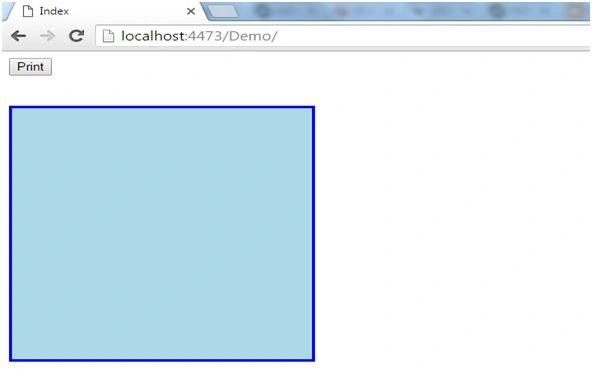
- Now to get the JSON method executed and print the message within the given box, we will have to make use of JQuery within which we will invoke the “getJSON” method in which we will invoke the “WelcomeMessage” method.
- The code will look like this:
- <scriptsrc="~/Scripts/jquery-2.2.3.min.js">
- </script>
- <script type="text/javascript">
- $(document).ready(function()
- {
- $("#btn1").click(function()
- {
- vardivObj = $("#messagediv");
- $.getJSON("/Demo/WelcomeMessage/", null, function(data)
- {
- divObj.append("<b>" +
- data + "</b>");
- });
- });
- });
- </script>
- Once the button is clicked, the output looks like the following:
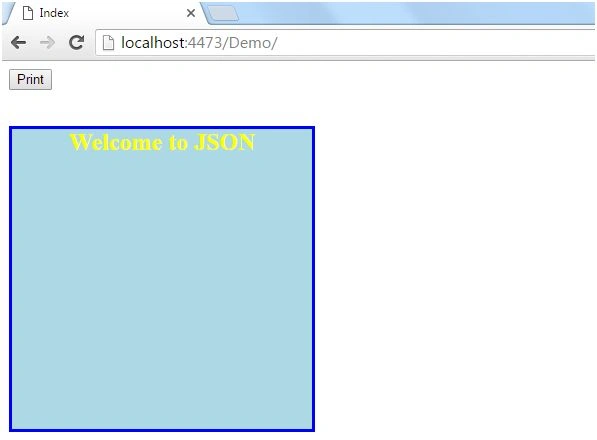
Summary
The above example is only to demonstrate how to use JSON in MVC. I hope this article was helpful. Please feel free to share your thoughts/opinion/feedback regarding the same.
Sonu ChaudharyPosted Jun 6, 2016, 9:43 AM
good one...
Vignesh ManiPosted Jun 6, 2016, 5:29 AM
Nice
RajaPosted Jun 6, 2016, 12:24 AM
Great...
Debasis SahaPosted Jun 6, 2016, 12:17 AM
Good One..
Biplab BiswasPosted Jun 4, 2016, 1:58 PM
Nice...Very Imformative.