

Introduction
This article shows how to add several features on a frame using Java. The example in this article opens multiple frames from a single frame using menu items. Let's proceed to explore the Frame features of Java.
Frame in Java
First of all one should know what exactly a Frame is. Frame is a class of the java.awt package. A Frame is a resizable and movable window with a title bar and maximize, minimize and close buttons. A Frame is a container that can have MenuBars, MenuItems and some other components like label, button, textfield, radio button and so on. A Frame is the most important component of the Abstract Window Toolkit (AWT) that is treated as a complete window for specific software.
How to Create a Frame in Java
A Frame can be created in one of two ways. By adapting any of the following two ways, we will be able to get a Frame. The two ways are:
- By following the simple concept of inheritance i.e., by extending the Frame class. We will be considering this method in the article for demonstration purposes and will get a brief idea of it.
- By creating an object of the Frame class, in other words using association.
If the second way is adapted then the following concepts are to be considered.
Constructor of Frame class
- Frame(): It constructs a new Frame with no title that was initially invisible.
public Frame()
- Frame(String title): It constructs a Frame with some title as specified by the programmer.
public Frame(String title)
- Frame(String title,image icon): It constructs a frame with a title as specified by the programmer as well as an image icon, as shown in following screenshot.

public Frame(String title,image icon)
Methods of the Frame class
- setTitle(String value): This method provides a title to the Frame if not specified at the time of object declaration of the Frame.
Frame object.setTitle("String value");
- String getTitle(): This method returns the title of the Frame.
String variable=Frame object.getTitle();
- setSize(int row,int col): This method sets the size of the Frame, row and column wise.
void setSize(int row,int col);
- setVisible(boolean mode): It makes the Frame visible to us. If the parameter ed is "true" then it will be visible otherwise if it is "False" then the Frame will not be visible.
void setVisible(boolean mode);
- setState(int state): It sets the state of the Frame as:
"0" for Normal state
"1" for iconified state i.e., minimized
"2" for deiconified state i.e., maximized
void setState(int state);
- setResizable(boolean mode): It sets the frame in the position that it can be resized or can be fixed.
"true"- resizable
"False"- can not be resized.
public setResizable(boolean mode);
- setBackground(Color.color name): It sets some specified color on the background of the Frame.
Frame object.setBackground(Color.color name);
Frame Application
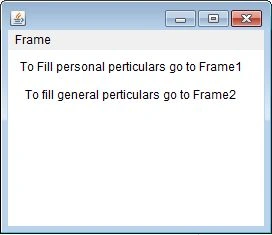
In this application, there is a Frame whose menu retrieves two other Frames with different Fields inside it. These Frames contain different Labels and TextFields to collect the individual's information. The source code is as follows:
Source Code
- import java.awt.*;
- import java.awt.event.*;
- class prg1 extends Frame implements ActionListener
- {
- MenuBar mb;
- MenuItem mi1, mi2;
- Menu m1;
- Label l1, l2;
- public prg1()
- {
- setLayout(new FlowLayout());
- mb = new MenuBar();
- m1 = new Menu("Frame");
- mb.add(m1);
- mi1 = new MenuItem("Frame1");
- m1.add(mi1);
- mi2 = new MenuItem("Frame2");
- m1.add(mi2);
- l1 = new Label("To Fill personal perticulars go to Frame1");
- l2 = new Label("To fill general perticulars go to Frame2");
- add(l1);
- add(l2);
- mi1.addActionListener(this);
- mi2.addActionListener(this);
- setMenuBar(mb);
- }
- public void actionPerformed(ActionEvent e)
- {
- if (e.getSource() == mi1)
- {
- prg2 p = new prg2();
- p.setSize(300, 300);
- p.setVisible(true);
- }
- if (e.getSource() == mi2)
- {
- prg3 p1 = new prg3();
- p1.setSize(300, 300);
- p1.setVisible(true);
- }
- }
- }
- class prg2 extends Frame implements WindowListener
- {
- Label l, b1, b2, b3, b4, b5;
- TextField t1, t2, t3, t4, t5;
- public prg2()
- {
- setLayout(new FlowLayout());
- l = new Label("this is frame 1");
- b1 = new Label("First Name");
- b2 = new Label("Last Name");
- b3 = new Label("Father's Name");
- b4 = new Label("Date of Birth");
- b5 = new Label("Qualification");
- t1 = new TextField(20);
- t2 = new TextField(20);
- t3 = new TextField(20);
- t4 = new TextField(20);
- t5 = new TextField(20);
- add(l);
- add(b1);
- add(t1);
- add(b2);
- add(t2);
- add(b3);
- add(t3);
- add(b4);
- add(t4);
- add(b5);
- add(t5);
- addWindowListener(this);
- }
- public void windowActivated(WindowEvent e)
- {
- }
- public void windowDeactivated(WindowEvent e)
- {
- }
- public void windowOpened(WindowEvent e)
- {
- }
- public void windowClosed(WindowEvent e)
- {
- }
- public void windowClosing(WindowEvent e)
- {
- setVisible(false);
- }
- public void windowIconified(WindowEvent e)
- {
- }
- public void windowDeiconified(WindowEvent e)
- {
- }
- }
- class prg3 extends Frame implements WindowListener
- {
- Label l, b1, b2, b3, b4;
- TextField t1, t2, t3, t4;
- public prg3()
- {
- setLayout(new FlowLayout());
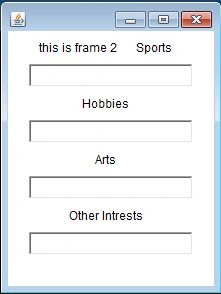
- l = new Label("this is frame 2");
- b1 = new Label("Sports");
- b2 = new Label("Hobbies");
- b3 = new Label("Arts");
- b4 = new Label("Other Intrests");
- t1 = new TextField(20);
- t2 = new TextField(20);
- t3 = new TextField(20);
- t4 = new TextField(20);
- add(l);
- add(b1);
- add(t1);
- add(b2);
- add(t2);
- add(b3);
- add(t3);
- add(b4);
- add(t4);
- addWindowListener(this);
- }
- public void windowActivated(WindowEvent e)
- {
- }
- public void windowDeactivated(WindowEvent e)
- {
- }
- public void windowOpened(WindowEvent e)
- {
- }
- public void windowClosed(WindowEvent e)
- {
- }
- public void windowClosing(WindowEvent e)
- {
- setVisible(false);
- }
- public void windowIconified(WindowEvent e)
- {
- }
- public void windowDeiconified(WindowEvent e)
- {
- }
- }
- class callFrm
- {
- public static void main(String arg[])
- {
- prg1 p = new prg1();
- p.setSize(300, 300);
- p.setVisible(true);
- }
- }
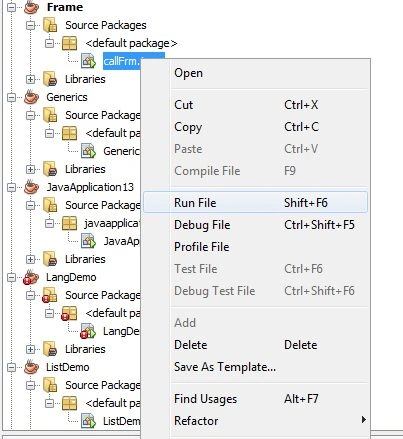
Output
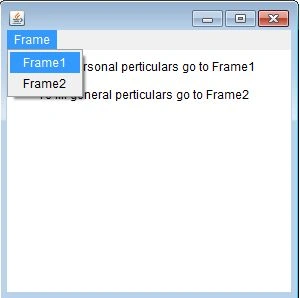
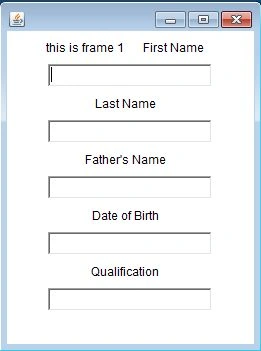
If frame1 is selected then the following frame will appear:
If Frame2 is selected then the following Frame will appear:
Join the conversation! Your thoughts help the community grow.