

FCM
As everyone knows the importance of push notification in apps, we will discuss FCM (Firebase Cloud Messaging) in this article.
Let’s see what the definition of FCM is.
Firebase Cloud Messaging is a powerful API that lets you deliver the messages reliably and independently of the platform you are developing on. With the help of FCM, you can send notification and message to your client’s app. We can send instant messages of up to 4KB in size.
Before moving ahead, we will summarize how we are going to implement it.
- We are going to develop an Android app that will display the notification.
- Setting up FCM.
- Saving token ID generated from android device to server using web service developed in .net
- Sending notification message from C# code.
Android app to display a notification
- First, let us create a new Android Studio Project with an Empty Activity.
- Once your project is loaded, click on "Firebase" from the Tools menu. With Android Studio 2.2, it is really easy to integrate Firebase into your project.
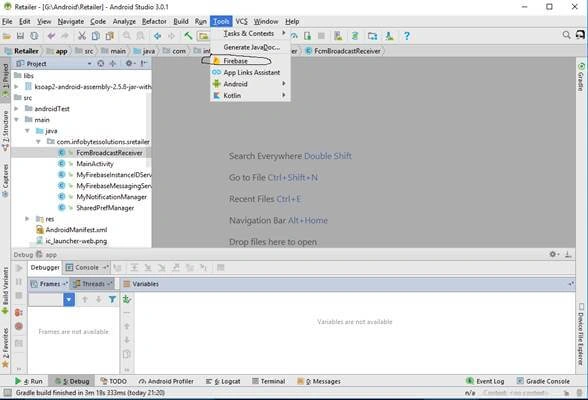
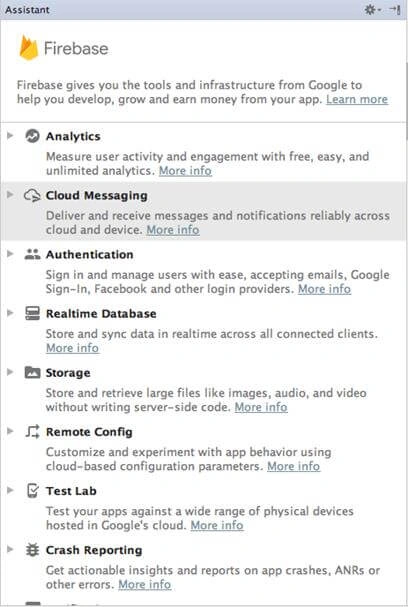
- All the available features will get opened. Click "Cloud Messaging".
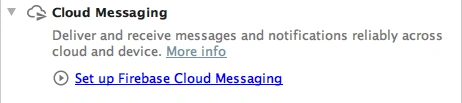
- Click on "Set up Firebase Cloud Messaging".
- Click on the "Connect to Firebase" button. A dialog will open.
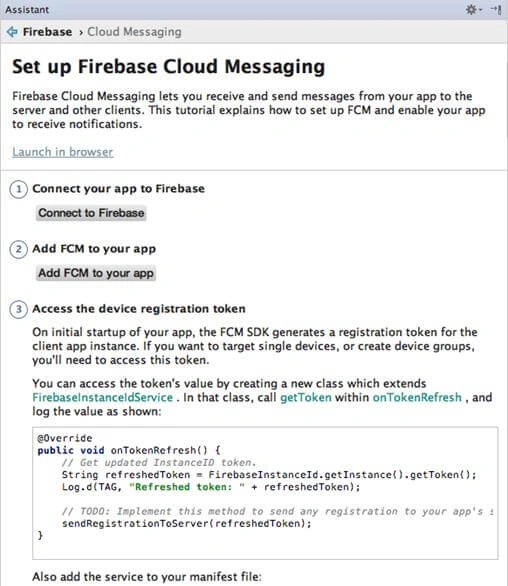
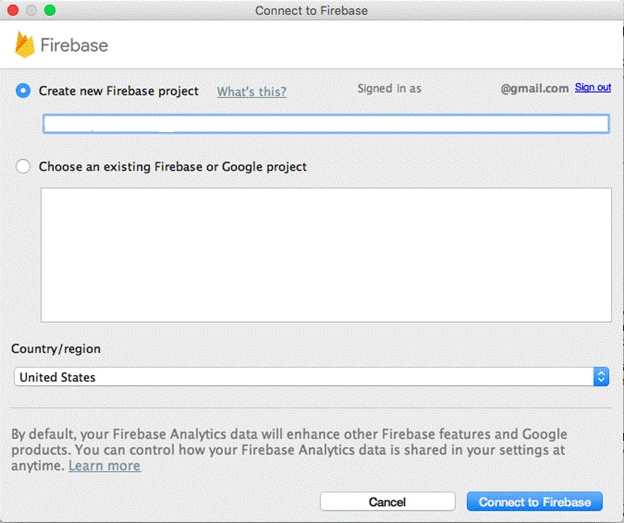
- Enter the project name and click on "Connect to Firebase".
- Click on the button "Add FCM to your app" and you will see a dialog box.
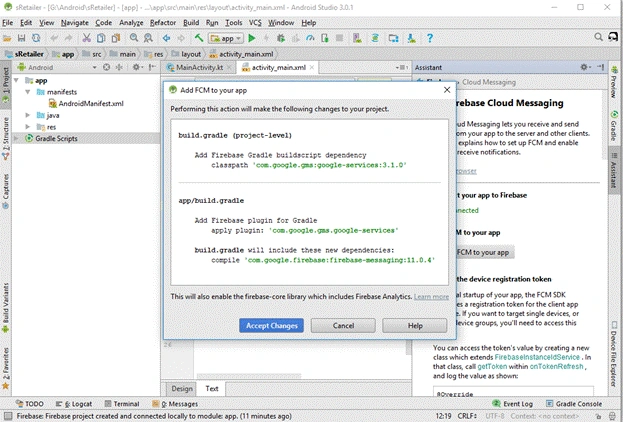
- Click on "Accept Changes".
- Every device generates a unique token or device id to receive notifications. And for this, we have to create a class that will extend the class FirebaseInstanceIdService. So, we have created MyFirebaseInstanceIDService.java
- To store the generated token in SharedPreferences, we have created SharedPrefManager.java in Singleton Pattern.
- To actually receive the notification FirebaseMessagingService is used, so we will create MyFirebaseMessagingService.java.
- We will edit the activity_main.xml file.
- Also, we will edit the MainActivity.java file.
- Also, edit the AndroidManifest.xml file.
MyFirebaseInstanceIDService.java
- package com.infobytessolutions.sretailer;
- /**
- * Created by Nilesh on 05/12/2017.
- */
- import android.util.Log;
- import com.google.firebase.iid.FirebaseInstanceId;
- import com.google.firebase.iid.FirebaseInstanceIdService;
- public class MyFirebaseInstanceIDService extends FirebaseInstanceIdService {
- private static final String TAG = "MyFirebaseIIDService";
- @Override
- public void onTokenRefresh() {
- //Getting registration token
- String refreshedToken = FirebaseInstanceId.getInstance().getToken();
- //Displaying token on logcat
- Log.d(TAG, "Refreshed token: " + refreshedToken);
- //calling the method store token and passing token
- storeToken(refreshedToken);
- }
- private void storeToken(String token) {
- //saving the token on shared preferences
- SharedPrefManager.getInstance(getApplicationContext()).saveDeviceToken(token);
- }
- }
SharedPrefManager.java
- package com.infobytessolutions.sretailer;
- /**
- * Created by Nilesh on 05/12/2017.
- */
- import android.content.Context;
- import android.content.SharedPreferences;
- public class SharedPrefManager {
- private static final String SHARED_PREF_NAME = "FCMSharedPref";
- private static final String TAG_TOKEN = "tagtoken";
- private static SharedPrefManager mInstance;
- private static Context mCtx;
- private SharedPrefManager(Context context) {
- mCtx = context;
- }
- public static synchronized SharedPrefManager getInstance(Context context) {
- if (mInstance == null) {
- mInstance = new SharedPrefManager(context);
- }
- return mInstance;
- }
- //this method will save the device token to shared preferences
- public boolean saveDeviceToken(String token){
- SharedPreferences sharedPreferences = mCtx.getSharedPreferences(SHARED_PREF_NAME, Context.MODE_PRIVATE);
- SharedPreferences.Editor editor = sharedPreferences.edit();
- editor.putString(TAG_TOKEN, token);
- editor.apply();
- return true;
- }
- //this method will fetch the device token from shared preferences
- public String getDeviceToken(){
- SharedPreferences sharedPreferences = mCtx.getSharedPreferences(SHARED_PREF_NAME, Context.MODE_PRIVATE);
- return sharedPreferences.getString(TAG_TOKEN, null);
- }
- }
MyFirebaseMessagingService.java
- package com.infobytessolutions.sretailer;
- /**
- * Created by Nilesh on 05/12/2017.
- */
- import android.app.NotificationManager;
- import android.app.PendingIntent;
- import android.content.Context;
- import android.content.Intent;
- import android.media.RingtoneManager;
- import android.net.Uri;
- import android.support.v4.app.NotificationCompat;
- import android.util.Log;
- import com.google.firebase.messaging.FirebaseMessagingService;
- import com.google.firebase.messaging.RemoteMessage;
- import org.json.JSONException;
- import org.json.JSONObject;
- public class MyFirebaseMessagingService extends FirebaseMessagingService {
- private static final String TAG = "MyFirebaseMsgService";
- @Override
- public void onMessageReceived(RemoteMessage remoteMessage) {
- if (remoteMessage.getData().size() > 0) {
- Log.e(TAG, "Data Payload: " + remoteMessage.getData().toString());
- try {
- JSONObject json = new JSONObject(remoteMessage.getData().toString());
- // sendPushNotification(json);
- sendNotification(json);
- } catch (Exception e) {
- Log.e(TAG, "Exception: " + e.getMessage());
- }
- }
- }
- private void sendNotification(JSONObject json) {
- Intent intent = new Intent(this, MainActivity.class);
- intent.addFlags(Intent.FLAG_ACTIVITY_CLEAR_TOP);
- Log.e(TAG, "Notification JSON " + json.toString());
- try{
- JSONObject data = json.getJSONObject("data");
- String title = data.getString("title");
- String message = data.getString("message");
- String imageUrl = data.getString("image");
- PendingIntent pendingIntent = PendingIntent.getActivity(this, 0 /* Request code */, intent,
- PendingIntent.FLAG_ONE_SHOT);
- Uri defaultSoundUri= RingtoneManager.getDefaultUri(RingtoneManager.TYPE_NOTIFICATION);
- NotificationCompat.Builder notificationBuilder = new NotificationCompat.Builder(this)
- .setSmallIcon(R.drawable.ic_launcher_background)
- .setContentTitle(title)
- .setContentText(message)
- .setAutoCancel(true)
- .setSound(defaultSoundUri)
- .setContentIntent(pendingIntent);
- NotificationManager notificationManager =
- (NotificationManager) getSystemService(Context.NOTIFICATION_SERVICE);
- notificationManager.notify(0 /* ID of notification */, notificationBuilder.build());
- } catch (JSONException e) {
- Log.e(TAG, "Json Exception: " + e.getMessage());
- } catch (Exception e) {
- Log.e(TAG, "Exception: " + e.getMessage());
- }
- }
- }
activity_main.xml
- <?xml version="1.0" encoding="utf-8"?>
- <RelativeLayout xmlns:android="http://schemas.android.com/apk/res/android"
- xmlns:tools="http://schemas.android.com/tools"
- android:id="@+id/activity_main"
- android:layout_width="match_parent"
- android:layout_height="match_parent"
- android:paddingBottom="@dimen/activity_vertical_margin"
- android:paddingLeft="@dimen/activity_horizontal_margin"
- android:paddingRight="@dimen/activity_horizontal_margin"
- android:paddingTop="@dimen/activity_vertical_margin"
- tools:context=".MainActivity">
- <EditText
- android:id="@+id/editTextPhoneNo"
- android:layout_width="match_parent"
- android:layout_height="wrap_content"
- android:layout_above="@+id/buttonRegister"
- android:hint="Enter Phone No"
- android:inputType="phone" />
- <Button
- android:layout_centerVertical="true"
- android:text="Register Device"
- android:id="@+id/buttonRegister"
- android:layout_width="match_parent"
- android:layout_height="wrap_content" />
- </RelativeLayout>
MainActivity.java
- package com.infobytessolutions.sretailer;
- import android.app.ProgressDialog;
- import android.os.Bundle;
- import android.os.StrictMode;
- import android.util.Log;
- import android.view.View;
- import android.support.v7.app.AppCompatActivity;
- import android.widget.Button;
- import android.widget.EditText;
- import android.widget.TextView;
- import android.widget.Toast;
- import com.google.firebase.messaging.FirebaseMessaging;
- import org.ksoap2.SoapEnvelope;
- import org.ksoap2.serialization.SoapObject;
- import org.ksoap2.serialization.SoapSerializationEnvelope;
- import org.ksoap2.transport.AndroidHttpTransport;
- import org.xmlpull.v1.XmlPullParserException;
- import java.io.IOException;
- public class MainActivity extends AppCompatActivity
- implements View.OnClickListener {
- //defining views
- private Button buttonRegister ;
- private TextView textViewToken;
- private EditText editTextPhoneNo;
- private ProgressDialog progressDialog;
- @Override
- protected void onCreate(Bundle savedInstanceState) {
- super.onCreate(savedInstanceState);
- setContentView(R.layout.activity_main);
- //getting views from xml
- editTextPhoneNo= (EditText) findViewById(R.id.editTextPhoneNo);
- buttonRegister = (Button) findViewById(R.id.buttonRegister);
- //adding listener to view
- buttonRegister.setOnClickListener(this);
- onNewIntent(getIntent());
- FirebaseMessaging.getInstance();
- }
- private void sendTokenToServer(){
- progressDialog = new ProgressDialog(this);
- progressDialog.setMessage("Registering Device...");
- progressDialog.show();
- final String token = SharedPrefManager.getInstance(this).getDeviceToken();
- final String phoneNo = editTextPhoneNo.getText().toString();
- if (token == null) {
- progressDialog.dismiss();
- Toast.makeText(this, "Token not generated", Toast.LENGTH_LONG).show();
- return;
- }
- String TAG = "Update token id";
- String nameSpace="http://ws.mywebservice.com/";
- String url="http://ws.mywebservice.com/WebService.asmx";
- String SOAPACTION_getLandmark="http://ws.mywebservice.com/updateTokenID";
- String method_name_getLandmark="updateTokenID";
- // Allow internet
- if (android.os.Build.VERSION.SDK_INT > 9) {
- StrictMode.ThreadPolicy policy = new StrictMode.ThreadPolicy.Builder()
- .permitAll().build();
- StrictMode.setThreadPolicy(policy);
- }
- SoapObject Request = new SoapObject(nameSpace,method_name_getLandmark);
- Request.addProperty("phoneNo",phoneNo.trim());
- Request.addProperty("TokenID",token);
- // Create a envelope
- SoapSerializationEnvelope envelope = new SoapSerializationEnvelope(
- SoapEnvelope.VER12);
- envelope.dotNet = true;
- envelope.setOutputSoapObject(Request);
- try {
- AndroidHttpTransport transp = new AndroidHttpTransport(url);
- transp.call(SOAPACTION_getLandmark, envelope);
- SoapObject obj1 = (SoapObject) envelope.bodyIn;
- // String obj2 =(String) obj1.getProperty(0);
- Log.d("Token:----", obj1.toString());
- // Log.d("OTP:----", obj1.getProperty(0).toString());
- Log.d(TAG, "Token finished");
- } catch (IOException e) {
- Log.d(e.getMessage(), "Token");
- e.printStackTrace();
- } catch (XmlPullParserException e) {
- e.printStackTrace();
- }
- progressDialog.dismiss();
- }
- @Override
- public void onClick(View view) {
- if (view == buttonRegister) {
- //getting token from shared preferences
- String token = SharedPrefManager.getInstance(this).getDeviceToken();
- //if token is not null
- if (token != null) {
- //displaying the token
- // textViewToken.setText(token);
- sendTokenToServer();
- } else {
- //if token is null that means something wrong
- textViewToken.setText("Token not generated");
- }
- }
- }
- }
AndroidManifest.xml
- <?xml version="1.0" encoding="utf-8"?>
- <manifest xmlns:android="http://schemas.android.com/apk/res/android"
- package="com.infobytessolutions.sretailer">
- <uses-permission android:name="android.permission.INTERNET" />
- <uses-permission android:name="android.permission.ACCESS_NETWORK_STATE" />
- <uses-permission android:name="android.permission.ACCESS_WIFI_STATE" />
- <uses-permission android:name="com.google.android.c2dm.permission.RECEIVE"/>
- <uses-permission android:name="android.permission.WAKE_LOCK"/>
- <uses-permission android:name="android.permission.RECEIVE_BOOT_COMPLETED" />
- <uses-permission android:name="android.permission.VIBRATE" />
- <permission
- android:name="${applicationId}.permission.C2D_MESSAGE"
- android:protectionLevel="signature"/>
- <uses-permission android:name="${applicationId}.permission.C2D_MESSAGE"/>
- <application
- android:allowBackup="true"
- android:icon="@mipmap/ic_launcher"
- android:label="@string/app_name"
- android:roundIcon="@mipmap/ic_launcher_round"
- android:supportsRtl="true"
- android:theme="@style/AppTheme">
- <activity
- android:name=".MainActivity"
- android:label="@string/app_name"
- android:theme="@style/AppTheme.NoActionBar">
- <intent-filter>
- <action android:name="android.intent.action.MAIN" />
- <category android:name="android.intent.category.LAUNCHER" />
- </intent-filter>
- </activity>
- <service
- android:name=".MyFirebaseInstanceIDService">
- <intent-filter>
- <action android:name="com.google.firebase.INSTANCE_ID_EVENT"/>
- </intent-filter>
- </service>
- <service
- android:name=".MyFirebaseMessagingService">
- <intent-filter>
- <action android:name="com.google.firebase.MESSAGING_EVENT"/>
- </intent-filter>
- </service>
- </application>
- </manifest>
Setting up FCM in Firebase console
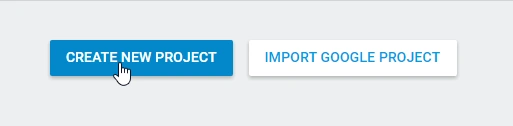
- Go to Firebase console and create a new project.
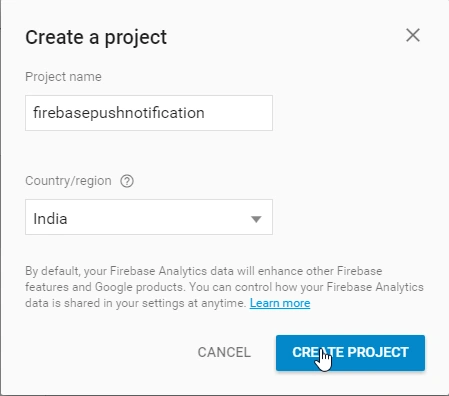
- Now, put your app name and select your country.
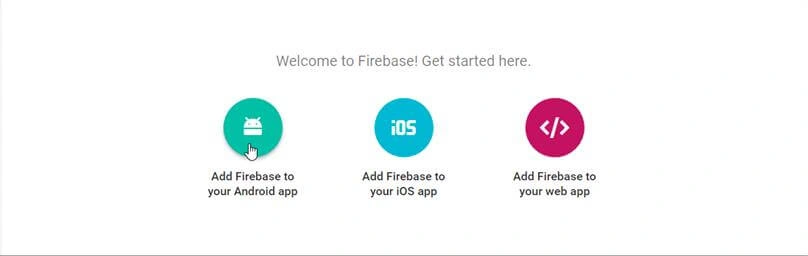
- Now, click "Add Firebase to your Android app".
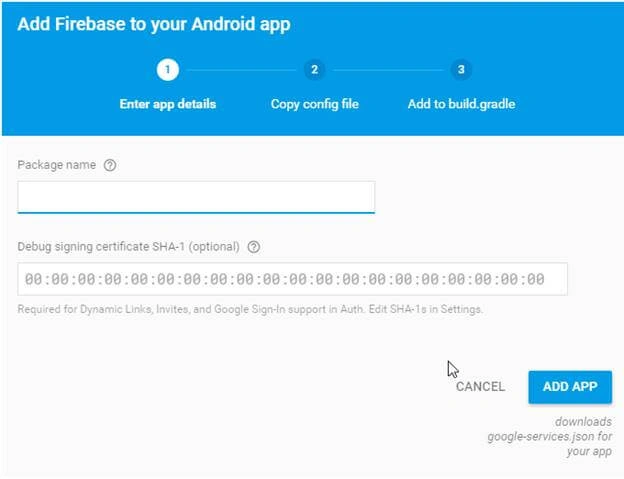
- Now, you have to enter your project's package name and click on "Add App".
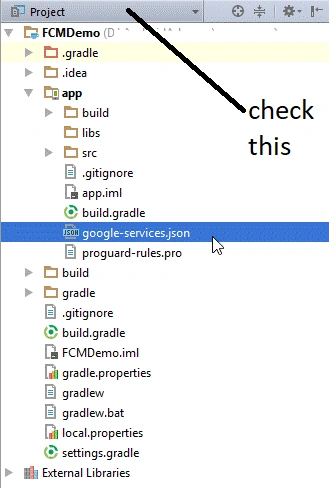
- After this, you will get a google-services.json file by going to the Project Settings.
- Go to the root level build.gradle file and add the following code.
- buildscript {
- repositories {
- jcenter()
- google()
- }
- dependencies {
- classpath 'com.android.tools.build:gradle:3.0.1'
- //Add this line
- classpath 'com.google.gms:google-services:3.1.0'
- }
- }
- allprojects {
- repositories {
- jcenter()
- google()
- }
- }
- task clean(type: Delete) {
- delete rootProject.buildDir
- }
- Inside app level build.gradle file, make the following changes.
- apply plugin: 'com.android.application'
- android {
- compileSdkVersion 26
- defaultConfig {
- applicationId "com.infobytessolutions.sretailer"
- minSdkVersion 21
- targetSdkVersion 26
- versionCode 1
- versionName "1.0"
- testInstrumentationRunner "android.support.test.runner.AndroidJUnitRunner"
- }
- buildTypes {
- release {
- minifyEnabled false
- proguardFiles getDefaultProguardFile('proguard-android.txt'), 'proguard-rules.pro'
- }
- }
- }
- dependencies {
- implementation fileTree(dir: 'libs', include: ['*.jar'])
- implementation 'com.android.support:appcompat-v7:26.1.0'
- implementation 'com.android.support:support-v4:26.1.0'
- implementation 'com.android.support:design:26.1.0'
- implementation 'com.android.support.constraint:constraint-layout:1.0.2'
- implementation 'com.google.firebase:firebase-messaging:10.2.1'
- testImplementation 'junit:junit:4.12'
- androidTestImplementation 'com.android.support.test:runner:1.0.1'
- androidTestImplementation 'com.android.support.test.espresso:espresso-core:3.0.1'
- compile files('libs/ksoap2-android-assembly-2.5.8-jar-with-dependencies.jar')
- }
- apply plugin: 'com.google.gms.google-services'
- Now, sync your project.
Saving token ID generated from android device to server using web service developed in .net
If you have knowledge of creating a web service, then add the below code to it, else learn it by searching on Google because our main focus in this article is FCM.
- We have table “Customers” with phoneNo and tokenID columns.
- In my case, phone number values are already stored.
- [WebMethod]
- public void updateTokenID(string phoneNo, string TokenID) {
- int count = db.Customers.Where(c => c.PhoneNo == phoneNo).Count();
- Customer cust = db.Customers.FirstOrDefault(c => c.PhoneNo == phoneNo);
- cust.TokenID = TokenID;
- db.SubmitChanges();
- }
To run web service properly in Android, you have to add ksoap2-android-assembly-2.5.8-jar-with-dependencies.jar in Android project.
Also, have a look at mainactivity.java file's sendTokenToServer() method where web service call is handled.
Sending notification message from C# code
Create a new C# project and add the following class and call it in any event like button.
- public class FCMPushNotification {
- public FCMPushNotification() {
- // TODO: Add constructor logic here
- }
- public bool Successful {
- get;
- set;
- }
- public string Response {
- get;
- set;
- }
- public Exception Error {
- get;
- set;
- }
- public FCMPushNotification SendNotification(string _title, string _message, string _topic, string deviceId) {
- FCMPushNotification result = new FCMPushNotification();
- try {
- result.Successful = true;
- result.Error = null;
- // var value = message;
- string serverKey = "Your server key";
- string senderId = "your sender id";
- var requestUri = "https://fcm.googleapis.com/fcm/send";
- WebRequest webRequest = WebRequest.Create(requestUri);
- webRequest.Method = "POST";
- webRequest.Headers.Add(string.Format("Authorization: key={0}", serverKey));
- webRequest.Headers.Add(string.Format("Sender: id={0}", senderId));
- webRequest.ContentType = "application/json";
- var data = new {
- to = deviceId, // this if you want to test for a single device
- // to = "/topics/" + _topic, // this is for topic
- priority = "high",
- notification = new {
- title = _title,
- body = _message,
- show_in_foreground = "True",
- icon = "myicon"
- }
- };
- var serializer = new JavaScriptSerializer();
- var json = serializer.Serialize(data);
- Byte[] byteArray = Encoding.UTF8.GetBytes(json);
- webRequest.ContentLength = byteArray.Length;
- using(Stream dataStream = webRequest.GetRequestStream()) {
- dataStream.Write(byteArray, 0, byteArray.Length);
- using(WebResponse webResponse = webRequest.GetResponse()) {
- using(Stream dataStreamResponse = webResponse.GetResponseStream()) {
- using(StreamReader tReader = new StreamReader(dataStreamResponse)) {
- String sResponseFromServer = tReader.ReadToEnd();
- result.Response = sResponseFromServer;
- }
- }
- }
- }
- } catch (Exception ex) {
- result.Successful = false;
- result.Response = null;
- result.Error = ex;
- }
- return result;
- }
- }
How to get server key and sender id
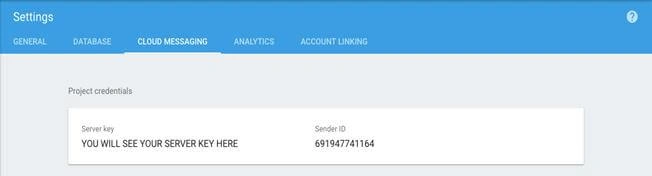
- Go to Firebase Console and inside your project settings, go to Cloud Messaging tab.
- You will find the Cloud Messaging Server Key here, copy it.
So that’s it. Though a few mobile phones will kill this notification when an application is killed. I am working on it too. Feel free to comment, I would like to guide you if you are stuck somewhere and also like to learn more from you guys.
Aric CampebllPosted Jul 21, 2020, 9:05 PM
Can this work for data messages to the client without the push notification? Thanks
Manoj KumarPosted Feb 25, 2020, 7:20 AM
Very Nice Informative Article <a hre="https://www.computersciencejunction.in/2020/02/13/relational-algebra-in-dbms/">Relational Algebra in Dbms </a>
Edzio AuditorePosted Jun 19, 2018, 4:15 AM
Hi ' Nilesh ' , thank you for the tuto, i want to send notification from restful sevices webApi from asp.net app to my android app using FireBase, and this when i have for example in my database in sql Server some changes in some table ... any help appreciated thanks !!!