

Entity Framework Demo
This article introduce entity framework. In this article we learn Entity frame work. This article for those who is beginner in entity framework who is already done work with ado.net. In this article we discuss about Entity frame work.
- Why we use entity frame work?
- CRUD (create ,update, retrieve ,Delete) operation using Entity framework.
- Why we use entity framework
- If you don’t want to write Ado.Net code for connecting to the database table.
- Entity frame work code common for all database like sql,oracle and any other database because its translated at runtime by the particular provider of database.
- Entity frame work is good if you want to move your database from sql to oracle and any other database and then you need to changes all query which you have written in sql or other database. If you use entity frame work in your application don’t need to worry about database migration because in entity framework queries written in linq and this query translated at runtime.
- Using entity frame work we can combine tables from different database and also from different server.
- If you don’t want to write Ado.Net code for connecting to the database table.
- What is entity framework?
It is a type of Data access layer (DAL).there are different Data access layer in .Net technology.
- Ado.Net
- Entity framework
- NHibernate
Entity frame work is an ORM (object relation mapping) frame work that enable the developer to insert, update, delete and retrieve record from database without writing much more code to access database.
ORM- This frame work allows speeding up your development process and increasing maintainability of code. This frame work allows interacting with database using object.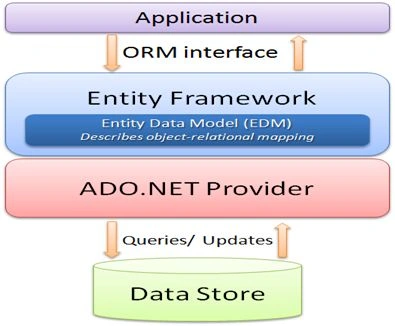
- CRUD Operation using Entity Framework
Now I am creating a application in which we learn how to use entity framework in asp.net and how to use it to perform CURD (create update retrieve delete) operation in database.
Creating Database
Let’s create a table for employee (Name of table tblemployee) in database and we will perform CRUD operation on this table.DataBase Table
Adding Ado.Net entity model in website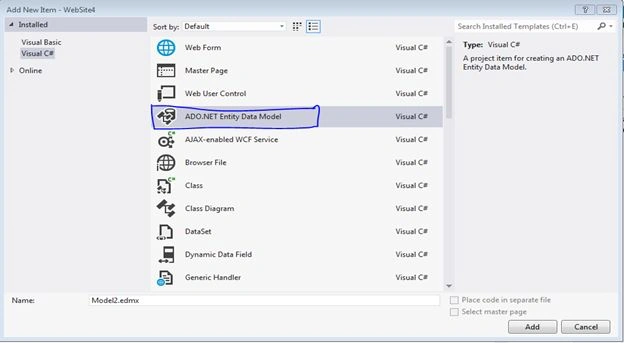
Once we select entity data model to add in our website then we will have to need choose model contents.
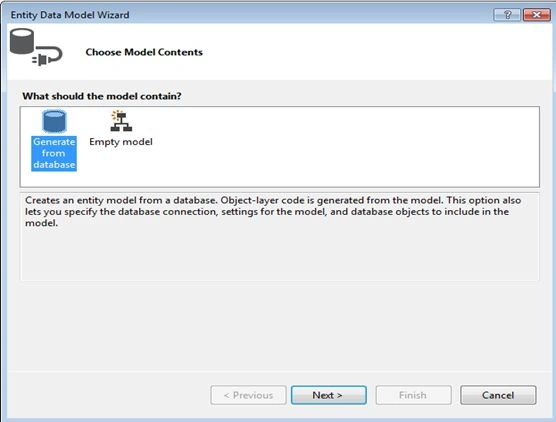
Here we have two options one is generate from existing database and second one is empty model.
- Generate from database->this option means create entity model from existing database schema. If we have already database ready then we use this option.
- Empty model->using this we can design model and hook up model later to the database.
Here we use Generate from database after adding this generated entity for tblEmployee is
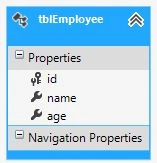
And also class form performing database operation is already created. Now we just need to know how to use it.
Insert and Display(Retrieve)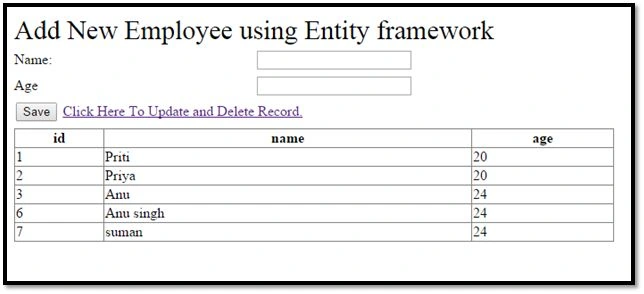
Insert a record
Using this screen we can add new employee in our database table using entity framework and display all employee record. We need to some line of code for adding record in database.Add this code on button click event. Using AddTotblEmployees method we can add new record in database actual operation perform by AddTotblEmployees this method. Here we can also see how to retrieve data from database table and display in girdview.
- //Add new record in table
- TestEntities t = new TestEntities();
- tblEmployee employee = new tblEmployee();
- employee.name = txtname.Text.Trim();
- employee.age =Convert.ToInt16(txtage.Text.Trim());
- t.AddTotblEmployees(employee);
- t.SaveChanges();
- Bindgridview();
Retrieve Record
In this method we have to write code for binding gridview with employee data. Update and Delete
- private void Bindgridview()
- {
- TestEntities test = new TestEntities();
- gdvEmployeerecord.DataSource = test.tblEmployees;
- gdvEmployeerecord.DataBind();
- }
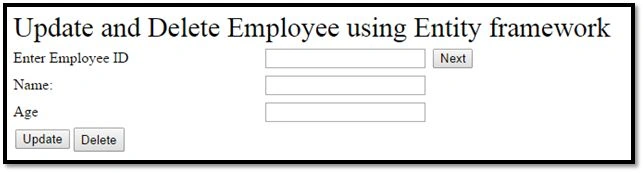
Using this screen we can update existing particular employee and delete particular employee.
At first we need to retrieve particular employee record from database so that we need to put this code for retrieving data from database. Write this code on Next button click. This code populates employee name and age in textbox according to employee id.Updating a Record
After that we can perform changes .If we want to update record of particular id we need to put this code in update button click.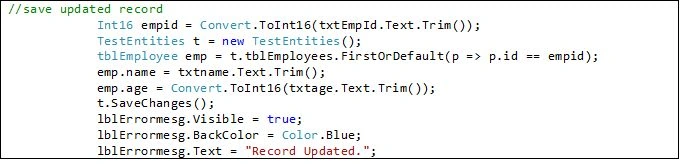
Deleting a Record
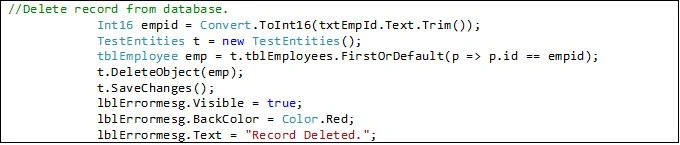
If we want to delete particular record then we need to put this code in delete button click.
- Generate from database->this option means create entity model from existing database schema. If we have already database ready then we use this option.
Thanks for reading my article. Please Download Attached file for complete demo.
Seungwon HongPosted Sep 10, 2018, 7:00 PM
Nice article!
Ravikiran PabbathiPosted Apr 1, 2017, 7:26 AM
Hi akshay ,While I Click on configure data source in Entitydatasource control i am unable get dbcontext wizad,,I got some error window...I tried last 15days , getting frustrated plz help me..Error Window message is"This version of the Entity Data Source wizard is only compatible with Entity Framework 5. If you’re not using Entity Framework 5 you can configure the control by editing the markup on the page. The page editor has IntelliSense support for ASP.NET controls. If you’re using Entity Framework 6 you should also be using the EF6-compatible version of the Entity Data Source control, available as the Microsoft.AspNetEntityDataSource package in NuGet." I am Using Entityframework 6.1.3,Vs-2015,ms Sql server-2014.
Tapan PatelPosted Mar 27, 2017, 3:35 PM
Nice one. My 2 cents. Don't forget to add PK to your table else you won't see that table in EF diagram (from recent mess I ended up with ;) ).
Hammad SajidPosted Feb 17, 2017, 3:42 PM
Thank's, Nice Article
RakeshPosted Feb 7, 2017, 9:42 AM
Good Article Sir Mr. Akshay Phadke
Manav PandyaPosted Feb 4, 2017, 4:56 AM
Thank you sir for that , eagerly waiting Akshay Phadke
Akshay PhadkePosted Feb 2, 2017, 11:25 PM
Manav Pandya I havent yet .. i will prepare a demo and will uplaod it soon ..
Manav PandyaPosted Feb 2, 2017, 12:43 PM
If you have than please let me know sir
Manav PandyaPosted Feb 2, 2017, 12:43 PM
Do you have any demo same as above with gridview CRUD in ASP.NET MVC ??
Manav PandyaPosted Feb 2, 2017, 12:42 PM
Thanks for sharing this one sir Akshay Phadke
Thennarasu NPosted Jan 27, 2017, 7:52 AM
Good Article and Keep Going on..