

WCF Endpoints
Every service has a unique address and this unique address has the three attributes Address, Binding, and Contract. In other words, we can say an endpoint is a combination of address, binding, and contract. If you are unfamiliar with address, binding and contract then please read my previous article Introduction to WCF: Part 1. In this article, I will give you a short note about these three attributes of endpoints.
- Address: contains information about where a service can be found.
- Binding: contains information about how a client can communicate with a service.
- Contract: It's an agreement between service and client.
There is one more property in an endpoint, behavior. Behavior is not an attribute of an endpoint.
- Behavior: A set of behaviors that specify local implementation details of the endpoint.
Let me describe using an example. I am using my previous demo project.
In ImyService.cs
- namespace myFirstApp
- {
- [ServiceContract]
- public interface IMyService
- {
- [OperationContract]
- int AddTwoNo(int intFirstNo, int intSecondNo);
- }
- }
In MyService.svc.cs
- namespace myFirstApp
- {
- public class MyService : IMyService
- {
- public int AddTwoNo(int intFirstNo, int intSecondNo)
- {
- return intFirstNo + intSecondNo;
- }
- }
- }
- <?xml version="1.0"?>
- <configuration>
- <appSettings>
- <add key="aspnet:UseTaskFriendlySynchronizationContext" value="true" />
- </appSettings>
- <system.web>
- <compilation debug="true" targetFramework="4.5" />
- <httpRuntime targetFramework="4.5"/>
- </system.web>
- <system.serviceModel>
- <services>
- <service name="myFirstApp.MyService" behaviorConfiguration="serviceBehaviour">
- <!--endpoint start here-->
- <endpoint address="addTwo" binding="basicHttpBinding" contract="myFirstApp.ImyService"></endpoint>
- <!--endpoint end here-->
- <host>
- <baseAddresses>
- <add baseAddress="http://localhost:36246/"/>
- </baseAddresses>
- </host>
- </service>
- </services>
- <behaviors>
- <serviceBehaviors>
- <behavior name="serviceBehaviour">
- <serviceMetadata httpGetEnabled="true" httpsGetEnabled="true"/>
- <serviceDebug includeExceptionDetailInFaults="false"/>
- </behavior>
- </serviceBehaviors>
- </behaviors>
- <protocolMapping>
- <add binding="basicHttpsBinding" scheme="https" />
- </protocolMapping>
- <serviceHostingEnvironment aspNetCompatibilityEnabled="true" multipleSiteBindingsEnabled="true" />
- </system.serviceModel>
- <system.webServer>
- <modules runAllManagedModulesForAllRequests="true"/>
- <directoryBrowse enabled="true"/>
- </system.webServer>
- </configuration>
Let's update my service reference.
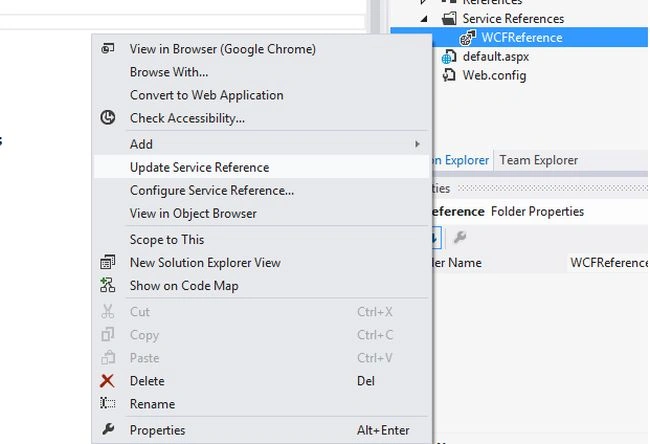
In default.aspx
- <table>
- <tr><td>First No</td><td><asp:TextBox ID="txtFirst" runat="server"></asp:TextBox></td></tr>
- <tr><td>Second No</td><td><asp:TextBox ID="txtSec" runat="server"></asp:TextBox></td></tr>
- <tr><td colspan="2"><asp:Button ID="btnAdd" runat="server" Text="Add" OnClick="btnAdd_Click" /></td>
- </tr>
- <tr><td colspan="2"><asp:Label ID="lblResult" runat="server"></asp:Label></td></tr>
- </table>
- using System;
- namespace WCFClientApp
- {
- public partial class _default : System.Web.UI.Page
- {
- protected void btnAdd_Click(object sender, EventArgs e)
- {
- int intFirstNo = 0, intSecNo = 0, intResult = 0;
- intFirstNo = Convert.ToInt16(txtFirst.Text);
- intSecNo = Convert.ToInt16(txtSec.Text);
- WCFReference.MyServiceClient client = new WCFReference.MyServiceClient();
- intResult = client.AddTwoNo(intFirstNo, intSecNo);
- lblResult.Text = "Result is :"+intResult;
- client.Close();
- }
- }
- }
Run the application and get the expected results.
I hope this article is helpful to you.
Pankajkumar PatelPosted Sep 13, 2019, 12:57 AM
Good one ...
Pramod ThakurPosted Feb 5, 2016, 11:48 PM
thanks Kalaivanan E..
ravi thakurPosted Dec 22, 2014, 2:23 AM
it is nice 4 helping friends
Kalaivanan EPosted Nov 14, 2014, 6:10 AM
good
Joginder BangerPosted Nov 11, 2014, 6:41 AM
Good Job sir..of course this is very helpful for me.