

In this 13th day of AngularJS article series, we are going to learn next key players/concept of AngularJS, understanding the concept of Routing in AngularJS. Before moving to key players/concepts of AngularJS, please read my previous articles:
- Introduction to AngularJS – Day 1
- Introduction to AngularJS – Day 2
- Introduction to AngularJS – Day 3
- Introduction to AngularJS – Day 4
- Introduction to AngularJS – Day 5
- Introduction to AngularJS – Day 6
- Introduction to AngularJS – Day 7
- Introduction to AngularJS – Day 8
- Introduction to AngularJS – Day 9
- Introduction to AngularJS – Day 10
- Introduction to AngularJS – Day 11
- Introduction to AngularJS – Day 12
Routing
We are going to learn one of the core feature of AngularJS called Routing. It enables you to create different URLs for views in your application. It shows you the views depend on what route is chosen. The route is specified in the URL after the ‘#’ sign. This AngularJS features is mostly used in Single Page Application, because in SPA we render multiple views in one part of your application. It helps you in dividing the application and binds the views to the controllers.
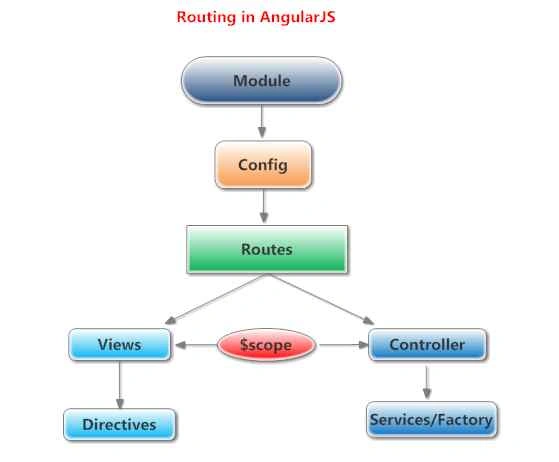
For example see the following image:
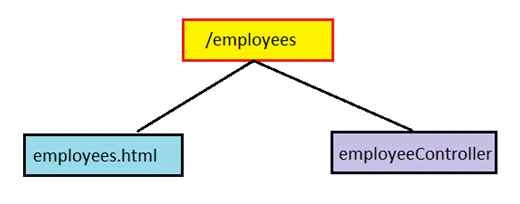
AngularJS routes associate with a view and a controller. It relies on ‘ngRoute’ module (include separate script for this). Routes are configured using the ‘$routeProvider’. The ‘ng-route’ module provides the routing and linking services and directives for angular application. For that we have to download ‘angular-route.min.js’ file or directly use CDN path.
Using ngRoute module:
- You can download it and include as follows:
- <script src="Scripts/angular-route.min.js"></script>
- You can directly use CDN as follows:
- <script src="https://ajax.googleapis.com/ajax/libs/angularjs/1.2.28//angular-route.min.js"></script>
ng-view directives
The dynamically loaded views are injected into the shell page as a module loads. The ngView directive is used to display the HTML templates or views in the specified routes. Every time the current route changes, the included view changes with it according to the configuration of the $route service. You can use ng-view directives as follows:
- <div ng-view> </div>
- <ng-view> </ng-view>
Routes are configured by calling ‘angular.module.config ()’. $routeProvider is injected dynamically. It is used for configuring the routes. The config () takes a function which takes the $routeProvider as parameter and the routing configuration goes inside the function. $routeProvider has a simple API, accepting either the when () or otherwise () method.
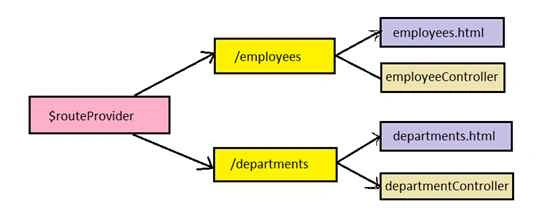
The following is the routing syntax:
- var app = angular.module("myApp", ['ngRoute']);
- app.config(function ($routeProvider)
- {
- $routeProvider.when('/view1',
- {
- templateUrl: 'views/view1.html',
- controller: 'FirstController'
- })
- .when('/view2',
- {
- templateUrl: 'views/view2.html',
- controller: 'SecondController'
- })
- .otherwise(
- {
- redirectTo: '/view1'
- });
- });
- AngularJS routing functionality is located in the ngRoute module, add a <script> that loads ‘angular-route.min.js’.
- <script src="Scripts/angular-route.min.js"></script>
- Reference ngRoute in your module as follows:
- var app = angular.module("myApp", ['ngRoute']);
- Using $routeProvider to configure routes, it is injected dynamically as follows:
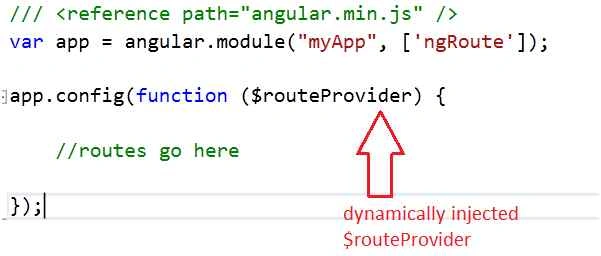
- Defining Routes using ‘angular.config()’, as follows:
- /// <reference path="angular.min.js" />
- var app = angular.module("myApp", ['ngRoute']);
- app.config(function ($routeProvider)
- {
- $routeProvider.when('/employees',
- {
- templateUrl: 'views/employees.html',
- controller: 'employeeController'
- })
- .when('/departments',
- {
- templateUrl: 'views/departments.html',
- controller: 'departmentController'
- })
- .otherwise(
- {
- redirectTo: '/employees'
- });
- });
- Creating two controllers ‘employeeController’ and ‘departmentController’ as follows:
appController.js- //Employee Controller
- app.controller("employeeController", function ($scope)
- {
- $scope.employees = ['Jeetendra', 'Sameer', 'Paritosh', 'Makarand', 'Prasad'];
- });
- //Department Controller
- app.controller("departmentController", function ($scope)
- {
- $scope.departments = ['IT', 'Admin', 'HR', 'Marketing'];
- });
- /// <reference path="angular.min.js" />
- var app = angular.module("myApp", ['ngRoute']);
- app.config(function ($routeProvider)
- {
- $routeProvider.when('/employees',
- {
- templateUrl: 'views/employees.html',
- controller: 'employeeController'
- })
- .when('/departments',
- {
- templateUrl: 'views/departments.html',
- controller: 'departmentController'
- })
- .otherwise(
- {
- redirectTo: '/employees'
- });
- });
- //Employee Controller
- app.controller("employeeController", function ($scope)
- {
- $scope.employees = ['Jeetendra', 'Sameer', 'Paritosh', 'Makarand', 'Prasad'];
- });
- //Department Controller
- app.controller("departmentController", function ($scope)
- {
- $scope.departments = ['IT', 'Admin', 'HR', 'Marketing'];
- });
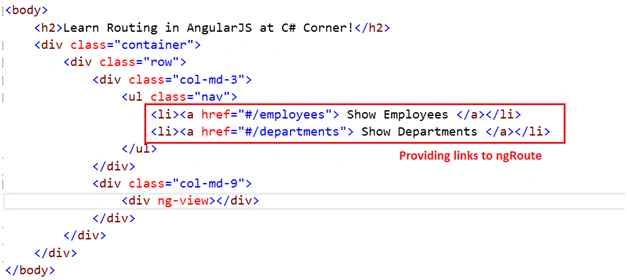
- Using ‘ng-view’ directive for rendering particular view on as per route defined as follows:
index.html
- <!DOCTYPE html>
- <html ng-app="myApp">
- <head>
- <title>Routing in AngularJS</title>
- <script src="Scripts/angular.min.js"></script>
- <script src="Scripts/angular-route.min.js"></script>
- <script src="Scripts/appController.js"></script>
- </head>
- <body>
- <h2>Learn Routing in AngularJS at C# Corner!</h2>
- <div class="container">
- <div class="row">
- <div class="col-md-3">
- <ul class="nav">
- <li><a href="#/employees"> Show Employees </a></li>
- <li><a href="#/departments"> Show Departments </a></li>
- </ul>
- </div>
- <div class="col-md-9">
- <div ng-view></div>
- </div>
- </div>
- </div>
- </body>
- </html>
employees.html
departments.html- <div>
- <h2>List of Employees</h2>
- <ul ng-repeat="emp in employees">
- <li>{{emp}}</li>
- </ul>
- </div>
- <div>
- <h2>List of Departments</h2>
- <ul ng-repeat="dept in departments">
- <li>{{dept}}</li>
- </ul>
- </div>
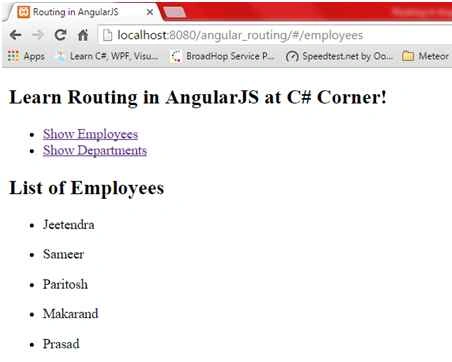
- Now our example is ready to run, open in browser, you can see first time output as follows:
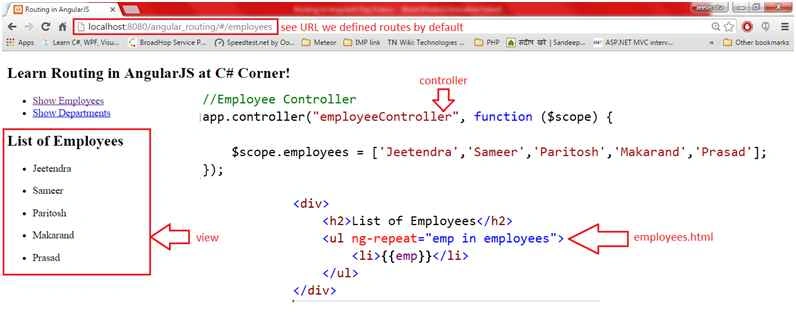
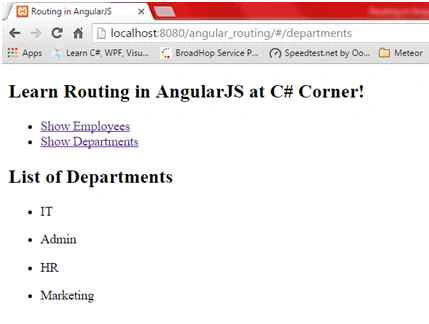
In above output you can see the list of record we defined in ‘employeeController’ by default because view provide default route to ‘/employee’. After we click on ‘Show Departments’, it shows the following output,
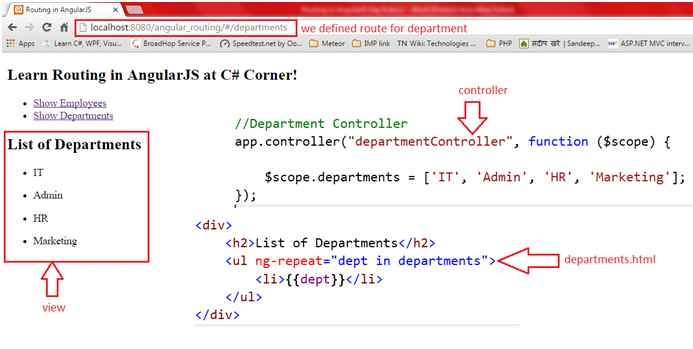
In above output you can see the list of record we defined in ‘departmentController’, you can see how this ‘$routeProvider’ binds the particular view to the controller as per the routes we defined.
- Show Employees
- Show Departments
Great, we learned Routing in AngularJS with example successfully.
Summary
I hope that beginners as well as students understood the concept of Routing in AngularJS with example. If you have any suggestion regarding this article, then please contact me. Stay tuned for other concepts of AngularJS coming soon!
Thanks for reading. Learn it! Share it!
Pankaj Kumar ChoudharyPosted Jul 6, 2016, 1:29 AM
Nice Explain.....
Kuppurasu NagarajPosted Apr 30, 2016, 2:59 PM
Nice Sharing..
Vivek KumarPosted Apr 22, 2016, 11:49 AM
Good article series.its really helpful for beginners.
Muhammad Aqib ShehzadPosted Jan 5, 2016, 7:42 AM
Nice one Dear
Sibeesh VenuPosted Dec 31, 2015, 3:20 AM
Nice Share
Rupesh KahanePosted Dec 31, 2015, 2:59 AM
Nice share..
Rupali ShindePosted Dec 30, 2015, 11:22 PM
thanks for sharing
Kiranteja JallepalliPosted Dec 30, 2015, 10:48 PM
Great Work.
sreenivasa kPosted Dec 30, 2015, 4:13 PM
very nice